Wiki: docs: How to create side navigation?
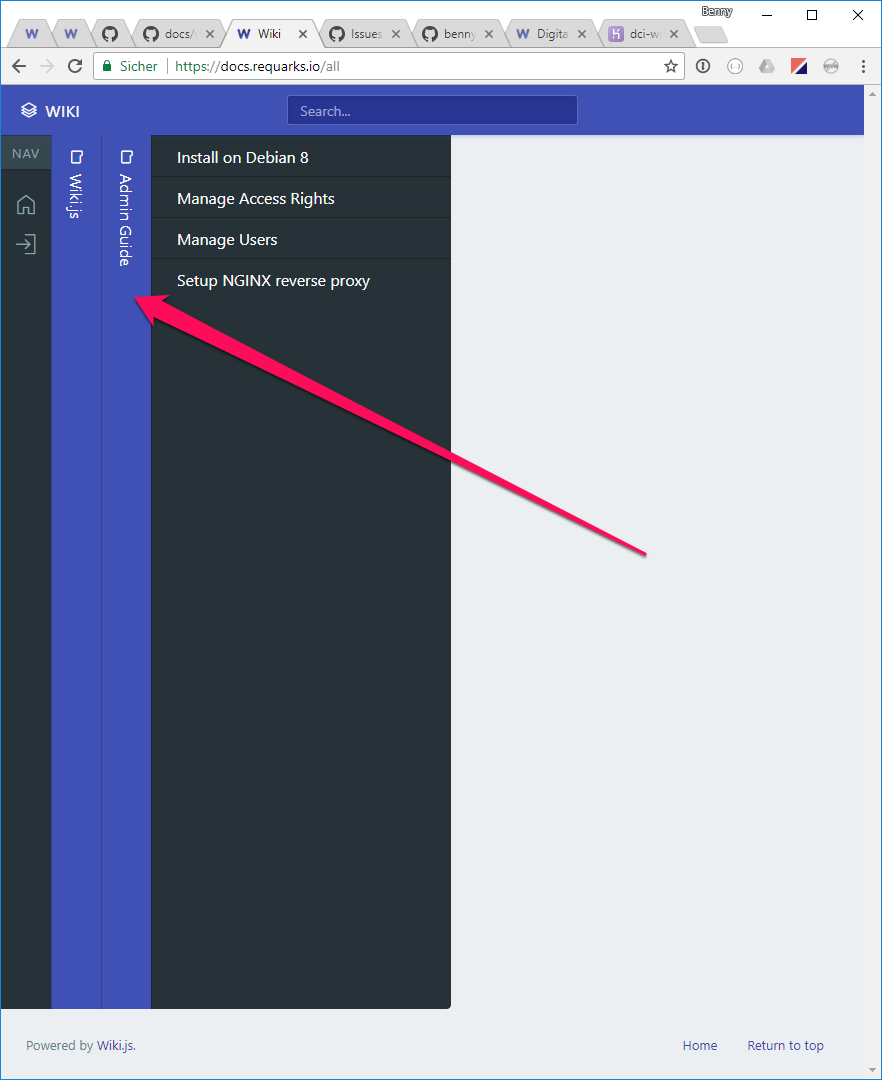
In the Wiki.js documentation I have seen that it's possible to create a very nice looking side navigation (like "All Pages" -> "Wiki.js" -> "Admin Guide"). How can this be achieved? I already created directories and subdirectories in my GitHub repository (which syncs with my Wiki.js installation) but these directories don't show up as clickable menu items. 😢
This is what I want to build:
 bennycode
All 6 comments
Directories are not actual pages. You must create a page inside for them to appear in the navigation.
 NGPixel
on 8 Aug 2017
NGPixel
on 8 Aug 2017
I created a Markdown page inside the newly created directories but they didn't show up in my navigation. 😢
I looked up this directory to get a grasp of what's going on. In the screenshot it's shown that the sidebar navigation is named "Admin Guide" but the folder inside the "Requarks/docs" repo is just called "admin-guide", so how does the translation (from "admin-guide" directory to "Admin Guide" navigation) happen?
bennycode
on 8 Aug 2017
Your folders (and files) must follow the kebab case naming if you create them outside Wiki.js. Otherwise they won't be indexed properly.
Names are automatically converted back to normal case when displayed. e.g. admin-guide becomes Admin Guide
NGPixel
on 8 Aug 2017
Thanks for the info!
Instead of naming my directory "Curriculum", I named it "the-curriculum" and it was picked up by the automatic GitHub synchronization. 👍
bennycode
on 10 Aug 2017
can we keep this sidebar fixed ? when you open a page it disappears is there is a way to keep the folder structure ?
 el3ctrician
on 15 Dec 2017
el3ctrician
on 15 Dec 2017
@el3ctrician i would love this feature too - but i dont think it makes sense to discuss it here - open a new issue/feautre request
the best solution would be to have an option to fix it or show breadcrumbs top/bottom of the page
(mayb this is planned for 2.0 anyways)
 Frankstar
on 23 Dec 2017
Frankstar
on 23 Dec 2017
Related issues
 ccolella-mdc
·
3Comments
ccolella-mdc
·
3Comments
 thinkh
·
4Comments
thinkh
·
4Comments
 den1622
·
3Comments
den1622
·
3Comments
 p-se
·
3Comments
p-se
·
3Comments
 SharkProgramming
·
4Comments
SharkProgramming
·
4Comments
Most helpful comment
can we keep this sidebar fixed ? when you open a page it disappears is there is a way to keep the folder structure ?