Widescreenfixespack: [SH2] Emulate/transpose SH3 PC's noise filter to SH2 PC?
Not sure if it's possible but can SH3 PC's noise filter effect be emulated or transposed to SH2 PC?
Between the two SH3's noise effect is vastly superior. SH3 has smaller, finer noise grains which retains the effect but is more subtle whereas SH2 has large, obvious, chunky grain bits that can honestly be a bit intrusive.
Is the noise effect randomly generated by code? Or is it a sequence of semi-alpha images overlaid and rapidly being changed on the screen?
 Polymega
All 48 comments
Good question!
Commenting so I receive updates.
 seagull
on 6 Aug 2017
seagull
on 6 Aug 2017
My hunch is that it's a translucent overlay. If it was generated then I doubt it would look as low-res as it does, but I'll take a look later.
 AeroWidescreen
on 6 Aug 2017
AeroWidescreen
on 6 Aug 2017
SH3 Noise effects volume is variable, and its not random. In some places, mostly the non-Silent Hill areas -except nightmare versions of the places- is very thin and almost nonexistent. When you go to Silent Hill it gets thicker and thicker and becomes as intrusive as SH2 Noise effect. It purposefully made that way, as you progress further in the game you pick up more memories of your former self, become more Alessa and get more Noise effect. But there are some weird exceptions like when you in the church hall no NE, but the moment you go through the door, you're in the SH2 level of NE. The thick and chunky Noise effect of Sh2 explained as related to James' delusions. But i think I know where you are coming from because strange thing about SH3 NE is that if you turn it off you lose all the vibrant luminance light and contrast, unlike SH2, turning off gains you the contrast. I don't know why they locked together all these effects with NE, Its kinda awkward really, I can't turn it on for Sh2 and can't turn it off for SH3. But I think Its not the filter itself is the issue here but its effect on the overall image quality.
 CHNSK
on 6 Aug 2017
CHNSK
on 6 Aug 2017
If it's an image overlay in SH2 we could either a) increase the overlay's resolution but because that's probably not possible as previously discussed we could b) shrink the film grain bits in the image file(s) and re-save them out.
Polymega
on 6 Aug 2017
I can make the noise filter render at a smaller size, giving it a crisper look.
(click to make larger)

Although I'm not sure why you have the impression SH3's noise filter looks any more detailed. It's rendered at the same size with a similar looking texture as vanilla SH2. It might just be a combination of its varying opacity and blending effect that improves contrast, like Markeron mentioned.
AeroWidescreen
on 7 Aug 2017
Yas!!
Please do this!
seagull
on 7 Aug 2017
That really is a marked improvement!
SH2 PC's vanilla noise grain is noticeably larger than SH3's. As you said: They may both be using similar/identical noise textures but if that's the case SH3 has implemented it far better in a way where the noise grain bits are not as obviously large.
Polymega
on 7 Aug 2017
Well, one trick of SH3 is, trick may not be the right word but, that it doesn't use the full effect of the noise in well-lit places, which is half of the entire game. This might be the ideal NE jdkubiak likes, I also agree and that's how modern games like outlast etc uses the NE:

However second part of the game where we deal with dark and nightmare worlds, its as thick as SH2, you can literally count the giant black dot chunks, but its not as bothersome because the night hides its saturation to the whole screen:
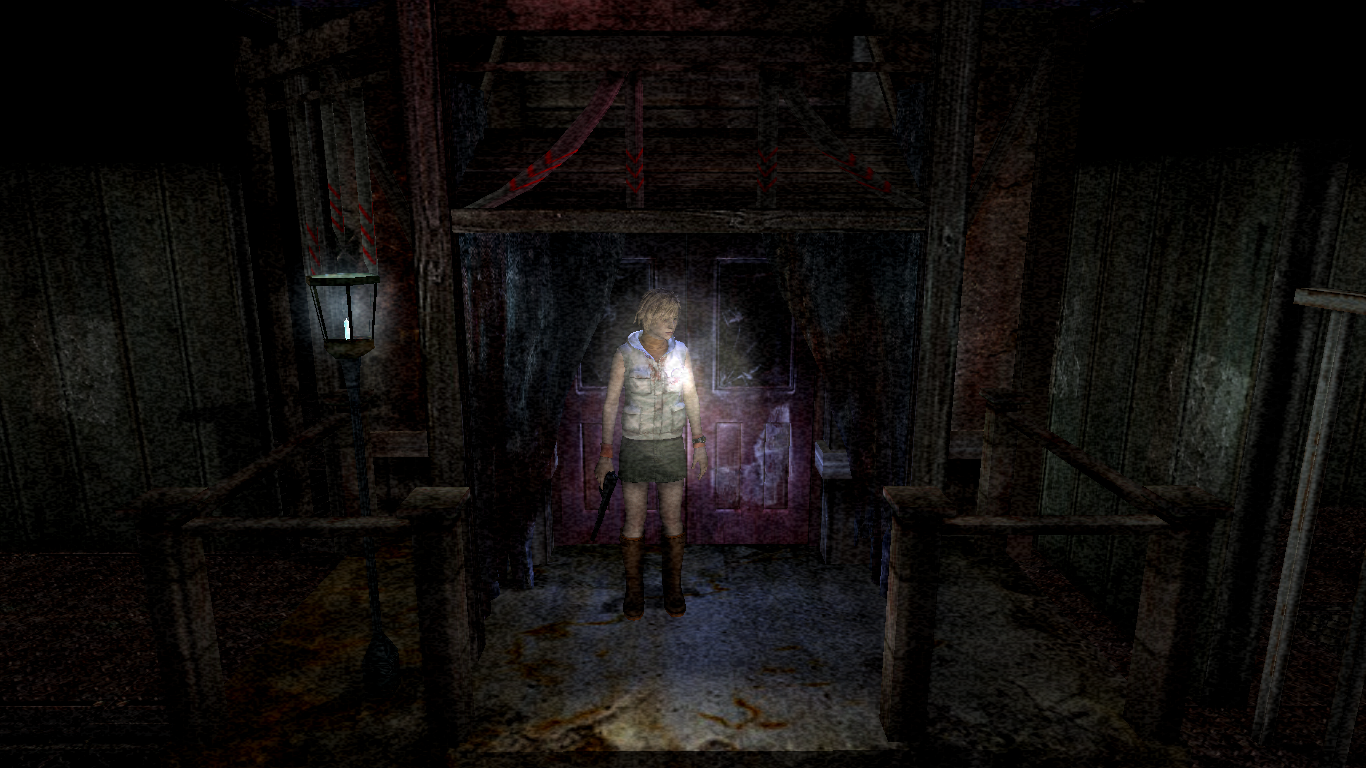
All depends on how you boil the frog. It's also my belief that one of the reasons why SH3 fog doesn't look as good in the way to the hospital (daytime again) is because of NE but that would be a stretch.
Thank you Aero. As a person who never uses NE in SH2, I'd love to try this. It looks like, let's say, 'In the Train' section of SH3. Would love to give it a go and try out in the game. One question: could you render at a little more smaller size which would make the black dots even smaller?
CHNSK
on 7 Aug 2017
A "fog density" zero-to-one decimal value would be perfect for the INI, I think.
seagull
on 7 Aug 2017
One question: could you render at a little more smaller size which would make the black dots even smaller?
Yeah, but the smaller you make it the easier it is to notice the checkerboard pattern it has. The texture is repeating itself to fill the space. It does this with the default size as well, but again, not as noticeable.
If the noise filter is generated then there might be a way to fix that, but I'll have to do more research first.
A "fog density" zero-to-one decimal value would be perfect for the INI, I think.
That's most likely what we'll do again, since this is highly subjective.
AeroWidescreen
on 7 Aug 2017
I don't think there's anything I can do about the pattern it has. It just seems like the texture it uses is too small. Do you guys still want me to add this as an option, and if so would you like the same to be done for SH3? I haven't checked yet, but I'm pretty sure I could do the same thing for that game as well.
AeroWidescreen
on 9 Aug 2017
Yes, please do. I can't see the need for SH3, but if it's possible, please throw it in there as well as I'm sure someone somewhere will desire such functionality.
seagull
on 9 Aug 2017
Thank you for doing this. So is the noise grain a series of ever-changing images overlaid on top then?
Polymega
on 9 Aug 2017
Thank you for doing this. So is the noise grain a series of ever-changing images overlaid on top then?
I don't know for certain. All I can tell is that it's a tile of the same animation all individually rotating very quickly. It's much harder to notice the pattern in SH3 due to the aforementioned blending and variable opacity.
If you're wondering if I think it's an animated image or generated noise, then I'm 99% sure it's an image. I'm just not sure how the effect is achieved exactly.
AeroWidescreen
on 10 Aug 2017
(Perlin) noise texture is generated by a d3d8 shader. It is then blent with the scene texture. Here's an example dumped from SH3:

Noise intensity data comes from .ded files from the VFS.
 07151129
on 10 Aug 2017
07151129
on 10 Aug 2017
And if that is a direct, un-altered capture of the filter then we can easily see the solid line that goes around its edges which makes the checkerboard pattern even more visible. Hm...
Polymega
on 10 Aug 2017
@jdkubiak the line around the pattern is actually due to the tool I used to dump the texture.
07151129
on 10 Aug 2017
That's good to hear then.
I'm no programmer by any means so I'd like to ask you and @AeroWidescreen this: Can a seamless, tileable Perlin noise filter be implemented into the game?
https://gamedev.stackexchange.com/a/23705~~
Scratch this. That code is written in Python and the end results still seem noticeably tiled.
Polymega
on 10 Aug 2017
By the way, @07151129, good to see you here. Nice work on SH3Proxy.
seagull
on 10 Aug 2017
@07151129 Thank you for explaining this, I learn something new every day. If I understand you correctly, does this mean the noise _is_ generated in real-time, and it would therefore be possible to cover a larger area so we can reduce the amount of tiling, if not eliminate tiling completely?
AeroWidescreen
on 10 Aug 2017
Don't celebrate just yet, but I was able to increase the resolution of the noise filter (the higher the res the smaller it becomes) and then expand it to fill the entire screen. The result is a very crisp effect, and unlike the resizing method, the amount of image tiling isn't increased. The noise texture itself has a pattern to it, but the overall result is much better than before.
http://i.imgur.com/uvPzEoC.jpg
The reason I say don't celebrate yet is because I ran into an issue that made my game crash when I was testing this. It might have been because of some other changes I made, since I haven't been able to reproduce it yet, but I will have to do more thorough testing tomorrow.
@07151129 Based on v1.1 gimpsRus exe
Controls the amount of image tiling; what I use to resize but no longer necessary
004780E0 - mov [esp+2C],40800000 { 4.00 }
004780E8 - mov [esp+48],40800000 { 4.00 }
004780F0 - mov [esp+5C],40800000 { 4.00 }
004780F8 - mov [esp+60],40800000 { 4.00 }
Resolution; must be changed before starting the game.
00478373 - push 00000080 { 128 decimal } // try 256 decimal
00478378 - push 00000080 { 128 decimal } // try 256 decimal
Expansion; must be changed before starting the game
004783FA - mov ebp,00000020 { 32 decimal } // try 64 decimal
00478402 - mov edi,00000020 { 32 decimal } // try 64 decimal
AeroWidescreen
on 11 Aug 2017
It looks bloody amazing, though! I see no readily apparent, immediate tiling vs. the previous image.
Fingers crossed it falls into place without further issue.
Polymega
on 11 Aug 2017
It does look very good, if quite slight; with a reduction in chunk size comes a reduction in opacity.
Perhaps a slider for that would be a good option as well...?
seagull
on 11 Aug 2017
Chunk size seems to be relative to resolution size. So a lower res noise filter will get you bigger chunks back. I'd say just have one slider _(wrong choice of word)_ adjustable decimal value for noise resolution to help with user experience/ease.
Polymega
on 11 Aug 2017
That sounds good, yeah.
seagull
on 11 Aug 2017
The reason I crashed yesterday is because it only works with certain values, and they must be changed proportionally. It's probably better to offer different mode choices to prevent troubleshooting headaches in the future. More than likely SH3 will be the same.
http://i.imgur.com/6Q7o9Hn.gif
IncreaseNoiseEffectRes = 1 // 2 = doubles increase, 3 = quadruples increase, 4 = dramatic increase
That should be enough choices to accommodate everyone, and unless you guys have any further complaints I'll get the information ready for ThirteenAG as soon as I can.
AeroWidescreen
on 12 Aug 2017
Sounds like an excellent plan to me! Oh man, what noise level will I use?!? Decisions!
Polymega
on 12 Aug 2017
Amazing work as usual.
Now, the agonising wait to see it on AppVeyor...
seagull
on 12 Aug 2017
PS - What's AppVeyor?
Polymega
on 12 Aug 2017
https://ci.appveyor.com/project/ThirteenAG/widescreenfixespack/build/artifacts
It's where developer builds are posted before they're fully QA'd and cleared for public use.
Read: _it's the cool kids' club_
seagull
on 12 Aug 2017
Gotcha! Thanks
Polymega
on 12 Aug 2017
So excited about this and waiting or the update!
Will you put this filter grain scaler in both SH2 and SH3?
Thanks for the hard work to achieve this quality in the fixes!
 RenoFriends
on 13 Aug 2017
RenoFriends
on 13 Aug 2017
So excited about this and waiting or the update!
Will you put this filter grain scaler in both SH2 and SH3?
Thanks for the hard work to achieve this quality in the fixes!
As of right now only SH2. I tried SH3 and was able to increase the resolution, but it affects the animated textures and crashes the game every single time. It's not a big deal, since SH3 didn't really need this feature to begin with, but yeah, I'll have to come back to this at some other time.
@ThirteenAG
I'm using different modes instead of making it manually adjustable, since it crashes if you don't use the right values. You could allow manual adjustment anyway, but I think people would complain about crashing.
For Silent Hill 2
IncreaseNoiseEffectRes = 1 // Use 2, 3, or 4 for higher resolutions
Eliminates tiling. Apply to all modes 1 through 4.
004780E0 mov [esp+2C],3F800000 // 1.0 static float
004780E8 mov [esp+48],3F800000 // 1.0 static float
004780F0 mov [esp+5C],3F800000 // 1.0 static float
004780F8 mov [esp+60],3F800000 // 1.0 static float
Mode 1
00478373 push 00000300 // 640 decimal
00478378 push 00000300 // 640 decimal004783FA mov ebp,000000A0 // 160 decimal
00478402 mov edi,000000A0 // 160 decimalMode 2
00478373 push 000003C0 // 960 decimal
00478378 push 000003C0 // 960 decimal004783FA mov ebp,000000F0 // 240 decimal
00478402 mov edi,000000F0 // 240 decimalMode 3
00478373 push 00000500 // 1280 decimal
00478378 push 00000500 // 1280 decimal004783FA mov ebp,00000140 // 320 decimal
00478402 mov edi,00000140 // 320 decimalMode 4
00478373 push 00000780 // 1920 decimal
00478378 push 00000780 // 1920 decimal004783FA mov ebp,000001E0 // 480 decimal
00478402 mov edi,000001E0 // 480 decimal
AeroWidescreen
on 14 Aug 2017
It's not a big deal, since SH3 didn't really need this feature to begin with
Totally agree with this. Never once when I was playing SH3 PC did I stop and think, "Man, this film grain does not look good," as I've done with SH2 PC.
PS - Looking over your image example again @AeroWidescreen IncreaseNoiseEffectRes=3 is where it's at for me. So sexy... so good...
Polymega
on 14 Aug 2017
@AeroWidescreen Is there any update on the noise filter fix for SH2? =(
RenoFriends
on 25 Sep 2017
Nope. It all depends on when ThirteenAG gets around to it.
AeroWidescreen
on 25 Sep 2017
It's time @RenoFriends :)
Thank you both @ThirteenAG and @AeroWidescreen !
I can't wait to try this myself when I get home from work tonight!!
Polymega
on 5 Oct 2017
Noise effect level 2 is where it's at for me. <3 So nice... Thank you guys so much
Polymega
on 6 Oct 2017
Second, anything else is too fine to see.
Nice work, thanks guys.
seagull
on 6 Oct 2017
It really is nice, isn't it? Makes the entire game look sharper, including the FMVs since the noise filter is used there too.
AeroWidescreen
on 7 Oct 2017
@jdkubiak But is this updated anywhere?
RenoFriends
on 15 Nov 2017
Yes: Update your Widescreen Fix through the Mod Updater and tell it to replace your INI files.
Polymega
on 15 Nov 2017
@jdkubiak I did it and in my SilentHill2.WidescreenFix.ini this is what I've got... Thanks!
PD: I have the ini files inside the scripts folder.... does this affect the rewriting during updating?
[MAIN]
ResX = 3840
ResY = 2160
FMVWidescreenMode = 1
FMVWidescreenEnhancementPackCompatibility = 1
Fix2D = 0
[MISC] //some features from https://github.com/emoose/sh2proxy
DisableCutsceneBorders = 1
SingleCoreAffinity = 1
DisableSafeMode = 1
FastTransitions = 1
CreateLocalFix = 1
FPSLimit = 30
PS2CameraSpeed = 1 // Use with FPSLimit = 30
GamepadControlsFix = 1 // Allows the same button to be assigned to multiple actions
LightingFix = 1 // Flashlight will no longer illuminate objects behind it, and fog will be restored for one of the ending cutscenes
ReduceCutsceneFOV = 1 // Cutscenes will use vert- scaling to hide off-screen characters
SteamCrashFix = 0 // Prevents a crash when Steam's controller configuration is used
RenoFriends
on 15 Nov 2017
@jdkubiak @AeroWidescreen Could anyone help please? I'm stuck here for 1h without success...
I just executed the modupdater as I entered the game, selected replace all on ini files (with & without the "update all downloaded files" checkbox) and as I see on my files, only the d3d8.dll is updated... my SilentHill2.WidescreenFix.ini looks the same without any more options like the NoiseFilterEffectRes or the Fullscreen image =( (sorry for the double post)
RenoFriends
on 15 Nov 2017
Download the developer build here: https://ci.appveyor.com/api/buildjobs/bgwsuoigm3xda3w3/artifacts/SilentHill2.WidescreenFix.zip
AeroWidescreen
on 15 Nov 2017
@AeroWidescreen I love you so much =D Now it works!
I skipped about the FullscreenImages update so whats that about? I saw it interferes with the Fix2D one right?
RenoFriends
on 15 Nov 2017
Letterboxed images are scaled to fullscreen: https://www.youtube.com/watch?v=gCH41EmLprc
AeroWidescreen
on 15 Nov 2017
@AeroWidescreen Amazing work! Fix2D wouldn't be needed with this, I saw the maps doesn't glitch with the letters behind and everything looks in place =) Thanks and hope someday it can be implemented (I know should be hard) without using cheat engine ;) Cheers
RenoFriends
on 15 Nov 2017
Related issues
 Half-dude
·
4Comments
Half-dude
·
4Comments
 ThirteenAG
·
3Comments
ThirteenAG
·
3Comments
 Keith94
·
5Comments
Keith94
·
5Comments
 AlexandrR29
·
14Comments
AlexandrR29
·
14Comments
 Weaselbandit
·
9Comments
Weaselbandit
·
9Comments
Most helpful comment
I can make the noise filter render at a smaller size, giving it a crisper look.
(click to make larger)

Although I'm not sure why you have the impression SH3's noise filter looks any more detailed. It's rendered at the same size with a similar looking texture as vanilla SH2. It might just be a combination of its varying opacity and blending effect that improves contrast, like Markeron mentioned.