Whatsapp-web.js: window.Store is undefined
Any idea why it isn't working? I never receive the authentication, I did a little digging and I found that window.Store is always undefined, maybe is related with some Whatsapp Web update?
 waltergammarota
All 8 comments
Thanks for bringing this up @waltergammarota. I face this issue as well.
My findings:
(node:5923) UnhandledPromiseRejectionWarning: Unhandled promise rejection. This error originated either by throwing inside of an async function without a catch block, or by rejecting a promise which was not handled with .catch(). (rejection id: 6)
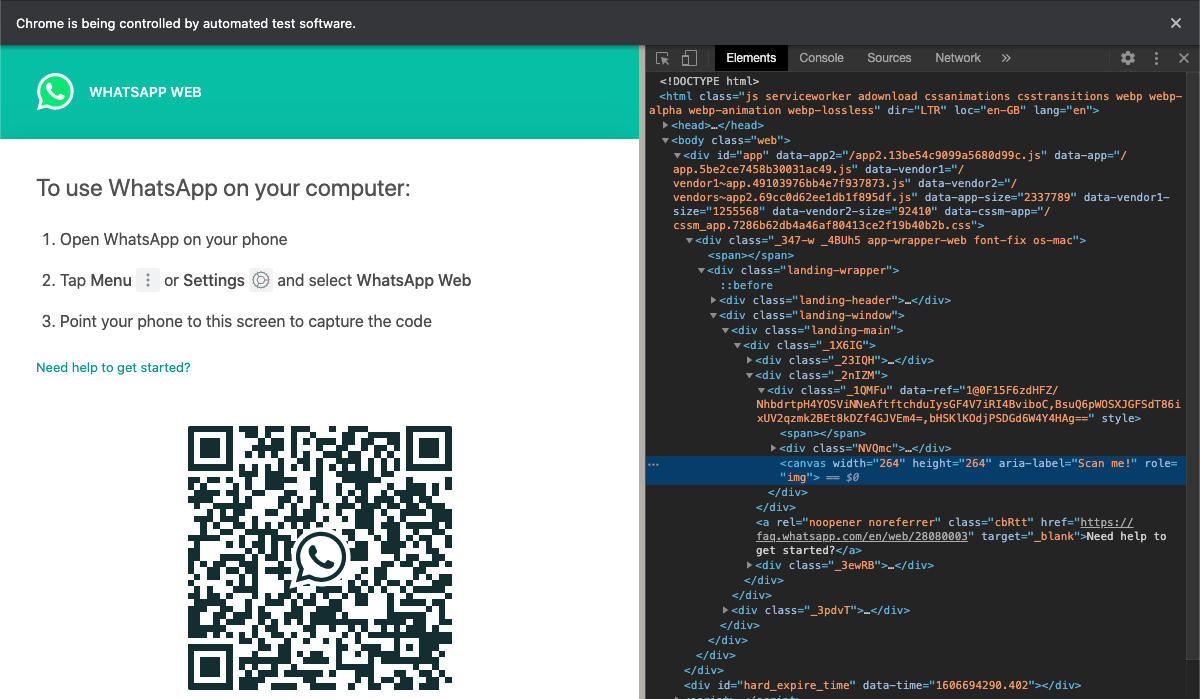
(node:5923) UnhandledPromiseRejectionWarning: TimeoutError: waiting for selector "canvas" failed: timeout 45000ms exceeded
    at new WaitTask (/opt/dreszcz-bot/node_modules/puppeteer/lib/DOMWorld.js:407:34)
    at DOMWorld._waitForSelectorOrXPath (/opt/dreszcz-bot/node_modules/puppeteer/lib/DOMWorld.js:332:26)
    at DOMWorld.waitForSelector (/opt/dreszcz-bot/node_modules/puppeteer/lib/DOMWorld.js:315:21)
    at Frame.waitForSelector (/opt/dreszcz-bot/node_modules/puppeteer/lib/FrameManager.js:384:51)
    at Frame.<anonymous> (/opt/dreszcz-bot/node_modules/puppeteer/lib/helper.js:117:27)
    at Page.waitForSelector (/opt/dreszcz-bot/node_modules/puppeteer/lib/Page.js:818:33)
    at Timeout.getQrCode [as _onTimeout] (/opt/dreszcz-bot/node_modules/whatsapp-web.js/src/Client.js:109:28)
    at process._tickCallback (internal/process/next_tick.js:68:7)
This is what I get... pupeteer can't find canvas selector with the QR... but it's there when you check on Chromium:
 ENT108
on 4 Jun 2020
ENT108
on 4 Jun 2020
Hi! Thanks for the report. It seems like the latest WhatsApp Web update introduced some breaking changes. I am not able to fix it at this very moment but will fix it ASAP in a couple hours.
It looks like #235 was reporting the same issue but they seem to have fixed it using some workaround. If anybody can determine the necessary changes and make a PR it would be greatly appreciated. Regardless, like I said, in a few hours I will be able to take a look myself.
 pedroslopez
on 4 Jun 2020
pedroslopez
on 4 Jun 2020
Simple dom change
Client.js Line 71
const KEEP_PHONE_CONNECTED_IMG_SELECTOR = '[data-asset-intro-image="true"]';
const KEEP_PHONE_CONNECTED_IMG_SELECTOR = '[data-asset-intro-image-light="true"]';
 oguzhan51
on 5 Jun 2020
oguzhan51
on 5 Jun 2020
@oguzhan51 this fixes it for me. Thanks.
However, it's odd that @ENT108 's issue is on QR scanning, which is not the case for me. I will push a release with @oguzhan51 's fix shortly.
pedroslopez
on 5 Jun 2020
@waltergammarota @ENT108 @oguzhan51 @caioagiani @javierportillo v1.6.1 is now released. Please test and report back if the issue is fixed for you or not.
pedroslopez
on 5 Jun 2020
It's working! thx @oguzhan51
 caioagiani
on 5 Jun 2020
caioagiani
on 5 Jun 2020
@pedroslopez it did the trick! Thanks for super fast fix!
ENT108
on 5 Jun 2020
Okay, great! Closing this issue as it seems to have been resolved.
pedroslopez
on 5 Jun 2020
Related issues
 fdciabdul
·
6Comments
fdciabdul
·
6Comments
 tarikhagustia
·
10Comments
tarikhagustia
·
10Comments
 marcopandolfo
·
5Comments
marcopandolfo
·
5Comments
 andersondeoliveiramachado
·
7Comments
andersondeoliveiramachado
·
7Comments
 riagie
·
6Comments
riagie
·
6Comments
Most helpful comment
@waltergammarota @ENT108 @oguzhan51 @caioagiani @javierportillo v1.6.1 is now released. Please test and report back if the issue is fixed for you or not.