Wet-boew: IE: Date Picker doesn't work for me on Internet Explorer
I have a date picker on my form, and it doesn't show properly on Internet Explorer (I have no issue on Edge and Google Chrome though).
Here is my code:
<div class="form-group col-sm-6 col-md-6 col-lg-6">
        <label for="dateDateOfBirth" class="required"><span class="field-name">@Localizer["DateOfBirth"]</span> <strong class="required">@SharedLocalizer["Required"]</strong></label>
        <input class="form-control" id="dateDateOfBirth" name="dateDateOfBirth" type="date" data-rule-dateiso="true" required="required">
    </div>
Here is what it looks like on Internet Explorer (the toggle button to open the calendar never shows up):
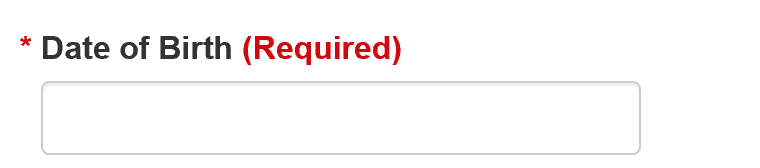
Can anyone provide any help or feedback?
Thank you,
 kitana-ifbbpro
All 5 comments
It looks like you've got it right. Does it work for you on the form validation working example page?
From the reference doc for the date picker, I see it says,
The input type="date" polyfill will be initialized automatically unless the input type="date" element is added after the page has already loaded.
Could it be that you are adding the field to the page after the page is already loaded?
You're only going to see it on IE, as Edge, Chrome, and FireFox all have their own built-in date pickers.
P.S. When you finally get it to work, I'd suggest putting the datepicker-format part in as shown in the example too.
 RobJohnston
on 3 Mar 2020
RobJohnston
on 3 Mar 2020
What do I have to do to get the input type=date polyfill to be initialized properly when it gets added after the page has already loaded?
Thank you so much,
kitana-ifbbpro
on 3 Mar 2020
I found an old issue https://github.com/wet-boew/wet-boew/issues/7596 where somebody had the same question. See if you find that solution workable.
RobJohnston
on 4 Mar 2020
Something like this might work:
$( refElmInputAdded ).trigger( "wb-init.wb-date" );
 duboisp
on 6 Mar 2020
duboisp
on 6 Mar 2020
@kitana-ifbbpro Did you make it work using @duboisp's suggestion? If so, can you close this issue? Thank you!
 GormFrank
on 14 May 2020
GormFrank
on 14 May 2020
Related issues
 shawnthompson
·
4Comments
shawnthompson
·
4Comments
 juleskuehn
·
3Comments
juleskuehn
·
3Comments
 zomby22
·
5Comments
zomby22
·
5Comments
 sarumim
·
4Comments
sarumim
·
4Comments
 swapnalithakarpspc
·
5Comments
swapnalithakarpspc
·
5Comments