Wet-boew: WET4 Calendar of Events - set the heading title date base on calendar selection
Hello
The plugin works great with ASP and Postgres, however, if I want the heading title to change without LOOPING and simply change the Month and Year base on the calendar selection, how can I code it? I try adding a javascript where the innerHTML would simply display the month and year outside the loop, but this is not working and I know why, but I don't have any other solution on how to do it.
I also want to display a message when there is no events found for a specific month. This is most likely to be done using jquery with this plugin.

 zomby22
All 5 comments
You have a JS function that bind to the JS event wb-updated.wb-calevt. As per the calendar documentation, it should be triggered every time the events calendar is updated (e.g., month changed).
 duboisp
on 19 Apr 2018
duboisp
on 19 Apr 2018
the documentation is not helping a whole lot. I am not good with jquery unless im working with a working example.
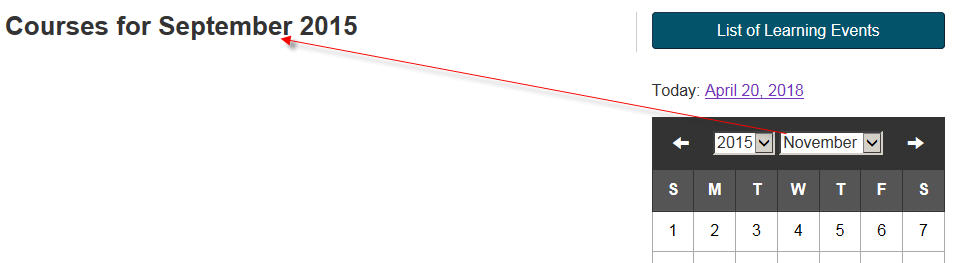
I need to include the date to match the month of the calendar drop down outside the ol tag.
$( document ).on( "wb-ready.wb-calevt", ".wb-calevt", function( event ) {
something here!!!
});
this is what I get when I try. I have 4 different courses active (this is just an example) September 2015 to April 2018.
zomby22
on 20 Apr 2018
Using this yield the year and month:
        $( document ).on( "wb-updated.wb-calevt", ".wb-calevt", function( event ) {
            var calYr = $( "#calendar1" ).find( "select.cal-year option:selected" ).text();
            var calMn = $( "#calendar1" ).find( "select.cal-month option:selected" ).text();
        });
 thekodester
on 20 Apr 2018
thekodester
on 20 Apr 2018
thank you thekodester, its working now.
zomby22
on 20 Apr 2018
Related issues
 AtomicNumber28
·
7Comments
AtomicNumber28
·
7Comments
 shawnthompson
·
4Comments
shawnthompson
·
4Comments
 sarumim
·
4Comments
sarumim
·
4Comments
 kitana-ifbbpro
·
6Comments
kitana-ifbbpro
·
6Comments
 samghar1
·
5Comments
samghar1
·
5Comments
Most helpful comment
Using this yield the year and month: