Wet-boew: Menu not visible in mobile view (only the mb-pnl button that is visible)
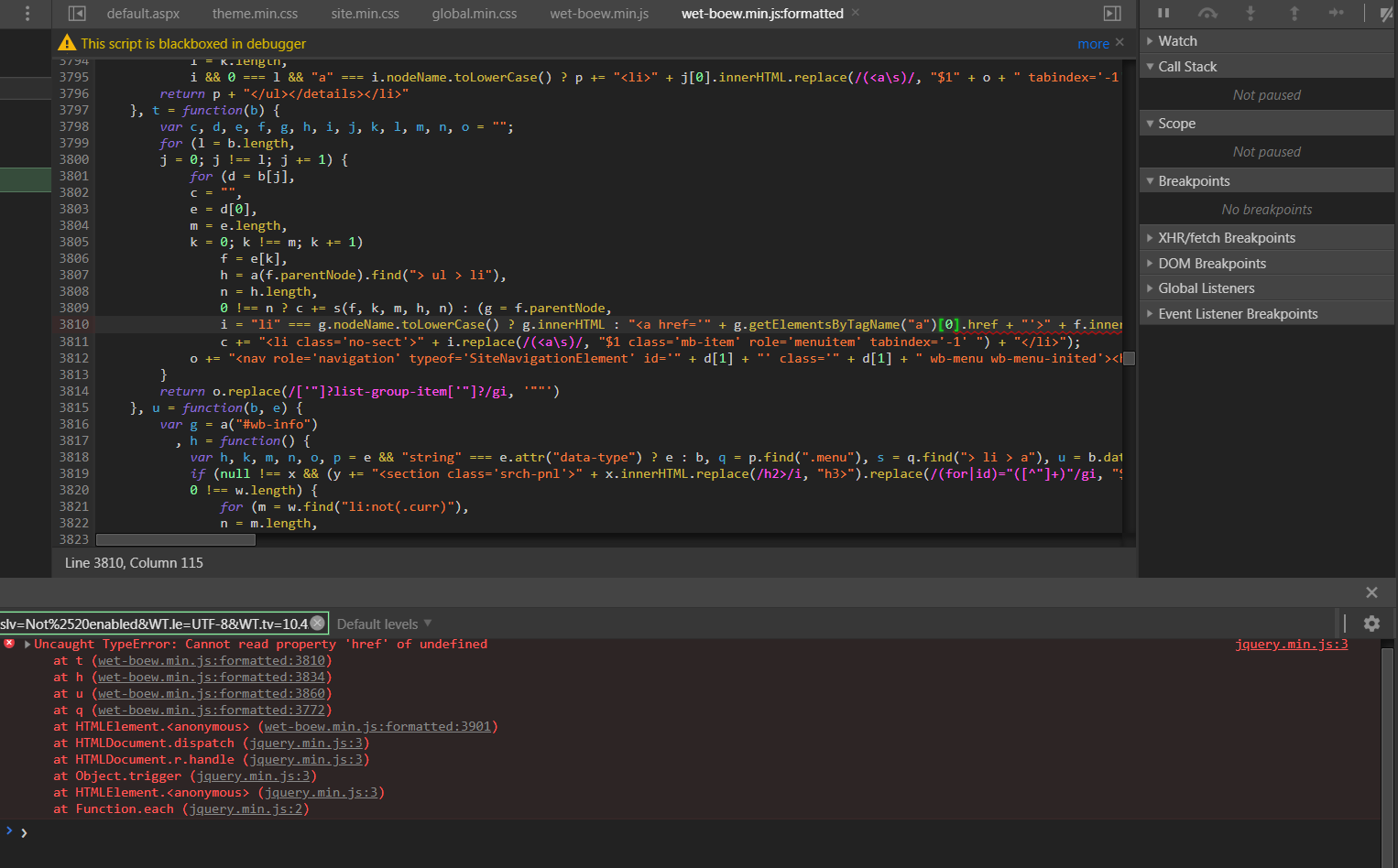
I'm working with WET v4.0.26 I'm not seeing the menu on the mobile view. There's one Wet-boew.min.js error Uncaught TypeError: Cannot read property 'href' of undefined at t (wet-boew.min.js:formatted:3810)
at h (wet-boew.min.js:formatted:3834)
at u (wet-boew.min.js:formatted:3860)
at q (wet-boew.min.js:formatted:3772)
Here is a picture of the menu working fine in a desktop view (md and lg)
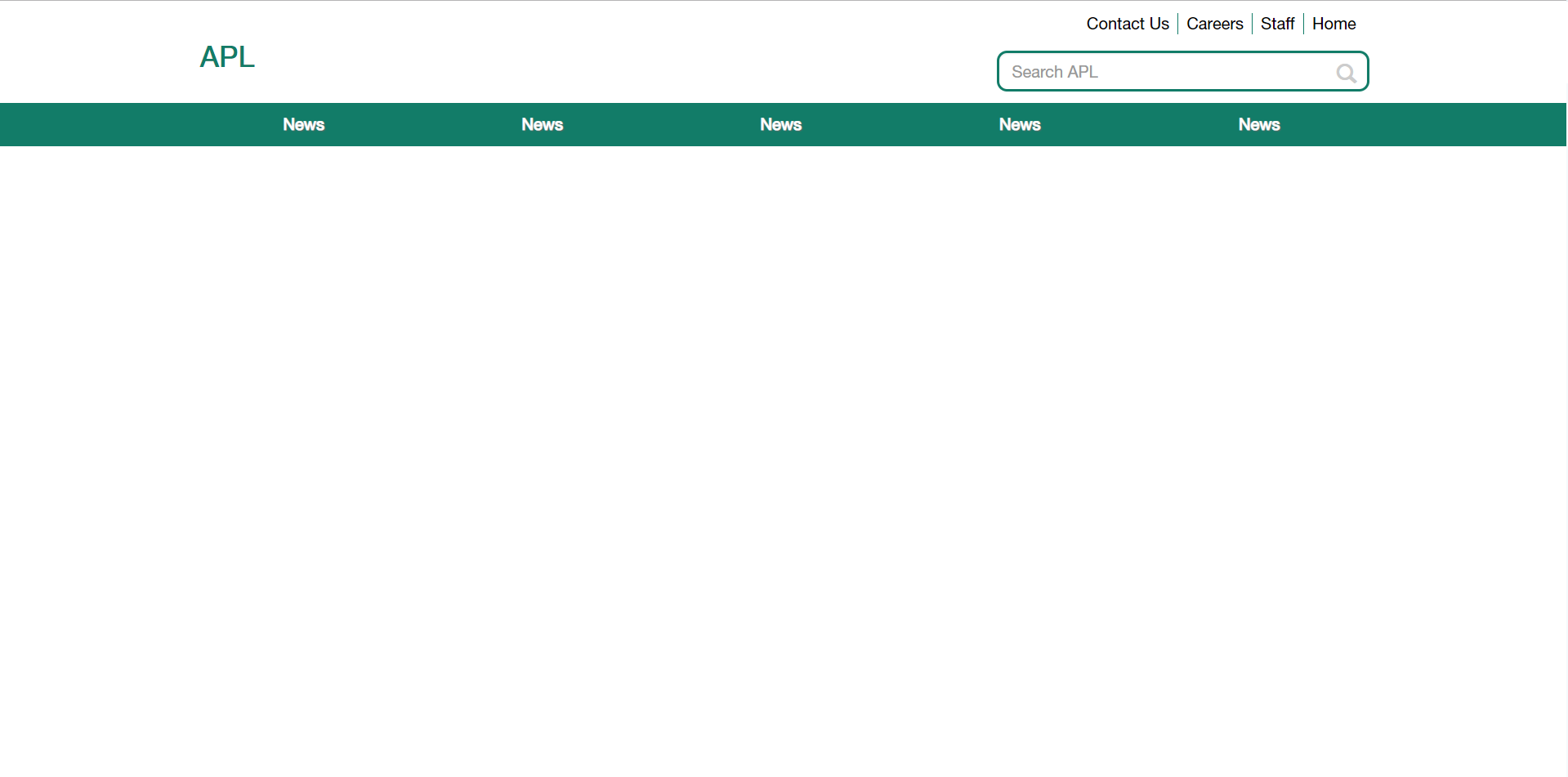
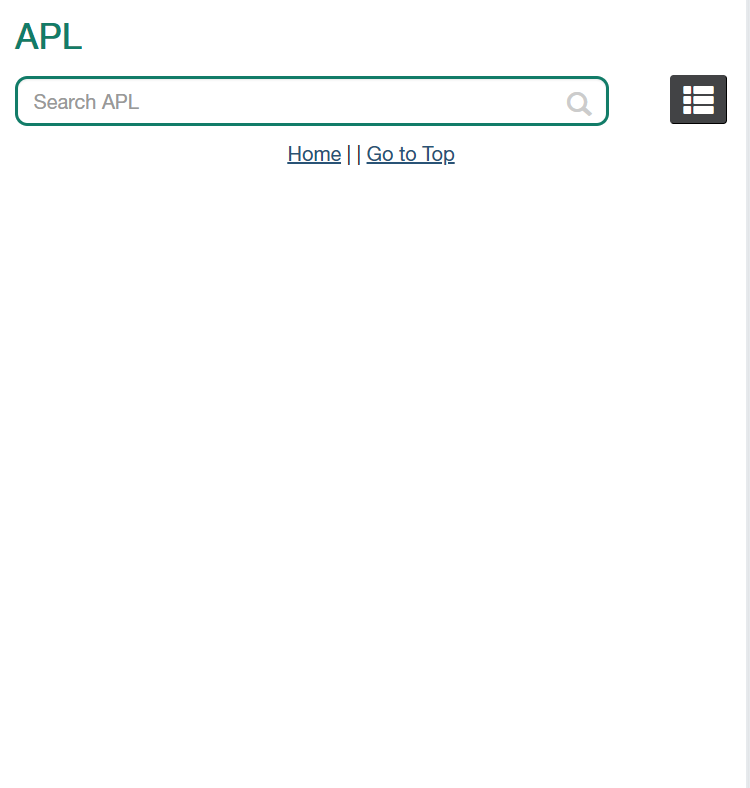
but when I resize the window, I can see the mobile nav button but when I click on it nothing happens.
Here is the error:
Thank you.
 samghar1
All 5 comments
Can you provide the HTML markup used for your page header?
 duboisp
on 20 Feb 2019
duboisp
on 20 Feb 2019
Here is the HTML markup.
`
<header role="banner">
    <div id="wb-bnr">
        <div id="wb-bar">
            <div class="container">
                <div class="row">
                    <!-- HEADER QUICK LINKS START-->
                    <section id="wb-lng" class="hidden-xs hidden-sm col-md-12">
                        <h2>Header Links</h2>
                        <ul class="text-right">
                        <li>Link 1 </li>
                        <li>Link 2 </li>
                        <li>Link 3 </li>
                        </ul>
                    </section>
                    <!-- HEADER QUICK LINKS END-->
                </div>

                <div id="headerlogos" class="row">
                    <!-- HEADER LOGO MAIN START -->
                     <div id="wb-sttl" class="col-xs-12 col-md-8">
                        <div class="div-main-header">
                            <h3 class="main-header">APL</h3>
                        </div>
                    </div>
                    <!-- HEADER LOGO MAIN END -->

                    <!-- HEADER SEARCH START -->
                    <section id="wb-srch" class="col-xs-10 col-md-4 wb-srch">
                        <h2>Search</h2>
                        <form action="/action_page.aspx" method="get" role="search" class="form-inline">
                            <input type="hidden" name="src" value="search.aspx" />
                            <input type="hidden" name="filetype" value="all" />
                            <div id="custom-search-input">
                                <div class="row">
                                    <div class="col-md-12">
                                        <input type="search" class="search-query form-control" name="k" placeholder="Search APL">
                                        <span class="input-group-btn">
                                            <button class="btn btn-danger" type="submit" > <span class="glyphicon glyphicon-search"></span> </button>
                                        </span>
                                    </div>
                                </div>
                            </div>
                        </form>
                     </section>
                     <section class="wb-mb-links col-xs-2 visible-sm visible-xs" id="wb-glb-mn">
                        <h2>Search and menus</h2>
                        <ul class="pnl-btn list-inline">
                            <li>
                                <a href="#mb-pnl" title="Search and menus" aria-controls="mb-pnl" class="overlay-lnk btn btn-sm btn-default" role="button">
                                    <span class="glyphicon glyphicon-th-list"></span>
                                    <span class="wb-inv">Search and menus</span>
                                </a>
                            </li>
                        </ul>
                        <div class="wb-mb-links col-xs-12 visible-sm visible-xs" id="wb-glb-mn">
                            <h2>Search and menus</h2>
                            <!IoRangeRedDotMode><!-- THIS IS REQUIRED BY WET - DO NOT MOVE OR REMOVE --><!/IoRangeRedDotMode>
                            <div id="mb-pnl"></div>
                            <!IoRangeRedDotMode><!-- THIS IS REQUIRED BY WET - DO NOT MOVE OR REMOVE --><!/IoRangeRedDotMode>
                        </div>
                    </section>
                    <!-- HEADER SEARCH END -->
                </div>
            </div>
        </div>
    </div>


    <!-- MAIN NAVIGATION START -->
    <nav role="navigation" id="wb-sm" data-trgt="mb-pnl" class="wb-menu visible-md visible-lg" typeof="SiteNavigationElement">
        <div class="container nvbar">
            <h2>Topics menu</h2>
            <div class="row">
                <ul class="list-inline menu">
                <li><a id="navitem-426402f2-905c-42d6-9523-52a90345363e" class="item" role="menubar" href="/13718.aspx">News</a></li>
                <li><a id="navitem-78115fd1-205d-42f5-8290-9e1c85f789f7" class="item" role="menubar" href="/13719.aspx">News</a></li>
                <li><a id="navitem-b7d4a21f-ed2b-40e3-bf32-6a02d1c734ad" class="item" role="menubar" href="/13726.aspx">News</a></li>
                <li><a id="navitem-b7d4a21f-ed2b-40e3-bf32-6a02d1c734ad" class="item" role="menubar" href="/13726.aspx">News</a></li>
                <li><a id="navitem-b7d4a21f-ed2b-40e3-bf32-6a02d1c734ad" class="item" role="menubar" href="/13726.aspx">News</a></li>
                </ul>

            </div>
        </div>
    </nav>
    <!-- MAIN NAVIGATION END -->
</header>

<!--CONTENT HEADER END -->`
Thanks!
samghar1
on 20 Feb 2019
I'm not sure this is the issue, but the menubar role does not belong on those <a> tags.
Here's what our sub-menu-less items look like:
<nav role="navigation" id="wb-sm" data-trgt="mb-pnl" class="wb-menu visible-md visible-lg" typeof="SiteNavigationElement">
  <div class="container nvbar">
    <h2>Topics menu</h2>
    <div class="row">
      <ul class="list-inline menu" role="menubar">
        [...]
        <li><a href="/en/learning" class="item">Learning</a></li>
      </ul>
    </div>
  </div>
</nav>
You also have unusual markup around the <div id="mb-pnl"></div> part. Your <h2>Search and menus</h2> appears twice, and you have <div class="wb-mb-links col-xs-12 visible-sm visible-xs" id="wb-glb-mn"> wrapping <div id="mb-pnl"></div>, which may be causing problems.
Here's how we add custom markup:
<section class="wb-mb-links col-xs-12 visible-sm visible-xs" id="wb-glb-mn">
  <h2>Search and menus</h2>
  <ul class="pnl-btn list-inline text-right">
    <li>
      <a href="#mb-pnl" title="Search and menus" aria-controls="mb-pnl" class="overlay-lnk btn btn-sm btn-default" role="button">
        <svg width="17.49" height="17.49" version="1.1" viewBox="0 0 17.49 17.49" xmlns="http://www.w3.org/2000/svg">
          <path d="m12.5 11h-0.79l-0.28-0.27c0.98-1.14 1.57-2.62 1.57-4.23 0-3.59-2.91-6.5-6.5-6.5s-6.5 2.91-6.5 6.5 2.91 6.5 6.5 6.5c1.61 0 3.09-0.59 4.23-1.57l0.27 0.28v0.79l5 4.99 1.49-1.49zm-6 0c-2.49 0-4.5-2.01-4.5-4.5s2.01-4.5 4.5-4.5 4.5 2.01 4.5 4.5-2.01 4.5-4.5 4.5z" fill="#505050"/>
          <path d="m-3-3h24v24h-24z" fill="none"/>
        </svg>
        <svg width="18" height="12" version="1.1" viewBox="0 0 18 12" xmlns="http://www.w3.org/2000/svg">
          <path d="m-3-6h24v24h-24z" fill="none"/>
          <path d="m0 12h18v-2h-18zm0-5h18v-2h-18zm0-7v2h18v-2z" fill="#505050"/>
        </svg>
        <span class="wb-inv">Search and menus</span>
      </a>
    </li>
  </ul>
  <div id="mb-pnl"></div>
</section>
<div id="mb-pnl"></div> is simply dropped after <ul class="pnl-btn list-inline text-right">.
The wet-boew samples do the same:
<section class="wb-mb-links col-xs-12 visible-sm visible-xs" id="wb-glb-mn">
  <h2>Search and menus</h2>
  <ul class="pnl-btn list-inline text-right">
    <li><a href="#mb-pnl" title="Search and menus" aria-controls="mb-pnl" class="overlay-lnk btn btn-sm btn-default" role="button"><span class="glyphicon glyphicon-search"><span class="glyphicon glyphicon-th-list"><span class="wb-inv">Search and menus</span></span></span></a></li>
  </ul>
  <div id="mb-pnl"></div>
</section>
There's some markup transformation going on for the mobile menu, so in general, you want to keep the HTML as close to the original as possible. If you want to modify the look, you have to do pretty much everything in CSS, although you can usually change the order of <section> groups if needed.
Also try release 4.0.30. I'm still on 4.0.28.1 because there was a bug with using a non-AJAX menu in 4.0.29, but it's been fixed in 4.0.30. I don't know about 4.0.26.
 Pacoup
on 20 Feb 2019
Pacoup
on 20 Feb 2019
I revised my code and apparently I had an extra
samghar1
on 21 Feb 2019
Good to know.
I've just upgraded to 4.0.30 and wanted to mention I removed the item class from my menu items without dropdowns, otherwise I get the active class on the parent <li>, which causes the hover background color to briefly “stick” after the mouse moves away.
The class in question gets added with a timer to prevent the opened sub-menus from closing right away when users briefly mouse outside, which is better for usability, but it means the background color sticks for menu items without dropdowns, which doesn't make a lot of sense.
So you might want to remove class="item" from your non-dropdown link <a> tags.
From this:
<li><a href="/en/learning" class="item">Learning</a></li>
To this:
<li><a href="/en/learning">Learning</a></li>
Related issues
 shawnthompson
·
4Comments
shawnthompson
·
4Comments
 nickmarcil
·
5Comments
nickmarcil
·
5Comments
 swapnalithakarpspc
·
5Comments
swapnalithakarpspc
·
5Comments
 sarumim
·
4Comments
sarumim
·
4Comments
 matty-tee
·
4Comments
matty-tee
·
4Comments