Webwhatsapp-wrapper: window.Store has just vanished?
Hi, cannot find window.Store object anymore, it seems that Whatsapp Web has been just updated?
 flavionegrao
All 110 comments
Yeah same here..
 penpenaj
on 25 May 2018
penpenaj
on 25 May 2018
yes sir , i hope solve this ):
 mafrek
on 25 May 2018
mafrek
on 25 May 2018
same here....
 bobaoapae
on 25 May 2018
bobaoapae
on 25 May 2018
Yes, wapi_functions.getAllChats() not working.
It gives me:
ReferenceError: Store is not defined
Anyone no idea yet?
 kispi
on 25 May 2018
kispi
on 25 May 2018
They are usign javascript proxys now... so we need find some way to create a handler to this proxy
bobaoapae
on 25 May 2018
I think the same as bobaopae, it is runtime loading the Javascript
 Nikunj-rank
on 25 May 2018
Nikunj-rank
on 25 May 2018
It is possible to get ConnectionManager:
[Node id="App"]._reactRootContainer.current.child.child.child.child.child.memoizedProps.children[5].props.conn
 alfred82santa
on 25 May 2018
alfred82santa
on 25 May 2018
It is possible to get ChatCollection:
[Node id="App"]._reactRootContainer.current.child.child.child.child.child.child.sibling.sibling.sibling.sibling.sibling.child.child.child.child.child.sibling.sibling.sibling.sibling.sibling.child.child.child.child.memoizedState.chats[0].collection
alfred82santa
on 25 May 2018
It is possible to get ContactCollection from any chat:
chat.contact.collection
alfred82santa
on 25 May 2018
Hey Alfred, thank you for your information - how can I do this in chrome console/ javascript? Not much experienced with react
 tulssinep
on 25 May 2018
tulssinep
on 25 May 2018
is there any sollution for this?
 nanangsujoko
on 25 May 2018
nanangsujoko
on 25 May 2018
We should setup a discord channel for this project, discuss more frantic things like this
 mikkelam
on 25 May 2018
mikkelam
on 25 May 2018
document.querySelector("#app")._reactRootContainer.current.child.child.child.child.child.child.sibling.sibling.sibling.sibling.sibling.child.child.child.child.child.sibling.sibling.sibling.sibling.sibling.child.child.child.child.memoizedState.chats[0].collection.find("[email protected]").then(function(e) { e.sendMessage("Ola") });
 VinicSilva
on 25 May 2018
tulssinep
on 25 May 2018
VinicSilva
on 25 May 2018
tulssinep
on 25 May 2018
Facing same issue here.
Getting "ReferenceError: Store is not defined"
Any solution?
 tapankumar
on 25 May 2018
tapankumar
on 25 May 2018
alfred and vini give me your email address I want to gift you beer money
tulssinep
on 25 May 2018
any solution?
 victorriba
on 25 May 2018
victorriba
on 25 May 2018
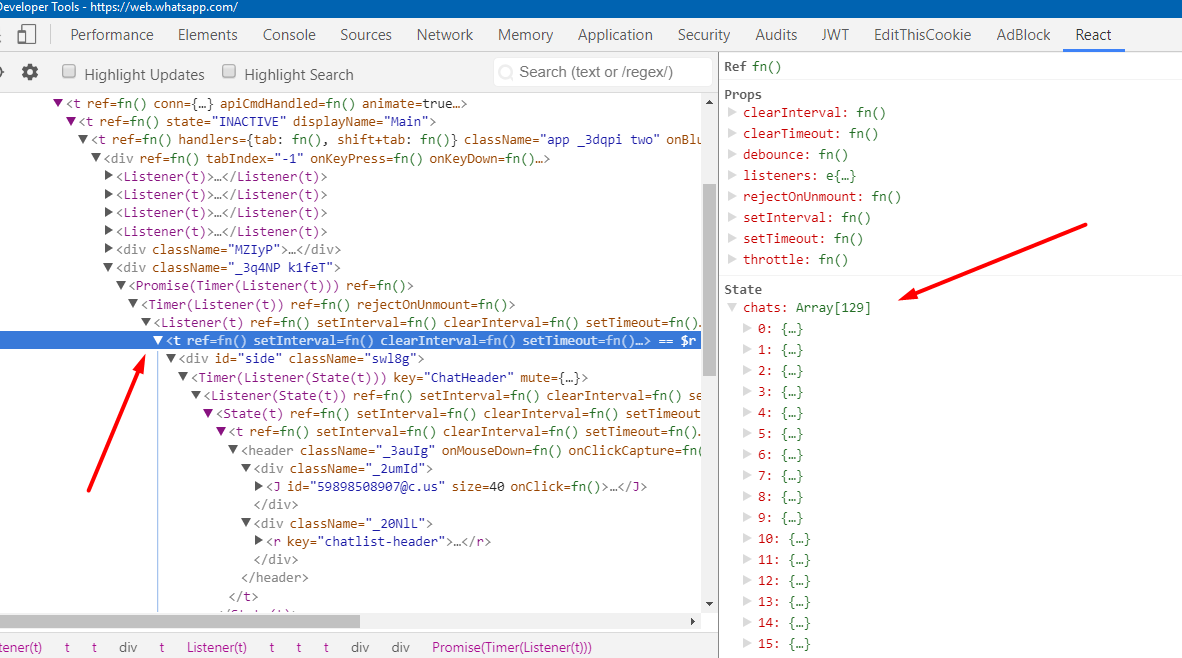
Chats models are still accessible. All we have to do is select the React node of the chat panel on the left like they said above.
 sevetseh28
on 25 May 2018
sevetseh28
on 25 May 2018
EDIT: THE MASTER BRANCH ALREADY IS WORKING
========
 alan-albuquerque
on 25 May 2018
alan-albuquerque
on 25 May 2018
dear alan-albuquerque how to send message?
 tarun82888
on 25 May 2018
tarun82888
on 25 May 2018
i can read now but can not send message
victorriba
on 25 May 2018
@alan-albuquerque your code also reads already read messages. isNewMsg property is no longer defined.
getUnreadMessages funcion needs more fixing than that.
Edit: just change __x_isNewMsg to isNewMsg .
sevetseh28
on 25 May 2018
@alan-albuquerque and this dont get all contacts, only get the contacts in cache
 alpires
on 25 May 2018
alpires
on 25 May 2018
@alpires yes, you must use chat[0].collection as @alfred82santa has said above
sevetseh28
on 25 May 2018
hi @alpires how can send messages to contact??
victorriba
on 25 May 2018
hi @sevetseh28 how can send messages to contact??
victorriba
on 25 May 2018
Thanks @sevetseh28
alpires
on 25 May 2018
@victorriba this work for now document.querySelector("#app")._reactRootContainer.current.child.child.child.child.child.child.sibling.sibling.sibling.sibling.sibling.child.child.child.child.child.sibling.sibling.sibling.sibling.sibling.child.child.child.child.memoizedState.chats[0].collection.find("[email protected]").then(function(e) { e.sendMessage("Ola") });
alpires
on 25 May 2018
@alpires can explain how can implement it please?
victorriba
on 25 May 2018
i make pull request thanks to @alan-albuquerque and
bobaoapae
on 25 May 2018
Some solution to get all contacts and not only all chats?
alpires
on 25 May 2018
alan-albuquerque sir thanks... now send message also done
tarun82888
on 25 May 2018
@sevetseh28 you're right! I changed my comment with your corrections =)
alan-albuquerque
on 25 May 2018
@alan-albuquerque @sevetseh28 @alfred82santa @Vini85428026 )
ERR
Traceback (most recent call last):
  File "./echo.py", line 50, in <module>
    for contact in driver.get_unread():
  File "WebWhatsapp-Wrapper-master/webwhatsapi/__init__.py", line 321, in get_unread
    raw_message_groups = self.wapi_functions.getUnreadMessages(include_me, include_notifications)
  File "WebWhatsapp-Wrapper-master/webwhatsapi/wapi_js_wrapper.py", line 28, in __getattr__
    wapi_functions = dir(self)
  File "WebWhatsapp-Wrapper-master/webwhatsapi/wapi_js_wrapper.py", line 46, in __dir__
    self.driver.execute_script(script.read())
  File "/usr/lib/python3.6/site-packages/selenium/webdriver/remote/webdriver.py", line 629, in execute_script
    'args': converted_args})['value']
  File "/usr/lib/python3.6/site-packages/selenium/webdriver/remote/webdriver.py", line 314, in execute
    self.error_handler.check_response(response)
  File "/usr/lib/python3.6/site-packages/selenium/webdriver/remote/errorhandler.py", line 242, in check_response
    raise exception_class(message, screen, stacktrace)
selenium.common.exceptions.JavascriptException: Message: SyntaxError: illegal character
@mafrek you can post your entire getUnreadMessages function body?
alan-albuquerque
on 25 May 2018
Edit wapi.js add function written by @alan-albuquerque
And replace all Store.Chat.models
To
WAPI.getChatModels();
All working... Tested dear
tarun82888
on 25 May 2018
@alan-albuquerque thanks all work now
victorriba
on 25 May 2018
Thanks, but 99% of the credits must go to @alfred82santa, I'm really impressionate how he discovered where was the new chats collections path haha, really insane dude, thanks
alan-albuquerque
on 25 May 2018
@alan-albuquerque @alfred82santa you know where are node to setPushname and sendSetStatus?
bobaoapae
on 25 May 2018
@alfred82santa thanks a lot for the quick answer you saved the day.
Perhaps we could find a way to dynamically find the Store?
I have the feeling it's too hardcoded and going to break again soon:
document.querySelector("#app")._reactRootContainer.current.child.child.child.child.child.child.sibling.sibling.sibling.sibling.sibling.child.child.child.child.child.sibling.sibling.sibling.sibling.sibling.child.child.child.child.memoizedState.chats[0].collection.models;
flavionegrao
on 25 May 2018
Great job Alan.. I changed as you suggested, everything works fine except sending message to group.
this is my code
for group in driver.contact_get_common_groups("[email protected]"):
print(group.id + " " + group.name)
if group.name=="Testing group":
driver.send_message_to_id(group.id,"test")
 syednaimath
on 25 May 2018
syednaimath
on 25 May 2018
some can help me to send imagen to a contact ?? @alan-albuquerque @alfred82santa @sevetseh28
Thank you
victorriba
on 25 May 2018
this.obj.ExecuteScript("Store.Chat.models[0].__x_id='" + array[i] + "@c.us'", new object[0]);
it vb.net
what change i do to work
 awad2005
on 26 May 2018
awad2005
on 26 May 2018
store command line
it does not work anymore
:-( help me
 oltanalkan
on 26 May 2018
oltanalkan
on 26 May 2018
De antemano gracias por el aporte....Pudieron descargar imagenes ....
 ederalbino
on 26 May 2018
ederalbino
on 26 May 2018
How can we send picture and video ?
Before Has a Store. We can forward any picture.
var msg = Store.Msg.models[0]; msg.id.id = arguments[0]; msg.id.remote = arguments[1]; msg.to = arguments[1]; msg.t = Math.ceil(new Date().getTime() / 1000); Store.Msg.send(msg);
Message Model Zero is Picture.
 desertsun16
on 26 May 2018
desertsun16
on 26 May 2018
@flavionegrao You are right, it's not a good solution. We must investigate more. I'm thinking about some autodiscovery process. I guess it's not possible to get old Store object. But we could recreate it.
On the other hand,I think we must refactor all js code, allowing to call functions in async mode, avoiding process locks. Also, new code should create a master object in order to work as proxy with python code. It should to make it easy to create new methods (I'm thinking how to send media files).
alfred82santa
on 26 May 2018
i have same issue,
webwhatsapi.wapi_js_wrapper.JsException: Error in function getUnreadMessages (ReferenceError: Store is not defined). Command: return WAPI.getUnreadMessages(false,false, arguments[0])
 ayrokid
on 26 May 2018
ayrokid
on 26 May 2018
any one knew where is the Wap object ?
or any method to check number uses whatsapp or not
Nikunj-rank
on 26 May 2018
How can I get the group id?.... Help
ederalbino
on 26 May 2018
@ederalbino use contact.chat.id
tarun82888
on 26 May 2018
@desertsun16 what is arguments[0]?
bobaoapae
on 26 May 2018
@desertsun16 check this -> https://github.com/mukulhase/WebWhatsapp-Wrapper/pull/223
bobaoapae
on 26 May 2018
Need to change the chat collection to above. The actual line returns empty array of chats when the user is seaching something in whats web:
document.querySelector("#app")._reactRootContainer.current.child.child.child.child.child.child.sibling.sibling.sibling.sibling.sibling.child.child.child.child.child.sibling.sibling.sibling.sibling.sibling.sibling.child.child.child.child.memoizedProps.chat.collection
 eduardobento
on 26 May 2018
eduardobento
on 26 May 2018
@eduardobento check last merge i made in https://github.com/mukulhase/WebWhatsapp-Wrapper/pull/223
bobaoapae
on 26 May 2018
I got to send a message to a new number.
First, you have to have a method like that at the driver
def create_chat_by_number(self, number, mensage):
url = self._URL+"/send?phone="+number
self.driver.get(url)
And then you have to update the javascript:
At my case, there is a method in the driver class
def send_to_phone_number(self, pno, message):
try:
script_path = os.path.dirname(os.path.abspath(__file__))
except NameError:
script_path = os.getcwd()
script = open(os.path.join(script_path, "js_scripts/send_message_to_phone_number.js"), "r").read()
success = self.driver.execute_script(script, pno, message)
return success
And the content from send_message_to_phone_number.js is that one:
var obj = document.querySelector("#main");
var chat = obj[Object.keys(obj)[0]].memoizedProps.children[1].props.chat;
var message = arguments[1];
var temp = {};
temp.contact = chat.__x__formattedTitle;
temp.id = chat.__x_id;
if((temp.id.search(contact)!=-1 || temp.id.search(contact2)!=-1 ) && temp.id.search('g.us')==-1 ){
chat.sendMessage(message);
return true
}
return false;
After that, you call:
driver.create_chat_by_number(phone, message)
driver.send_to_phone_number(phone, message) //this method will call the javascript method
 andlb
on 26 May 2018
andlb
on 26 May 2018
@bobaoapae thanks !!
eduardobento
on 26 May 2018
@karopass - THANKS SO MUCH!
maybe you can explain how find this?
bobaoapae
on 27 May 2018
@karopass
var nr = phone number; Store.ProfilePicThumb.find(nr+ '@c.us').then(function(r){ console.log(r)})
How can we do ?
oltanalkan
on 27 May 2018
Thanks
@alan-albuquerque
Solved!
Regards
 carlosedu137
on 27 May 2018
carlosedu137
on 27 May 2018
@karopass
window.Store.Presence.find(nr+'@c.us')
How can we do ?
 DRBILISIM
on 27 May 2018
DRBILISIM
on 27 May 2018
@karopass yes yes... how use this i know... i want to know how you find this for future updates...
bobaoapae
on 28 May 2018
I have taken a git pull and did "python setup.py install" however now getting "done is not a function".
Before taking pull, i was getting "ReferenceError: Store is not defined".
Has this fixed in master branch?
Waiting for QR
Bot started
Traceback (most recent call last):
File "/home/mobilnxt/.pyenv/versions/myvenv/lib/python3.6/site-packages/webwhatsapi-2.0.3-py3.6.egg/webwhatsapi/wapi_js_wrapper.py", line 102, in __call__
return self.driver.execute_async_script(command)
File "/home/mobilnxt/.pyenv/versions/myvenv/lib/python3.6/site-packages/selenium/webdriver/remote/webdriver.py", line 650, in execute_async_script
'args': converted_args})['value']
File "/home/mobilnxt/.pyenv/versions/myvenv/lib/python3.6/site-packages/selenium/webdriver/remote/webdriver.py", line 312, in execute
self.error_handler.check_response(response)
File "/home/mobilnxt/.pyenv/versions/myvenv/lib/python3.6/site-packages/selenium/webdriver/remote/errorhandler.py", line 242, in check_response
raise exception_class(message, screen, stacktrace)
selenium.common.exceptions.JavascriptException: Message: TypeError: done is not a function
During handling of the above exception, another exception occurred:
Traceback (most recent call last):
File "echo.py", line 26, in
for contact in driver.get_unread():
File "/home/mobilnxt/.pyenv/versions/myvenv/lib/python3.6/site-packages/webwhatsapi-2.0.3-py3.6.egg/webwhatsapi/__init__.py", line 327, in get_unread
raw_message_groups = self.wapi_functions.getUnreadMessages(include_me, include_notifications, use_unread_count)
File "/home/mobilnxt/.pyenv/versions/myvenv/lib/python3.6/site-packages/webwhatsapi-2.0.3-py3.6.egg/webwhatsapi/wapi_js_wrapper.py", line 106, in __call__
raise JsException("Error in function {0} ({1}). Command: {2}".format(self.function_name, e.msg, command))
webwhatsapi.wapi_js_wrapper.JsException: Error in function getUnreadMessages (TypeError: done is not a function). Command: return WAPI.getUnreadMessages(false,false,false, arguments[0])
tapankumar
on 28 May 2018
That was probably a bad merge. Will fix it.
 mukulhase
on 28 May 2018
mukulhase
on 28 May 2018
@mukulhase : Many thanks in advance. Please update here once fixed.
tapankumar
on 28 May 2018
@karopass
Hi, following your answer, I executed the command in node.js and got error saying:"ReferenceError: window is not defined".
how or where should I run it?
thanks
 lihisolomon
on 28 May 2018
lihisolomon
on 28 May 2018
Old Store object autodiscovery: #231
I think we could close this issue...
alfred82santa
on 28 May 2018
@mukulhase : I have taken a pull today at 09:50 PM IST and below are the files got changed.
Fast-forward
webwhatsapi/__init__.py | 20 ++++++++++++--------
webwhatsapi/async_driver.py | 13 +++++++------
webwhatsapi/js/wapi.js | 51 +++++++++++++++++++++++++++++++++++++++++++--------
webwhatsapi/objects/message.py | 3 ++-
4 files changed, 64 insertions(+), 23 deletions(-)
Now echo.py is not crashing however not able to read any text nor image message.
What can i do now?
tapankumar
on 28 May 2018
@mukulhase : This program is not able to receive text or images now after whatsapp did some change at their web.whatsapp.com.
Is this working working for anyone else?
tapankumar
on 29 May 2018
Its working fine..
tarun82888
on 29 May 2018
@tapankumar working fine here...
bobaoapae
on 29 May 2018
@tarun82888 @bobaoapae --It is not working for me.
Can you please review below of my code and suggest if there is any issue.
This is how i run my program.
python echo.py skskfvo8.xxxxx xxxx
After running my program, web.whatsapp.com open and connected properly in firefox however program is unable to read any message nor moving to next while loop.
Waiting for QR
Bot started
Checking for more messages - Server Number -xxxx
Nothing moves after this.
My Code
~~~
import time
from webwhatsapi import WhatsAPIDriver
from webwhatsapi.objects.message import Message, MediaMessage
import requests
from random import randint
import os
import sys
import requests.packages.urllib3
requests.packages.urllib3.disable_warnings()
driver = WhatsAPIDriver(
loadstyles=True, profile="/home/mobilnxt/.mozilla/firefox/" + sys.argv[1])
print("Waiting for QR")
driver.wait_for_login()
print("Bot started")
wa_server_number = sys.argv[2]
mediaPath = "/home/mobilnxt/Desktop/webwhatsapi/media/" + wa_server_number
if not os.path.exists(mediaPath):
os.makedirs(mediaPath)
while True:
time.sleep(randint(5, 10))
print('Checking for more messages - Server Number - ' + wa_server_number)
for contact in driver.get_unread():
for message in contact.messages:
if isinstance(message, MediaMessage):
if message.type == "image":
print("Media Message received")
print("Phone:" + message.sender.id +
"|Message Type:" + message.type)
#print("Message Type:" + message.type)
#print("Message Size:" + str(message.size))
#print("Message Mime:" + message.mime)
#print(message.content + ":" + message.filename)
message.save_media(mediaPath)
sender = message.sender.id.split('@')
files = {'wa_media': open(
mediaPath + "/" + message.filename, 'rb')}
messageData = {'wa_number': sender[0],
'wa_message': message.filename,
'wa_type': message.type,
'wa_server_number': wa_server_number}
requests.post(
'https://www.mobilnxt.in/api/wa_receive', files=files, data=messageData, verify=False)
#time.sleep(randint(5, 10))
driver.chat_send_seen(message.chat_id)
else:
print("Message Type:" + message.type + "|Not interested")
driver.chat_send_seen(message.chat_id)
else:
if hasattr(message, 'sender') and hasattr(message, 'content'):
print("Text message received")
print("Phone:" + message.sender.id +
"|Message:" + message.content)
# print("Message Type:" + message.type) #For text message, type=chat
sender = message.sender.id.split('@')
messageData = {'wa_number': sender[0],
'wa_message': message.content,
'wa_type': "text",
'wa_server_number': wa_server_number}
requests.post(
'https://xxxxxxxxxxx/api/wa_receive', data=messageData, verify=False)
#time.sleep(randint(5, 10))
driver.chat_send_seen(message.chat_id)
# contact.chat.send_message(message.safe_content)
~~~
tapankumar
on 29 May 2018
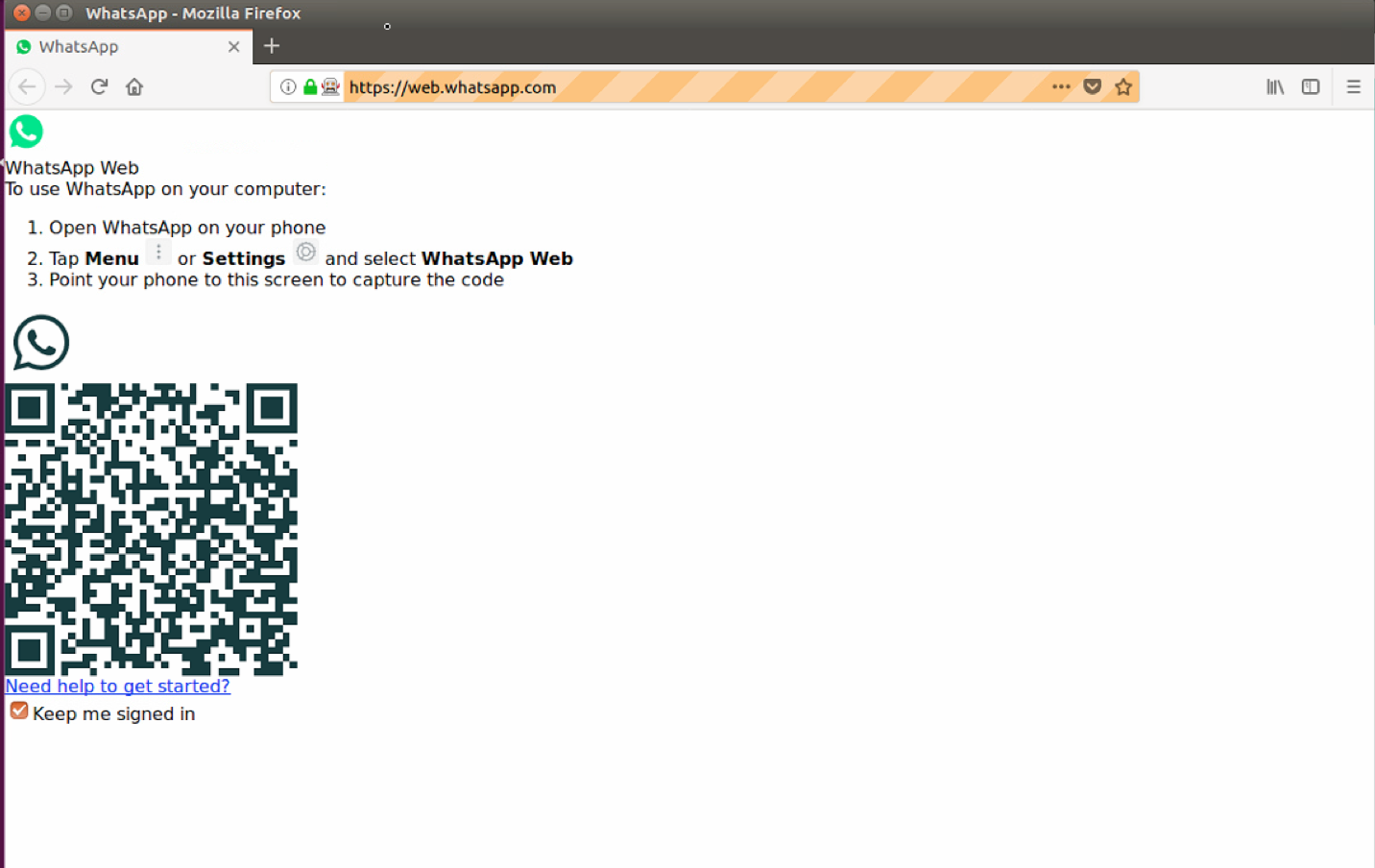
I have this weird thing, when I launch the echo, the whatsApp web looks broken, but if I surf to the web.whatsapp.com regularly it looks as usual
 MalkaBar
on 29 May 2018
MalkaBar
on 29 May 2018
use loadstyle
On Tue, May 29, 2018, 7:04 PM MalkaBar notifications@github.com wrote:
I have this weird thing, when I launch the echo, the whatsApp web looks
broken, but if I surf to the web.whatsapp.com regularly it looks as usual
[image: image]
https://user-images.githubusercontent.com/32748699/40670809-e29f57d4-6372-11e8-869c-16a2ae940179.png—
You are receiving this because you are subscribed to this thread.
Reply to this email directly, view it on GitHub
https://github.com/mukulhase/WebWhatsapp-Wrapper/issues/217#issuecomment-392833183,
or mute the thread
https://github.com/notifications/unsubscribe-auth/AAdkDtggsr-DwXpQIg4QC6GqGJjH_CDTks5t3XGMgaJpZM4UNQkX
.
 mhndm
on 29 May 2018
mhndm
on 29 May 2018
@mhndm Can you please elaborate on how to use loadstyle? I am not sure what it means
MalkaBar
on 29 May 2018
driver = WhatsAPIDriver(username="mkhase", loadstyle=True)
On Tue, May 29, 2018, 7:12 PM MalkaBar notifications@github.com wrote:
@mhndm https://github.com/mhndm Can you please elaborate on how to use
loadstyle? I am not sure what it means—
You are receiving this because you were mentioned.
Reply to this email directly, view it on GitHub
https://github.com/mukulhase/WebWhatsapp-Wrapper/issues/217#issuecomment-392836406,
or mute the thread
https://github.com/notifications/unsubscribe-auth/AAdkDt423oxx5RJPM60FU226kHZBa931ks5t3XOFgaJpZM4UNQkX
.
mhndm
on 29 May 2018
@mhndm I added this but I get this error
raceback (most recent call last):
  File "echo.py", line 5, in <module>
    driver = WhatsAPIDriver(username="mkhase", loadstyle=True)
TypeError: init() got an unexpected keyword argument 'loadstyle'
MalkaBar
on 29 May 2018
sorry with s
loadstyles
On Tue, May 29, 2018, 7:22 PM MalkaBar notifications@github.com wrote:
@mhndm https://github.com/mhndm I added this but I get this error
raceback (most recent call last): File "echo.py", line 5, in
driver = WhatsAPIDriver(username="mkhase", loadstyle=True) TypeError:
init() got an unexpected keyword argument 'loadstyle'—
You are receiving this because you were mentioned.
Reply to this email directly, view it on GitHub
https://github.com/mukulhase/WebWhatsapp-Wrapper/issues/217#issuecomment-392839566,
or mute the thread
https://github.com/notifications/unsubscribe-auth/AAdkDsZQfloVN0YgqTzAJgr82xl5Zsv-ks5t3XXUgaJpZM4UNQkX
.
mhndm
on 29 May 2018
@mhndm it worked! Thanks! :)
MalkaBar
on 29 May 2018
Function Getme not working.. Any one have idea?
tarun82888
on 29 May 2018
I also downloaded the latest build of the repository and still can't pass the missing store error, I tried @karopass' comment but it didn't work...anyone has a solution for this?
webwhatsapi.wapi_js_wrapper.JsException: Error in function getUnreadMessages (ReferenceError: Store is not defined). Command: return WAPI.getUnreadMessages(false,false, arguments[0])
MalkaBar
on 29 May 2018
@mhndm In which file do I put @karopass 's code?
lihisolomon
on 29 May 2018
@lihisolomon same question here. I tried to add this piece of code in wapi.js, but without success testing echo.py... any suggestion?
 mauricioribeiro
on 29 May 2018
mauricioribeiro
on 29 May 2018
Hi all,
Is this line supposed to not work?
for contact in driver.get_unread():
We can't receive or send messages...
MalkaBar
on 29 May 2018
@MalkaBar : I am too facing the same issue and waiting @mukulhase to fix it.
tapankumar
on 30 May 2018
After running my script for long time, i get below error.
However whatsapp web opened by echo.py is able to send and received message via firefox.
Waiting for QR
Bot started
Checking for more messages - Server Number -xxxx
Traceback (most recent call last):
File "/home/mobilnxt/.pyenv/versions/myvenv/lib/python3.6/site-packages/webwhatsapi-2.0.3-py3.6.egg/webwhatsapi/wapi_js_wrapper.py", line 102, in __call__
return self.driver.execute_async_script(command)
File "/home/mobilnxt/.pyenv/versions/myvenv/lib/python3.6/site-packages/selenium/webdriver/remote/webdriver.py", line 650, in execute_async_script
'args': converted_args})['value']
File "/home/mobilnxt/.pyenv/versions/myvenv/lib/python3.6/site-packages/selenium/webdriver/remote/webdriver.py", line 312, in execute
self.error_handler.check_response(response)
File "/home/mobilnxt/.pyenv/versions/myvenv/lib/python3.6/site-packages/selenium/webdriver/remote/errorhandler.py", line 242, in check_response
raise exception_class(message, screen, stacktrace)
selenium.common.exceptions.TimeoutException: Message: Timed out
During handling of the above exception, another exception occurred:
Traceback (most recent call last):
File "echo_test.py", line 26, in
for contact in driver.get_unread():
File "/home/mobilnxt/.pyenv/versions/myvenv/lib/python3.6/site-packages/webwhatsapi-2.0.3-py3.6.egg/webwhatsapi/__init__.py", line 327, in get_unread
raw_message_groups = self.wapi_functions.getUnreadMessages(include_me, include_notifications)
File "/home/mobilnxt/.pyenv/versions/myvenv/lib/python3.6/site-packages/webwhatsapi-2.0.3-py3.6.egg/webwhatsapi/wapi_js_wrapper.py", line 105, in __call__
raise Exception("Phone not connected to Internet")
Exception: Phone not connected to Internet
tapankumar
on 30 May 2018
@karopass @alfred82santa @alan-albuquerque @tarun82888
After sending 20 - 30 messages
Whatsapp account banned :-(
your phone number is no longer registered on this phone....
how can it be a solution ?
oltanalkan
on 31 May 2018
@oltanalkan which browser yoi use?
And also provide your code..
Something wrong in your codes
tarun82888
on 31 May 2018
I am confirming here that Installing from pip works fine. It seems version (2.0.5) available at pip is working fine however master branch code is not.
@MalkaBar : Please install from pip and see if it is working for you too.
pip install webwhatsapi
tapankumar
on 31 May 2018
@tarun82888
Code :
document.querySelector("#app")._reactRootContainer.current.child.child.child.child.child.child.sibling.sibling.sibling.sibling.sibling.child.child.child.child.child.sibling.sibling.sibling.sibling.sibling.child.child.child.child.memoizedState.chats[0].collection.find("[email protected]").then(function(e) { e.sendMessage("Ola") });
Browser chrome
After sending 20 - 30 messages
Whatsapp account banned :-(
your phone number is no longer registered on this phone....
oltanalkan
on 31 May 2018
@oltanalkan
querySelector("#app")._reactRootContainer.current.child.child.child.child.child.child.sibling.sibling.sibling.sibling.sibling.child.child.child.child.child.sibling.sibling.sibling.sibling.sibling.child.child.child.child.memoizedState.chats.collection.find("[email protected]").then(function(e) { e.sendMessage("Ola") });
try sir..
also set sleep time per sms
tarun82888
on 31 May 2018
@tarun82888
your code is not working
VM52:1 Uncaught ReferenceError: querySelector is not defined
at
when I add document.
document.querySelector("#app")._reactRootContainer.current.child.child.child.child.child.child.sibling.sibling.sibling.sibling.sibling.child.child.child.child.child.sibling.sibling.sibling.sibling.sibling.child.child.child.child.memoizedState.chats.collection.find("[email protected]").then(function(e) { e.sendMessage("Ola") });
Uncaught TypeError: Cannot read property 'find' of undefined
at
oltanalkan
on 31 May 2018
@oltanalkan
set pause delay after each sms send in your own codes
tarun82888
on 31 May 2018
@tarun82888
how seconds , do you have a suggestion ?
3-5-7-8-10-12 I did it but I was banned
oltanalkan
on 31 May 2018
@oltanalkan
i set half second only and no issue any
you try with 1 sec.
be sure pause delay per sms ...} not on per batch
tarun82888
on 31 May 2018
@tarun82888
are you recording phone book numbers?
because the code you gave me did not work
my code :
document.querySelector("#app")._reactRootContainer.current.child.child.child.child.child.child.sibling.sibling.sibling.sibling.sibling.child.child.child.child.child.sibling.sibling.sibling.sibling.sibling.child.child.child.child.memoizedState.chats[0].collection.find("[email protected]").then(function(e) { e.sendMessage("Ola") });
oltanalkan
on 31 May 2018
@oltanalkan
sir use your own codes..or use latest version
tarun82888
on 31 May 2018
@tarun82888
what's the latest version?
oltanalkan
on 31 May 2018
@oltanalkan
use latest version of webwhatsapi
tarun82888
on 31 May 2018
@karopass @alfred82santa @alan-albuquerque @Vini85428026 @tapankumar @MalkaBar @victorriba @tulssinep @mikkelam @mhndm
Do you have any suggestions for not being banned?
--I wait 1-10 seconds for each message
-- each message is different
Account is banned when you send 20-30 messages
what can i do?
Browser : chrome
the code I am using
document.querySelector("#app")._reactRootContainer.current.child.child.child.child.child.child.sibling.sibling.sibling.sibling.sibling.child.child.child.child.child.sibling.sibling.sibling.sibling.sibling.child.child.child.child.memoizedState.chats[0].collection.find("[email protected]").then(function(e) { e.sendMessage("Ola") });
oltanalkan
on 31 May 2018
@oltanalkan open new issue, please
too much noise in this one...
alfred82santa
on 31 May 2018
@karopass cc @alfred82santa
Again Store fail
window.Store = {}; webpackJsonp([], { "bcihgfbdeb": (x, y, z) => window.Store = z('"bcihgfbdeb"') }, "bcihgfbdeb")
https://imgur.com/0kYHzFr
https://imgur.com/G52QNs5
All code about webpack fail #231
 nicobytes
on 31 May 2018
nicobytes
on 31 May 2018
@alfred82santa agreed...
flavionegrao
on 1 Jun 2018
This API needs too many improvements
as get_unread is not working
 shashwatsanket997
on 6 Jun 2018
shashwatsanket997
on 6 Jun 2018
Why can I call
window.Store = {}; webpackJsonp([], { "bcihgfbdeb": (x, y, z) => window.Store = z('"bcihgfbdeb"') }, "bcihgfbdeb") only once? When I do it again it gets cleared and disappears. Any tips on that?
tulssinep
on 7 Jun 2018
I get a Error: Permission denied to access property "length", any idea why? when I use the webpackJsonp function in a content script injected to the page. And also I cannot access the #app element _reactRootContainer node, in the console.log function it shows up, but in my javascript content js fine it is inaccessible, any idea why?
 tinyCoder32
on 17 Jun 2018
tinyCoder32
on 17 Jun 2018
it does not work anymore
document.querySelector("#app")._reactRootContainer.current.child.child.child.child.child.child.sibling.sibling.sibling.sibling.sibling.child.child.child.child.child.sibling.sibling.sibling.sibling.sibling.child.child.child.child.memoizedState.chats[0].collection.find("[email protected]").then(function(e) { e.sendMessage("Ola") });
oltanalkan
on 28 Jul 2018
Store=webpackJsonp([], null, '"ebhdebaagj"').default
 Zibri
on 17 Feb 2019
Zibri
on 17 Feb 2019
Or even better:
!function(){for(var t of document.getElementsByTagName("script"))t.src.indexOf("/app.")>0&&fetch(t.src,{method:"get"}).then(function(t){return t.text().then(function(t){var e=t.indexOf('var a={};t["default"]')-89;window.ZStore=window.webpackJsonp([],null,JSON.stringify(t.substr(e,10))).default})})}();
ZStore contains the Store object.
Zibri
on 18 Feb 2019
This is working fine for me.
https://gist.github.com/phpRajat/a6422922efae32914f4dbd1082f3f412
 phpRajat
on 19 May 2019
phpRajat
on 19 May 2019
Related issues
 wallysonn
·
3Comments
wallysonn
·
3Comments
 smileman03
·
5Comments
smileman03
·
5Comments
 dafner
·
6Comments
dafner
·
6Comments
 rzlnhd
·
3Comments
mhndm
·
5Comments
rzlnhd
·
3Comments
mhndm
·
5Comments
Most helpful comment
document.querySelector("#app")._reactRootContainer.current.child.child.child.child.child.child.sibling.sibling.sibling.sibling.sibling.child.child.child.child.child.sibling.sibling.sibling.sibling.sibling.child.child.child.child.memoizedState.chats[0].collection.find("[email protected]").then(function(e) { e.sendMessage("Ola") });