 asdofindia
All 17 comments
Thanks, will implement this as soon as will support resolving usernames
 zhukov
on 12 Dec 2014
zhukov
on 12 Dec 2014
It turned out that we can only register web+tg protocol, which is not good enough.
But I managed to make links work with some server-side adjustments.
zhukov
on 16 Dec 2014
Since browsers do not allow registering the tg:// protocol, I've written a small user-script (AKA Greasemonkey script) to convert tg:// links into web+tg://.
Look at it:https://gist.github.com/denilsonsa/b32ee2957982bfa86a00
Install it: https://gist.github.com/denilsonsa/b32ee2957982bfa86a00/raw/telegram-tg-links-to-web-tg.user.js
Test it: http://telegramstickers.altervista.org/dr-house-sticker-pack/
 denilsonsa
on 30 Sep 2015
denilsonsa
on 30 Sep 2015
@denilsonsa good job! however I'm afraid this is not suitable for most of users, they usually don't want to install something.
zhukov
on 30 Sep 2015
I'm testing the script but it doesn't seem to work with the Chrome plugin webogram.
Is that expected?
 lapo-luchini
on 13 Sep 2016
lapo-luchini
on 13 Sep 2016
@lapo-luchini I don't know what is the plugin you are using. In fact, it is not a plugin, but probably a extension, or maybe a Chrome app. Could you provide the link to it?
Also, my script is extremely simple: look for all links in the page, if the link begins with tg://, replace it with web+tg://. Just that, nothing else.
denilsonsa
on 13 Sep 2016
@denilsonsa yeah, I meant the Chrome app.
And your script works perfectly, I can see the changed URL, but I guess the Chrome extension doesn't register it.
lapo-luchini
on 14 Sep 2016
Actually, the Chrome app contains this (minified) code:
if(g=!0,"registerProtocolHandler"in navigator){
try{navigator.registerProtocolHandler("tg","#im?tgaddr=%s","Telegram Web")}catch(t){}
try{navigator.registerProtocolHandler("web+tg","#im?tgaddr=%s","Telegram Web")}catch(t){}
}
so I don't know why it is not working.
lapo-luchini
on 14 Sep 2016
Is this no longer working?
I have Firefox 51.0.1 (64-bit) and https://web.telegram.org is no longer requesting to register protocol handlers.
 dan-it
on 17 Feb 2017
dan-it
on 17 Feb 2017
Yeah, I've disabled it. I see no point, since only web+ is required and behaviour is different between Chrome and Fx. Also we now have fancy button on t.me pages when authorised in Telegram Web.
zhukov
on 13 Mar 2017
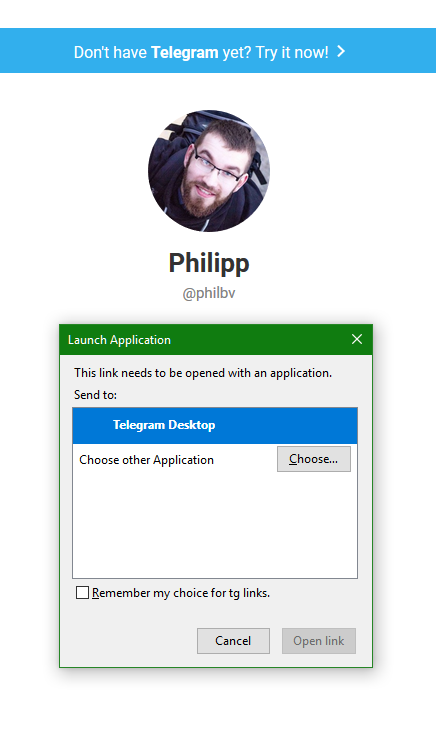
@zhukov , you don't see the points, so I show you. The current (and all previous) versions of desktop TG app don't support multiple accounts.
When I click the tg;// links in my mail, vk chats, fb chats and so so so on, I want to choose what account to use to send the message, because I might use web app for one account, and desktop app for another.
This is obvious and expected result.
What is the actual result?
It drops me on t.me page, where I have to close the choosing-app-window, then click "open in web".
@dan-it @lapo-luchini @denilsonsa @asdofindia
 PhilippBaranovskiy
on 6 Feb 2018
PhilippBaranovskiy
on 6 Feb 2018
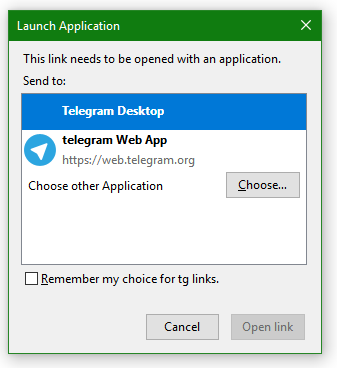
navigator.registerProtocolHandler("tg",
                                  "https://web.telegram.org/#/im?tgaddr=%s",
                                  "telegram Web App");
Works perfectly. So I didn't get what the problem is.
PhilippBaranovskiy
on 6 Feb 2018
sorry for ny English
I don't understand
href="tg://resolve?domain=@kalakamalaka" don't work
href="https://t.me/kalakamalaka" work
WHY?
 kalakamalaka
on 4 Apr 2018
kalakamalaka
on 4 Apr 2018
I have Firefox 51.0.1 (64-bit) and https://web.telegram.org is no longer requesting to register protocol handlers.
Yeah, I've disabled it. I see no point, since only web+ is required and behaviour is different between Chrome and Fx. Also we now have fancy button on t.me pages when authorised in Telegram Web.
I don't understand. I don't see any fancy buttons anywhere. When I click on telegram links I am redirected to a tg:// link which Firefox says it does not understand.
@rockfield's Javascript solved this perfectly. If it's so easy and straightforward I don't understand why it has been removed.
This has been bothering me for a long time since I have been completely unable to follow any telegram links with my computer.
 pouriap
on 6 May 2018
pouriap
on 6 May 2018
I am using Telegram in Opera but I can not open new web of Telegram.
Shown a window
"Unknown Protocol : Opera was unable to open the link since no application associated with "tg:" protocol was found on your system"
May be any setting problem in Opera web ?
Please to guide me. Thanks
 Kinza2018
on 12 Jul 2018
Kinza2018
on 12 Jul 2018
I have Opera version is 54.0.2952.54 & my system is 32 bit.
I am using Telegram in Opera but I can not open new web of Telegram.
Shown a window
"Unknown Protocol : Opera was unable to open the link since no application associated with "tg:" protocol was found on your system"
May be any setting problem in Opera web ?
Please to guide me. Thanks
Kinza2018
on 12 Jul 2018
No body want to help me or guide me. I think in this forum every one is busy.. !
Kinza2018
on 15 Jul 2018
Related issues
 Idran
·
4Comments
Idran
·
4Comments
 LulzRose
·
6Comments
LulzRose
·
6Comments
 azzimuth
·
5Comments
azzimuth
·
5Comments
 iagocavalcante
·
8Comments
iagocavalcante
·
8Comments
 tdimdimich
·
7Comments
tdimdimich
·
7Comments
Most helpful comment
Works perfectly. So I didn't get what the problem is.
