Webiny-js: Custom plugins are not reflected on the page builder
This is:
- Bug
Specifications
- OS: Mac
- Browser: Chrome
Expected Behavior
When creating a new page builder theme, the changes are not effective; the default theme is active.
Actual Behavior
When creating a new page builder theme, the changes should be effective.
Steps to Reproduce the Problem
- Follow this example to create a new page builder theme.
- Change an h1 label name as below:
h1: {
       label: "Test heading 1",
       component: "h1",
       className: "webiny-pb-typography-h1"
 },
- Check on the website to change a text in "Test heading 1"
Possible Solution
Check on this file for the fix: packages/app-template-admin-full/src/index.tsx
 AlbionaHoti
All 8 comments
The fix here is to move user's plugins to the bottom of the plugins array so it can replace existing built-in plugins:
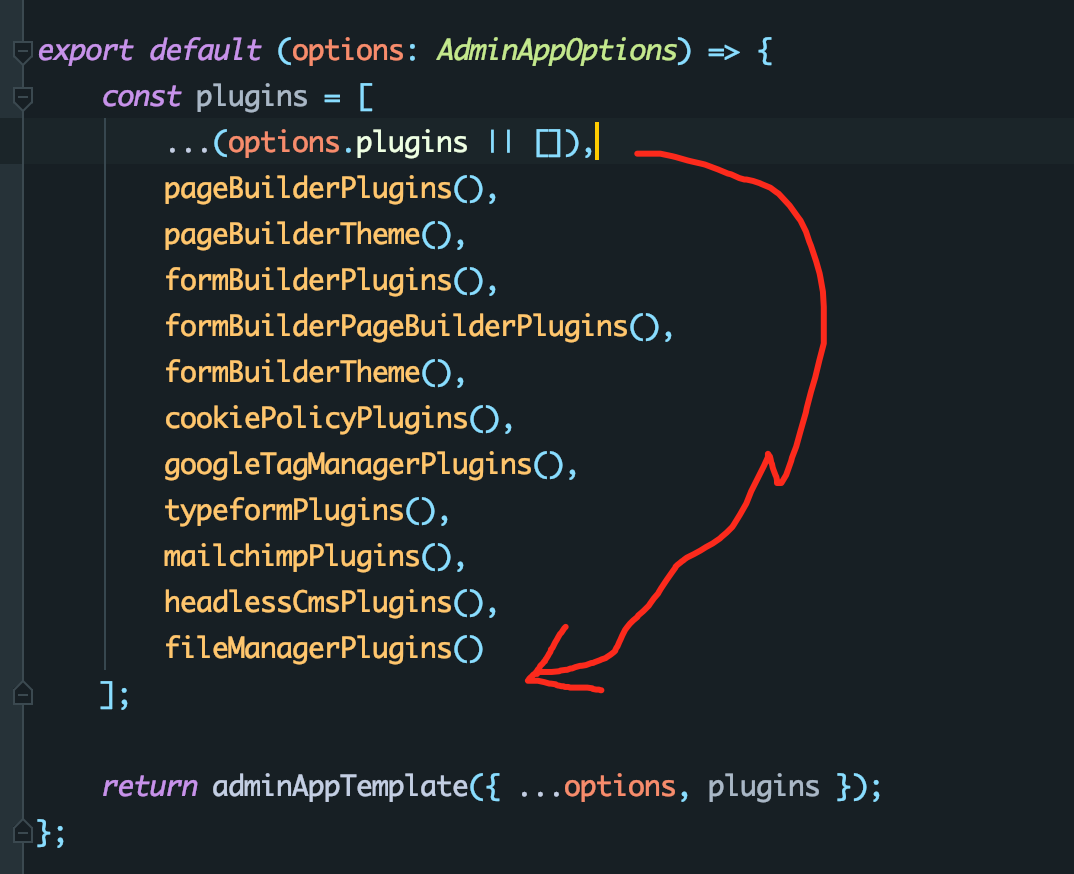
 Pavel910
on 4 Aug 2020
Pavel910
on 4 Aug 2020
@AlbionaHoti @Pavel910 I will work on this!
 TommyJackson85
on 5 Aug 2020
TommyJackson85
on 5 Aug 2020
@AlbionaHoti I am trying to follow the example link that you provided for setting up custom plugins, just to test out the changes @Pavel910 suggested to me.
The instructions are making note of a plugin folder from apps/site/srcfolder from the root directory, but it is not here already. I don't know if I am to run a command that builds it for me or not.
Am I to create a plugin folder with an index.ts file in which should execute the changes?
Would be helpful to give a few more tips or give further details on which sections of the link to follow. :)
TommyJackson85
on 11 Aug 2020
@AlbionaHoti I am trying to follow the example link that you provided for setting up custom plugins, just to test out the changes @Pavel910 suggested to me.
The instructions are making note of a plugin folder fromapps/site/srcfolder from the root directory, but it is not here already. I don't know if I am to run a command that builds it for me or not.
Am I to create apluginfolder with anindex.tsfile in which should execute the changes?Would be helpful to give a few more tips or give further details on which sections of the link to follow. :)
Hi @TommyJackson85, if you follow the iframe plugin example, it's your choice if you want to have the new plugins in a plugin folder or not in a folder at all. In the iframe example, I created the iframe folder in the apps/site/src/iframe and added the newly created plugins. You have to create an index.ts file in your plugin folder, in order to export the plugins you create and register them. Did you already joined our Slack Community -> https://www.webiny.com/slack It's much easier to talk there and go through the issues 😄 Note that the site and admin folders are inside the apps folder when you create a new project with webiny. https://github.com/webiny/webiny-examples/tree/master/iframe-page-element
AlbionaHoti
on 11 Aug 2020
@AlbionaHoti
UPDATE ok now I see the example you presented sorry, haha! I will just copy and paste your changes, etc.
TommyJackson85
on 11 Aug 2020
@AlbionaHoti Also, just so you know, I was trying to do this from the main webiny repository, let me know if that is wrong.
TommyJackson85
on 11 Aug 2020
@AlbionaHoti Also, just so you know, I was trying to do this from the main webiny repository, let me know if that is wrong.
Hey @TommyJackson85, here is the guide: http://docs.webiny.com/docs/guides/creating-iframe-element-plugin. You will find the github example repo there too. :)
AlbionaHoti
on 11 Aug 2020
@AlbionaHoti Also, just so you know, I was trying to do this from the main webiny repository, let me know if that is wrong.
Hey @TommyJackson85, here is the guide: http://docs.webiny.com/docs/guides/creating-iframe-element-plugin. You will find the github example repo there too. :)
I would recommend to create a new Webiny project, follow the guide here: http://docs.webiny.com/docs/get-started/quick-start. Then follow the Guide on adding a custom plugin with the link I provided.
AlbionaHoti
on 11 Aug 2020
Related issues
 khayong
·
6Comments
khayong
·
6Comments
 doitadrian
·
4Comments
doitadrian
·
4Comments
doitadrian
·
4Comments
doitadrian
·
4Comments
 icy-meteor
·
4Comments
icy-meteor
·
4Comments
 jcode-hub
·
4Comments
jcode-hub
·
4Comments