Webiny-js: Menu element plugin for Page Builder
This is:
- Feature request
Detailed Description
We want to create a new element plugin for Page Builder, which will allow us to use Menus, defined in the Menus module, as part of the page content.
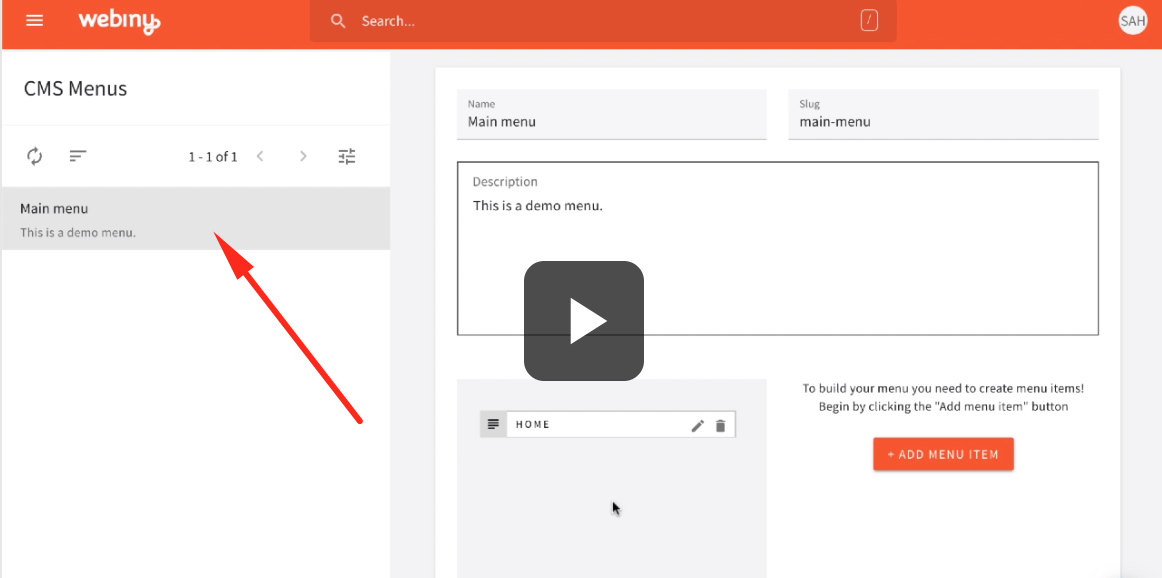
Once the user creates a new menu, he should be able to go to the page editor, and add a menu element, select which menu he wants to render, and select a component to render the menu.
To implement this, create a new package in the repository called app-plugin-page-builder-menu-element. Test your package by adding the plugin to the admin app. Also, add the render plugins to the site app and test rendering on the site.
References
The following references contain everything you need to implement this feature. To try out similar plugins, try adding a Form or a Pages List element to your page.
MUST READ: A tutorial on creating Page Builder element plugins:
https://docs.webiny.com/docs/guides/creating-iframe-element-plugin
A very similar plugin for Mailchimp:
https://github.com/webiny/webiny-js/tree/master/packages/app-mailchimp
An existing implementation of a very similar plugin to embed forms into the page editor:
https://github.com/webiny/webiny-js/tree/master/packages/app-form-builder/src/page-builder
An example of PagesList element and how it loads different renderers via plugins:
https://github.com/webiny/webiny-js/blob/master/packages/app-page-builder/src/render/plugins/elements/pagesList/index.tsx
A reference to PagesList element plugin for the editor:
https://github.com/webiny/webiny-js/tree/master/packages/app-page-builder/src/editor/plugins/elements/pagesList
 Pavel910
All 13 comments
@Pavel910 can I try this ? :)
 TommyJackson85
on 31 Aug 2020
TommyJackson85
on 31 Aug 2020
@TommyJackson85 sure! 🚀
Pavel910
on 1 Sep 2020
@Pavel910 Thanks! Looks like a good challenge for myself. :) How urgent is it to be done?
TommyJackson85
on 1 Sep 2020
@TommyJackson85 not urgent at all, it's just here so we don't forget about this feature. Take as much time as you need :)
Pavel910
on 1 Sep 2020
@Pavel910 thats great! Will start by reading the turorial anyway.
TommyJackson85
on 1 Sep 2020
@Pavel910 would it be best to start by creating the plugin as a package within Webiny's root directory packages folder while following the Creating Custom Page Elements tutorial ?
The tutorial shows you how to create a custom plugin for newly created projects as apposed to adding it to the main webiny repository.
If yes, should I import the plugin to app-page-builder package or any other packages?
TommyJackson85
on 1 Sep 2020
@TommyJackson85 the logic of building a plugin within or outside of Webiny is the same. Plugin is a plugin.
But for this task in particular, I would add this plugin directly to the app-page-builder core package. It's a very solid feature and it would be great to have it out of the box.
Pavel910
on 1 Sep 2020
@TommyJackson85 the logic of building a plugin within or outside of Webiny is the same. Plugin is a plugin.
But for this task in particular, I would add this plugin directly to theapp-page-buildercore package. It's a very solid feature and it would be great to have it out of the box.
@Pavel910 so in the app-page-builder/src/editor/plugins/elements and ``app-page-builder/src/render/plugins/elementswe will create amenu``` folders to hold the plugins?
TommyJackson85
on 1 Sep 2020
@TommyJackson85 just follow the existing structure, there are more than enough examples in that elements folder :) Just get going, and we'll easily refactor later on if needed 👍
Pavel910
on 1 Sep 2020
Just to inform everyone, I haven't abandoned this. I'm still working on this. I just got delayed over my regular job and from bugs with my initial PR. I have abandoned PR #1207 but I am using it as a reference still. I am now working on PR #1246. 🚀 🚀 😄
TommyJackson85
on 23 Sep 2020
This issue is stale because it has been open 60 days with no activity. Remove stale label or comment or this will be closed in 7 days.
 webiny-bot
on 23 Nov 2020
webiny-bot
on 23 Nov 2020
I will come back to this once webiny version 5 is released.
TommyJackson85
on 23 Nov 2020
@TommyJackson85 sure, no worries. It's a bot, so don't worry about it :)
Pavel910
on 23 Nov 2020
Related issues
 jacqui
·
6Comments
jacqui
·
6Comments
 doitadrian
·
3Comments
doitadrian
·
7Comments
doitadrian
·
3Comments
doitadrian
·
7Comments
 jsblx
·
4Comments
jsblx
·
4Comments
 icy-meteor
·
4Comments
icy-meteor
·
4Comments