Webiny-js: Ability to click out of help tutorial
This is:
- Bug
- Suggestion
Expected Behavior
When clicking outside of the mini-tutorial I expect it to disappear.
Actual Behavior
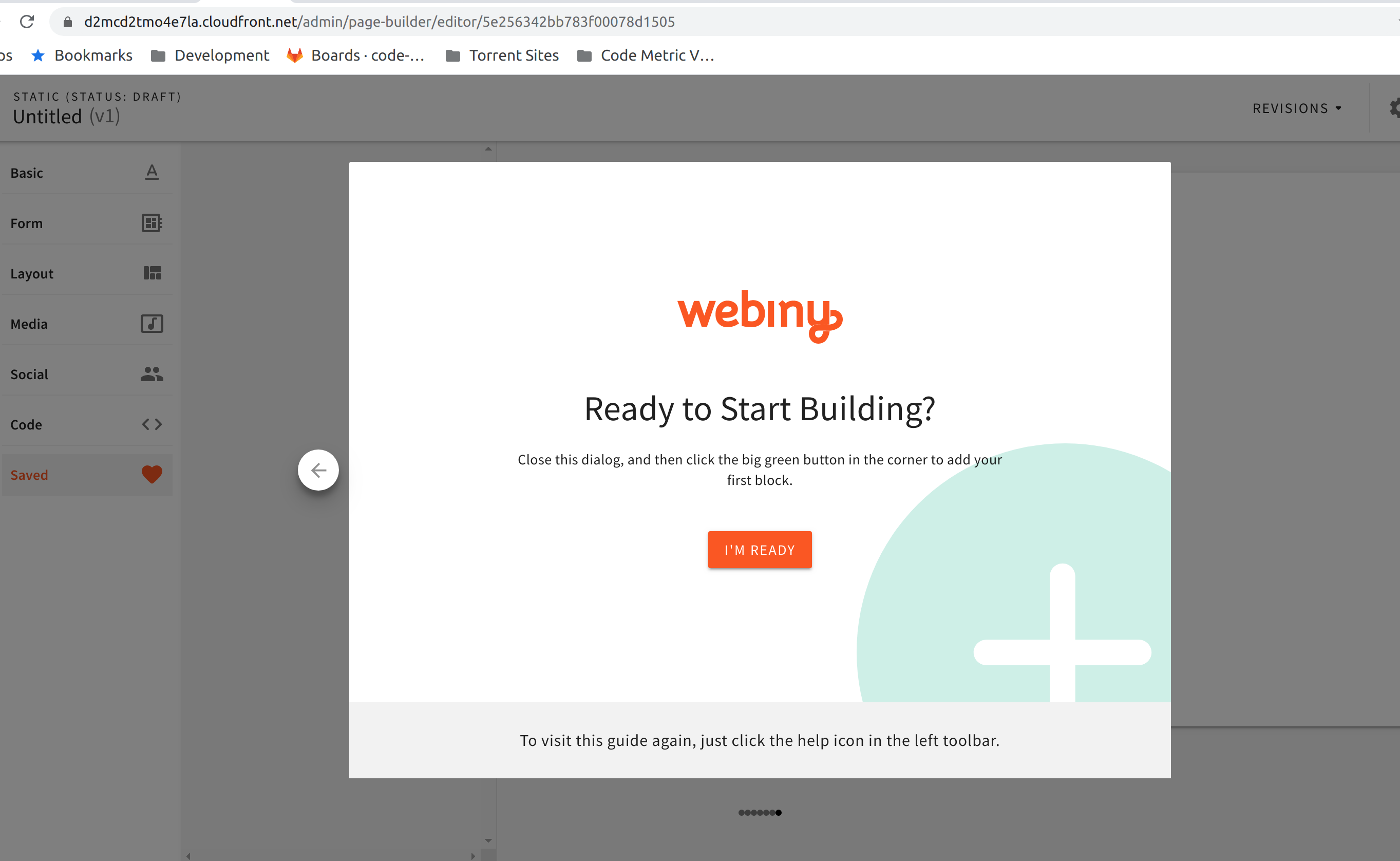
You must click "I'm Ready" button at end of tutorial to continue editing your content.
Steps to Reproduce the Problem
- Inside page editor
- Click help (?) from bottom of left hand navigation menu
- Up pops a useful tutorial on editing a page
- Click "i'm ready" button is the only way out of this tutorial
Detailed Description
 rpalmite
All 40 comments
Currently you can Esc out of it. Maybe we could enable the hide on click @SvenAlHamad ?
 Pavel910
on 20 Jan 2020
Pavel910
on 20 Jan 2020
Sounds good ... I would also encourage a contribution on this issue. It's a question of adding a simple onClick={closeDialog} attribute on the Overlay component.
This is the reference: https://github.com/webiny/webiny-js/blob/master/packages/app-page-builder/src/editor/plugins/toolbar/onboarding/Onboarding.js#L94
 SvenAlHamad
on 20 Jan 2020
SvenAlHamad
on 20 Jan 2020
Hey, I'd like to take this on. This would be my first contribution on Webiny.
 Fsalker
on 24 Jan 2020
Fsalker
on 24 Jan 2020
Brilliant!
To get started make sure to check the contribution doc: https://github.com/webiny/webiny-js/blob/master/CONTRIBUTING.md
For any other questions, just give me a ping here.
SvenAlHamad
on 24 Jan 2020
Yep, I'm currently working on launching the project locally. I'm not sure whether I'll particularly need an AWS account for this PR.
Fsalker
on 24 Jan 2020
Your guys' promptness is amazing.
Fsalker
on 24 Jan 2020
We try our best :)
In regards to AWS, you’ll still need an account to even run Webiny locally, as the API, even in development mode needs to be deployed into the cloud because of all other services it’s consuming.
https://docs.webiny.com/docs/get-started/development-principles/#cloud-native-development
P.S after your PR, checkout this page: https://www.webiny.com/swag
SvenAlHamad
on 24 Jan 2020
@Fsalker just a quick note: we strongly recommend you wait until our next release (should land tomorrow 🙏 ) as it introduces Typescript and many other changes. I will let you know when the master branch is ready for PRs.
Pavel910
on 24 Jan 2020
Ah sure. It's taken me a while to get a good grip on the project since I've actually started reading about Webiny, its funding, serverless stuff etc. You guys got a quite interesting company and project on your hands.
I was now stuck at deploying the api thru webiny delpoy-api with error CredentialsError: Missing credentials in config (edit) when deploying cognito (/edit). I suppouse it's because I haven't coupled my AWS IAM with the project locally yet. I'm still figuring it out.
Fsalker
on 24 Jan 2020
Since we use AWS SDK to deploy infrastructure, we need working AWS credentials.
The AWS_PROFILE is set in the .env.json file in the root of the project (or in the examples/.env.json if you're cloning this repo).
All you need to do is get your AWS user credentials and store them in ~/.aws/credentials file.
Here's a link to the AWS docs: https://docs.aws.amazon.com/cli/latest/userguide/cli-configure-files.html
Pavel910
on 24 Jan 2020
Thanks, I'm looking into it. You've saved me a lot of time 😄.
Fsalker
on 24 Jan 2020
Any clues for this new error?
SubscriptionRequiredException: The AWS Access Key Id needs a subscription for the service
I'm not sure which service it's talking about. I've populated ~/.aws/credentials with my Access & Secret keys
Fsalker
on 24 Jan 2020
Ah, looks like you credit card has not been approved yet. When you create AWS account, they require to setup a credit card, in case you go beyond the Free Tier usage. So unless you do that, your credentials will not work.
Go to your Billing Dashboard and then Payment Methods to see the status of your payment method.
Pavel910
on 24 Jan 2020
It turns out I'm using a card that has expired on 09/2019 😆
I've created my AWS account quite a while ago, I've never been aware I was to use a valid card before using AWS.
Fsalker
on 24 Jan 2020
There doesn't seem to be any status on the Payments Methods page, but they did charge me $1 and I'm getting the same subscription error in the console.
Fsalker
on 24 Jan 2020
Just give it some time; if anything is wrong, there will be a message about credit card validation.
I was helping my friend the other day to setup his AWS account, and it was not instant to say the least.
But it did work eventually. Unfortunately, there's nothing we can do about it 🍻
Pavel910
on 24 Jan 2020
(still waiting on it, getting the same error; perhaps they don't validate credit cards during weekends 🙄)
Fsalker
on 26 Jan 2020
That's weird 🤔 Maybe try opening a support ticket?
Pavel910
on 26 Jan 2020
I was thinking about that before checking whether they have live chat. Hope they answer it fairly quickly.
Fsalker
on 26 Jan 2020
Fun fact: they haven't returned my $1 yet. Maybe they're actually still working on it 🤔
I'll return with news soon.
Fsalker
on 26 Jan 2020
Maybe you are right about not processing on weekends. Because they usually return your $1 when the card validation is completed. Maybe it has something to do with bank transaction cycles, who knows.
Pavel910
on 26 Jan 2020
AWS should be all good now (thanks to their support): the app has been deployed at https://d2h1tdh2pi8ke.cloudfront.net/
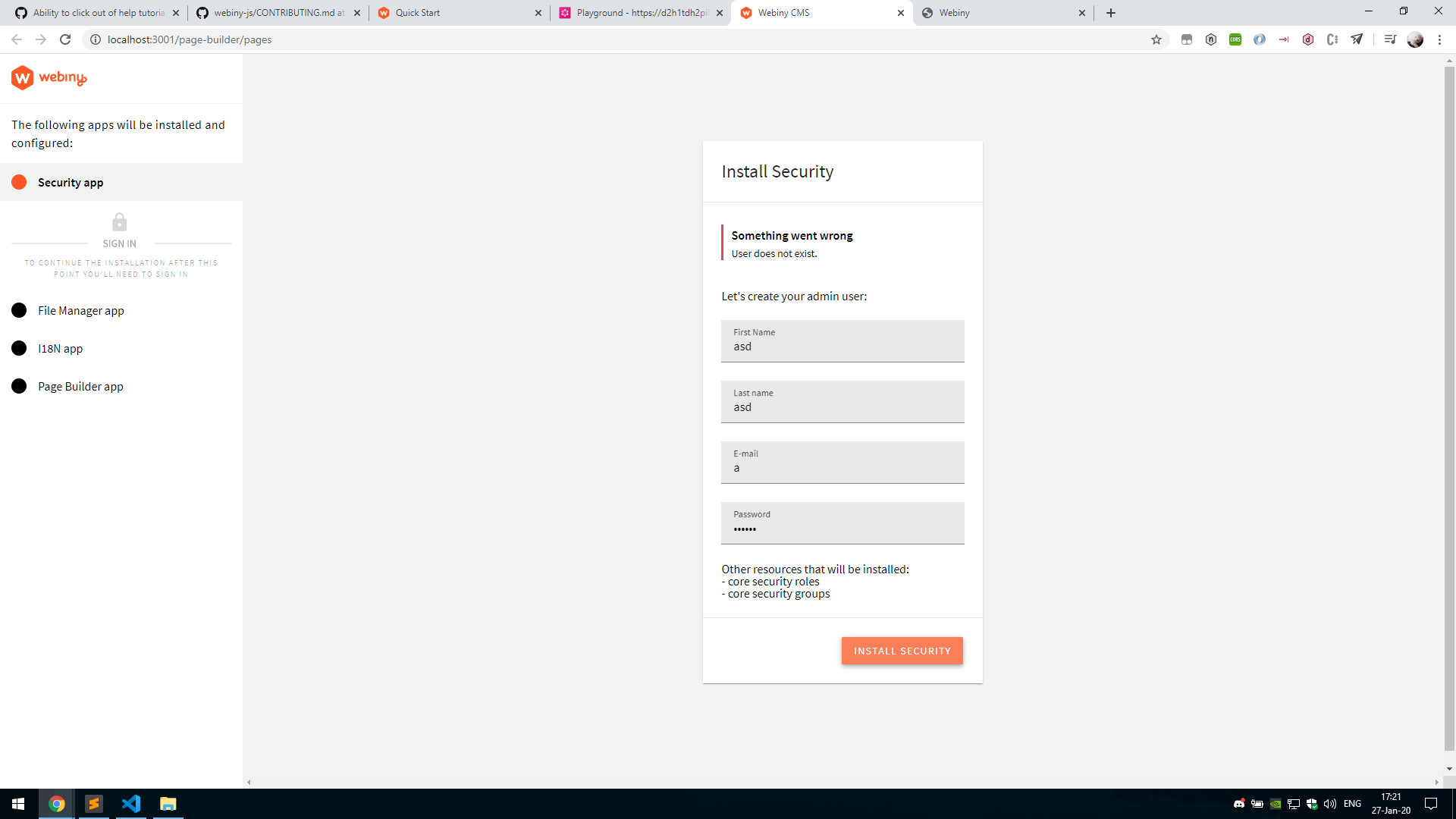
But I'm trying to go through admin's installation process and it's telling me that the "User does not exist" 🤔. This is fairly weird, according to https://docs.webiny.com/docs/get-started/quick-start/ I suppouse I should just create an (admin) account like I would normally do on any website.
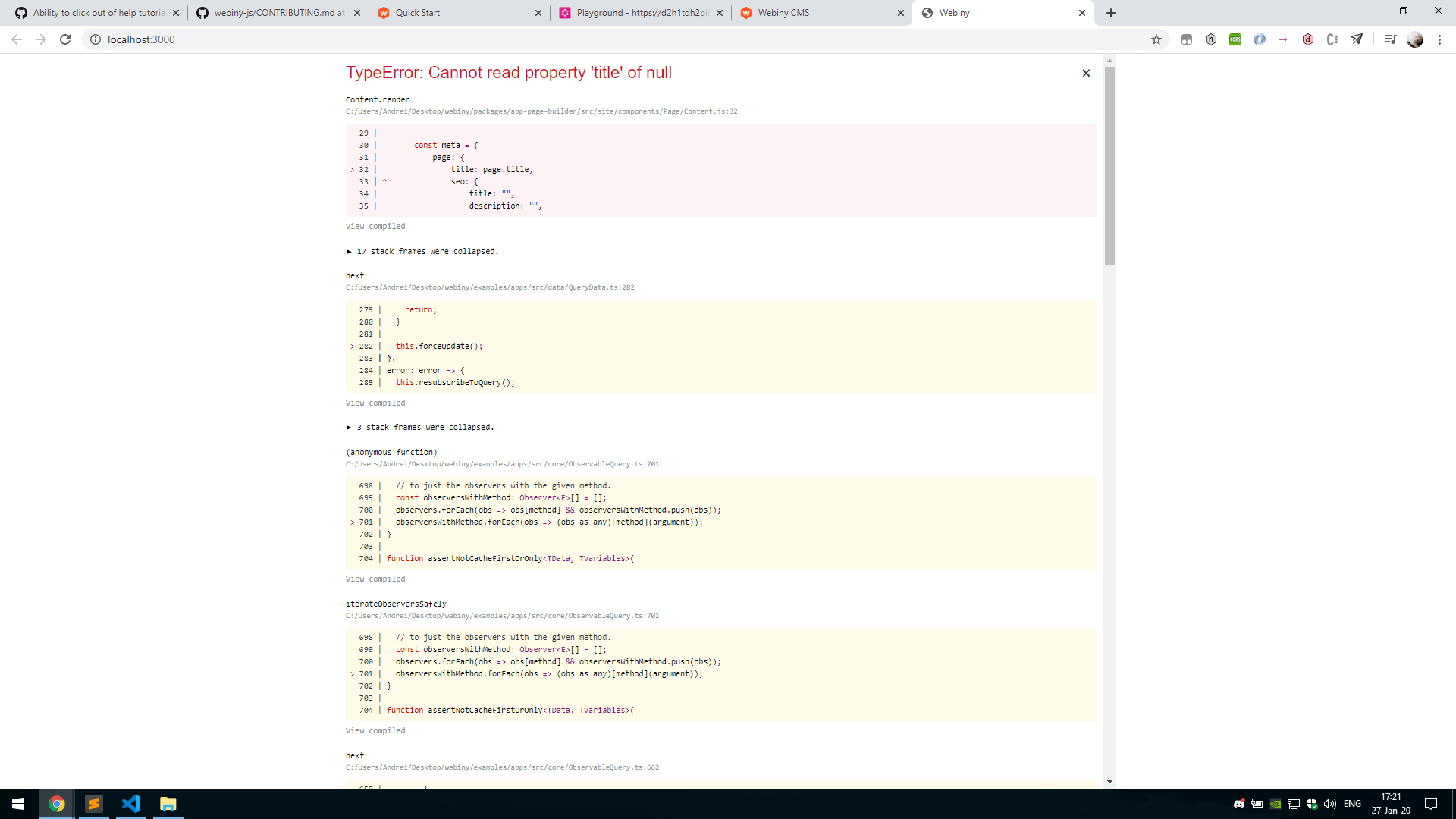
Also, the site app is busted for some reason - it's getting an error related to the title (see the pic below). I suppouse this has to be the site I'm administrating in /admin.
Fsalker
on 27 Jan 2020
The site app can not work until you finished the installation wizard, so that's ok. We do have a pending task to add a check for that and not crash, but notify the user about the installation.
Now the user creation - it should work exactly as you expect. I'm wondering, how did it even let you submit the form with an invalid email address!?
Can you please try entering some valid data? Don't try to look for bugs just yet ;) :D
Pavel910
on 27 Jan 2020
Hah, there is actually a validator missing on the email input, I'll fix it right away and it will be included in our release tonight. Very good find 🚀
Pavel910
on 27 Jan 2020
Haha, I'm glad I could help.
The first time i tried inserting a valid email, it popped the same error. I've tried again now and it just worked 🤷♂️.
Fsalker
on 27 Jan 2020
@Fsalker so we released the new version of Webiny; you can't upgrade an existing project, so you'll need to install a new version of our CLI and create a new project to get the latest stuff running.
Of, if you're working on a fork of our repo, update your fork. Everything is in the master branch. Let me know if you need help with anything.
Pavel910
on 28 Jan 2020
There seem to be plenty of audit vulnerabilities, perhaps you're already aware of them 🤔
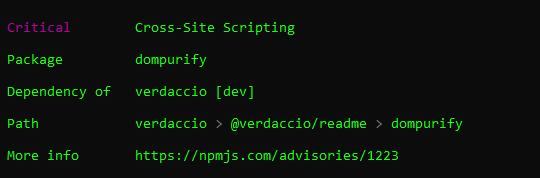

edit: Hold on, that's related to uninstalling @webiny/cli. I'm now reinstalling it
edit 2: I dunno exactly what happened there; I've reinstalled the project a couple more times in the mean time
Fsalker
on 28 Jan 2020
This time I deployed the app with webiny deploy-api, but I cannot reach the cloudfront server with DNS_PROBE_FINISHED_NXDOMAIN on Chrome (see the pic below)

The first time I did so, before the release, it was okay. I've tried deploying again, but to no avail 🤔
Fsalker
on 28 Jan 2020
I've actually deployed it roughly 3h ago for the first time and I got so bored of waiting that I winded up to the gym hoping it will be up once I'll return. But it didn't fix itself in the mean time 🤷♂️
Fsalker
on 28 Jan 2020
Wait, can you tell me some details about your project? So did you just updated the packages and deployed or have you created a brand new project with the new CLI?
CloudFront takes 5-6 minutes, sometimes even less to get up and running. If there was an error on our side, you'd get it in the browser (we finally fixed that problem as well).
Pavel910
on 28 Jan 2020
I've cloned master locally. Then I followed the Local Setup steps here https://github.com/webiny/webiny-js/blob/master/CONTRIBUTING.md and ran yarn, yarn setup-repo, cd examples && webiny deploy-api.
Cloudfront did seem to take a while to work, but it never worked for my API (today). It's odd, given that it worked a few days ago.
Fsalker
on 28 Jan 2020
Right now I've deployed the API again from CMD instead of Git Bash with webiny deploy-api, but I doubt it will work soon.
Fsalker
on 28 Jan 2020
Hi @Fsalker, I will try to set up the webiny-js/master from scratch, and let you know the results. Maybe that will give us additional hints. Hold on :)
 doitadrian
on 28 Jan 2020
doitadrian
on 28 Jan 2020
Hey @Fsalker, tried deploying everyhing from scratch, worked as expected, no errors.
But, I've checked the URL of your GQL endpoint (https://dy8cq7ti4nf.cloudfront.net/graphql), it seems to be working 🙃
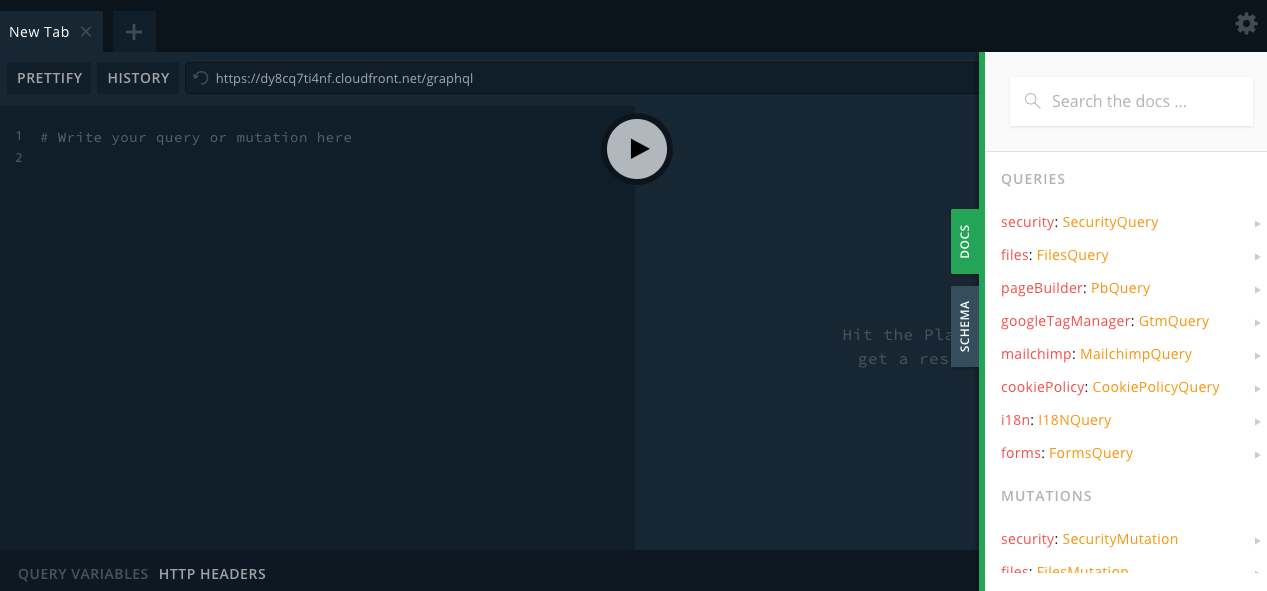
Can you check it out please?
Thank you!
doitadrian
on 28 Jan 2020
I've just checked it a few minutes ago (it was loading slowly so I just let the tab open). It does work now, weird but good.
Maybe it took longer than 10 minutes for the cloudfront server to be reachable for me (~5 hours to be precise). That's the only explanation I can think of.
Fsalker
on 28 Jan 2020
Actually sometimes your browser can cache whatever was the first response, and not let it go for quite a while. So if something is taking suspiciously long, try opening in a different browser. For me it very often works. On Chrome, sometimes clearing the DNS cache also helps: chrome://net-internals/#dns
Pavel910
on 28 Jan 2020
Mm I did restart my computer though. I should've tried in incognito mode (it's a very easy way to use a new session / cache).
Hope I didn't take too much of your guys' time 😅
Fsalker
on 28 Jan 2020
I was able to sucessfully run the admin (and site) app, modify something and see the change live. Let me see if I got this right:
Lerna allows me to run specific packages within our monolithic project and transpile our code automatically on save into the dist folder. This will be app-page-builder in my case.
Then, the admin app run with cd examples/apps/admin && yarn start sees this change and restarts by itself. This implies that admin watches a couple of packages' dist folders (I don't know exactly which, got a list? just out of curiosity 😄).
Is this correct?
Fsalker
on 28 Jan 2020
By the way, how do you guys navigate the project?
In my case it wasn't too difficult: I've wanted to edit a button so I searched its text ("Publish changes"). I found its component and it was all good. (even though it does have a duplicate in app-form-builder 🤔)
But perhaps there's a better way to do it, isn't there?
Fsalker
on 28 Jan 2020
Spot on! Let me give you more details:
Since this is a monorepo, it means we have lots of independent packages that can have their own build process/configs, so they need to be built before using them in any apps. That's what watch scripts do - they simply transpile the package using their respective .babelrc.js and put it in dist.
React apps "see" the change because webpack-dev-server is always in watch mode - whenever a dependency changes, it rebuilds the app. Since we import packages from node_modules, they always point to the root package folder, ie: packages/app-page-builder. But we need the dist folder; so we added a bunch of webpack aliases, which are generated automatically based on your yarn workspaces, and that is located here: packages/project-utils/cra/index.js:29.
As for project navigation, anything works. We try to keep the file structure organized, but it's not always easy to have a very clear organization in a project of this size. We ourselves do find text just as you did, and we also built this thing so 90% of the time we know where to look for things.
Btw, if you are having troubles looking up stuff, feel free to drop us a message on https://gitter.im/Webiny/webiny-js - that way we will keep github issues cleaner.
Also, feel free to fork the project, and open PRs when you're working on something; we can than discuss stuff in a dedicated thread.
Pavel910
on 28 Jan 2020
Related issues
Pavel910
·
5Comments
 khayong
·
6Comments
khayong
·
6Comments
 icy-meteor
·
4Comments
Pavel910
·
6Comments
doitadrian
·
5Comments
icy-meteor
·
4Comments
Pavel910
·
6Comments
doitadrian
·
5Comments
Most helpful comment
Hey, I'd like to take this on. This would be my first contribution on Webiny.