Web: As an avatar builder user, I want a shuffle button, so I can just pick a random avatar without thinking.
name: Feature request
about: Suggest an idea for this project
User Story
As an avatar builder user, I want a shuffle button, so I can just pick a random avatar without thinking.
Why Is this Needed
Summary:
Easier use of avatar builder
Description
Type:
Feature
Current Behavior
No Shuffle Button
Expected Behavior
- In the frontend, a Shuffle Button that just randomly picks a bunch of avatar items (and tones), then displays it on screen. The user can decide to save the avatar, or shuffle again.
- In the backend, a shuffle method that does the same thing, and assigns the avatar to the user.
Definition of Done
See above
 owocki
All 29 comments
@kziemianek any interest in this?
owocki
on 22 Feb 2019
Issue Status: 1. Open 2. Started 3. Submitted 4. Done
__This issue now has a funding of 65.0 DAI (65.0 USD @ $1.0/DAI) attached to it.__
- If you would like to work on this issue you can 'start work' on the Gitcoin Issue Details page.
- Want to chip in? Add your own contribution here.
- Questions? Checkout Gitcoin Help or the Gitcoin Slack
- $58,918.07 more funded OSS Work available on the Gitcoin Issue Explorer
 gitcoinbot
on 22 Feb 2019
gitcoinbot
on 22 Feb 2019
Issue Status: 1. Open 2. Started 3. Submitted 4. Done
__Work has been started__.
These users each claimed they can complete the work by 11 months, 3 weeks from now.
Please review their action plans below:
1) santteegt has started work.
does this need some shuffling constraints to be taken into account (e.g. don't combine girl hairstyle and facial hair at the same time)?
Learn more on the Gitcoin Issue Details page.
gitcoinbot
on 22 Feb 2019
@santteeget lets just build the shuffle functionality for now, and worry about those constraints in a v2 PR if needed
owocki
on 22 Feb 2019
@santteegt how goes?
owocki
on 25 Feb 2019
Hi @owocki,
I Just finished digging into the code. I realized that avatar features are statically defined under avatar/utils.js which makes it easy to distinguish between free and paid items, while feature colour options are within assets/v2/js/avatar_builder.js. With that in mind, I'm going to develop this randomize avatar builder on the client side, under the avatar_builder js file. I expect to send you a PR until tomorrow night
What do you think about the action button position?

 santteegt
on 26 Feb 2019
santteegt
on 26 Feb 2019
@owocki yes but... had old email for notifications, I was thinking about this button for a long time. If you have any questions/need help hit me up.
 kziemianek
on 26 Feb 2019
kziemianek
on 26 Feb 2019
@kziemianek no worries i understand.
@santteegt also checkout avatar/utils.py !
button positioning looks fine
owocki
on 26 Feb 2019
Hi @owocki,
This is how a random avatar is being generated without considering constraints between items.
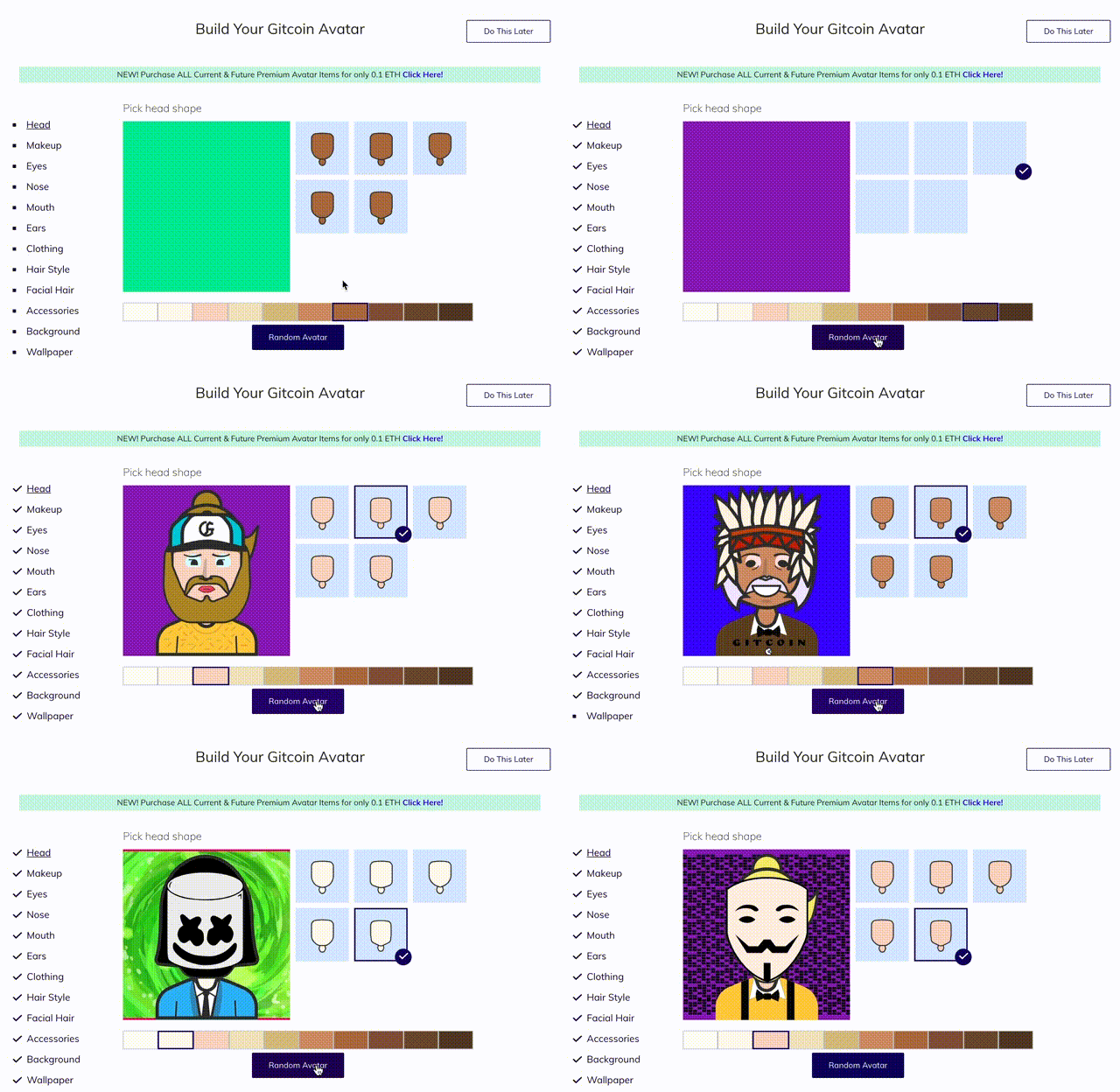
I didn't make a PR yet because there's still a little issue I'm having with certain accessory items that I need to review. In case you have any observations let me know so I can include them in the PR.
One issue that I had experienced is when I was handling the avatar context JSON data obtained through the avatar.utils.py. For some reason, some data metadata formatted as tuple list in Python is not properly parsed when passed to the JS frontend. For example, the options in the Head section that are defined in Python as:
{
                'name': 'Head',
                'title': 'Pick head shape',
                'options': ('0', '1', '2', '3', '4'), <===
                'paid_options': {}
},
in the JS context, it is is being parsed as:
{
                'name': 'Head',
                'title': 'Pick head shape',
                'options': '4', <=== it only gets the last value in the tuple list
                'paid_options': {}
},
To solve this issue without changing the data schema and breaking things, I implemented a custom filter in django called jsonify so I can transform that JSON using json.dumps() python library function before using it. Not 100% sure if this is the correct way to handle this problem.
santteegt
on 27 Feb 2019
Hey @santteegt wow you made quick work! Cool. :) I'm very excited to see this.
Can you submit a PR? cc @danlipert @thelostone-mc , we will comment on what you did once we see the code in the PR!
In the backend, a shuffle method that does the same thing, and assigns the avatar to the user.
Btw, did you have any luck building a backend shuffler in python? One experiment we want to run is assigning every new user who signs up to Gitcoin a random avatar, and we'll need to do that in python.
owocki
on 27 Feb 2019
very cool @santteegt !
 PixelantDesign
on 27 Feb 2019
PixelantDesign
on 27 Feb 2019
Hi @owocki,
Just created the PR for you to review it.
Btw, did you have any luck building a backend shuffler in python? One experiment we want to run is assigning every new user who signs up to Gitcoin a random avatar, and we'll need to do that in python.
I didn't try building the process in the backend, but I can take a shot on that as well if you wish. Basically it should store the newly created avatar after logging in for the first time?
santteegt
on 28 Feb 2019
will take a look!
Basically it should store the newly created avatar after logging in for the first time?
yes pls!
owocki
on 28 Feb 2019
Quick question, where's the callback function that is executed after a (new) user login?
santteegt
on 28 Feb 2019
context.py:line 61. Where the visit is recorded
owocki
on 28 Feb 2019
Hi @owocki,
I just updated the PR with the implementation to generate a random avatar for new users in the backend. However, I'm facing an issue with the order that different SVG avatar items are being set (i.e. long hairstyles are overlapping the head). Not sure if JSON data stored in avatar_custom_avatar needs to be ordered in a certain way. Could you test my implementation and see what could be the problem?
santteegt
on 3 Mar 2019
Not in a place where I can test right now.. but here is the JSON from a long haired avatar that renders correctly. Maybe that can help you figure out the order?
{"Ears": {"svg_asset": "2-FEF7EB.svg", "component_type": "Ears"}, "Eyes": {"svg_asset": "4.svg", "component_type": "Eyes"}, "Head": {"svg_asset": "0-FEF7EB.svg", "component_type": "Head"}, "Nose": {"svg_asset": "4.svg", "component_type": "Nose"}, "Mouth": {"svg_asset": "1.svg", "component_type": "Mouth"}, "Clothing": {"svg_asset": "hoodie-43B9F9.svg", "component_type": "Clothing"}, "HairLong": {"svg_asset": "7-back-F4EA6E.svg", "component_type": "HairStyle"}, "SkinTone": "FEF7EB", "HairColor": "F4EA6E", "HairShort": {"svg_asset": "7-front-F4EA6E.svg", "component_type": "HairStyle"}, "Background": "00A55E", "ClothingColor": "43B9F9"}
here's another one
{"Ears": {"svg_asset": "3-D8BF82.svg", "component_type": "Ears"}, "Eyes": {"svg_asset": "0.svg", "component_type": "Eyes"}, "Head": {"svg_asset": "4-D8BF82.svg", "component_type": "Head"}, "Nose": {"svg_asset": "3.svg", "component_type": "Nose"}, "Mouth": {"svg_asset": "2.svg", "component_type": "Mouth"}, "Glasses": {"svg_asset": "Glasses-0.svg", "component_type": "Accessories"}, "Clothing": {"svg_asset": "hoodie-F48914.svg", "component_type": "Clothing"}, "HairLong": {"svg_asset": "5-000000.svg", "component_type": "HairStyle"}, "Mustache": {"svg_asset": "Mustache-2-000000.svg", "component_type": "FacialHair"}, "SkinTone": "D8BF82", "HairColor": "000000", "Wallpaper": {"svg_asset": "portal.svg", "component_type": "Wallpaper"}, "Background": "25E899", "ClothingColor": "F48914"}
Using the last example you gave me, I'm getting this avatar (I removed the Wallpaper property as it overlapped everything):
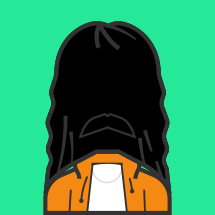
Not sure what is going on, if you generate the same avatar from the frontend, JSON data are similarly ordered but doesn't get this overlapping issue
santteegt
on 3 Mar 2019
@santteegt seems like old bug from days where avatars were created only thorugh avatar builder, I noticed it occours also when avatar is created from admin panel. I can take a look at it and drop fix in separate PR.
kziemianek
on 4 Mar 2019
@kziemianek hmmm.. any idea what the root cause is?
one workaround we could do is define a dict that orders from back to front which layers go first. i'm not super familiar with the code to know if this already exists..
owocki
on 5 Mar 2019
I tried to sort the dict in that way but then I realized that didn't solve the issue due to the hairstyle component defines subcomponents back & front, e.g. with current data schema it isn't possible to order back_hairstyle->head->front_hairstyle
santteegt
on 5 Mar 2019
Definitely the CustomAvatar#create_from_config method should ensure that components are properly ordered so resulting SVG has properly stacked layers and for example, wallpaper component should be the first one.
This might be a hint:
https://github.com/gitcoinco/web/blob/cf9c4d28599dc2e05830d3d45a1f18aa69d4ad6d/app/assets/v2/js/avatar_builder.js#L2-L7
kziemianek
on 5 Mar 2019
@santteegt I think that HairLong and HairShort are mutually exclusive.
kziemianek
on 5 Mar 2019
Definitely the
CustomAvatar#create_from_configmethod should ensure that components are properly ordered so resulting SVG has properly stacked layers and for example, wallpaper component should be the first one.This might be a hint:
web/app/assets/v2/js/avatar_builder.jsLines 2 to 7 in cf9c4d2
const layers = [
'Wallpaper',
'HatLong', 'HairLong', 'EarringBack', 'Clothing',
'Ears', 'Head', 'Makeup', 'HairShort', 'Earring', 'Beard', 'HatShort',
'Mustache', 'Mouth', 'Nose', 'Eyes', 'Glasses', 'Masks', 'Extras'
];
I'll use that to reorder avatar components after random generation
santteegt
on 6 Mar 2019
I updated the PR. Seems that by changing the handle_avatar_payload function to consider the order of avatar components solved the issue. Let me know if everything is ok :)
santteegt
on 6 Mar 2019
awesome :) pls submit work on gitcoin so that i can pay u
owocki
on 6 Mar 2019
Issue Status: 1. Open 2. Started 3. Submitted 4. Done
__Work for 65.0 DAI (65.0 USD @ $1.0/DAI) has been submitted by__:
@owocki please take a look at the submitted work:
- PR by @santteegt
- Learn more on the Gitcoin Issue Details page
- Want to chip in? Add your own contribution here.
- Questions? Checkout Gitcoin Help or the Gitcoin Slack
- $41,840.35 more funded OSS Work available on the Gitcoin Issue Explorer
gitcoinbot
on 6 Mar 2019
|
|
⚡️ A *Eye For Detail* Kudos has been sent to @santteegt for this issue from @owocki. ⚡️ Nice work @santteegt! Your Kudos has automatically been sent in the ETH address we have on file. |
gitcoinbot
on 7 Mar 2019
Issue Status: 1. Open 2. Started 3. Submitted 4. Done
__The funding of 65.0 DAI (65.0 USD @ $1.0/DAI) attached to this issue has been approved & issued to @santteegt.__
- Learn more on the Gitcoin Issue Details page
- Questions? Checkout Gitcoin Help or the Gitcoin Slack
- $42,385.90 more funded OSS Work available on the Gitcoin Issue Explorer
gitcoinbot
on 7 Mar 2019
Related issues
kziemianek
·
3Comments
 pelsasser
·
4Comments
pelsasser
·
4Comments
 Makondor2
·
3Comments
Makondor2
·
3Comments
 thelostone-mc
·
4Comments
thelostone-mc
·
4Comments
 abitrolly
·
4Comments
abitrolly
·
4Comments