Web-stories-wp: Unexpected alt attribute added to amp-video
Bug Description
I added a video to an story page and it resulted in this markup:
<amp-video
    autoplay="autoplay" poster="https://wordpressdev.lndo.site/content/uploads/2020/09/image.jpeg"
    artwork="https://wordpressdev.lndo.site/content/uploads/2020/09/image.jpeg"
    title="Title text"
    alt="Alt text"
    layout="fill"
    loop="loop"
    id="el-b8f30411-37f5-4e4e-ace6-8b2666470bd2-media"
>
    <source type="video/mp4" src="https://wordpressdev.lndo.site/content/uploads/2020/09/PXL_20200907_180100-trimmed.mp4"></source>
</amp-video>
Note the amp-video here has both a title and an alt attribute.
In the documentation for amp-video, there is no reference to alt.
The alt attribute is likewise not copied onto the video child element by the amp-video extension:
<video class="i-amphtml-pool-media i-amphtml-pool-video i-amphtml-fill-content i-amphtml-replaced-content" id="i-amphtml-pool-media-5" playsinline="" webkit-playsinline="" preload="auto" poster="https://wordpressdev.lndo.site/content/uploads/2020/09/image-1.jpeg" muted="">
    <source type="video/mp4" src="https://wordpressdev.lndo.site/content/uploads/2020/09/PXL_20200908_112624.mp4">
</video>
There is no mention of alt on the MDN documentation for video, nor is there any reference in the HTML spec.
So, even though the alt attribute is allowed on amp-video according to the validator spec, it appears that this attribute serves no purpose and it may have been a bug to allow it in the first place.
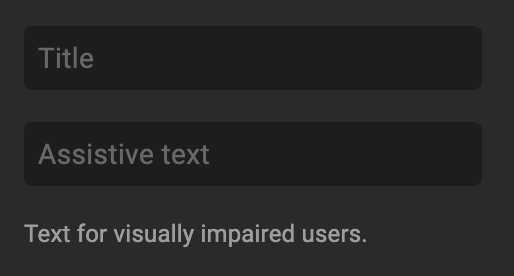
To this end, the "Assistive text" field should probably be omitted from the UI since it doesn't actually aide in accessibility:
Expected Behaviour
The alt attribute shouldn't be added to the amp-video element since it appears to not serve any purpose.
Steps to Reproduce
Add a video to a story page and provide assistive text.
Additional Context
- Plugin Version: 1.1.0-alpha
- Operating System: MacOS
- Browser: Chrome
_Do not alter or remove anything below. The following sections will be managed by moderators only._
Acceptance Criteria
Implementation Brief
 westonruter
All 9 comments
The alt attribute is actually supported specifically in Stories, per https://github.com/ampproject/amphtml/issues/30415#issuecomment-699627830. However to me it seems aria-label would be the better attribute to use.
westonruter
on 27 Sep 2020
Let's wait to see what the outcome of https://github.com/ampproject/amphtml/issues/30415 is on this one
 swissspidy
on 28 Sep 2020
swissspidy
on 28 Sep 2020
There should only be one text field that sets both alt and title.
 choumx
on 26 Oct 2020
choumx
on 26 Oct 2020
Got it, thanks for clarifying, will pick it up!
 zidianlyu
on 11 Nov 2020
zidianlyu
on 11 Nov 2020
One more thing to clarify from this story, should we drop the UI text input 'Assistive text'?
zidianlyu
on 12 Nov 2020
I think so yeah, from reading through this issue and the upstream one it sounds like we'd want to keep only the "Title" field
swissspidy
on 12 Nov 2020
Added video, previewed, and seeing this:
<amp-video autoplay="autoplay" poster="https://stories-qa-wordpress-amp.pantheonsite.io/wp-content/uploads/2020/11/image-4.jpeg" artwork="https://stories-qa-wordpress-amp.pantheonsite.io/wp-content/uploads/2020/11/image-4.jpeg" **title="mall crowd"** **alt="mp4 sample"** layout="fill" id="el-f9c4c293-d2e3-4056-bd7f-5ed88d29cdfd-media" class="i-amphtml-layout-fill i-amphtml-layout-size-defined i-amphtml-element i-amphtml-disable-mediasession i-amphtml-poolbound i-amphtml-media-component i-amphtml-video-interface i-amphtml-built i-amphtml-layout" i-amphtml-layout="fill" preload="auto"><video class="i-amphtml-pool-media i-amphtml-pool-video i-amphtml-fill-content i-amphtml-replaced-content" id="i-amphtml-pool-media-4" playsinline="" webkit-playsinline="" preload="auto" poster="https://stories-qa-wordpress-amp.pantheonsite.io/wp-content/uploads/2020/11/image-4.jpeg" muted=""><source type="video/mp4" src="https://stories-qa-wordpress-amp.pantheonsite.io/wp-content/uploads/2020/11/mp4-sample.mp4"></video><i-amphtml-video-icon class="amp-video-eq"><div class="amp-video-eq-col"><div class="amp-video-eq-filler amp-video-eq-1-1"></div><div class="amp-video-eq-filler amp-video-eq-1-2"></div></div><div class="amp-video-eq-col"><div class="amp-video-eq-filler amp-video-eq-2-1"></div><div class="amp-video-eq-filler amp-video-eq-2-2"></div></div><div class="amp-video-eq-col"><div class="amp-video-eq-filler amp-video-eq-3-1"></div><div class="amp-video-eq-filler amp-video-eq-3-2"></div></div><div class="amp-video-eq-col"><div class="amp-video-eq-filler amp-video-eq-4-1"></div><div class="amp-video-eq-filler amp-video-eq-4-2"></div></div></i-amphtml-video-icon></amp-video>
According to instructions in 5332, should be the same value
Editor:

But when I choose "edit" from the three-dot icon for the video, I'm seeing this:

 csossi
on 1 Dec 2020
csossi
on 1 Dec 2020
Thanks for flagging @csossi! While you just discovered an issue, I want to clarify one thing:
When you choose "edit" from the three-dot icon for the video to update a video's description, this will actually update the video description on the server for any future use. However, it will not update the video you already inserted on the page. For existing videos in the story you'll need to go through the design panel.
swissspidy
on 1 Dec 2020
Verified in QA
csossi
on 9 Dec 2020
Related issues
 o-fernandez
·
3Comments
swissspidy
·
3Comments
o-fernandez
·
3Comments
swissspidy
·
3Comments
 3pgarro
·
4Comments
3pgarro
·
4Comments
 jauyong
·
4Comments
o-fernandez
·
3Comments
jauyong
·
4Comments
o-fernandez
·
3Comments