Web-stories-wp: Collection of issues i faced while using the plugin
Hello,
I want to share my issues experience with the plugin!
i'm using the last version of wordpress and web stories plugin, here some issues i faced (Sorry if just reported)
Test link i used: https://claudia-makeup.com/stories/trucco-anni-70-webstory/)
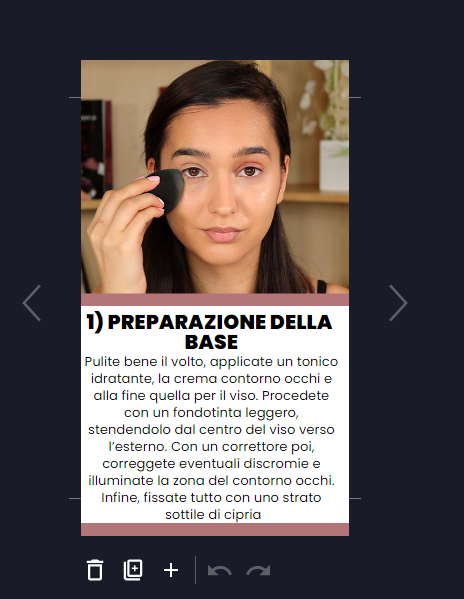
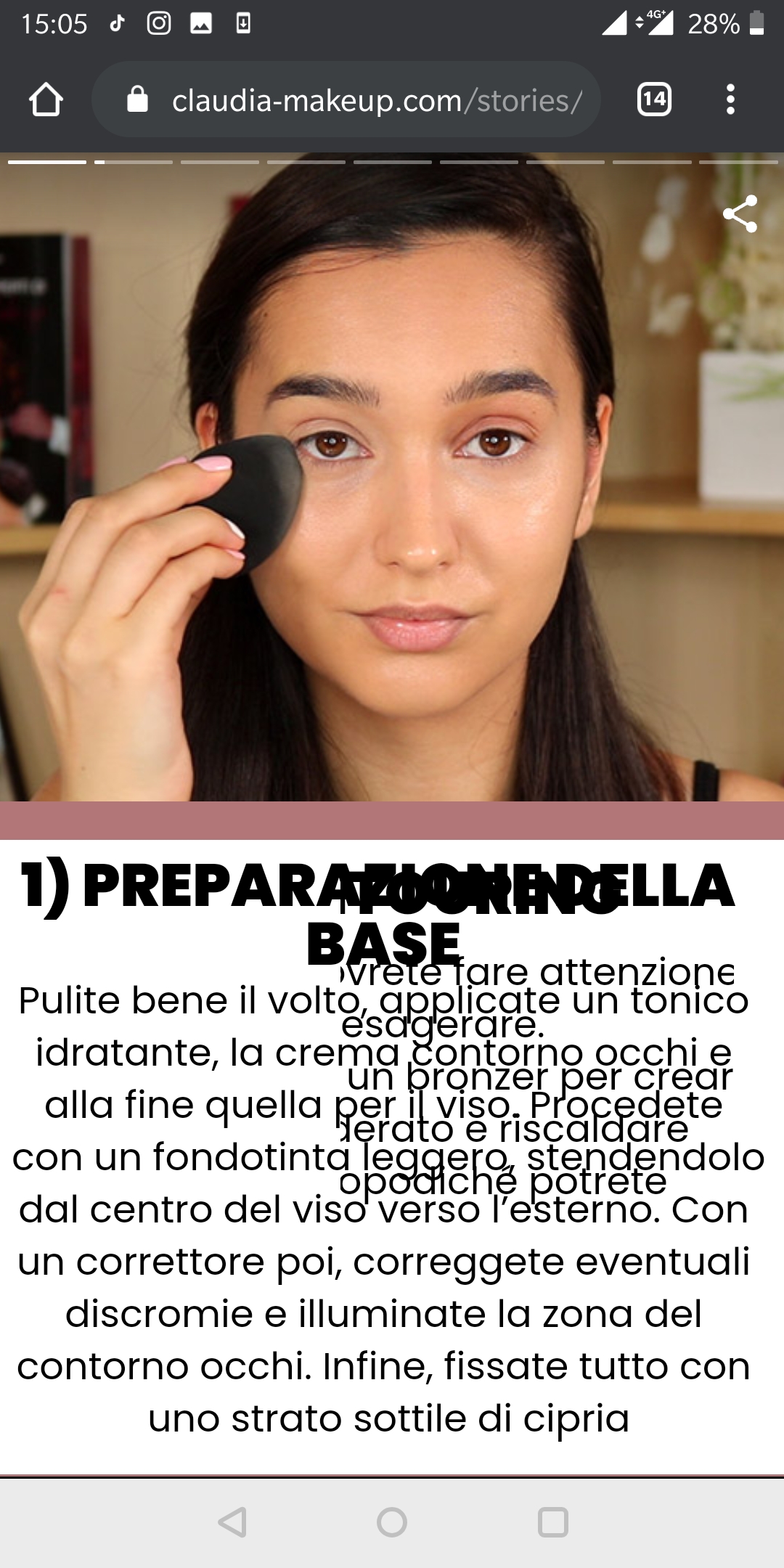
1) Edit view is different from the final result
Edit view:
Mobile online view:
Desktop online view:
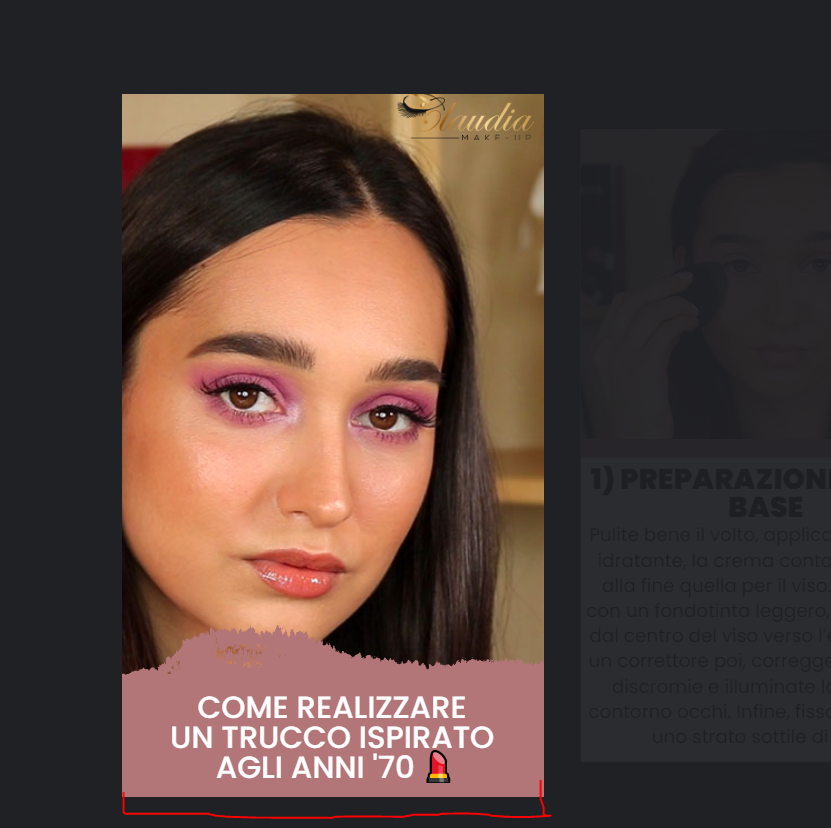
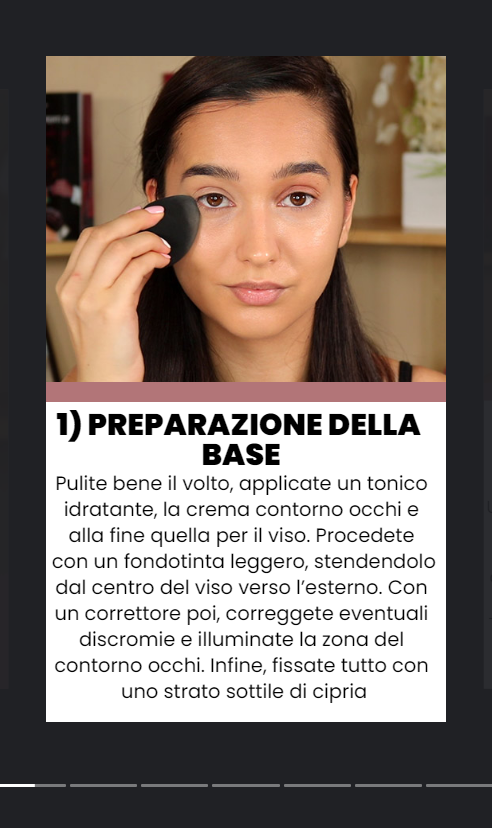
The height seems a little larger from edit view, expecially compared with the online mobile view where i can't even see the bottom pink line
There is a weird bug where some text is over the original text on mobile view, but there isnt on desktop online view and on edit view, another case on the last page of the webstory
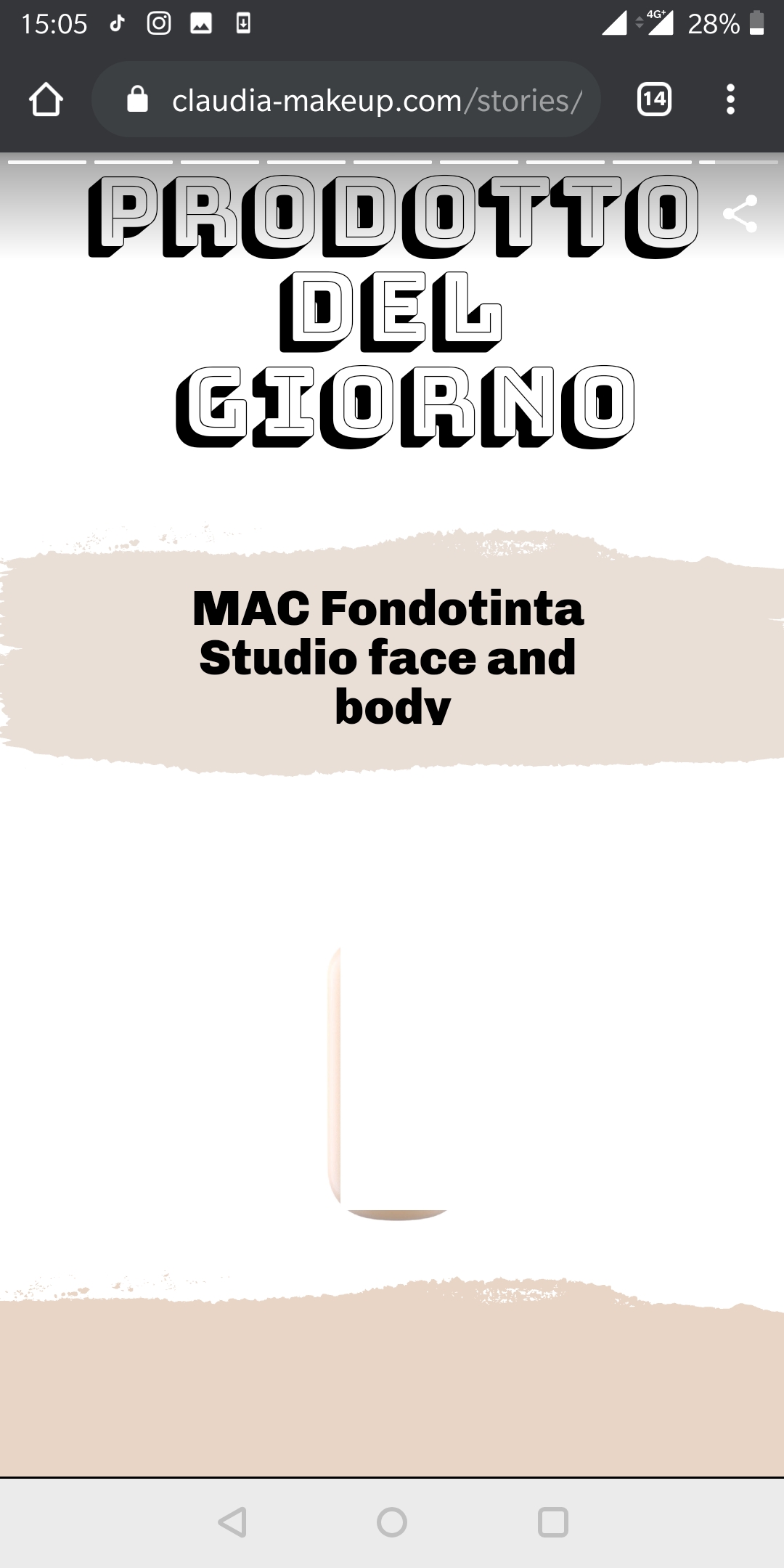
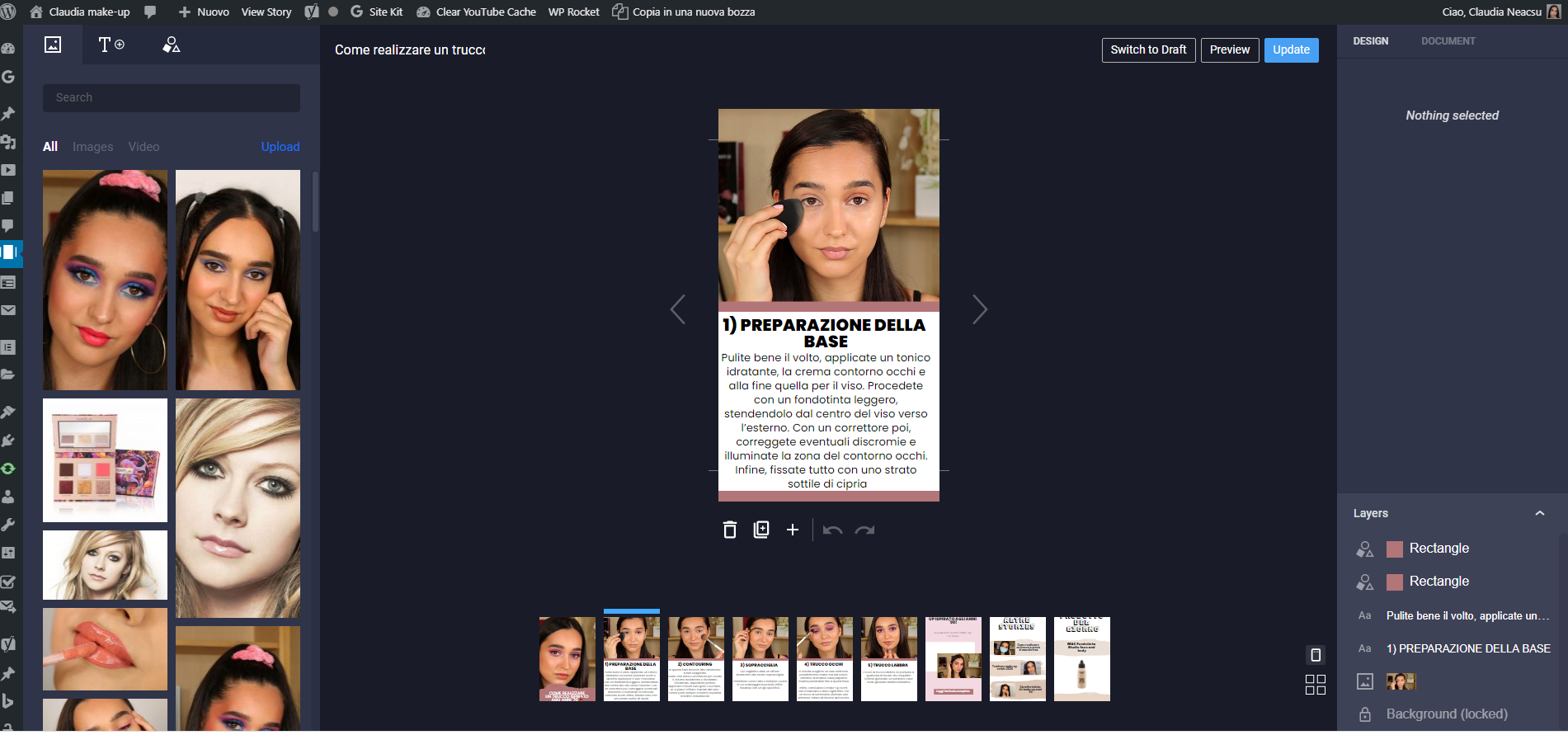
Sometimes my wordpress editor is zoomed, sometimes not, this issue also change single elements ratio. It's hard to duplicate, i try to attach some screenshots
No zoom:
Zoom:
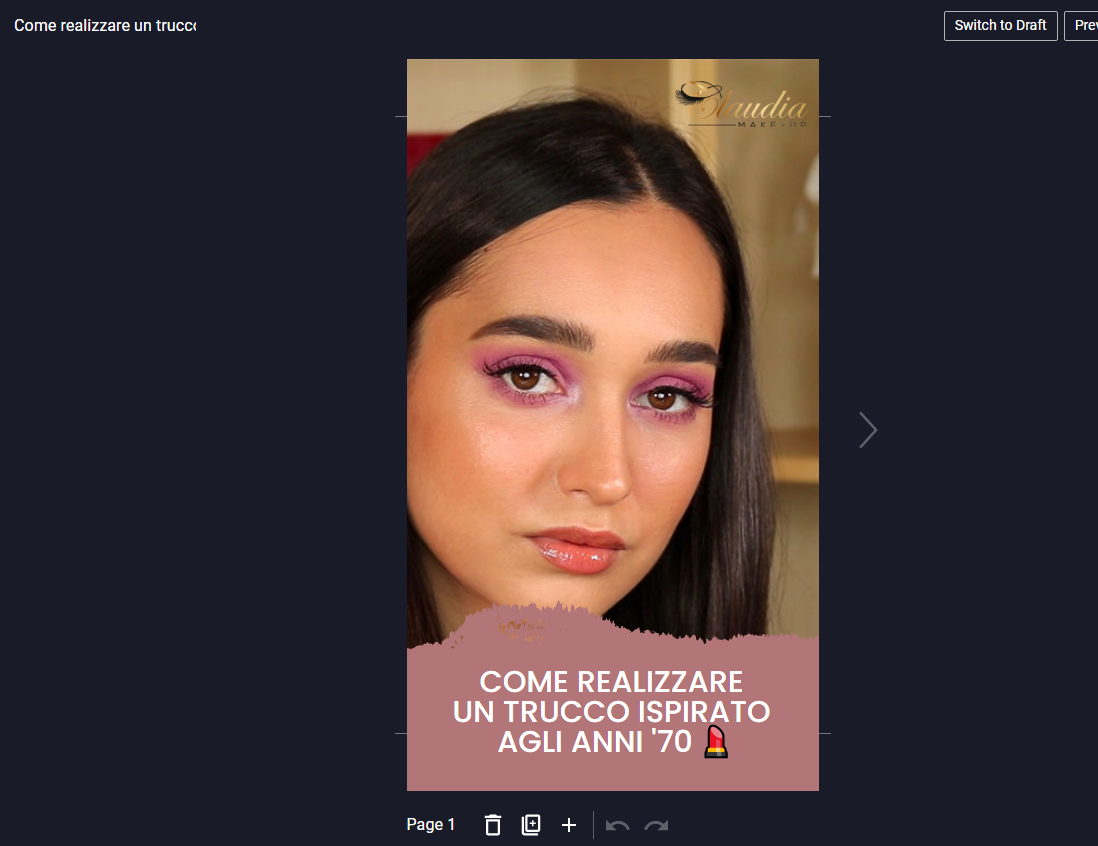
Basically the zoomed version is almost similar to the final result, the unzommed editor is like the 1 screenshot. When i experience this change i also see that elements inside the story editor move their position inside the frame (its not a proportional scale)
2) Cover image stories
Google search console report me an error with cover image size, but i can't see any note on the editor that suggest the right size to use. Is it possible to know the right size (So i can fix this issue) and have a little note about it into the backend?
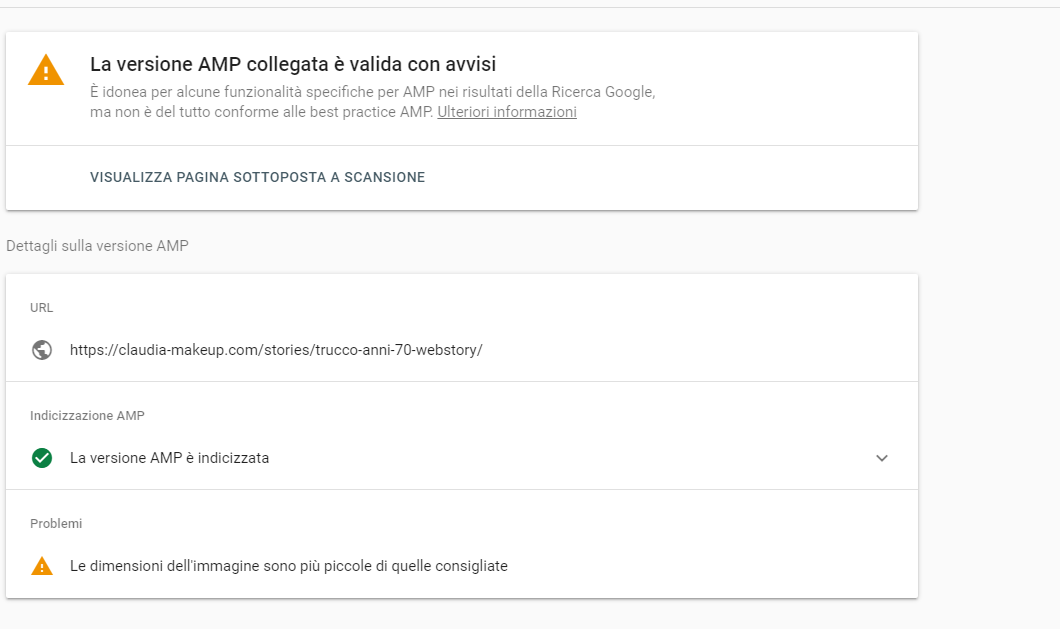
I hope all it's clear, thanks in advice!
 Dennis-95
All 20 comments
Hi @Dennis-95! Thanks again for sharing your feedback and findings!
- Edit view is different from the final result
Could you share the following about both your Mobile and Desktop device:
Plugin Version: [ex: Beta-1.2]
Browser: [ex: Chrome, Safari, Edge]
Device: [ex: iPhone 6, MacBook Air]
Operating System: [ex: MacOS, Windows]
We'll continue to investigate this further on our side.
- Cover image stories
This looks related to a similar issue reported, which we are investigating. The specification for the cover image (poster image) can be found here. Note the following recommended minimum requirements:
Each poster image should meet the recommended minimum size:
Portrait: 640px x 853px
Landscape: 853px x 640px
Square: 640px x 640px
 ernee
on 24 Jul 2020
ernee
on 24 Jul 2020
Could you share the following about both your Mobile and Desktop device:
Plugin Version: 1.0.0-beta.1
Browser desktop: Chrome on windows 10
Browser mobile: Chrome
Mobile Device: One plus 5t
Operating System: Windows 10, Android 9.0
This looks related to a similar issue reported, which we are investigating. The specification for the cover image (poster image) > can be found here. Note the following recommended minimum requirements
My images are 1200x600, do you even suggest to wait your fix?
Thanks a lot for your work!
Dennis-95
on 24 Jul 2020
Sometimes my wordpress editor is zoomed, sometimes not, this issue also change single elements ratio. It's hard to duplicate, i try to attach some screenshots
Curious, in those cases, is your browser zoomed? Does pressing Ctrl+- (make everything smaller) or Ctrl+0 (reset zoom to 100%) help? See https://support.google.com/chrome/answer/96810?hl=en for the keyboard shortcuts.
My images are 1200x600, do you even suggest to wait your fix?
Yes, please wait until we've implemented a fix on our side. We'll post an update here once the issue has been addressed. It's a rather high priority thing as it breaks discovery, so it should be soon.
 swissspidy
on 24 Jul 2020
swissspidy
on 24 Jul 2020
Curious, in those cases, is your browser zoomed? Does pressing Ctrl+- (make everything smaller) or Ctrl+0 (reset zoom to 100%) help? See https://support.google.com/chrome/answer/96810?hl=en for the keyboard shortcuts.
Nope it's always 100%! But today, opening the editor, here the zoomed version of it!
As you can see all it's equal to the previews non-zoomed screen, except for the story editor that it's way bigger:
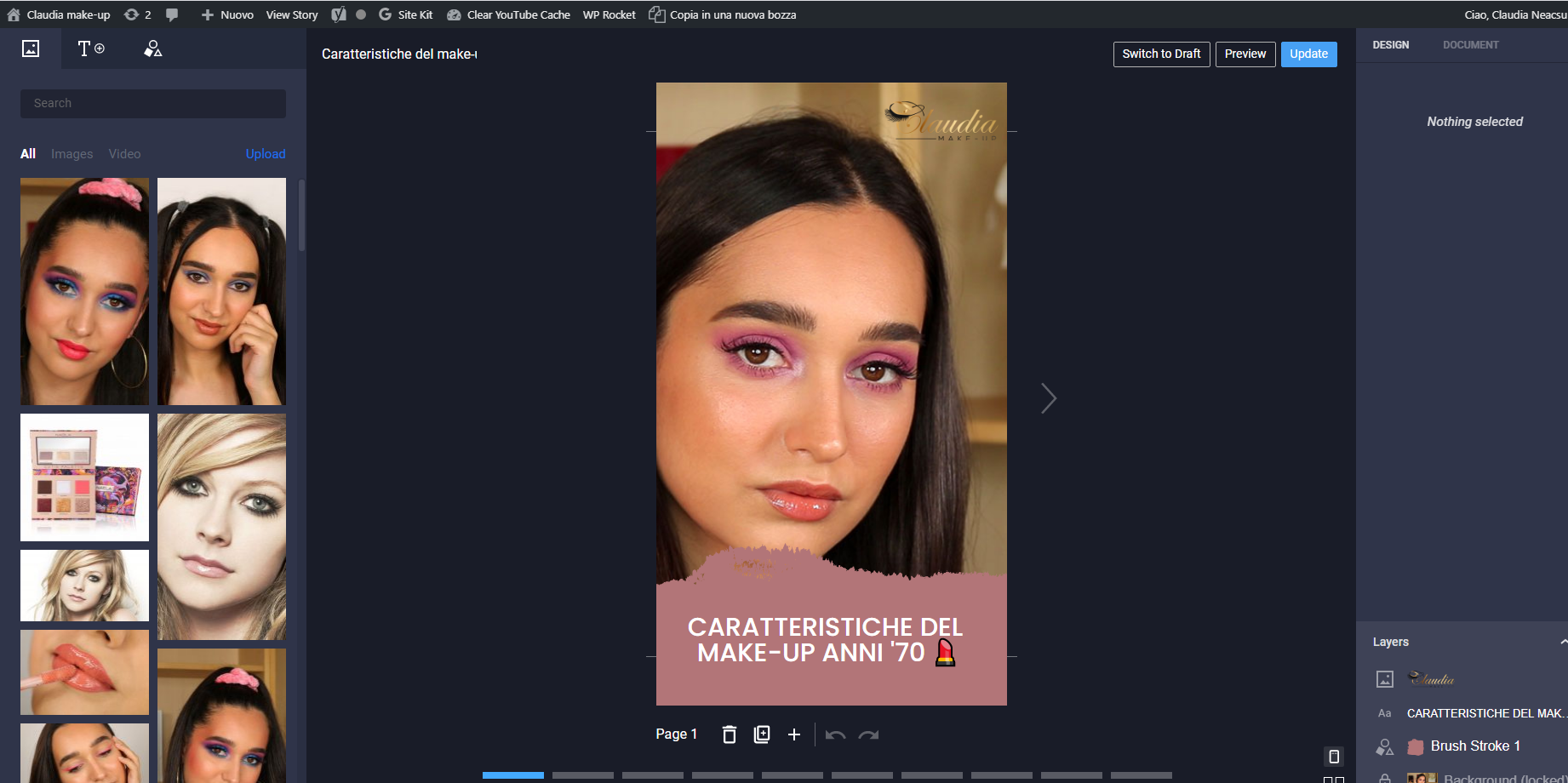
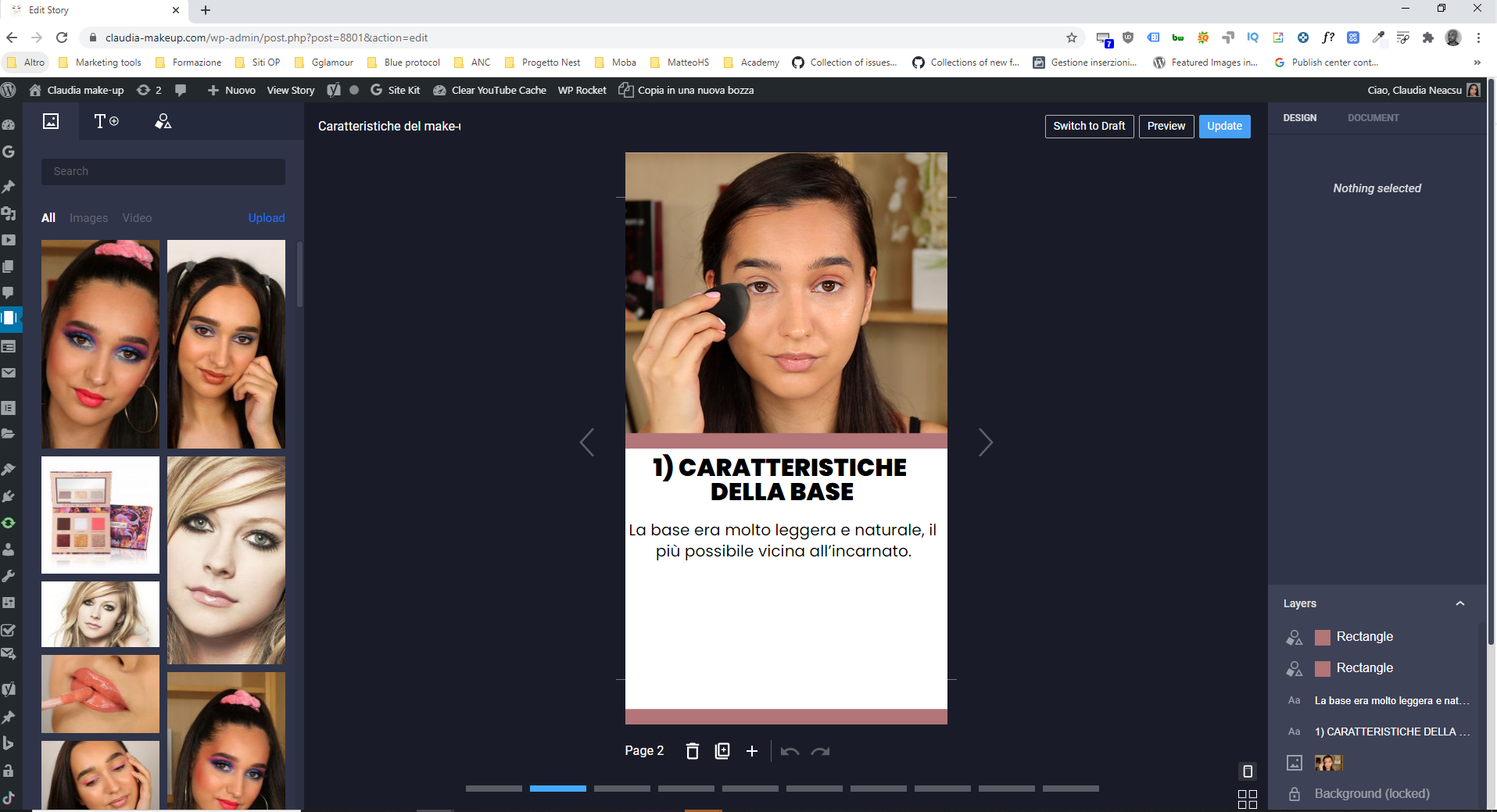
My images are 1200x600, do you even suggest to wait your fix?
Yes, please wait until we've implemented a fix on our side. We'll post an update here once the issue has been addressed. It's a rather high priority thing as it breaks discovery, so it should be soon.
Thanks a lot!
About the over text / different results deom editor to live version do you have any idea if it's a bug or an isoleted problem?
Dennis-95
on 24 Jul 2020
PS: I'm actually adding a new story, the editor started like always with the zoomed version (I think the right one), after a draft save and a broswer window change now i see the unzoomed editor ( bug probably)
An interesting thing is that after this "minification", the element height (at first inside the webstory frame) it's now outside the frame (red paint on my screenshot)
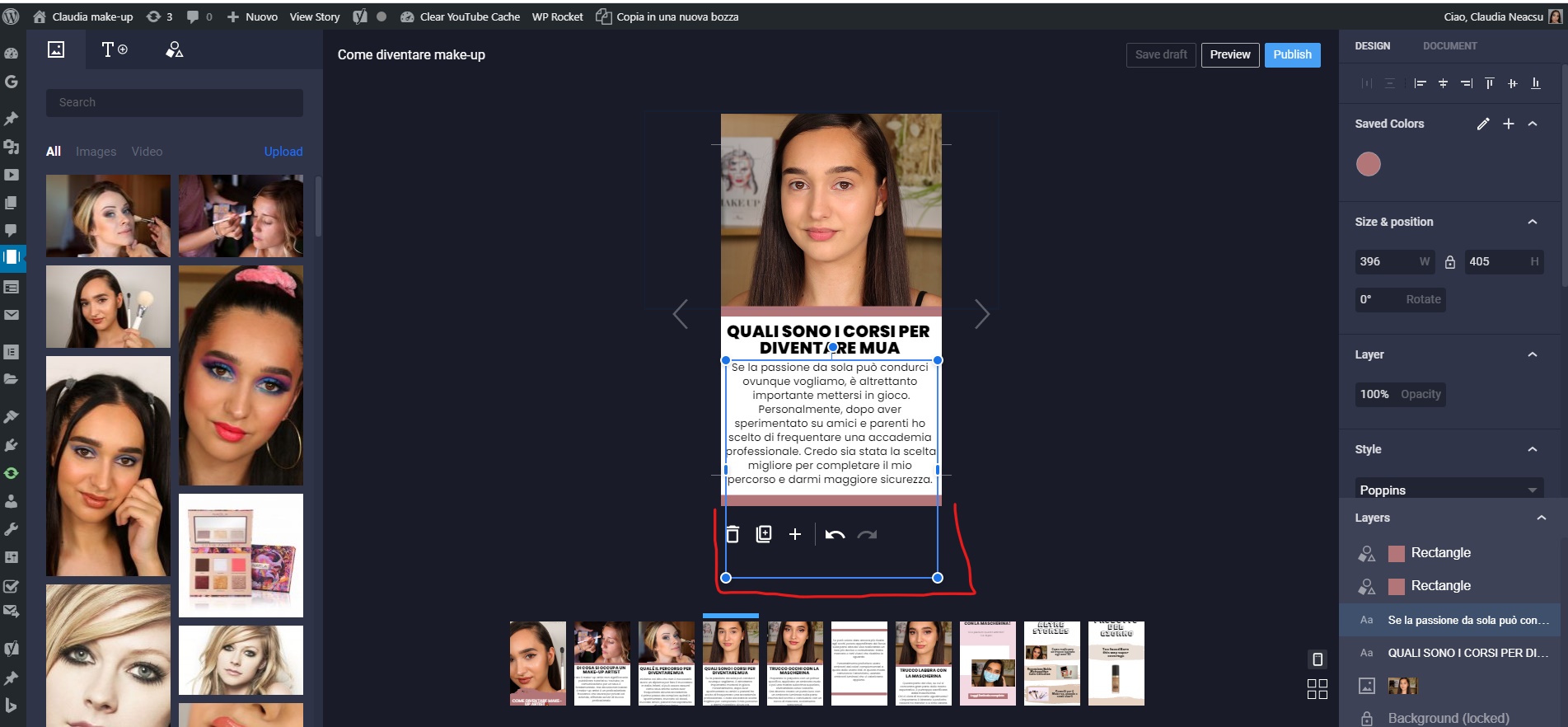
Dennis-95
on 24 Jul 2020
@Dennis-95 thanks for the additional info!
- Edit view is different from the final result
a) I've been trying to recreate the issue with the overlapping text (second page and last page of story) on mobile using the Chrome browser and emulating the One Plus 5T, but haven't seen it yet.
Are you still experiencing the issue? Would you happen to have another device to confirm if the issue occurs there too?
The height seems a little larger from edit view, expecially compared with the online mobile view where i can't even see the bottom pink line
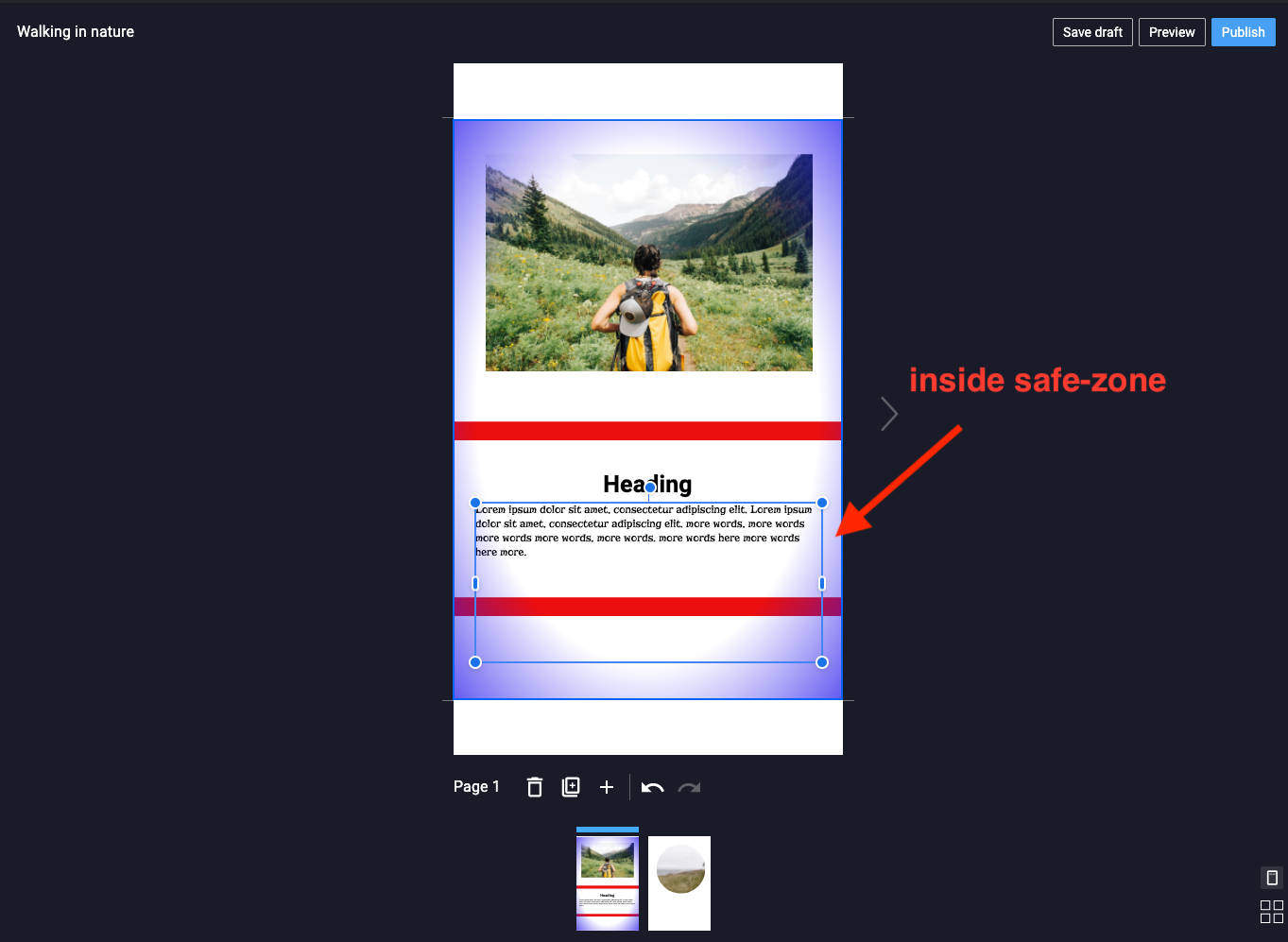
b) I will confirm this, but the view in the editor and the story preview may not match exactly in scale (the preview provides a good idea of how things will look in the final result). With that said, you could be experiencing the effects of some elements being outside of the Safe-Zone. When you toggle the Safe-Zone, guides will appear to show the areas of the page to place important elements to guarantee their visibility (Screenshot).
Sometimes my wordpress editor is zoomed, sometimes not, this issue also change single elements ratio. It's hard to duplicate, i try to attach some screenshots
c) Thanks for the screenshots and details! A few more questions:
What is the size of your monitor and are you working with the browser at full screen?
Is this consistent with your experience:
When the editor is zoomed in, you cannot see the thumbnails: Screenshot
When the editor is zoomed out (at 100%) you can see the thumbnails: Screenshot
- You mentioned the ratio changes for elements. Do you mean the numeric value of the ratio displayed on the _Design panel_ to the right in the editor like for the text element in your screenshot?
ernee
on 27 Jul 2020
a) I've been trying to recreate the issue with the overlapping text (second page and last page of story) on mobile using the Chrome browser and emulating the One Plus 5T, but haven't seen it yet.
Actually i can't test in another device, could you? this is the link: https://claudia-makeup.com/stories/trucco-anni-70-webstory/
Here the video from my one plus 5t (Chrome broswer): https://drive.google.com/file/d/1Rv3a3mgr-mTW0fn5-JG5bqLwc_1WFXaX/view?usp=sharing. Yes i still experience this issue
b) I will confirm this, but the view in the editor and the story preview may not match exactly in scale (the preview provides a good idea of how things will look in the final result). With that said, you could be experiencing the effects of some elements being outside of the Safe-Zone. When you toggle the Safe-Zone, guides will appear to show the areas of the page to place important elements to guarantee their visibility (Screenshot).
i can't see all your screenshot but i assume that it exist a safezone where to place elements, but probably in this case it's a bug, because i see cutted text like this:
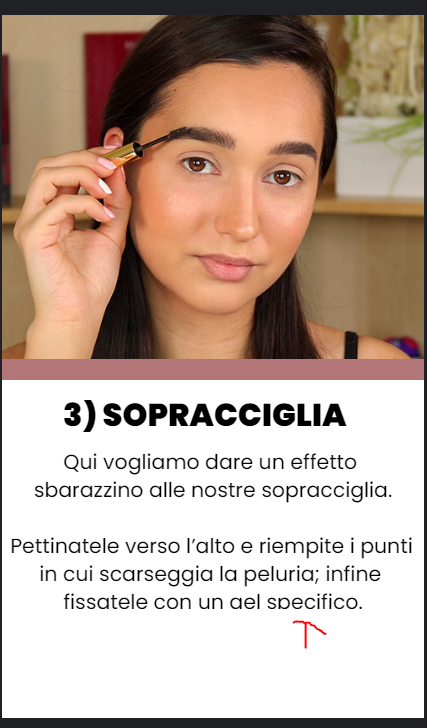
c) Thanks for the screenshots and details! A few more questions:
- What is the size of your monitor and are you working with the browser at full screen?
1920x1080
- Is this consistent with your experience:
When the editor is zoomed in, you cannot see the thumbnails: Screenshot
When the editor is zoomed out (at 100%) you can see the thumbnails: Screenshot
I can see only the 2 screen, but indeed the effect it's the same if i zoom at 100%, but when it happens the zoom is always 100%. I randomly experience this after refresh the editor or change broswer window
- You mentioned the ratio changes for elements. Do you mean the numeric value of the ratio displayed on the _Design panel_ to the right in the editor like for the text element in your screenshot?
No i meant that the width and height of the text frame seems keep the zoomed size, so when the bug happens (and the editor is smaller) i can see the text element get out of editor lines
Hope it's clear, thanks a lot
Dennis-95
on 28 Jul 2020
Actually i can't test in another device, could you?
Yes, I have viewed the story in another type of Android device and I do not see the issue. Thanks for the video!
i can't see all your screenshot but i assume that it exist a safezone where to place elements, but probably in this case it's a bug, because i see cutted text like this:
Is this also from your mobile view of the story?
ernee
on 28 Jul 2020
Yes, I have viewed the story in another type of Android device and I do not see the issue. Thanks for the video!
Oh nice, probably a bug from my side only?
Is this also from your mobile view of the story?
Nope, this screen is from windows 10 google chrome!
Dennis-95
on 28 Jul 2020
Hi @Dennis-95 !
Oh nice, probably a bug from my side only?
We're not sure just yet. We're working on trying to recreate the issue on our side to see. Really appreciate the information you have provided so far.
I was wondering if you could test something when you have a moment?
For the pages with the issues with:
- the text overlapping in mobile (Chrome/ OnePlus 5T)
- missing/ cut text on desktop (Chrome/ Windows 10)
Could you try to place all the elements/ layers inside the safe-zone and check if the issues continue in the devices when previewing the story?
I'm not sure if you could view my screenshot before, but this is the toggle and guides for the safe-zone:
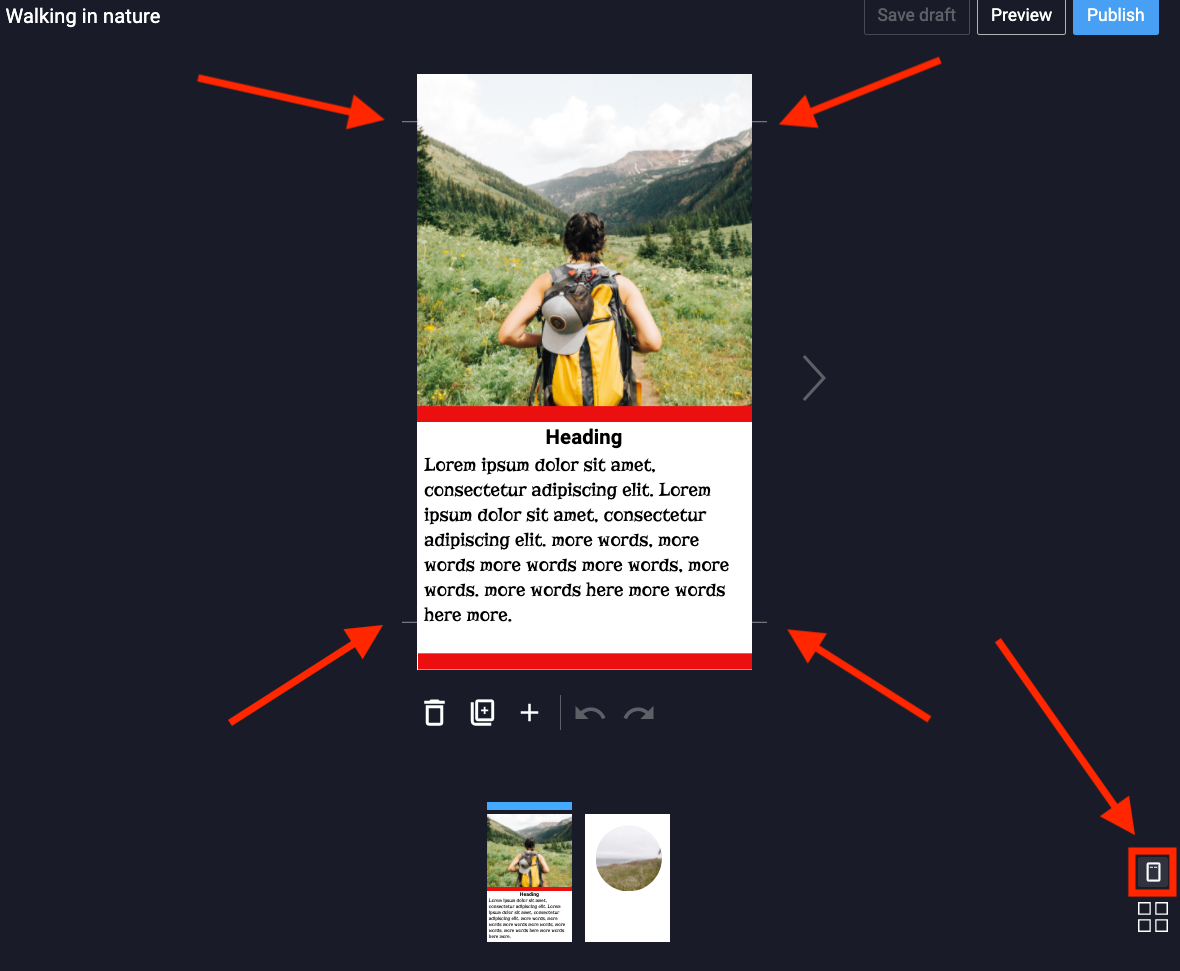
If you could attempt to place/ resize the elements/ layers inside the safe-zone that may help determine if this is a factor or not in the display issues:
ernee
on 30 Jul 2020
Hi @Dennis-95 !
Oh nice, probably a bug from my side only?
We're not sure just yet. We're working on trying to recreate the issue on our side to see. Really appreciate the information you have provided so far.
I was wondering if you could test something when you have a moment?
For the pages with the issues with:
- the text overlapping in mobile (Chrome/ OnePlus 5T)
- missing/ cut text on desktop (Chrome/ Windows 10)
Could you try to place all the elements/ layers inside the safe-zone and check if the issues continue in the devices when previewing the story?
The text-cut seems fixed, the overlapping text on mobile still up!
https://claudia-makeup.com/stories/trucco-anni-70-webstory/
Thanks a lot!
Dennis-95
on 1 Aug 2020
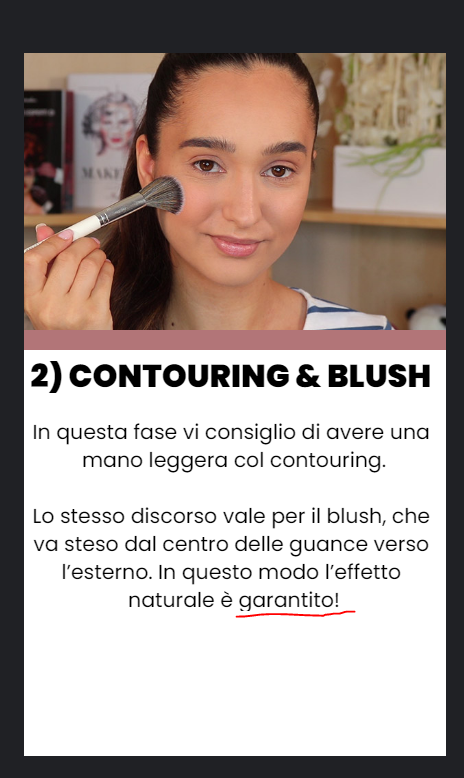
PS: Check also: https://claudia-makeup.com/stories/trucco-anni-40-webstory/ on 2) story, the text is in the center of the story, but the text is cutted anyway
Dennis-95
on 2 Aug 2020
^ @merapi perhaps you know it, is the above something that #3184 covers?
swissspidy
on 3 Aug 2020
 Dennis-95
on 6 Aug 2020
Dennis-95
on 6 Aug 2020
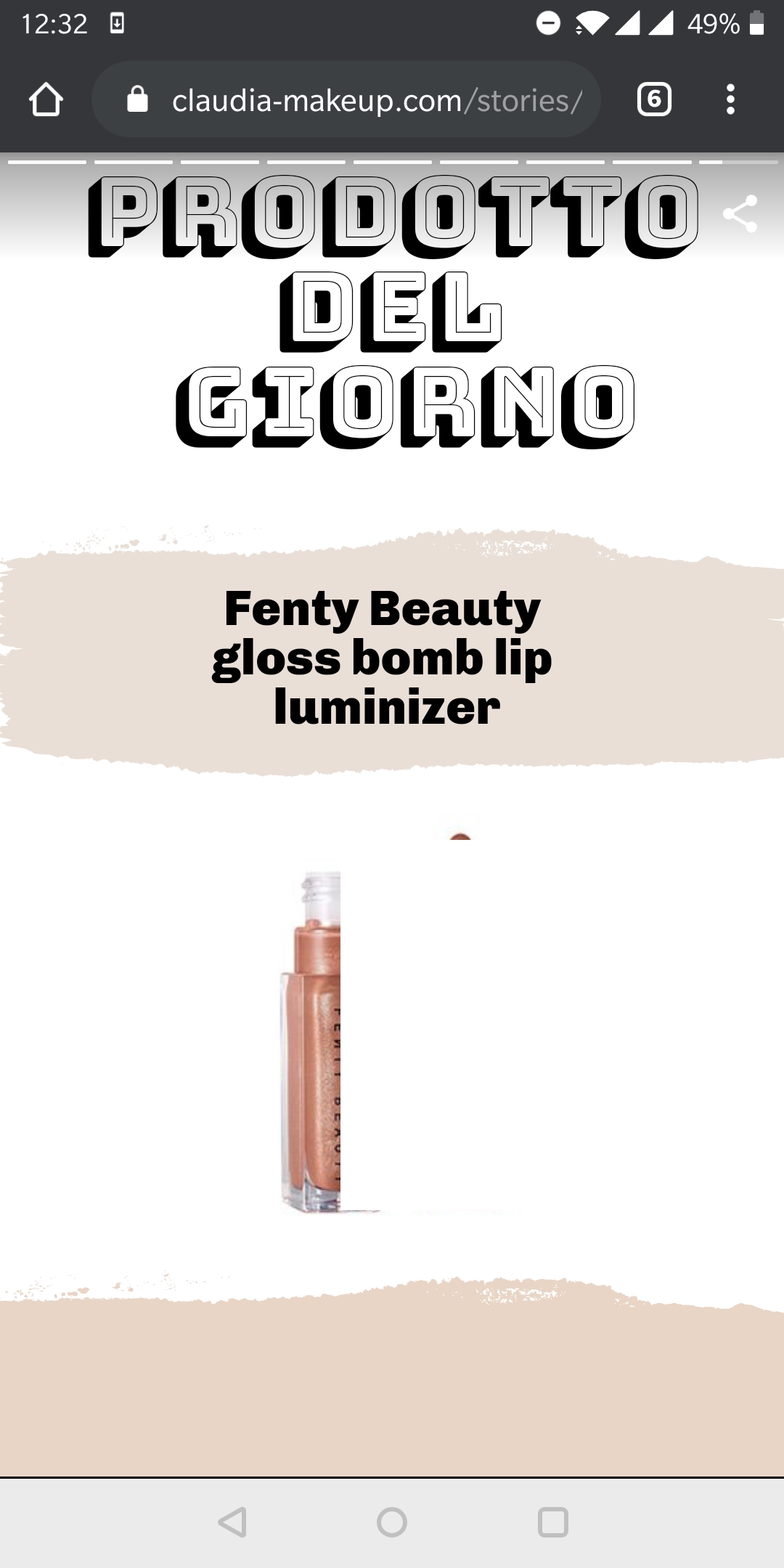
Interesting how that white box over the image is exactly the same for both stories:
https://user-images.githubusercontent.com/45852903/89522166-0df51380-d7e1-11ea-8c55-5ea72706691b.jpg
https://user-images.githubusercontent.com/45852903/88290313-db362000-ccf6-11ea-80e9-82571e39a72e.jpg
The behavior is quite similar throughout the whole story in the video you've shared: https://drive.google.com/file/d/1Rv3a3mgr-mTW0fn5-JG5bqLwc_1WFXaX/view
So.... some follow-up questions from my side:
- Does this also happen when you create a new blank story, without a template?
- Does this also happen when _viewing_ other web stories? Here are some other web stories in the wild:
https://edition-cnn-com.cdn.ampproject.org/c/s/edition.cnn.com/ampstories/world/protecting-the-antarctic-a-journey-to-a-continent-in-distress
https://www-usatoday-com.cdn.ampproject.org/c/s/www.usatoday.com/amp-stories/beyonce-rule-the-world/
https://www-wired-com.cdn.ampproject.org/c/s/www.wired.com/amp-stories/space-photos-of-the-week-111817/
https://expansion.mx/ampstories/2018/12/12/nueve-hoteles-para-dormir-antes-de-morir - What version of Chrome are you running on your One Plus? Can you update it?
- Can you ask a friend or family member to view your story on their mobile device? Do they see the same issue?
It really feels like an issue specific to your device, as I can't reproduce it. But hopefully the answers to these questions will help us narrow this down.
swissspidy
on 6 Aug 2020
Does this also happen when you create a new blank story, without a template?
I have to test this! i will update it in the next days
Does this also happen when _viewing_ other web stories? Here are some other web stories in the wild:
Nope, they works perfectly for both desktop and mobile
What version of Chrome are you running on your One Plus? Can you update it?
Latest one, but it's almost the same in all broswers, i attach some test i collected:
- Test from google news app mobile: https://drive.google.com/file/d/16lwUQmHU15_xkTg54rAffTxTFyjjQLzG/view?usp=sharing
- Test from google chrome mobile in 2 different ways, embed and direct link: https://drive.google.com/file/d/16vmcJSsj3M4sK0GKgPRGbqj8G7EgS03z/view?usp=sharing
- Test from firefox mobile: https://drive.google.com/file/d/16vsCsTigumLYhEav5L5N2qqy8hDT3Qi2/view?usp=sharing
- Test from desktop both chrome and Firefox: https://drive.google.com/file/d/1Sc2o63jlziIpDB6pkEePXXO8EeePWvKd/view?usp=sharing
- Can you ask a friend or family member to view your story on their mobile device? Do they see the same issue?
Yes, i tried from a lot devices, the only bug it persist in all device is the cutted text in the bottom, the rest seems all fixed! (Probably my device bugs only as you mentioned)
Hope it helps! @swissspidy
Dennis-95
on 8 Aug 2020
Does this also happen when you create a new blank story, without a template?
I have to test this! i will update it in the next days
Here we go! A new story, made from 0 and with all elements built inside the suggested area: https://claudia-makeup.com/stories/come-preparare-pelle-makeup-webstory/
It seems way better, i can see only the text cut on slide 8 and 10!
@swissspidy
Dennis-95
on 11 Aug 2020
Hi @Dennis-95 ! I believe you've been able to give the recent version 1.0.0-rc.1 a try.
Could you let us know if you're still seeing any of the issues mentioned above? It may be device related, but this is helpful info to keep on our radar. Thanks!
ernee
on 15 Sep 2020
Hi @Dennis-95 ! I believe you've been able to give the recent version 1.0.0-rc.1 a try.
Could you let us know if you're still seeing any of the issues mentioned above? It may be device related, but this is helpful info to keep on our radar. Thanks!
@ernee Let me congratulates first wit the team for the awesome work on plugin and github!
We can definitely sat that all problems are fixed, i've actually only one report but i don't really know how it works, i try to explain:
In my websites i use this plugin https://wordpress.org/plugins/gn-publisher/, so basically every time i update a post automatically my publish center recognize the update, and update also my google news feed.
This it seems not happen for web stories, for example times ago i forgot in 1 webstory to add the cover image before publishing, and even if i added it after the publish there was no way to modify the publish center feed to show the cover image.
Do you know something about this? Thanks a lot!
Dennis-95
on 15 Sep 2020
@Dennis-95 thank you for all your helpful feedback, requests, and bug reports during this time!
There is an ongoing discussion about Google News support in this feature request: https://github.com/google/web-stories-wp/issues/3107
So support for this and with other plugins is still being reviewed, but your use case would be helpful to add to the request. I'll link to your inquiry there and feel free to add your feedback as well.
I'll close this issue currently.
ernee
on 16 Sep 2020
Related issues
 wassgha
·
3Comments
ernee
·
4Comments
swissspidy
·
3Comments
wassgha
·
3Comments
ernee
·
4Comments
swissspidy
·
3Comments
 jauyong
·
4Comments
jauyong
·
4Comments
 3pgarro
·
4Comments
3pgarro
·
4Comments