Web-stories-wp: Dashboard: Created/last modified dates are sometimes in the future
Bug Description
On dashboard, "Date Created" and "Last Modified" show dates in the future for recent timestamps when viewed in EST.
Steps to Reproduce
- Set system time to EST.
- Create a new story.
- Open the dashboard and view the story in the list.
Expected: "Date Created" and "Last Modified" display a date in recent past.
Actual: The dates show a time in the future.
Screenshots
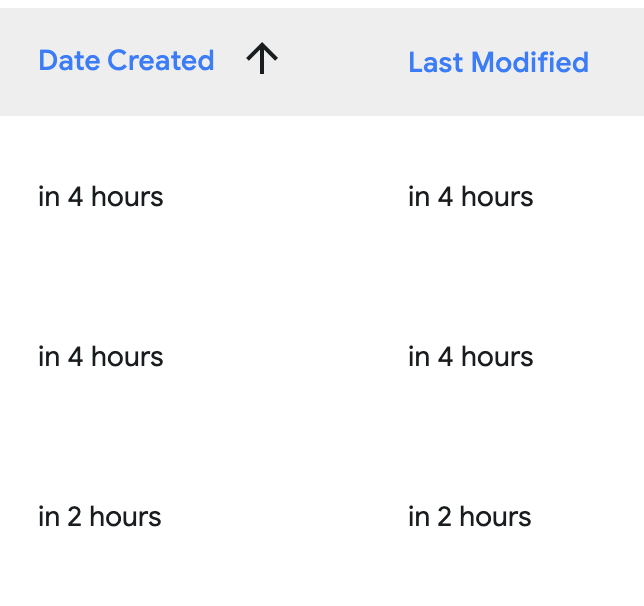
Additional Context
- Plugin Version: 1.0.0-alpha+edfbf49
- Operating System: macOS 10.15.4
- Browser: Chrome 83
_Do not alter or remove anything below. The following sections will be managed by moderators only._
Acceptance Criteria
Implementation Brief
 choumx
All 20 comments
Follow up question on this @choumx
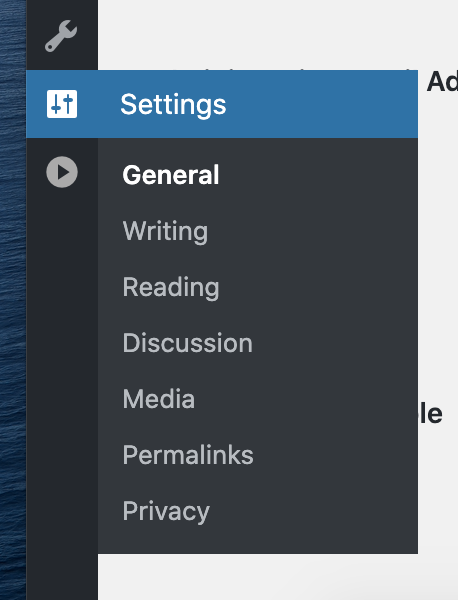
You mentioned that you Set system time to EST. - can you tell me what your time zone is in wordPress?
If you go to settings > general there should be a dropdown. We've run into some funky timezone issues involving this and unfortunately there's no really great way to circumnavigate this. I want to see if this issue you're having is different from the wordPress settings one we've encountered.
 BrittanyIRL
on 8 Jun 2020
BrittanyIRL
on 8 Jun 2020
I don't think I have access to "Dashboard > Settings" since I'm not an administrator. I tried these instructions.
choumx
on 8 Jun 2020
And you couldn't get there?

BrittanyIRL
on 9 Jun 2020
@choumx on Stories Labs you‘re actually a super admin. Although you have two accouts for some reason, one from today.
@BrittanyIRL I think all sites on that environment are set to UTC+0, if that helps.
 swissspidy
on 9 Jun 2020
swissspidy
on 9 Jun 2020
@swissspidy thanks, i can see it 🙃 ! it's more just deducing if the instance that @choumx is seeing is unrelated to the issue where system timezone is conflicting with the wordpress timezone. I think it's the same issue, which means we can't really do much about it. It's up to users to set their timezones - we can't know that for them without causing more chaos with times!
BrittanyIRL
on 9 Jun 2020
Curious: why is the system time ever interfering? Shouldn‘t the WordPress timezone be used in all cases?
swissspidy
on 9 Jun 2020
That's a great question. I believe it's because moment is looking at the system timezone and the data's getting saved in wordpress timezone but i am happy to do some digging. I'll probably push this off until after getting some more parts of the dashboard done so we have confirmations and error handling.
BrittanyIRL
on 9 Jun 2020
Ah sorry, I reported this on staging where I don't have admin rights. Though you're right that it's the same on dev.
choumx
on 9 Jun 2020
more info needed from the INFRA team to understand what information WP will be provided.
 bmattb
on 13 Jul 2020
bmattb
on 13 Jul 2020
Spent some time looking into this. Essentially what's happening is:
I edit the date on a story and it'll save in whatever timezone my wordPress settings are currently on.
I update my wordPress settings and my story still has that same "time" set to it but not adjusted for the new timezone - so for instance, I have my 10am published EST story and I change my timezone from EST to MST and the story still has 10am on it.
Meanwhile, my browser's timezone is what moment js is using to figure out the .fromNow() api - that we use to parse that nice "3 hours ago" message.
We have several competing settings for timezone + date and they aren't playing super nicely together. I feel like this is really obvious for the stories team since everyone is so spread out which is really an interesting stress test to have from the get go.
I've tried addressing this inconsistency looking into the _gmt version of the date getting passed as the response on the stories api but find the same issue.
I think some help from the infra team moving forward would be good. Just so we can collectively determine the best place to solve for the odd time traveling cases :D
BrittanyIRL
on 13 Jul 2020
Thanks for the great writeup @BrittanyIRL!
I think this makes it pretty clear that we should not be using the browser's timezone for displaying the dates, but instead the site's timezone at all times.
We're not facing a new problem here. It's something Gutenberg has had to look into early on, and solved via the @wordpress/date package (which we currently use for formatting, FWIW), which sets Moment's timezone according to the site settings.
Under the hood it's quite simple, as it uses moment-timezone to set the timezone according to what is passed to the script from the WP side.
One interesting twist: there can be timezones that are not represented by a location, but only an _offset_ (e.g. UTC+5:45). To accommodate for this, the @wordpress/date package creates a special WP timezone under the hood in order to be able to create date objects from a date string in the WP timezone, as well as to check whether a date is considered in the future according to the WordPress settings. (source)
My proposal:
- We pass the timezone string (e.g.
America/New York) to the React app. - We pass the timezone offset (e.g.
UTC-4) to the React app. - Whenever we deal with dates, instantiate
momentwith the timezone information. (basically like this) - To avoid more dependencies on
moment/@wordpress/date(we'd want to get rid of them eventually), it's probably best to build this ourselves instead of just using functions provided by@wordpress/date. - This also applies to the story editor as we display dates there as well...
- ...because of this, it might make sense to put this shared logic into a dedicated
assets/src/date"package"
swissspidy
on 14 Jul 2020
@BrittanyIRL Can you please provide a story point estimate for this issue please
bmattb
on 14 Jul 2020
Thanks @swissspidy
I really like the idea of a dedicated assets/src/date "package" - what do you think about me spinning this up and using it in the dashboard as a bit of a test and then we can have a separate story for swapping the editor to use the shared resource later on? I feel like this will make testing a bit less daunting and easier to find the edge cases (since dates are always always always trickier than we ever anticipate).
Before I can really point this, can you expand on your thoughts surrounding this:
it's probably best to build this ourselves instead of just using functions provided by @wordpress/date.
Do you mean building it out within moment and avoiding internal usage of wordPress/date? We already rely on moment and their timezone package is the most obvious choice to handle this, especially given the internationalization of the tooling. To me, if we can just grab the timezone and the offset (good thought pointing that out, that explanation was great) from settings as we do the date format and then use that info within our new date parsing with moment and moment timezone so that we're not leaning into wordPress and tearing that out of dates won't be nearly as hard. I'm hesitant to DIY such a robust set of functionality for date handling! If we want to not use moment for it, we could swap for date-fns which is way lighter and has similar timezone addons.
BrittanyIRL
on 14 Jul 2020
what do you think about me spinning this up and using it in the dashboard as a bit of a test and then we can have a separate story for swapping the editor to use the shared resource later on?
SGTM!
Before I can really point this, can you expand on your thoughts surrounding this:
All I want is to avoid using anything other than format from the @wordpress/date package. I am not suggesting to replace everything moment or moment-timezone does.
Edit: I am saying this because I think we can & should get rid of @wordpress/date and do the format part ourselves, see #3186.
swissspidy
on 14 Jul 2020
Oh Phew 🙃
And yes sounds great! I'll lean into moment and moment timezone.
Feel pretty good about this plan, I'll point and start working on it in this sprint and will reach out with any further questions.
BrittanyIRL
on 14 Jul 2020
@bmattb - pointed at 5, we have a lot of the base functionality here done but will need to spend a fair amount of time adding tests for the things we update.
BrittanyIRL
on 14 Jul 2020
Just because we can do things in PHP doesn't mean we should :-)
This approach here makes it easier to decouple the apps from WordPress and integrate with other platforms. There will be other data sources in the future beyond WordPress (3P Media, templates API, etc.) where we'll likely also have to deal with dates. Also, less dependencies on server-side changes makes it easier to iterate fast on the client-side.
If you feel strongly about this let's discuss this in #2199 or even the next meeting.
Date is a weird middle ground. Normally I would say, the backend should be providing data in a format for the front end to consume. If the front end is doing a lot of the heavily lifting formatting data then that is a problem. For this format of data is a expensive, then there can be a performance overhead to the user on every page request. For the most part, I believe we want to spare the user and the users device having to do compute where we can avoid it. As this compute normally means slow responsiveness etc.
For 3P media, template or other CMS integration will need a structured and designed REST API. We are currently using the WordPress REST API and it's format of data and response. I believe we will soon grow out and will have design and build our own REST APIs. With these custom apis will have complete control and I will be easy for us to create a design document to give to other CMS providers to say, here, to integrate with stories editor, you will need these apis.
If we have a spec for the REST API that is needed for this editor, then there is no issue around adding a new field in whatever format that is needed.
This is not something I think is a massive problem or a show stopper, the work done to day seems solid. But I also don't think that is a bad thing to do some of the heavily lifting on the server, compared to Pascals thoughts on the matter.
 spacedmonkey
on 17 Jul 2020
spacedmonkey
on 17 Jul 2020
Verified in QA
 csossi
on 7 Aug 2020
csossi
on 7 Aug 2020
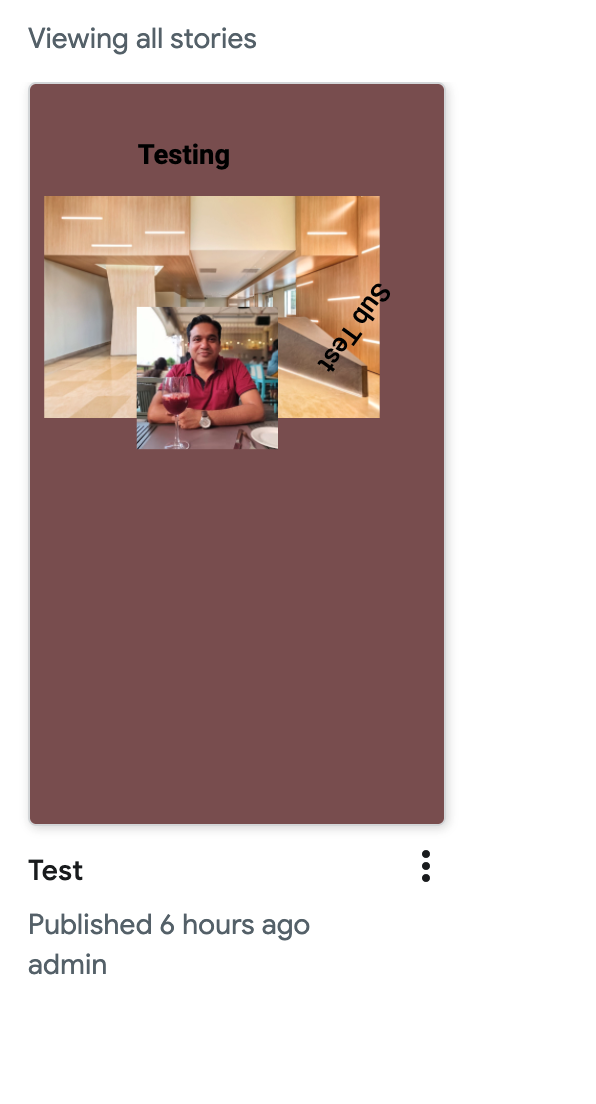
Add the new story, a few mins ago and displaying that I have published it 6 hours ago.
 debabratakarfa
on 20 Aug 2020
debabratakarfa
on 20 Aug 2020
Thanks @debabratakarfa, we're already tracking this in #4095.
swissspidy
on 20 Aug 2020
Related issues
 wassgha
·
3Comments
swissspidy
·
3Comments
wassgha
·
3Comments
swissspidy
·
3Comments
 netnaps
·
3Comments
csossi
·
3Comments
swissspidy
·
3Comments
netnaps
·
3Comments
csossi
·
3Comments
swissspidy
·
3Comments