Web-stories-wp: Cannot restore the default video poster image
Bug Description
Cannot undo setting video poster image
Expected Behaviour
See Flow in Figma
Steps to Reproduce
Screenshots
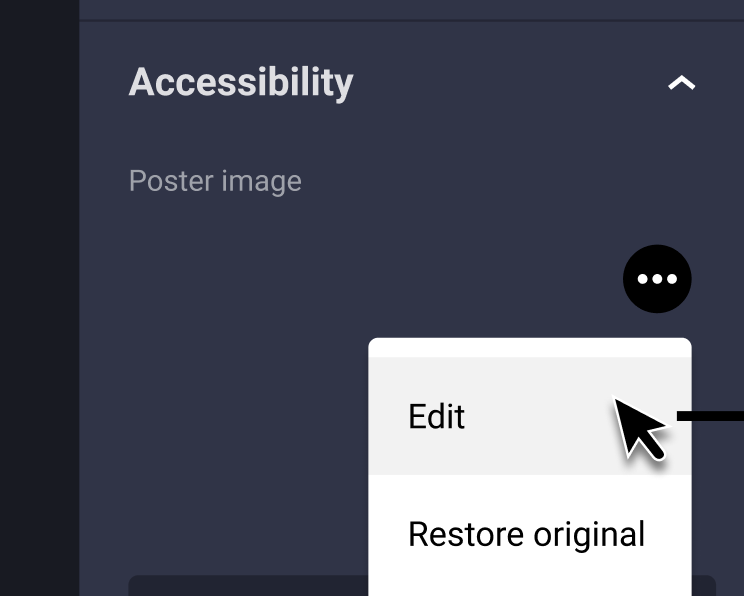
Expected flow in Figma:
_Do not alter or remove anything below. The following sections will be managed by moderators only._
Acceptance Criteria
QA Instructions
_See #4112_
 jauyong
All 32 comments
Asked for clarification in https://www.figma.com/file/Cd9iacVknHK62RO4pRwb68?node-id=2671:55920#24985068
 diegovar
on 29 Apr 2020
diegovar
on 29 Apr 2020
@samitron7 what are your thoughts on this? These image selection components show an Edit pencil button that will trigger the Wordpress media picker, but don't provide a way of removing the image. Should this kind of media controls expose some sort of (X) button at the top right to remove the image?
diegovar
on 30 Apr 2020
I thought the WP editor had a remove function. Let me add the ability to remove on the image itself. WIll send link to Figma once I'm done
 samitron7
on 1 May 2020
samitron7
on 1 May 2020
Any updates on this?
diegovar
on 6 May 2020
@spacedmonkey Are poster images autogenerated and if there is a scenario where we can’t autogenerate. Asking because I’m wondering if we need UI to allow users to remove. We want to always encourage replacing and not just removing and having nothing. @o-fernandez Do you know how poster images are used once published?
samitron7
on 20 May 2020
IMO this should work with the assumption that an auto-generated poster is always available as a fallback.
I think allowing users to remove the poster image makes sense in some way. Example:
- Upload video
- Poster is generated
- Replace poster with something else
- Realize that manually set replacement poster does not look good.
- How do I get back the generated one?!
Do you know how poster images are used once published?
The poster is an image that displays in the UI (when viewing the story) until the video is downloaded.
 swissspidy
on 20 May 2020
swissspidy
on 20 May 2020
Agree with Pascal - I'd imagine it's just revert to auto-generated poster in case of removing.
 o-fernandez
on 20 May 2020
o-fernandez
on 20 May 2020
@jauyong To confirm -- is the original issue about undoing via Undo icon or shortcut? Both seem to work currently when testing.
 miina
on 20 May 2020
miina
on 20 May 2020
In my testing, I have not be able to break the poster generation, so we can guess it will work 99.999 of the time.
At the moment, you can only edit the generated one to replace with something else. In https://github.com/google/web-stories-wp/pull/1783 we now store the generated poster id as another key. So we could add 'Revert to automatically generated poster' button, if we so wished.
 spacedmonkey
on 20 May 2020
spacedmonkey
on 20 May 2020
I also just tested this and the undo button seems to work for me.
spacedmonkey
on 20 May 2020
Ah good point on #4 and #5 Pascal. @miina hmm, I didn't even realize you can undo that with shortcut but how did you do the "Undo icon" portion in your comment? There is no undo icon at this point.
samitron7
on 20 May 2020
@samitron7 I meant the Undo icon of the History.
Basically I was trying to figure out if that's what @jauyong meant in the original issue description -- if it wasn't possible to undo the action via history -- since that seems to be working currently.
miina
on 20 May 2020
Just finished the flow for this and removed the ux needed label
samitron7
on 21 May 2020
@miina sorry for the delay. I'm 99.99% sure I filed this on behalf of someone else. Anyway, if undo is working, should we repurpose this ticket to accommodate the new flow in Figma then? @diegovar are you going to be working on this?
jauyong
on 26 May 2020
@jauyong I've changed the name of the issue to reflect more accurately what this issue is now about.
miina
on 28 May 2020
Hi @diegovar , have you started working on this?
👍 If you have, please push whatever branch you have (so we can track progress), give it an estimate of remaining effort and move to "in progress".
👎 If not, please un-assign yourself, so someone else can pick this up.
 barklund
on 28 May 2020
barklund
on 28 May 2020
@barklund Sorry for the confusion, I've unassigned myself.
diegovar
on 29 May 2020
Infra team to confirm that all needed data is being provided via the API
 bmattb
on 13 Jul 2020
bmattb
on 13 Jul 2020
Quick update from the WordPress side of things:
When a poster image is generated for a video, we store a reference to the poster image in the database. That means even if the poster is removed by the user in the UI, we can still retrieve the originally generated one.
Here's what we've currently implemented:
When requesting a single video via the REST API (e.g. GET /wp-json/wp/v2/media/123)...
If a video has a poster image, the featured_media_src object will contain information about it, and the featured_media_src.generated flag will tell you whether it was auto-generated or not.
If the poster was removed by the user, featured_media_src will be empty.
However, because we store the ID of the auto-generated poster image, we can backfill featured_media_src with its information.
That would be a rather simple change on the PHP side of things (~2 points). That doesn't include the changes to the editor though.
swissspidy
on 15 Jul 2020
@swissspidy please create your dependancy ticket and link here for ref, thx
bmattb
on 15 Jul 2020
@bmattb as soon as someone can verify that this aaproaxh works for the editor / to solve this
swissspidy
on 15 Jul 2020
@swissspidy Would this essentially mean that if the featured image gets removed, it would be replaced with the automatically generated one? Basically Restore would trigger removing the featured image which would then restore the original one since the featured image can't be empty?
If for some unknown reason the automatically generated image is missing, we should re-generate the poster image from the editor side, I assume? Should we add that check to the PHP side -- to ensure the file still exists, just in case?
miina
on 16 Jul 2020
Would this essentially mean that if the featured image gets removed, it would be replaced with the automatically generated one? Basically Restore would trigger removing the featured image which would then restore the original one since the featured image can't be empty?
Basically yes, unless that's not desired of course. Then we could also provide two separate fields:
manually_set_poster_image_src- could be emptygenerated_poster_image_src- should never be empty
If for some unknown reason the automatically generated image is missing, we should re-generate the poster image from the editor side, I assume? Should we add that check to the PHP side -- to ensure the file still exists, just in case?
We'd definitely do some checks to see whether the ID belongs to an actual existing attachment in WP, but looking for the file on disk is a bit too much IMO. I mean, then we'd basically need to do that for all images and videos everywhere, not just the poster image. Why would we do this file exists check for the poster only?
swissspidy
on 16 Jul 2020
Why would we do this file exists check for the poster only?
Thought of that since it was automatically generated, potentially quite some time ago, and because we have the option to regenerate it again -- in case of all images and videos everywhere else we don't have that option. In case of a broken image somewhere else the user could just replace it, however, how can the user replace the automatically generated image if it's broken? I suppose always regenerating a new image would be the safest option, however, maybe that's something to think about if it should actually happen 🤷
Basically yes, unless that's not desired of course. Then we could also provide two separate fields:
Hmm, well, this action would need to be one history entry only (changing the src should happen once only). Perhaps in this case, two fields would make more sense. Otherwise, we'd need a single API request which would remove the active poster and return back the auto-generated one. Or maybe that's what you were thinking of? Thoughts?
miina
on 16 Jul 2020
Otherwise, we'd need a single API request which would remove the active poster and return back the auto-generated one. Or maybe that's what you were thinking of? Thoughts?
That's what would happen, yes: you send a POST request to remove the poster, and in the response you get back the updated data. In the updated data, since there is no poster anymore (featured_media_src would be empty), we would automatically fill featured_media_src with the data from the generated poster.
swissspidy
on 16 Jul 2020
That's what would happen, yes:
Then this should work well :)
miina
on 16 Jul 2020
Alright, created #3230 to implement this on the PHP side of things.
Once implemented, we can check back here to see what's left to be done in the editor.
swissspidy
on 16 Jul 2020
Am I missing something here, there is currently no way of removing the poster image, only assigning a new one.
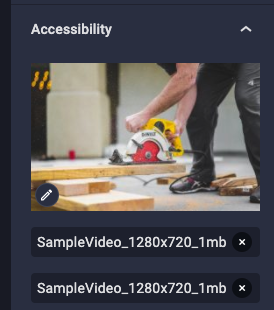
Clicking on a edit button brings up a media selector dialog with option to select a new one or close.
So here is my recommendation.
If a user has selected a custom poster image and doesn't like it, there should be a button that says 'Restore generated poster image' or something similar. ( This button would only appear if a custom poster is set ). When a user click on this button, a POST request is sent and the featured image for the video / poster is set back to the original poster image.
To do this, post the generated poster and user poster will have to different fields in the api.
This way is cleaner and means that the data is correct and we not backfilling data. Backfilling like this may cause us issues later on.
spacedmonkey
on 17 Jul 2020
After revisting Figma, and asking for clarification of video behavior in both #3230 and #3438 it appears that no API changes are needed.
If you add a video to the canvas, its ID is preserved in the resource object:
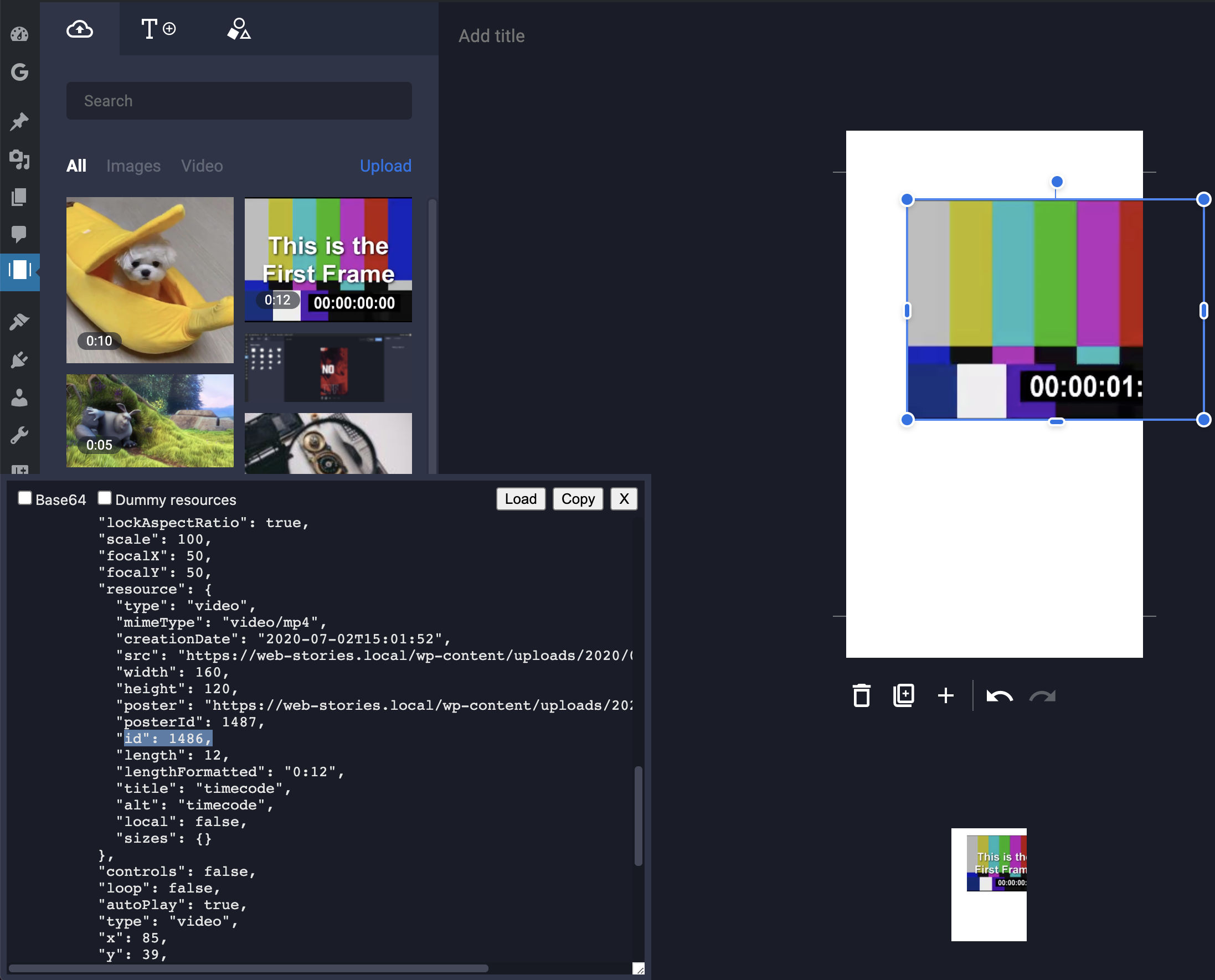
Now, restoring the originally generated poster image would be as simple as follows:
- HTTP Request:
GET web-stories/v1/media/1486, where1486is the video ID. - Retrieve value of
web_stories_poster_idfrom response. This will be the ID of the automatically generated poster. For example1234. - HTTP Request:
POST web-stories/v1/media/1486to setfeatured_mediato1234 - Retrieve value of
featured_media_srcfrom the response. This will contain the poster image URL - Update video element accordingly.
Could use a helper function like this (props Jonny):
 const getMediaById = useCallback(
    (mediaId) => {
      const path = addQueryArgs(`${media}/${mediaId}`, { context: `edit` });
      return apiFetch({ path });
    },
    [media]
  );
See #3441 and 3442 for context
swissspidy
on 24 Jul 2020
@swissspidy, I'm sorry to report, that all your effort was for naught. Setting the poster image in the editor simply means locally in the editor data associating an extra image URL with the element, but doesn't touch the source video element at all. Adding two instances of the same video and changing the poster image for one, does not change anything for the other.
Thus this resetting of the poster image is simply clearing the locally stored extra image and nothing more. It was really simple - the main task in this ticket turned out to be about the dropdown.
barklund
on 20 Aug 2020
If that's what product & UX came up with, fair enough 🤷 👍
swissspidy
on 20 Aug 2020
Verified in QA
 csossi
on 25 Aug 2020
csossi
on 25 Aug 2020
Related issues
jauyong
·
4Comments
 obetomuniz
·
3Comments
obetomuniz
·
3Comments
 Maverick283
·
3Comments
Maverick283
·
3Comments
 injainja
·
4Comments
injainja
·
4Comments
injainja
·
4Comments
injainja
·
4Comments