Web-stories-wp: Search Results: Result count per type
Feature Description
Related: #772, #773
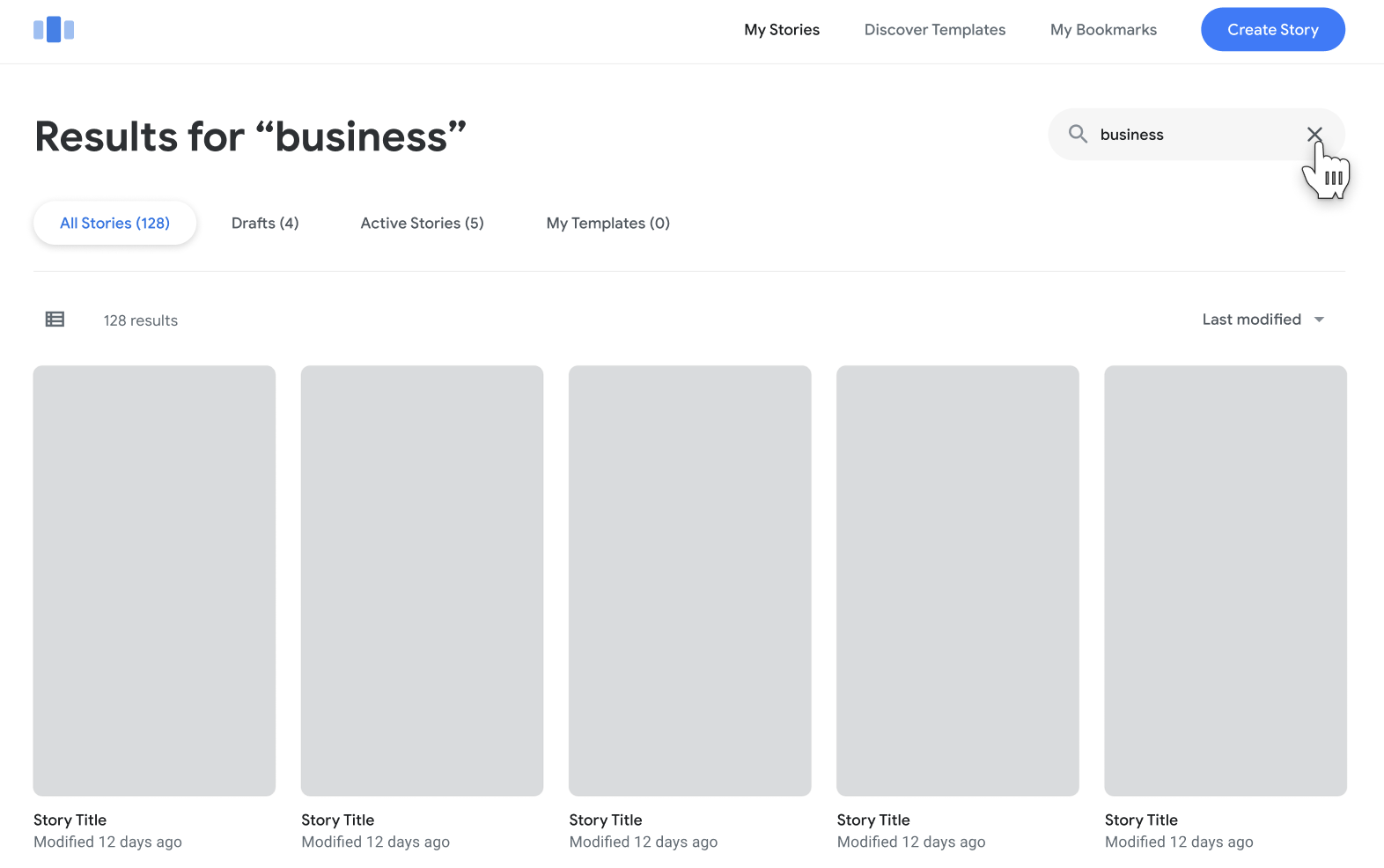
When searching and filtering results on the dashboard, we need to show the total number of results, as well as the number of results per status (e.g. 10 totals, 5 drafts, 5 published). WordPress currently only reports the totals irregardless of status (i.e. 10 totals).
The search view also has a count for found templates. Given that templates are likely to be their own entity / post type, this probably requires some more tinkering, which we can do once we got to it.
Slack discussion
Example on Figma
Screenshot:
_Do not alter or remove anything below. The following sections will be managed by moderators only._
Acceptance Criteria
QA Instructions
 swissspidy
All 20 comments
@spacedmonkey @miina curious to hear your thoughts on this. Not sure how easy it is to implement.
The current X-WP-Total HTTP header is super simple because WP_Query uses SQL_CALC_FOUND_ROWS and returns the total by default.
swissspidy
on 9 Apr 2020
@swissspidy Should be relatively easy in theory:
We could probably add get_items method to the web stories REST endpoint and use something like $response->header('X-WP-countByStatus, wp_json_encode(wp_count_posts( 'web-story' )) before returning the response.
 miina
on 16 Apr 2020
miina
on 16 Apr 2020
^ The header's value could be customized of course (e.g. add templates' count), wouldn't need to just pass all the counts for web-story, there's a lot of unnecessary, but adding a header when getting the stories should be quite straightforward. (If I understood the issue correctly.)
EDIT: Perhaps I didn't understand the issue correctly afterall! Will check how the search is being used in Dashboard...
miina
on 16 Apr 2020
Ok, instead of just using the count of web stories, we can loop through the found posts from search, count them by status before returning the response and set the header accordingly.
miina
on 16 Apr 2020
Perhaps @BrittanyIRL can clarify here, but I think if search results are paginated, the count needs to be for the total, unpaginated result set.
swissspidy
on 16 Apr 2020
Ah, that's a good point! Perhaps we'd need to execute a custom query on the DB in this case with SQL_CALC_FOUND_ROWS.
miina
on 16 Apr 2020
Hey! Thanks for tagging me @swissspidy
you're right - since the results are paginated we need to get the total, unpaginated result set by status
 BrittanyIRL
on 16 Apr 2020
BrittanyIRL
on 16 Apr 2020
The Figma design shows the total in brackets in each pill/tab, eg. 'All Stories (128)', 'Drafts (8)', 'Active Stories (120)'. It also shows the same number below the active tab, eg. '128 results'.
If 'Drafts' were active instead of 'All Stories', will this show '8 results' or '128 results'? ie. is this supposed to be the total, or a copy of the number in the pill.
 cvolzke4
on 23 Apr 2020
cvolzke4
on 23 Apr 2020
@samitron7 with the new designs, do we need to know these counts anymore?
BrittanyIRL
on 5 May 2020
Per Sam's comment in slack yesterday:
in the example in the new video the search was done preform when you were browsing templates so you won't get the tab navigations hence no number counter is needed. In this ticket, search is applied on My Stories hence you'll see the tabs and the counters. Let me know if you see something different but in short the counts should be there for sections that have the tab navigation
So with the new designs we still need these counts.
BrittanyIRL
on 8 May 2020
@o-fernandez - this needs PHP implementation on the API before we can add the counts to the dashboard.
BrittanyIRL
on 8 May 2020
Should I pick this up @swissspidy ?
 spacedmonkey
on 11 May 2020
spacedmonkey
on 11 May 2020
@spacedmonkey feel free! Note that the count needs to be for the total, unpaginated result set. See discussion above for some ideas on how this could be implemented.
swissspidy
on 11 May 2020
@BrittanyIRL @cvolzke4 @jauyong #1761 closed this issue as the API work was done. However, the UI changes in #1312 are still open. Is there an existing issue for the UI work already? Or does this need one?
swissspidy
on 14 May 2020
we need an issue for the UI work. Just made one here: https://github.com/google/web-stories-wp/issues/1784
BrittanyIRL
on 14 May 2020
I am implementing the UI now and found something not quite right.
When I toggle to just see 'drafts' or 'publish' status we are filtering the stories on the API and updating accordingly so that we have accurate pagination and data.
ie:
wp/v2/web-story?context=edit&order=desc&orderby=modified&page=1&per_page=10&status=draft&_locale=user
If status= publish AND draft I get back this: {"all":18,"publish":3,"draft":15}
but if i swap to just the drafts I will get this: {"all":15,"publish":3,"draft":15}
I am so sorry i didn't notice this earlier.
We need that all key there to always equal the combination of publish and draft.
@swissspidy @spacedmonkey ^^
BrittanyIRL
on 15 May 2020
However, the search should be considered as the totals are returned. So if I search for 'nature' and i have a total of 7 results, 3 drafts, 4 published i should have a total of 7 not a total of all of my stories ever.
^^ @samitron7 @o-fernandez can you confirm?
BrittanyIRL
on 15 May 2020
No worries @BrittanyIRL! That seems legit. We'll address this.
swissspidy
on 15 May 2020
Third time is the charm here. After further testing we've found that the API is returning different results for the header counts by status on pagination. It's not noticeable at first unless you only have a few stories to show.
To see this really take effect try this
Dashboard: https://stories-new-wordpress-amp.pantheonsite.io/wp-admin/edit.php?post_type=web-story&page=stories-dashboard#/
- search 'draft' to limit results (you should get 69 stories total, 65 drafts, 4 published
- scroll the page so that the API calls more pages. You'll see
publishturn to 0.
Page 4
https://stories-new-wordpress-amp.pantheonsite.io/wp-json/wp/v2/web-story?context=edit&order=desc&orderby=modified&page=4&per_page=10&search=draft&status=publish%2Cdraft&_locale=user
x-wp-totalbystatus: {"all":69,"publish":4,"draft":65}


md5-422fb7d6565401754ec38ac4a7ea4641


https://stories-new-wordpress-amp.pantheonsite.io/wp-json/wp/v2/web-story?context=edit&order=desc&orderby=modified&page=5&per_page=10&search=draft&status=publish%2Cdraft&_locale=user


md5-ab8caf77c15ef5ccf1ad382cbad3a8d3


x-wp-totalbystatus: {"all":69,"publish":0,"draft":65}
Verified in QA (tested in Master)
 csossi
on 5 Jun 2020
csossi
on 5 Jun 2020
Related issues
 injainja
·
4Comments
injainja
·
4Comments
 ernee
·
4Comments
ernee
·
4Comments
 dvoytenko
·
3Comments
dvoytenko
·
3Comments
 o-fernandez
·
4Comments
csossi
·
3Comments
o-fernandez
·
4Comments
csossi
·
3Comments
Most helpful comment
However, the search should be considered as the totals are returned. So if I search for 'nature' and i have a total of 7 results, 3 drafts, 4 published i should have a total of 7 not a total of all of my stories ever.
^^ @samitron7 @o-fernandez can you confirm?