Web-stories-wp: Stories need to appear in the default loop / WP homepage feed
Feature Description
Stories, per default, need to appear on the homepage when published. Since custom post types don't do this by default, we need to be creative here. I propose the following:
- Ship with a Gutenberg block so one can easily create a homepage post with a story embed (it would be a manual process though). We plan on doing this anyway.
- Offer an option to auto-post a new standard feed post with an embedded story as part of the story publish flow. We'll make that the default option in the editor (but make it configurable).
Our exec leadership has marked this as launch blocker for the beta, so this is a drop-everything-and-make-it-happen kind of thing after alpha.
I nominate either @spacedmonkey or @swissspidy to work on this and make it happen.
_Do not alter or remove anything below. The following sections will be managed by moderators only._
Acceptance Criteria
QA Instructions
 pbakaus
All 38 comments
Just going to leave this here - https://github.com/spacedmonkey/built-in-taxos-cpt
 spacedmonkey
on 10 Apr 2020
spacedmonkey
on 10 Apr 2020
Simply including custom post types in homepage queries is likely undesired by users as it's quite unexpected and can break existing layouts easily. Leveraging Gutenberg blocks makes sense to me. Especially with full site editing in the works.
In the end, what we need a block that displays a story using amp-story-player. The markup for that looks as follows:
<head>
  <script
    async
    src="https://cdn.ampproject.org/amp-story-player-v0.js"
  ></script>
  <link
    href="https://cdn.ampproject.org/amp-story-player-v0.css"
    rel="stylesheet"
    type="text/css"
  />
</head>
<body>
  <amp-story-player style="width: 360px; height: 600px;">
    <a
      href="https://preview.amp.dev/documentation/examples/introduction/stories_in_amp/"
      style="--story-player-poster: url('https://amp.dev/static/samples/img/story_dog2_portrait.jpg')"
    >
      Stories in AMP - Hello World
    </a>
  </amp-story-player>
</body>
There are a few ways we can implement this, from hijacking WordPress's oEmbed template (requires an iframe) to just save the needed HTML as-is in the block's save function (requires unfiltered HTML caps).
Some potential middle ground that could work for now:
- Create a new
web-stories/embedblock - This block is dynamic, the markup is assembled in PHP side. Avoids issues with unfiltered_html restrictions in WordPress. Allows loading JS & CSS only when block is actually used.
- Sizing works like in the image block:
The block's size can be adjusted using sliders, preserving the aspect ratio.
Different dimensions can be entered in the sidebar if needed, not preserving the aspect ratio. - Selecting the story to embed:
It would probably be easiest if embedding would work by selecting a story from a dropdown.
This way we have the story's post ID and can easily fetch its poster image, title, and URL in PHP to assemble the markup
Alternative: Selecting the story works by pasting the URL. A REST API endpoint would then be used to fetch the title and poster image. - Optional: the poster image could be manually overridden via the sidebar
 swissspidy
on 14 Apr 2020
swissspidy
on 14 Apr 2020
@spacedmonkey @miina WDYT about the suggestion above? Curious to hear your opinion.
I think we can easily start with a simple block to embed one's own stories.
In the future we could extend this block (and extract into its own plugin) to work for any web story out there, and for people who are not using the editor.
swissspidy
on 14 Apr 2020
It would be great to have both approaches in (4). Stories local to the site hosting the block, would appear in the drop down. And 3P stories could be entered via URL (assuming the Story player can play 3P stories).
 amedina
on 15 Apr 2020
amedina
on 15 Apr 2020
All of this sounds good to me, but I want to bring in another thing we need: From the story editor, there should be an affordance to create a new post after publishing the story, in which case we should generate a standard post (not a custom post) prefilled with the correct gutenblock for the story, and then directly open it for edit.
/cc @samitron7 for thoughts
pbakaus
on 15 Apr 2020
I am not too worried about that part, as it basically means assembling the block markup, creating a post via the API, and directing the user to it. We'd just need to make sure to decouple WP-specific stuff from the editor in a good way.
swissspidy
on 15 Apr 2020
@swissspidy Makes sense to me, the suggested block!
Some notes:
- Should the block perhaps allow adding multiple stories, too?
- We'd still need to render it in the editor, too, I suppose
amp-story-playershould work in the post editor as expected? Could we just useServerSideRenderin this case (if it's 100% identical in terms of markup)? Or is there any reason why it should render differently in the editor? - Should we enforce the recommended width/height ratio for the player? (3:5)
 miina
on 15 Apr 2020
miina
on 15 Apr 2020
It would be great to have both approaches in (4)
That could work, yeah.
Should the block perhaps allow adding multiple stories, too?
In the future we might want to create a block for showing the latest stories, otherwise it seems like this could be achieved by using the columns block. Or could you perhaps elaborate on potential use cases?
We'd still need to render it in the editor, too, I suppose
amp-story-playershould work in the post editor as expected?
I hope so! I don't see why not. We should try to avoid ServerSideRender due to its UX issues. If amp-story-player doesn't work out of the box, we might be able to put it in a sandboxed iframe (like Gutenberg does for other embeds).
Should we enforce the recommended width/height ratio for the player? (3:5)
Good question. I'll leave this up for others to decide, but I think my sizing suggestion above could work well here. If you resize using resize handles, it would maintain the 3:5 aspect ratio, but any manual changes would override it (but could be reset, of course)
swissspidy
on 15 Apr 2020
In the future we might want to create a block for showing the latest stories, otherwise it seems like this could be achieved by using the columns block. Or could you perhaps elaborate on potential use cases?
It looks like amp-story-player can have multiple stories in a way that once one story has ended, the other story starts -- in the same player (adding multiple a tags into the same player). Using columns would work for the option to use multiple players, not for that though.
miina
on 16 Apr 2020
I think this should be an opt in feature. Displaying stories on the home page / archive pages may have unknown side effects and may break sites. Other CPT do not do this and forcing stories may upset some users.
A custom block and a widget to embed stories is a good way to get stories out their corner...
spacedmonkey
on 16 Apr 2020
@miina Ah, good point! It could potentially work like the core/buttons block, which can have n core/button inner blocks. Perhaps something for a second iteration.
swissspidy
on 16 Apr 2020
I think this should be an opt in feature. Displaying stories on the home page / archive pages may have unknown side effects and may break sites. Other CPT do not do this and forcing stories may upset some users.
A custom block and a widget to embed stories is a good way to get stories out their corner...
Yep, we will most likely make it an explicit user choice (the creation of a new post with story embedded).
pbakaus
on 18 Apr 2020
Questions.
- Would we create a new post with an embedded version or just include the stories custom post type in the loop?
- If a story appears on the homepage, should it also appear in other places like
- Search
- Category archive
- Tag archive
- Author archive
- Date based archives ( www.example.com/2019/01/01 )
- Next and previous links in post pages.
- Should stories appear in the post REST API endpoint? For those doing headless WP.
- Is there a figma design for what a story looks like on a home page?
- What about themes that use excerpts on archive / home page?
spacedmonkey
on 20 Apr 2020
Would we create a new post with an embedded version or just include the stories custom post type in the loop?
We're currently focusing on creating a Gutenberg block to embed stories, rather than including stories alongside regular posts. For this, we use amp-story-player, as mentioned earlier in this thread.
swissspidy
on 20 Apr 2020
If a story appears on the homepage, should it also appear in other places like
- Search
- Category archive
- Tag archive
- Author archive
- Date based archives ( www.example.com/2019/01/01 )
- Next and previous links in post pages.
- Should stories appear in the post REST API endpoint? For those doing headless WP.
- Is there a figma design for what a story looks like on a home page?
- What about themes that use excerpts on archive / home page?
Ideally all of this, but I'm scared to patch the loop to include it as custom post type in everything as I don't think themes are well prepared for it. Hence, the MVP being a Gutenberg block, and an optional but suggested post creation workflow.. ideas here are welcome though!
pbakaus
on 21 Apr 2020
What are people thoughts on this ?
Would we create a new post with an embedded version ?
To a expand on the idea, when a story is created, also create a new post ( post with post type of post), that has the same name. The content this post, would have the embedded story block.
It is a little wasteful to create a secondary post for each story, but may work around a lot of the limitation of WP.
spacedmonkey
on 22 Apr 2020
What are people thoughts on this ?
Would we create a new post with an embedded version ?
To a expand on the idea, when a story is created, also create a new post ( post with post type of post), that has the same name. The content this post, would have the embedded story block.
It is a little wasteful to create a secondary post for each story, but may work around a lot of the limitation of WP.
That's the plan, actually :)
pbakaus
on 23 Apr 2020
@swissspidy this issue is marked as UX Needed. Is the spec still incomplete? If you still require a UX design for this, LMK so we can figure out priorities with @samitron7
 o-fernandez
on 6 May 2020
o-fernandez
on 6 May 2020
@o-fernandez So there are two parts here as per the issue description: 1) the Gutenberg block, 2) an option to create a new post with that block in it
For 1), there is no design for the Gutenberg block. In #1249 we are currently following Gutenberg design principles to create a block, which I think is totally fine for a first iteration. What's also missing are things like a block icon (i.e. a Web Stories icon like we would need for the admin menu item on the left-hand side) or good example content. _After beta_ we would need to have a closer look at these things.
For 2) there is no spec as far as I know. IMO not super urgent, as the most critical thing is having a Gutenberg block in the first place (#1249).
swissspidy
on 6 May 2020
For history https://github.com/ampproject/amp-wp/issues/3072
spacedmonkey
on 8 May 2020
@swissspidy do you have a screenshot /recording we can add here to see what the block looks like and where the spec needs are? Just to make sure we focus our time on the spec side properly, given all the other spec needs we've been working through. :)
o-fernandez
on 21 May 2020
@o-fernandez Screenshots and screen recordings are available at https://drive.google.com/drive/folders/1hs8w0c9gLpPXRRT8vjpmM9_cnEoYFTAk?usp=sharing. PTAL
A few notes from my side:
- The block's look and feel is mimicked after existing Gutenberg blocks, like the YouTube block and the image block. I recommend trying those out in the editor to see the similarities.
- Still missing: good example story to display before inserting a block (as seen in
Full Flow.mov) - Still missing: a Web Stories icon associated with the block (as seen in
Full Flow.mov). Right now it's a "page" icon with three lines. - Still missing: spec for part 2) as defined in the issue description. I cannot really take a screenshot here for something that does not exist...
swissspidy
on 27 May 2020
@swissspidy a few things that stood out to me. Generally it looks good, and a great start!
- Noticed that the user needs to paste in the web story URL, would be great if they can easily search through their current stories and embed one without knowing the URL. Adding links in the post allow for this and I see that web stories are already in the list for links, so it'd be expanding this to the story block url field
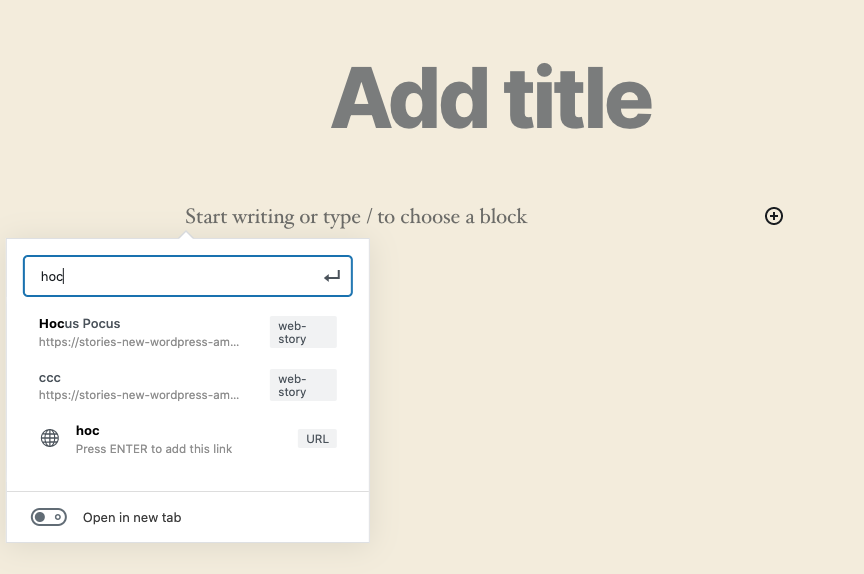
- When viewing the published post and tapping/clicking on a story, my expectation is that the story would load in a fullscreen overlay. So the fact that it just plays in the container in the post was a bit odd to me.
I think both of these are nits/not critical for the initial merge of this, but would love for us to think through potential improvements as we go towards the Stable release.
@samitron7 for her review and feedback on the placeholder story/icons/etc.
o-fernandez
on 27 May 2020
would be great if they can easily search through their current stories and embed one without knowing the URL
That's still an open todo, as per the discussion above and on #1249.
When viewing the published post and tapping/clicking on a story, my expectation is that the story would load in a fullscreen overlay. So the fact that it just plays in the container in the post was a bit odd to me.
That's not how the AMP story player works. With that, the story is embedded and viewable right within the page, without leaving the page. However, we've discussed adding a button to allow viewing the story fullscreen. This would be custom functionality on top of the story player that we'd have to implement.
I think both of these are nits/not critical for the initial merge of this, but would love for us to think through potential improvements as we go towards the Stable release.
Agreed.
We should create new issues for those enhancements and treat this one here more like an epic.
swissspidy
on 28 May 2020
Created new issues: #2240, #2241, #2242, #2243. Labelled UX needed where applicable.
Still need feedback on this:
Offer an option to auto-post a new standard feed post with an embedded story as part of the story publish flow. We'll make that the default option in the editor (but make it configurable).
@samitron7 friendly ping
swissspidy
on 4 Jun 2020
@swissspidy as @samitron7 gets around to this, is there a standard way to pop up a notification to the user when they hit Publish that says:
"Your Web Story has been published [can include permalink in there]. Would you like to include it on a new post?"
Then the dialog/notification can have two buttons options for the user:
- Dismiss
- Add to new post
With "Add new post" being the defaulted option.
If they select "Add to new post" they would be taken to a new post with the story automatically added to the body using your widget.
I think that's the easiest thing to do for now, unless Sam has a full design. But LMKWYT on feasibility.
Also @pbakaus in case he has thoughts on this approach or other ideas.
o-fernandez
on 4 Jun 2020
Waiting for further feedback, but yeah this is possible.
We can add dialogs in this style: https://google.github.io/web-stories-wp/?path=/story/stories-editor-components-dialog-delete-media--default
swissspidy
on 4 Jun 2020
Confirming that we'll scratch auto-post for now, and go with something @o-fernandez has said. We just need to make it super trivial to create the new post after publishing the story.
pbakaus
on 5 Jun 2020
Works for me. Should be easy enough to add.
swissspidy
on 5 Jun 2020
@pbakaus @o-fernandez @samitron7 PTAL at the screenshots I added to #2275. Feel free to test it on the QA environment.
swissspidy
on 5 Jun 2020
@pbakaus @o-fernandez @samitron7 PTAL at the screenshots I added to #2275. Feel free to test it on the QA environment.
Looks very good to me. I'd go ahead with this and we can revise/update if @samitron7 has any feedback to incorporate.
o-fernandez
on 5 Jun 2020
Nice! This is good enough for now imho, agree with Omar.
pbakaus
on 5 Jun 2020
Hey Folks - sorry I missed this entire thread. I'm going to have to figure out a better system for filtering out github with my mentions.
But this all looks good to me and I actually already have design for this (several weeks back and reviewed with Paul) that is less intrusive to the users but I think what Omar recommended would work for beta. Communication disconnect here. @o-fernandez we can review the design and see what I may need to change for stable.
 samitron7
on 11 Jun 2020
samitron7
on 11 Jun 2020
Oh, good to know that there's design for that!
It requires the pre-publish panel to exist first, so reworking for stable sounds good to me.
@samitron7 Some thoughts on the design, if I may:
- We should only offer the "Draft post with embedded story" option.
Not only because it might otherwise be confusing for the user to have so many options.
I guarantee you that in 100% of all cases users would want to first preview the post, and make sure the post has all the right tags/categories, SEO values, etc.
And if they really don't need to change anything, publishing the draft post would just be 1 click away. - When going with that, I would just add a button below that preview saying "Create new draft post"
- The preview there looks interesting, but also complex, as it displays the actual story and the actual title.
What if the title is longer? Could we perhaps just add a static screenshot? - Should the "Create" link open in a new tab or the current one?
- What should the pre-publish flow look like if I didn't directly publish the story, but set it to be published in the future?
swissspidy
on 11 Jun 2020
@csossi See #2275 for QA instructions
swissspidy
on 12 Jun 2020
 csossi
on 16 Jun 2020
csossi
on 16 Jun 2020
@o-fernandez The flow for beta with the dialog has now landed. Can you verify that? Note that the flow will look different for stable, see #2399.
swissspidy
on 17 Jun 2020
This works beautifully, thanks @swissspidy !
o-fernandez
on 18 Jun 2020
Related issues
swissspidy
·
3Comments
swissspidy
·
3Comments
 dvoytenko
·
3Comments
dvoytenko
·
3Comments
 injainja
·
4Comments
injainja
·
4Comments
injainja
·
4Comments
injainja
·
4Comments