Web-stories-wp: Font: Saved Text Style in Design Panel
As a story creator, I want to save and edit text style presets to reuse in my story.
- Text style presets can be easily applied to any text element. A text style preset can include: Font variant, Font size, Line height, Letter spacing, Font Style, Text Color, Fill color, Fill style, Padding.
- A user can apply a text style preset by selecting any text element or text selection and clicking on their desired preset styling from the text style presets panel.
Adding & Removing text style presets
- A user may add a text style preset by selecting an existing text element and clicking on the (+) button in the color preset section tof the design panel.
- A user may remove a preset by clicking on the edit option in the text style preset section and then the (x/remove) icon on the text style preset.
Note: The preset will only save styling that is applied to the entire text element. If the text element has a mix of styles for a given property (e.g., parts bolded and parts not) then the preset will ignore that styling as part of the preset (will save without any bolding).
Acceptance Criteria
- A user is able to save new text styles for reuse
- User is able to apply previously saved text styles to other elements within the story.
- Saved text styles are available anytime a user is editing the existing story.
Design in progress
Testing
I
- Add a Text element
- Verify that Saved styles panel is visible.
- Add a Media element and select both elements
- Verify that the Saved Styles panel is not visible.
II
- Add a Text element and change its style (for the whole text): font, font-weight, letter-spacing, italic, bold, background color/highlight, line-height, underline, text color, padding.
- Click on the
+icon next to the "Saved styles" to add a text preset. - Verify that a preset is added accordingly.
- Add a new text now.
- Click on the preset while the text is selected.
- Verify that the same styles are now applied on the new text element.
- Add more text elements and verify that the style is added on multi-selection, too
III
- Add a few text elements and change their styles separately.
- Multi-select the added elements and click the icon to add the presets again.
- Verify that multiple style presets are added at the same time, one per each text.
IV
- Add a text element with some inline styles applied on part of the text only.
- Now add a preset.
- Verify that the styles that are applied partially on the text only are not considered in the saved preset.
V
- Add a few text elements and create some presets.
- Click the Edit icon for the "Saved styles"
- Verify that the edit mode is entered with remove icons appearing on the presets.
- Click on the Remove icon and verify the presets being removed.
Reviews
- [ ] Product brief reviewed by UX
- [x] Product brief reviewed by eng (TL and/or dev)
- [ ] UX Design reviewed and approved by PM
- [ ] UX Design reviewed and approved by eng
- [ ] Eng design reviewed by TL (if needed)
 jauyong
All 16 comments
Should we combine this #29?
 swissspidy
on 19 Feb 2020
swissspidy
on 19 Feb 2020
I think we are going to need to save this data in new field on in the post meta. So we are going to need PHP and REST API work done here, I believe.
 spacedmonkey
on 26 Feb 2020
spacedmonkey
on 26 Feb 2020
@pbakaus Can the user add/edit Text presets without having templates? If yes, then perhaps it would be good to have a separate issue for adding/managing presets independently of templates.
 miina
on 4 Mar 2020
miina
on 4 Mar 2020
@pbakaus Can the user add/edit Text presets without having templates? If yes, then perhaps it would be good to have a separate issue for adding/managing presets independently of templates.
Yep. @samitron7 to confirm.
 pbakaus
on 7 Mar 2020
pbakaus
on 7 Mar 2020
@samitron7 is finalizing the spec, this was part of the redesign.
 o-fernandez
on 1 Jul 2020
o-fernandez
on 1 Jul 2020
@miina @pbakaus
Can the user add/edit Text presets without having templates? If yes, then perhaps it would be good to have a separate issue for adding/managing presets independently of templates.
Text presets in the design panels aren't coupled at all to templates so the answer is yes. to be clear @miina these are saved text presets which mean they are 100% user generated. The text preset in the Text panel (left hand side) is coupled to templates. If you're using a template, text styles from the template will be brought into the text preset section.
 samitron7
on 2 Jul 2020
samitron7
on 2 Jul 2020
@samitron7 is this ticket still relevant? If so, can you link the specific figma section it refers to, thanks!
 barklund
on 13 Aug 2020
barklund
on 13 Aug 2020
@barklund yeah, this is text presets. @samitron7 did we finalize the ui for text presets (not the headers in text panel, but the styled text presets in design panel?) @pbakaus FYI that this may also be at risk.
o-fernandez
on 20 Aug 2020
I believe @miina already did the work for this all and it's hidden behind a feature flag. All the rules she's implemented should apply and the one big difference would be we pull all text styles into it's own section:
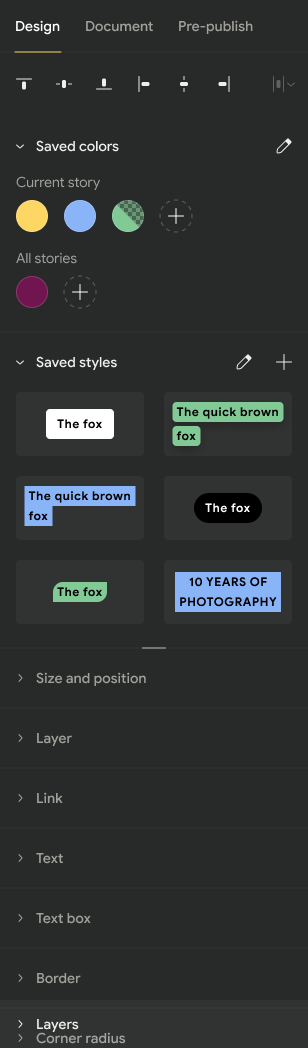
@miina @barklund to confirm what else is needed from UX.
samitron7
on 24 Aug 2020
hey folks, please ping me if there are additional questions. I'll take this off @samitron7's plate to unblock her (and I'll review with her later).
pbakaus
on 25 Aug 2020
Everything related to the presets is currently visible -- there are no additional implemented hidden features (but the structure is still in place to easily add text styles back):
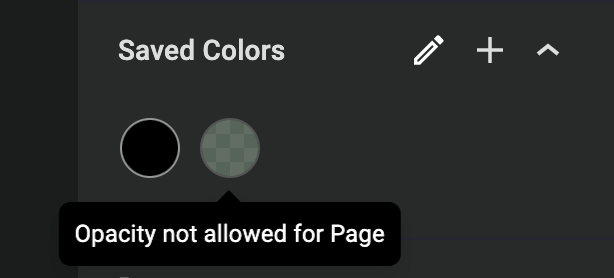
@pbakaus Some questions on Text Styles:
- Which values will be saved to the Text Style? How will the user know which values are saved to the Text Style (e.g. if there's line-height, that might not be obvious from the preview)?
- If there is no fill background displayed for a text (it's transparent), how will this be displayed in a text preview (if it's dark text and we just leave it transparent on the panel area it wouldn't stand out from the generally dark design)?
- To confirm: Previously, when clicking on the
+icon for a text element, if the text didn't have any styling except for the font color, a Color preset was added, however, if the Text had any other styling, a Text style preset was added. Will this logic remain the same?
miina
on 25 Aug 2020
@miina here's my take on your questions.
@pbakaus Some questions on Text Styles:
- Which values will be saved to the Text Style? How will the user know which values are saved to the Text Style (e.g. if there's line-height, that might not be obvious from the preview)?
The list of values that will be saved are now in the product brief
Please add a comment to the brief if something doesn't make sense there, or is missing, so we can close the thread there and reflect in the brief.
- If there is no fill background displayed for a text (it's transparent), how will this be displayed in a text preview (if it's dark text and we just leave it transparent on the panel area it wouldn't stand out from the generally dark design)?
@samitron7 do you have a standard suggestion here? This seems more clearly a UX consideration. We can ship without any special things here, but it will be problematic for dark text styles without a light bg.
- To confirm: Previously, when clicking on the
+icon for a text element, if the text didn't have any styling except for the font color, a Color preset was added, however, if the Text had any other styling, a Text style preset was added. Will this logic remain the same?
I don't think we should do this. I think that if the user clicks (+) on the text styles section, we should always save a text style. If they click (+) on the color presets, we add a color preset. Mixing up the behavior of one button based on opaque system logic seems more trouble than it's worth, IMO.
o-fernandez
on 25 Aug 2020
@o-fernandez Thanks! Will start working on this already to get it in on time.
The list of values that will be saved are now in the product brief
Will there be a tooltip on hover to show which values are saved to the preset? E.g. padding and line-height will not be obvious just from the preset preview. This might be missing design in Figma if that's the case -- IIRC it used to be in the old Figma before. Thoughts?
miina
on 25 Aug 2020
@miina here's my take on your questions.
@pbakaus Some questions on Text Styles:
- Which values will be saved to the Text Style? How will the user know which values are saved to the Text Style (e.g. if there's line-height, that might not be obvious from the preview)?
The list of values that will be saved are now in the product brief
Please add a comment to the brief if something doesn't make sense there, or is missing, so we can close the thread there and reflect in the brief.
- If there is no fill background displayed for a text (it's transparent), how will this be displayed in a text preview (if it's dark text and we just leave it transparent on the panel area it wouldn't stand out from the generally dark design)?
@samitron7 do you have a standard suggestion here? This seems more clearly a UX consideration. We can ship without any special things here, but it will be problematic for dark text styles without a light bg.
Probably have to use some type of background in that case, I'll let @samitron7 confirm. But shouldn't stop somebody from implementing, this can come last.
- To confirm: Previously, when clicking on the
+icon for a text element, if the text didn't have any styling except for the font color, a Color preset was added, however, if the Text had any other styling, a Text style preset was added. Will this logic remain the same?I don't think we should do this. I think that if the user clicks (+) on the text styles section, we should always save a text style. If they click (+) on the color presets, we add a color preset. Mixing up the behavior of one button based on opaque system logic seems more trouble than it's worth, IMO.
+1, strongly agree.
pbakaus
on 25 Aug 2020
@samitron7 to update with the transparency mock
 bmattb
on 26 Aug 2020
bmattb
on 26 Aug 2020
Verified in QA
 csossi
on 4 Sep 2020
csossi
on 4 Sep 2020
Related issues
 Maverick283
·
3Comments
Maverick283
·
3Comments
 dvoytenko
·
3Comments
swissspidy
·
3Comments
csossi
·
3Comments
dvoytenko
·
3Comments
swissspidy
·
3Comments
csossi
·
3Comments
 injainja
·
4Comments
injainja
·
4Comments
Most helpful comment
@miina @pbakaus
Can the user add/edit Text presets without having templates? If yes, then perhaps it would be good to have a separate issue for adding/managing presets independently of templates.
Text presets in the design panels aren't coupled at all to templates so the answer is yes. to be clear @miina these are saved text presets which mean they are 100% user generated. The text preset in the Text panel (left hand side) is coupled to templates. If you're using a template, text styles from the template will be brought into the text preset section.