Web-bugs: whoishorsejs.com - design is broken
URL: https://whoishorsejs.com/
Browser / Version: Firefox 63.0
Operating System: Mac OS X 10.14
Tested Another Browser: Yes
Problem type: Design is broken
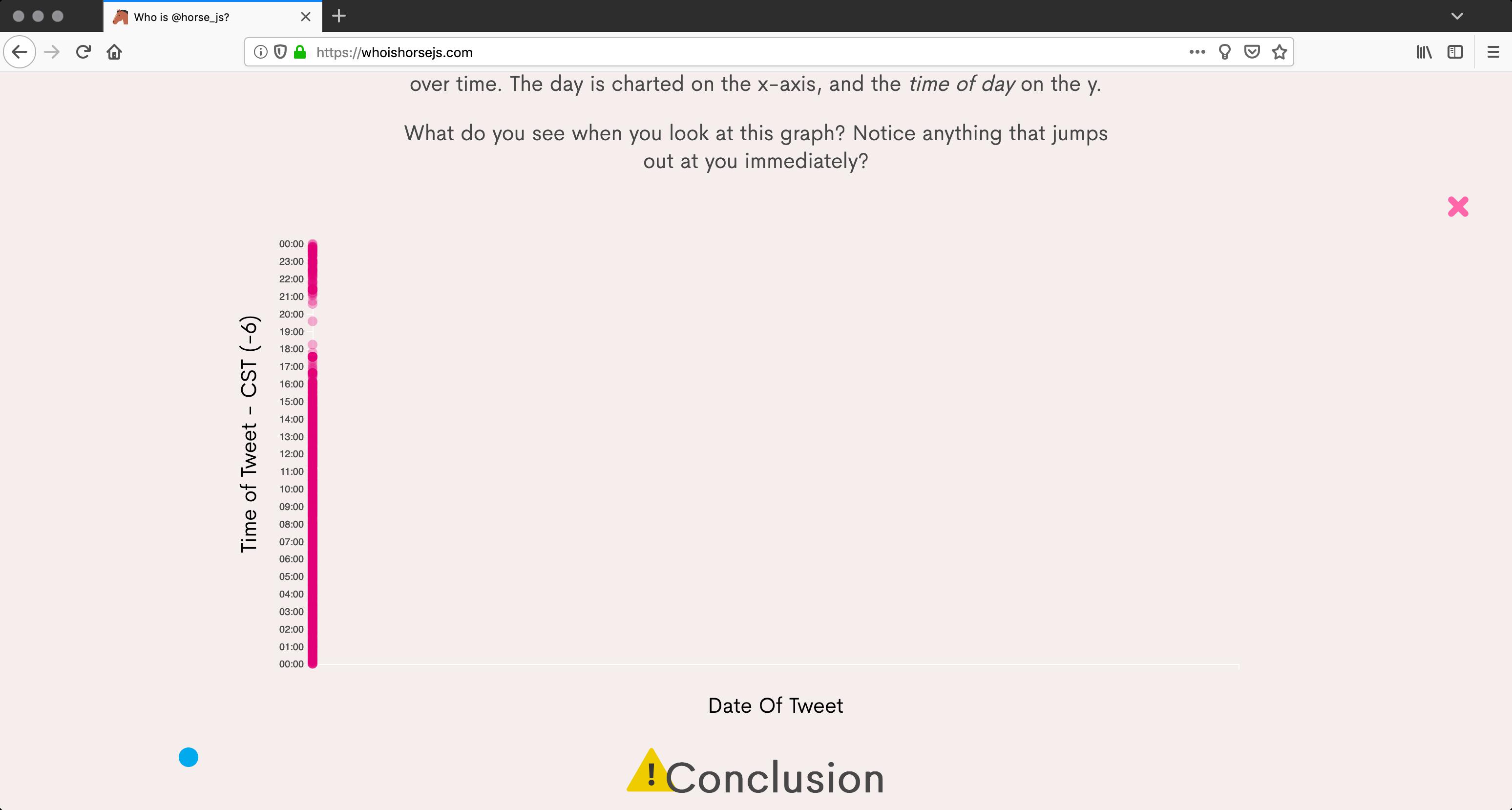
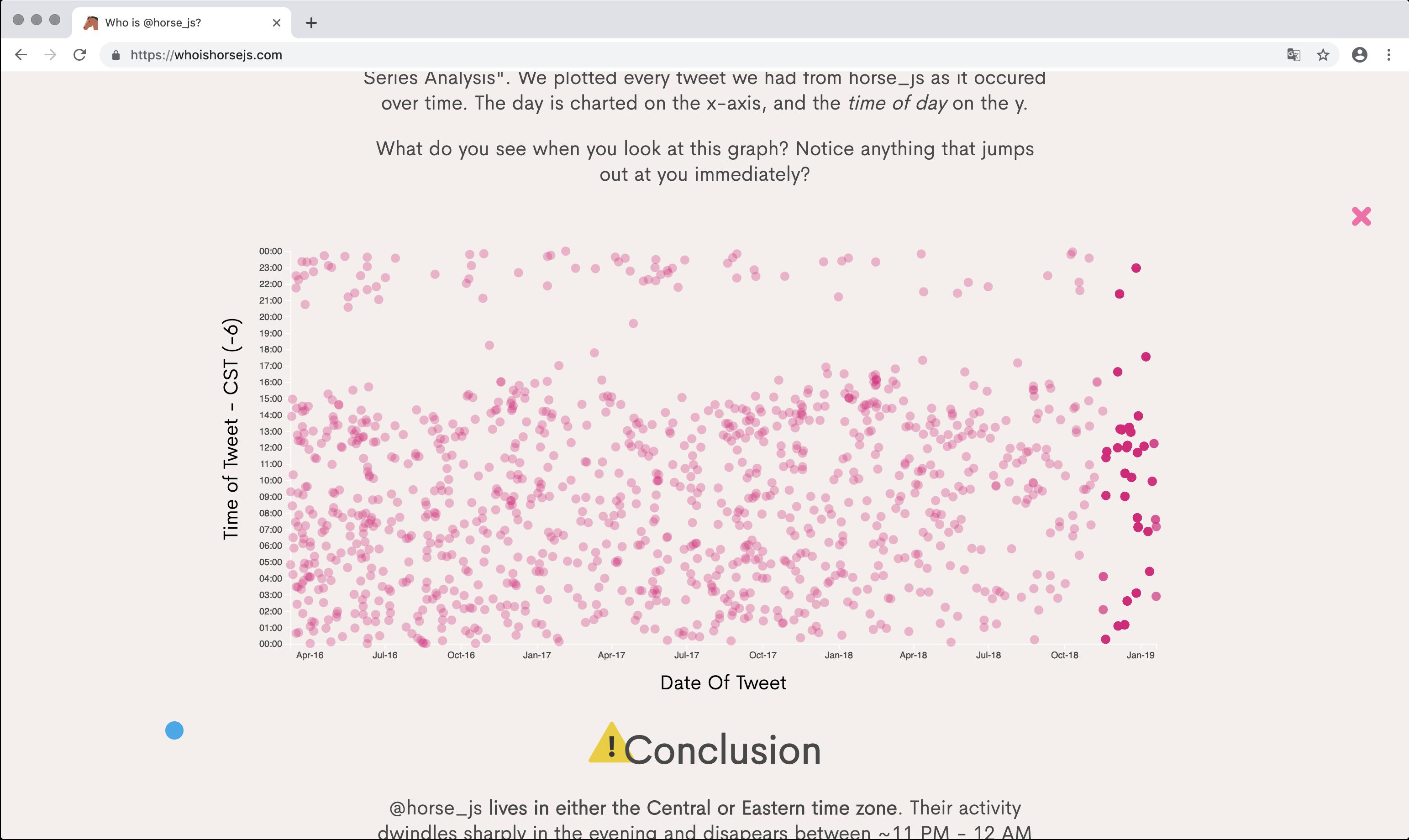
Description: Elements are missing and the graphs are unreadable. Designed for Chrome 🙄
Steps to Reproduce:
Browser Configuration
- None
Reported by @magervalp
_From webcompat.com with ❤️_
 webcompat-bot
All 10 comments
Firefox
Chrome
 karlcow
on 22 Jan 2019
karlcow
on 22 Jan 2019
Oh well, it's a Date.parse() issue. 🗑🔥
In Firefox, all the circles in those scatterplots look like this:
<circle class="horse-point" cx="NaN" cy="377.3946759259259" r="5"></circle>
Notice the NaN as the x coordinate here. The x coordinate is supposed to be calculated by a D3 scale function, but the used function has a range of [NaN, NaN], so something is broken here. Looking at the definition of said scale function, the problem becomes visible (from webpack:///./src/charts/scatterplot.js):
let x = d3Scale.scaleTime()
  .domain([d3.min(data, d => {
    return new Date(moment(d.created_at).format('MM-DD-YYYY'));
  }), d3.max(data, d => {
    return new Date(moment(d.created_at).format('MM-DD-YYYY'));
  })])
  .range([0, width]);
Effectively, this ends up calling the Date constructor with a MM-DD-YYYY date, which is not supported by us. Therefore, D3 tries to scale the values between two invalid dates, which isn't going too well. Ultimately, this is bug 1235045.
Hey, @paladique! According to the credits on that page, you worked on it, so you might be able to help out here. Since you are already using Moment.js, I don't think there is reason to build a string to then construct a new Date object here. I did some tests, and it looks like you could simply re-write that x function as:
let x = d3Scale.scaleTime()
  .domain([d3.min(data, d => {
    return moment(d.created_at).toDate();
  }), d3.max(data, d => {
    return moment(d.created_at).toDate();
  })])
  .range([0, width]);
which seems to be working just fine, and it's not depending on Date.parse() implementations here. Let me know if this doesn't work for some reason!
Also, thank you very much for providing a sourcemap, because that made debugging this much, much easier. :)
 denschub
on 25 Jan 2019
denschub
on 25 Jan 2019
@denschub thank you, @burkeholland and I will look into this!
 paladique
on 4 Feb 2019
paladique
on 4 Feb 2019
@paladique If you want a really easy fix you could also just replace the - with /'s
 NickolasBoyer
on 5 Feb 2019
NickolasBoyer
on 5 Feb 2019
If you want a really easy fix you could also just replace the
-with/'s
JFTR: Please don't. :) Although it would work in major browsers, Date.parse() is spe' ed to accept RFC2822 or ISO 8601 dates. MM/DD/YYYY is not covered by any of those specifications. If we have a solution that doesn't violate specs and depend on browser's implementations, let's use those, and not depend on weird hacks.
denschub
on 5 Feb 2019
Here is a ❤ for everyone who took their time to help fix this issue. It puts a smile on my face! @denschub - thank you for actually diagnosing and providing the fix. I feel like we need to put your name on the site somewhere now too!
@paladique - thanks for tagging me here. I would have lost this in the deluge of Github emails if I had not seen your name.
An update has been pushed and there is no longer 5K errors in the console. 😉
🐴🐴🐴🐴🐴🐴
 burkeholland
on 11 Feb 2019
burkeholland
on 11 Feb 2019
@burkeholland Thank you!
The twitter-widgets still don't render in Firefox though, should there be a separate issue for that?
 MagerValp
on 11 Feb 2019
MagerValp
on 11 Feb 2019
Ah - I didn't realize that was the case. A separate issue for that would be awesome.
burkeholland
on 11 Feb 2019
I can confirm that the charts work now, thanks for the update @burkeholland!
The twitter-widgets still don't render in Firefox though, should there be a separate issue for that?
This is because of Tracking Protection, and we have multiple bugs filed in Bugzilla for that already.
thank you for actually diagnosing and providing the fix. I feel like we need to put your name on the site somewhere now too!
Ah, y'know, just doing my job here. :)
As the issue with the charts is fixed, let's close this as fixed.
denschub
on 21 Feb 2019
This issue has been automatically locked since there has not been any recent activity after it was closed. Please open a new issue at https://webcompat.com/issues/new if you are experiencing a similar problem.
![lock[bot] picture](https://avatars1.githubusercontent.com/in/6672?v=4&s=40) lock[bot]
on 28 Feb 2019
lock[bot]
on 28 Feb 2019
Related issues
 Ezio916
·
4Comments
Ezio916
·
4Comments
 bvanrijn
·
4Comments
webcompat-bot
·
4Comments
bvanrijn
·
4Comments
webcompat-bot
·
4Comments
 IngrownMink4
·
3Comments
IngrownMink4
·
3Comments
 halwane050
·
5Comments
halwane050
·
5Comments