Web-bugs: creator.kodular.io - design is broken
URL: http://creator.kodular.io/?locale=en
Browser / Version: Firefox 64.0
Operating System: Mac OS X 10.14
Tested Another Browser: Yes
Problem type: Design is broken
Description: The phone image doesn't have margin on the right compared to Chrome result
Steps to Reproduce:
The phone vector at the center of the screenshot needs to have the same amount of margins from left and right. Firefox doesn't display the right one while Chrome does.
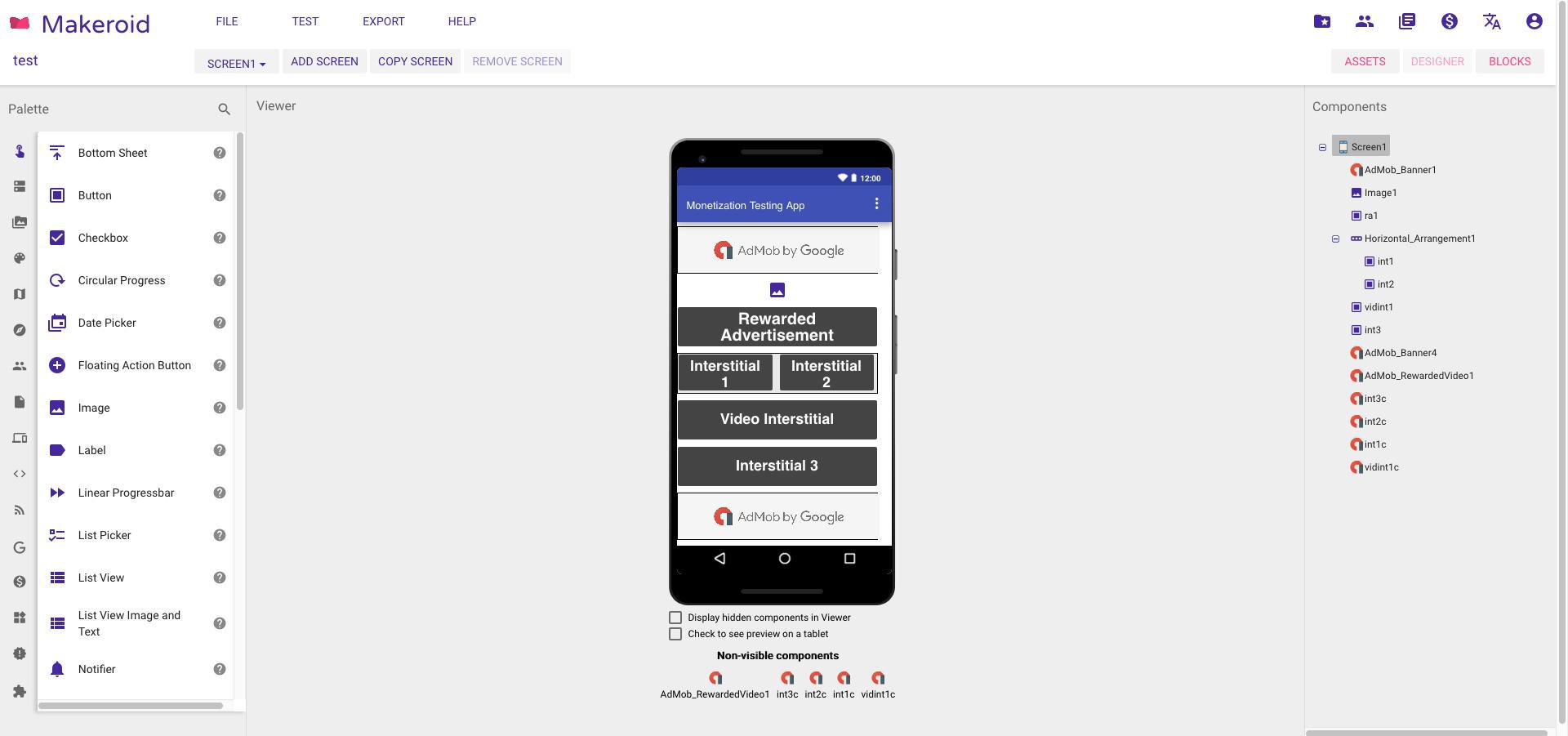
Browser Configuration
-
{u'mixed active content blocked': False, u'buildID': u'20181013100102', u'hasTouchScreen': False, u'tracking content blocked': u'false', u'consoleLog': [u'[console.log(Project.loadProjectNodes(): loadingInProgress = true) ode-0.js:10040:3]', u'[console.log(Project.loadProjectNodes(): loadingInProgress = false) ode-0.js:10040:3]', u'[console.log(MockForm: refresh() called.) ode-0.js:10040:3]', u'[console.log(MockForm: refresh() called.) ode-0.js:10040:3]', u'[console.log(MockForm: refresh() called.) ode-0.js:10040:3]', u'[console.log(MockForm: refresh() called.) ode-0.js:10040:3]', u'[console.log(MockForm: refresh() called.) ode-0.js:10040:3]', u'[console.log(MockForm: doRefresh() called) ode-0.js:10040:3]', u'[console.log(MockForm: doRefresh() done.) ode-0.js:10040:3]', u'[console.log(Blockly.Versioning: In Blockly.Versioning.upgrade, upgradeComponentType(Language,22,22,[object HTMLUnknownElement])) ode-0.js:80520:41]', u'[console.log(Blockly.Versioning: In Blockly.Versioning.upgrade, upgradeComponentType(Screen,35,35,[object HTMLUnknownElement])) ode-0.js:80520:41]', u'[console.log(Blockly.Versioning: In Blockly.Versioning.upgrade, upgradeComponentType(AdmobBanner,2,2,[object HTMLUnknownElement])) ode-0.js:80520:41]', u'[console.log(Blockly.Versioning: In Blockly.Versioning.upgrade, upgradeComponentType(Image,5,5,[object HTMLUnknownElement])) ode-0.js:80520:41]', u'[console.log(Blockly.Versioning: In Blockly.Versioning.upgrade, upgradeComponentType(Button,10,10,[object HTMLUnknownElement])) ode-0.js:80520:41]', u'[console.log(Blockly.Versioning: In Blockly.Versioning.upgrade, upgradeComponentType(HorizontalArrangement,7,7,[object HTMLUnknownElement])) ode-0.js:80520:41]', u'[console.log(Blockly.Versioning: In Blockly.Versioning.upgrade, upgradeComponentType(AdmobRewardedVideo,2,2,[object HTMLUnknownElement])) ode-0.js:80520:41]', u'[console.log(Blockly.Versioning: In Blockly.Versioning.upgrade, upgradeComponentType(AdMobInterstitial,2,2,[object HTMLUnknownElement])) ode-0.js:80520:41]', u'[console.log(Blockly.Versioning: Blockly.Versioning.upgrade: Final conversion to Blockly.mainWorkspace) ode-0.js:80520:41]', u'[console.log(Blockly.Versioning: Blockly.Versioning.ensureWorkspace: converting dom to Blockly.mainWorkspace) ode-0.js:80520:41]', u'[console.log(MockForm: doRefresh() called) ode-0.js:10040:3]', u'[console.log(MockForm: doRefresh() done.) ode-0.js:10040:3]', u'[console.log(MockForm: refresh() called.) ode-0.js:10040:3]', u'[console.log(MockForm: doRefresh() called) ode-0.js:10040:3]', u'[console.log(MockForm: doRefresh() done.) ode-0.js:10040:3]'], u'gfx.webrender.blob-images': True, u'gfx.webrender.all': False, u'mixed passive content blocked': False, u'gfx.webrender.enabled': False, u'image.mem.shared': True, u'channel': u'nightly'}
_From webcompat.com with ❤️_
 ardacebi
All 13 comments
@ardacebi is there any way you can share your project with me? Or give me some steps to be able to build something similar to what's in your screenshot?
(or email the exported .aia project to [email protected]?)
thanks!
 miketaylr
on 16 Oct 2018
miketaylr
on 16 Oct 2018
@miketaylr You can access the interface and see the issue here: http://builder.makeroid.io
The project doesn't make any difference, it's always the same.
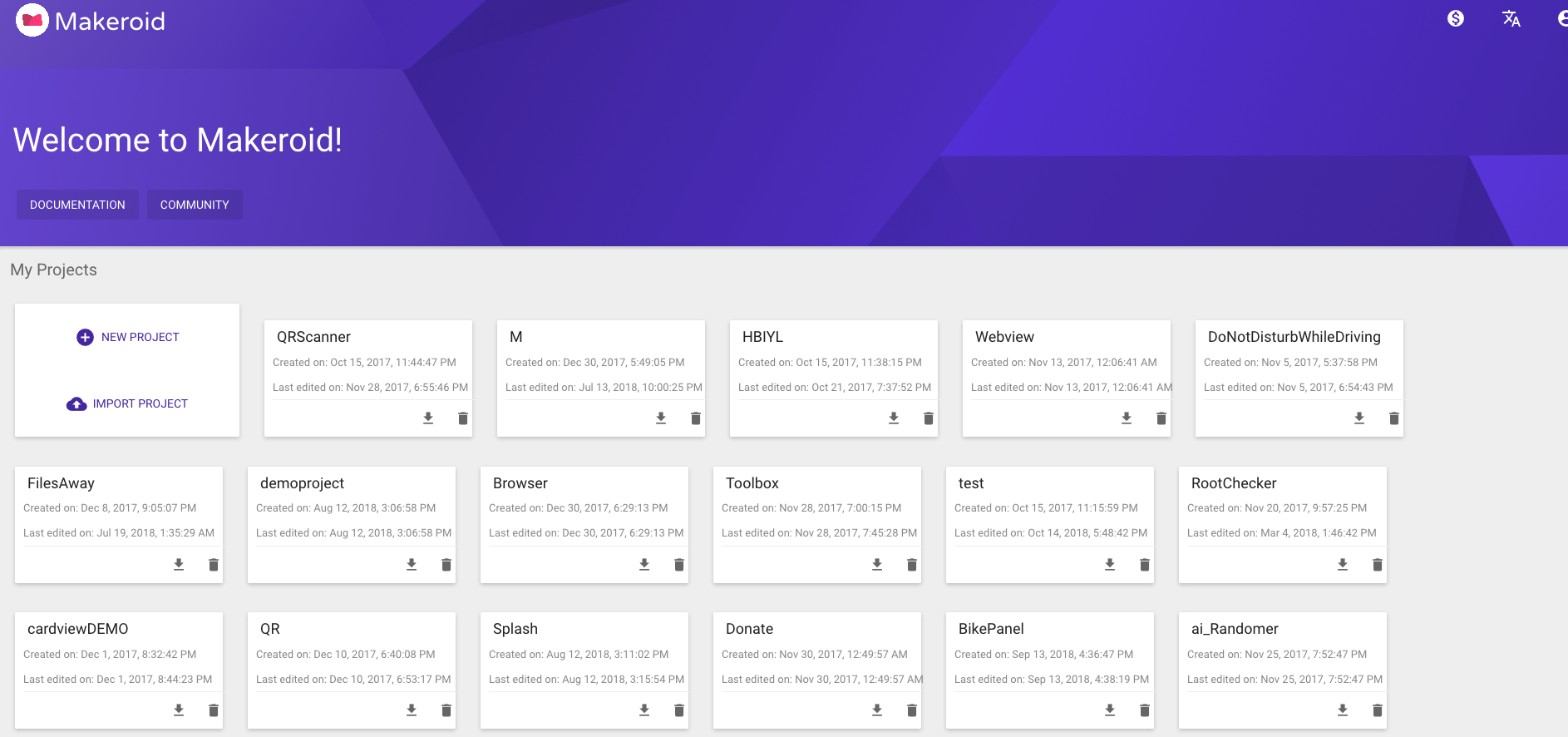
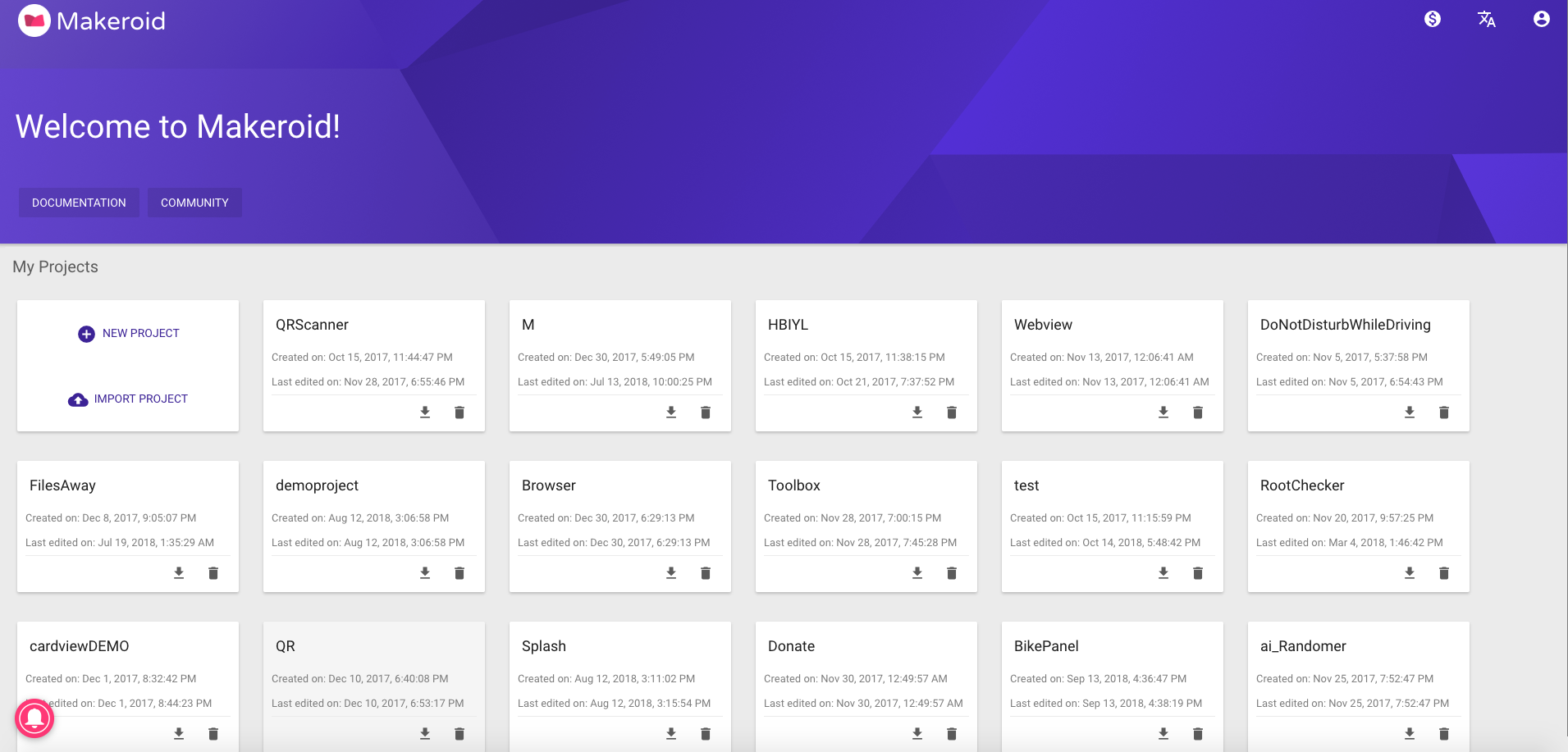
In addition to this issue, also want to include that the project cards appear misaligned compared to Chrome, below you can find some screenshot regarding and see it for yourself by creating 2 or more projects.
Firefox:
Chrome:
ardacebi
on 18 Oct 2018
Reping @miketaylr
 softvision-sergiulogigan
on 12 Nov 2018
softvision-sergiulogigan
on 12 Nov 2018
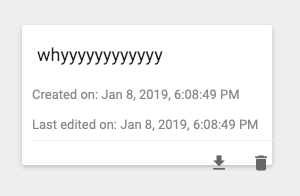
This is what this looks like in Firefox now, which maybe means we changed how we're doing layout for this particular pile of tables and divs.
The good news is it looks like the margins are fixed :)...the bad news, the buttons on the bottom look busted.
miketaylr
on 9 Jan 2019
@wisniewskit can your reduced test case addon help out here? The Snappy Snippet addon produces mostly garbage here: http://jsfiddle.net/h2wq31vf/
(but it does demonstrate the difference between Firefox and Chrome).
miketaylr
on 9 Jan 2019
becauuuuuse but basically I guess intrinsic sizing. the cards are tables.
there's a div wrapper that could be set to display: flex and
And instead of a fixed height on the table in
.projects-list__item--parent, .projects-list__new-project-panel {
height: 140px;
width: 250px;
background-color: var(--projects-list__panel);
display: inline-block;
margin: 15px;
padding: 10px;
border-radius: 2px;
box-shadow: 0 2px 4px rgba(0,0,0,.2);
cursor: pointer;
}
put the height of the table to be 100%.
.projects-list__item--parent, .projects-list__new-project-panel {
height: 100%;
width: 250px;
background-color: var(--projects-list__panel);
display: inline-block;
margin: 15px;
padding: 10px;
border-radius: 2px;
box-shadow: 0 2px 4px rgba(0,0,0,.2);
cursor: pointer;
}
so this:
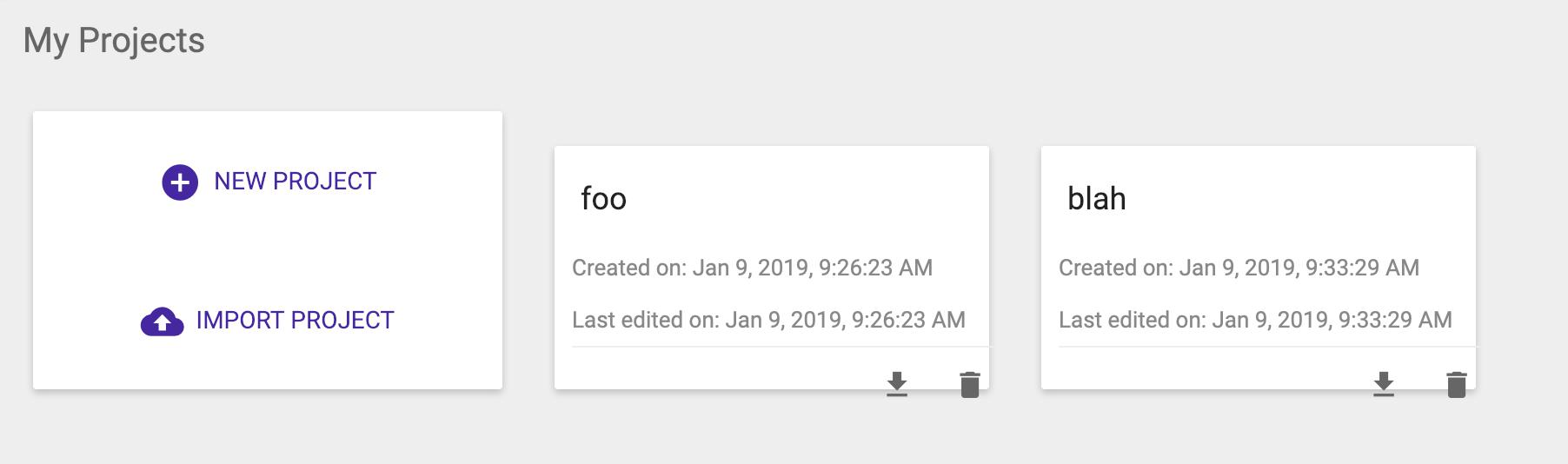
becomes:
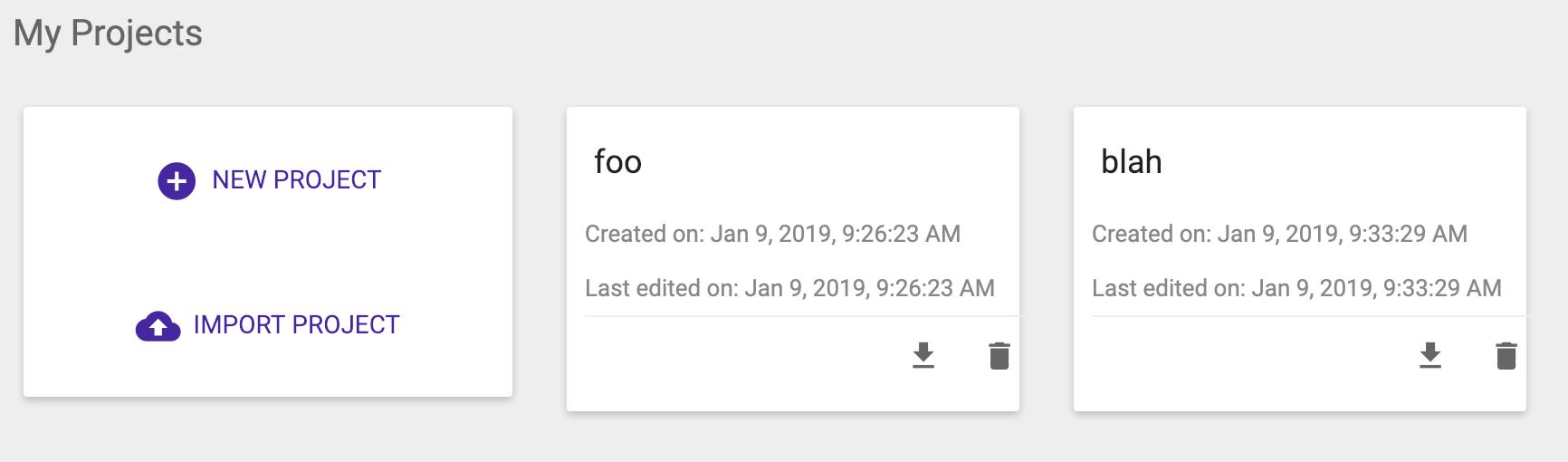
There are still things to fix. but it's a tad better.
 karlcow
on 9 Jan 2019
karlcow
on 9 Jan 2019
@miketaylr, to answer your question, yes my addon was able to make a reduced case. But I also managed to diagnose this one pretty quickly by studying the results in Chrome and Firefox.
The issue here is that they are coding the cards as <table> elements, then using CSS to change them to display: block-inline. You see, it turns out that Firefox gives <table> elements box-sizing: border-box by default, while Chrome gives them box-sizing: content-box. And since the site isn't specifying which to use for the inline-blocks, it uses whatever the browsers chose.
That is, specifying content-box sizing is enough to do the trick for me and make Chrome and Firefox render the cards similarly:
.projects-list__item--parent, .projects-list__new-project-panel {
  box-sizing: content-box;
}
Of course, this is an obvious interop issue, so I've filed bz1520018 to try to figure out what the best course of action will be for browser engine defaults for the box-sizing value, where they currently differ.
 wisniewskit
on 14 Jan 2019
wisniewskit
on 14 Jan 2019
Great, thank you!
miketaylr
on 14 Jan 2019
@barreeeiroo Please read everything
ardacebi
on 15 Jan 2019
Just a quick update: it seems as though Blink and WebKit are the ones with the buggy behavior here (Firefox and others are following the spec). Blink implied that they should fix this as part of a big rewrite of their table layout engine, so I think it's definitely wise for kodular to adopt a fix like the one I suggested to be interoperable (WebKit hasn't shown any signals on their related bug report yet).
wisniewskit
on 21 Feb 2019
@conorshipp could you help us to get this fixed, implemented in @kodular so the app is working in both chrome and firefox. Chrome will not fix their implementation before summer 2020 it seems.
karlcow
on 22 Jun 2019
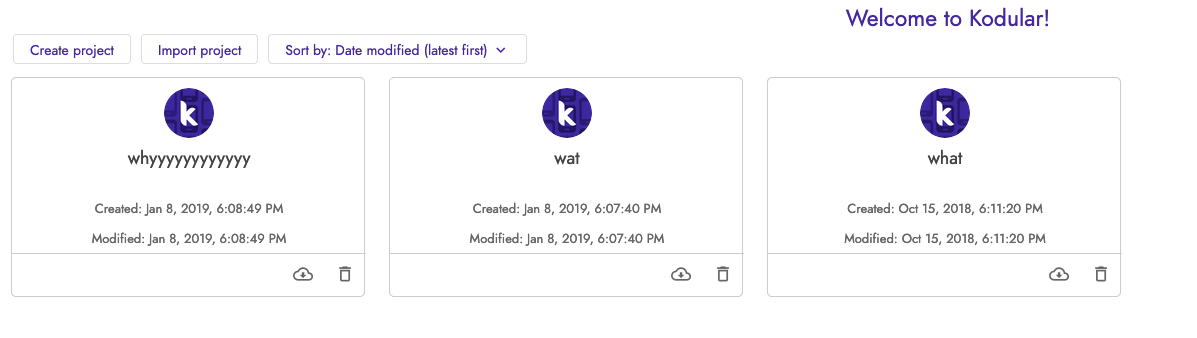
Hi @karlcow sorry about the late response. We've recently released a brand new design based on Material Design 2 and I believe all of the above issues should now be fixed.
 conorshipp
on 30 Aug 2019
conorshipp
on 30 Aug 2019
Hi @conorshipp -- thanks for the reply! I can confirm that the new design fixes the issues that were reported. Thanks!
miketaylr
on 30 Aug 2019
Related issues
 bvanrijn
·
4Comments
bvanrijn
·
4Comments
 webcompat-bot
·
4Comments
webcompat-bot
·
5Comments
webcompat-bot
·
4Comments
webcompat-bot
·
5Comments
 lolrepeatlol
·
4Comments
lolrepeatlol
·
4Comments
 oksas
·
5Comments
oksas
·
5Comments
Most helpful comment
@miketaylr, to answer your question, yes my addon was able to make a reduced case. But I also managed to diagnose this one pretty quickly by studying the results in Chrome and Firefox.
The issue here is that they are coding the cards as
<table>elements, then using CSS to change them todisplay: block-inline. You see, it turns out that Firefox gives<table>elementsbox-sizing: border-boxby default, while Chrome gives thembox-sizing: content-box. And since the site isn't specifying which to use for the inline-blocks, it uses whatever the browsers chose.That is, specifying content-box sizing is enough to do the trick for me and make Chrome and Firefox render the cards similarly:
Of course, this is an obvious interop issue, so I've filed bz1520018 to try to figure out what the best course of action will be for browser engine defaults for the box-sizing value, where they currently differ.