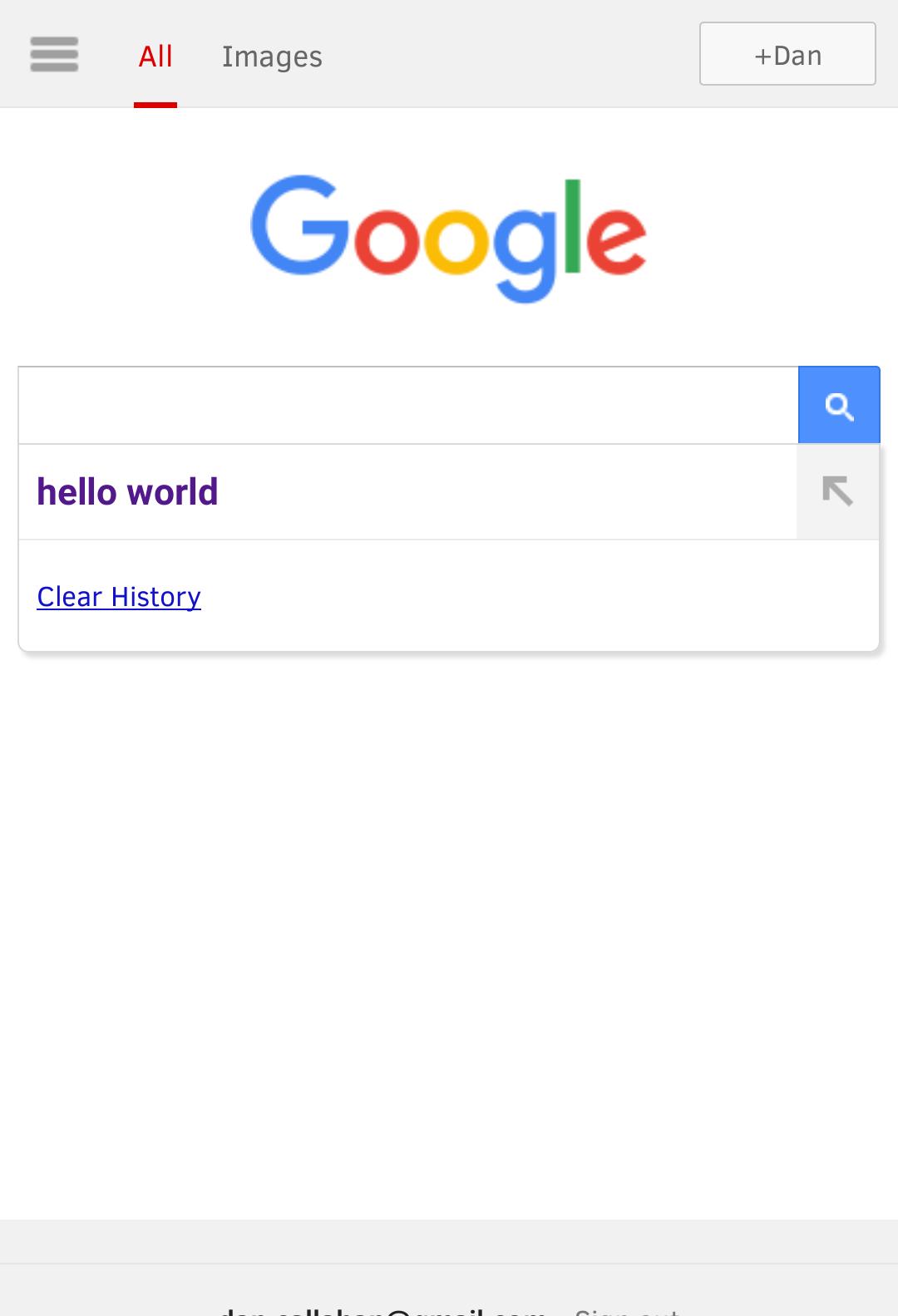
Web-bugs: www.google.com - Tapping a search suggestion doesn't trigger a search
Browser / Version: Firefox Mobile 59.0
Operating System: Android 8.1.0
Tested Another Browser: Yes
Problem type: Site is not usable
Description: Tapping a search suggestion doesn't trigger a search
Steps to Reproduce:
Go to google.com
Start typing anything
Touch one of the suggestions
This should start the search. Instead, it just fills the input field and sits there.
_From webcompat.com with ❤️_
 callahad
All 25 comments
Thanks @callahad. I can reproduce this issue in Firefox 59 for Android.
At first glance, it appears this is by design. Firefox for Android gets a tier2 experience compared to Chrome mobile. When we spoof as Chrome, we get the enhanced site which searches automagically after tapping a suggestion.
So I'm not sure if this is a compat issue, would need to test in Chrome spoofing as Firefox.
 adamopenweb
on 16 Dec 2017
adamopenweb
on 16 Dec 2017
Ah so testing in Chrome Desktop but spoofing as Firefox for Android, the click on the suggestion automatically starts the search.
Setting this bug as needs diagnosis.
adamopenweb
on 16 Dec 2017
Each suggestion are wrapped into a tr.
<tr>
    <td class="mssb_a gsfs" style="text-align: left; padding: 0px;" dir="ltr">
        <div class="msq_c">
            <button class="msq_a" style="padding: 10px 3px 11px 8px;">hello in<b> spanish</b>
            </button>
            <div class="msq_b" style="display: table-cell; padding: 10px 0px 11px;">
            </div>
        </div>
    </td>
</tr>
with a button element.
 karlcow
on 1 May 2018
karlcow
on 1 May 2018
                "ontouchstart"in window ? (e.ontouchstart = f,
                e.ontouchend = g) : (e.onmouseover = f,
                e.onmouseout = g);
                e.onclick = function(b) {
                    A.T.blur();
                    a.Sd() && mhp_Cr(A, a.U());
                    B.Lf();
                    B.jf(a.$a());
                    b = b || mhp_or(e).event;
                    c.Fe(b, a, v)
                }
b is MouseEvent and mhp_or() is Window.
e is
<div class="msq_c"><button class="msq_a" style="color: rgb(82, 24, 140); padding: 10px 3px 11px 8px;"><b>hello in japanese</b></button><div class="msq_b" style="display: table-cell; padding: 10px 0px 11px;"></div></div>
@wisniewskit Here is a good opportunity for me to learn how to use your addon.
c.Fe(b, a, v) is what starts the search in Chrome Canary, but in Firefox I don't know if it fails before.
I also wonder if it's in fact related to https://bugzilla.mozilla.org/show_bug.cgi?id=1089326
karlcow
on 1 May 2018
Since it doesn't work in Firefox's RDM when spoofing as FxA, but does works in Chrome's RDM when spoofing as FxA, it doesn't seem intentional on Google's part.
Stepping through the prettied version of the function in the debugger, it gets down into this function:
    b: function (a, b) {
      var c = f.We(b),
      d = e.od;
      p[d] && (p[d].value = c[d]);
      d = e.Xg;
      p[d] && (p[d].value = c[d]);
      g.submit()
    },
And it does indeed call submit on the search form, but that call unfortunately does nothing except return undefined -- no network request is made, nothing.
The form's markup seems fine, so it should work, but it doesn't. I altered the code to call it after a second using setTimeout; no dice. I even manually called submit on the form in the web console; nada. This despite the form passing checkValidity, and all of those approaches were working in Chrome.
I then used Tinker Tester Developer Spy to log all events that are fired while the click on the suggestions is being handled, but none of the listed events that were being handled by the page's scripts influenced the submit call.
Bizarre. I'm at a loss. @DenSchub, @miketaylr, @karlcow, have any of you ever seen a case like this?
 wisniewskit
on 5 Jul 2018
wisniewskit
on 5 Jul 2018
Without actually checking, as you probably can respond faster than I can dig into the site: Is the submit() call a call to the native form submit function, or something custom? Are there any hidden form fields that have HTML5 validations on them (not JS stuff, but required/pattern attributes and so on)?
 denschub
on 5 Jul 2018
denschub
on 5 Jul 2018
Good thinking. But yes, the console reports it's native:
function submit() {
    [native code]
}
(It's actually easy to test; just tap on a suggestion, see it not work, then mess around with the only form element on the page in the web console.)
Edit: I also don't think it's the form's validity, since it passes checkValidity.
wisniewskit
on 5 Jul 2018
One other thing to note; if you just type some text into the search bar and try calling submit on it in the web console, it works. It just stops working after you click on a suggestion, making me wonder if something in the code-path is corrupting the form somehow?
wisniewskit
on 5 Jul 2018
@miketaylr have any of you ever seen a case like this?
nothing comes to mind no...
 miketaylr
on 5 Jul 2018
miketaylr
on 5 Jul 2018
Ah, I think I figured it out. The breakage is happening because they are modifying the form after calling submit, in this function:
  function h() {
    for (var a, b, c; c = ba.pop(); ) a = c.getType(),
    (b = U[a]) || (b = U[a] = [
    ]),
    b.push(c),
    a = c.uc(),
(console.log("removing (1):",a.outerHTML)),
    a.parentNode.removeChild(a);
    for (; a = pa.firstChild; )
(console.log("removing (2):",a.outerHTML)),
    a = pa.removeChild(a),
    a.de ? I.push(a)  : qa.push(a);
    k = [
    ]
  }
I added those console.log statements to see what it's removing:
removing (1): <div class="gsch_a"><a href="javascript:void(0)">Clear History</a></div>
removing (1): <div class="msq_c"><button class="msq_a" style="color: rgb(82, 24, 140); padding: 10px 3px 11px 8px;"><b>trumpanzee</b></button><div class="msq_b" style="display: table-cell; padding: 10px 0px 11px;"></div></div>
removing (1): <div class="msq_c"><button class="msq_a" style="color: rgb(82, 24, 140); padding: 10px 3px 11px 8px;"><b>trump</b></button><div class="msq_b" style="display: table-cell; padding: 10px 0px 11px;"></div></div>
removing (1): <div class="msq_c"><button class="msq_a" style="color: rgb(82, 24, 140); padding: 10px 3px 11px 8px;"><b>translate</b></button><div class="msq_b" style="display: table-cell; padding: 10px 0px 11px;"></div></div>
removing (2): <tr class=""><td class="mssb_a gsfs" style="padding: 0px; text-align: left;" dir="ltr"></td></tr>
removing (2): <tr class="mssb_f"><td><hr class="mssb_f"></td></tr>
removing (2): <tr><td class="mssb_a gsfs" style="padding: 0px; text-align: left;" dir="ltr"></td></tr>
removing (2): <tr class="mssb_f"><td><hr class="mssb_f"></td></tr>
removing (2): <tr><td class="mssb_a gsfs" style="padding: 0px; text-align: left;" dir="ltr"></td></tr>
removing (2): <tr class="mssb_f"><td><hr class="mssb_f"></td></tr>
removing (2): <tr><td class="mssb_a gsfs" style="padding: 10px 3px 11px 8px; text-align: left;" dir="ltr"></td></tr>
That is, it's removing the search suggestions interface from the form. But as I mentioned (and confirmed using console.log) they are doing this removal after they call submit.
This seems to cancel or break Firefox's submission of the form, while in Chrome it still goes ahead (and yes, it does the removal after submitting as well, according to my console output).
I also confirmed that Firefox lets the form go through just fine if the removals aren't done, but at this point my brain's too fried to want to figure out which behavior is "correct", so I'll leave that for later.
Either way, Google could make this work by simply removing the elements before submitting, or not bothering to do so at all (on the grounds that the page will change to another one anyhow by submitting the form).
I'm not 100% sure which would be best, but since this is their simpler page meant for browsers like Firefox, I suspect it would be best for them to fix this even if Firefox is doing something odd. As such I'm setting this to contactready.
wisniewskit
on 5 Jul 2018
wunderbar!
karlcow
on 6 Jul 2018
Reaching out via our partner mailing list.
adamopenweb
on 6 Jul 2018
@wisniewskit It's a little odd that removing things from the form affects the behavior, especially since none of the things being removed include the form or its controls, right?
I would be pretty interested in a standalone testcase (doesn't have to be reduced) that shows the behavior difference there, because it presumably indicates a bug in Firefox, Chrome, the spec, or multiple of the above...
 bzbarsky
on 6 Jul 2018
bzbarsky
on 6 Jul 2018
@bzbarsky, unfortunately coming up with a minimized test-case is proving challenging; I'm not sure if I'll be able to create one.
However, you're right, if I simply create a test-case with a form containing the same markup, and have a script call submit on it, then immediately remove the same nodes from it that the google code seems to be removing, the form still submits.
So I can't be sure why the removal of the nodes in the live code is causing the breakage. At this stage I can only report that preventing their removal is letting the form submit in the live code.
wisniewskit
on 12 Jul 2018
@wisniewskit Is there a way to reproduce the problem in Firefox for desktop? Presumably by spoofing as Firefox for Android? How do I do that, precisely?
bzbarsky
on 12 Jul 2018
@bzbarsky, yes, I just visit google.com in the Responsive Design Mode, using a custom device with touch support and a Fennec UA-string.
Or more precisely, visit google.com in a new tab, start the RDM (ctrl+shift+m), click "no device selected", click "edit list...", click "add device", check "touch", and paste in a Fennec UA like Mozilla/5.0 (Android 8.0.0; Mobile; rv:63.0) Gecko/63.0 Firefox/63.0, click save, click done. Then click "no device selected" and pick the new custom one, and refresh the tab.
wisniewskit
on 12 Jul 2018
Still an issue.
miketaylr
on 26 Jul 2019
Duplicate issue on Bugzilla: https://bugzilla.mozilla.org/show_bug.cgi?id=1576947.
I reached out to Google for a third time about this. No response so far.
adamopenweb
on 11 Sep 2019
Hi - I'm an engineer on the Google homepage team. Just wanted to update this thread that I'm looking into this.
I'm able to repro @wisniewskit's findings (e.g. removing the DOM mutation code "fixes" the issue) but I have reason to suspect the underlying issue is more complicated than that. So I have no ETA for a fix at the moment but will update this thread if there's anything new to report.
 anbenson
on 29 Oct 2019
anbenson
on 29 Oct 2019
Thanks for the update!
miketaylr
on 29 Oct 2019
This is still reproducible on:
Browser / Version: Firefox Preview Nightly 191227 (🦎: 73.0a1-20191224041100)
Firefox Nightly 68.4a1 (2019-12-25)
Operating System: Samsung Galaxy S8 (Android 9) - 1440 x 2960 pixels, 18.5:9 ratio (~570 ppi density)
 softvision-sergiulogigan
on 27 Dec 2019
softvision-sergiulogigan
on 27 Dec 2019
I made a partial fix which is now live. Most suggestions should now search on tap.
anbenson
on 13 Jan 2020
Thank you!
miketaylr
on 13 Jan 2020
I say let's close this. In my tests, I get expected behavior. Happy to see this old bug fixed!
miketaylr
on 13 Jan 2020
Related issues
 bvanrijn
·
4Comments
bvanrijn
·
4Comments
 vickychin
·
4Comments
vickychin
·
4Comments
 Gravydigger
·
4Comments
karlcow
·
5Comments
Gravydigger
·
4Comments
karlcow
·
5Comments
 scheinercc
·
6Comments
scheinercc
·
6Comments
Most helpful comment
I made a partial fix which is now live. Most suggestions should now search on tap.