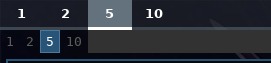
Changing workspaces button's padding to 0 0px does not make it any narrower beside Sway's built-in swaybar. I expect them to at least be as narrow as sway's workspace buttons. Do I do something wrong, is it a bug or intended?

By the way, my screen resolution is 1366 by 768.
 ghost
ghost
All 10 comments
Can you provide your whole css file, on my side if i set padding to 0, it's very thin.
 Alexays
on 4 Nov 2018
Alexays
on 4 Nov 2018
@Alexays I doubt it'll be neccessary. It's the same case for the default css file with no changes made to the config file as well:
ghost
on 4 Nov 2018
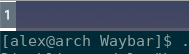
I have no idea, if I set padding to 0 it's okay :?
* {
    border: none;
    border-radius: 0;
    font-family: Roboto, Helvetica, Arial, sans-serif;
    font-size: 13px;
    min-height: 0;
}

window#waybar {
    background: rgba(43, 48, 59, 0.5);
    border-bottom: 3px solid rgba(100, 114, 125, 0.5);
    color: white;
}

#workspaces button {
    padding: 0;
    background: transparent;
    color: white;
    border-bottom: 3px solid transparent;
}

#workspaces button.focused {
    background: #64727D;
    border-bottom: 3px solid white;
}

#mode {
    background: #64727D;
    border-bottom: 3px solid white;
}

#clock, #battery, #cpu, #memory, #network, #pulseaudio, #custom-spotify, #tray, #mode {
    padding: 0 10px;
    margin: 0 5px;
}

#clock {
    background-color: #64727D;
}

#battery {
    background-color: #ffffff;
    color: black;
}

#battery.charging {
    color: white;
    background-color: #26A65B;
}

@keyframes blink {
    to {
        background-color: #ffffff;
        color: black;
    }
}

#battery.warning:not(.charging) {
    background: #f53c3c;
    color: white;
    animation-name: blink;
    animation-duration: 0.5s;
    animation-timing-function: linear;
    animation-iteration-count: infinite;
    animation-direction: alternate;
}

#cpu {
    background: #2ecc71;
    color: #000000;
}

#memory {
    background: #9b59b6;
}

#network {
    background: #2980b9;
}

#network.disconnected {
    background: #f53c3c;
}

#pulseaudio {
    background: #f1c40f;
    color: black;
}

#pulseaudio.muted {
    background: #90b1b1;
    color: #2a5c45;
}

#custom-spotify {
    background: #66cc99;
    color: #2a5c45;
}

#tray {
    background-color: #2980b9;
}
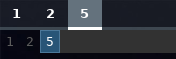
With the style css you provided it does not shrink significantly.. Is there a way I could help debugging this? I get no errors when I run it from the terminal or recompile it against the newest, freshly-compiled git version of Sway.
ghost
on 5 Nov 2018
@Bryophyllum Yep try with Gtk inspector
Alexays
on 5 Nov 2018
I ran GTK_DEBUG=interactive waybar, now what? What should I look for? I've never used GTK Inspector before.
ghost
on 5 Nov 2018
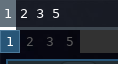
I think I figured it out: I changed the GTK theme from Adapta-ETA to GNOME's Adwaita and it's now narrower than Sway's workspace buttons. Weird. I would have not guessed that if I had to pinpoint the issue based on some statistics, etc from GTK Inspector.
ghost
on 5 Nov 2018
Did you try to put !important ?
Alexays
on 5 Nov 2018
No, I did not. Besides, I randomly tried switching GTK themes and I still have no idea how to either use or debug with it. Anyway, isn't this considered solved by now? The issue was the theme that forced the workspace buttons' lenght.
ghost
on 5 Nov 2018
In any case, thank you for taking your time to help me. c:
ghost
on 5 Nov 2018
Related issues
 GeoDerp
·
5Comments
GeoDerp
·
5Comments
 cmacrae
·
4Comments
cmacrae
·
4Comments
 atomheartother
·
3Comments
atomheartother
·
3Comments
 pedrocr
·
3Comments
pedrocr
·
3Comments
 docquantum
·
5Comments
docquantum
·
5Comments