Waveboxapp: Cursor not highlighting correct row in Gmail
- Wavebox Version: 4.5.10
- Operating System & Version: Mac OS 10.12.6 (also seen on 10.13)
- Account type (if applicable): gmail
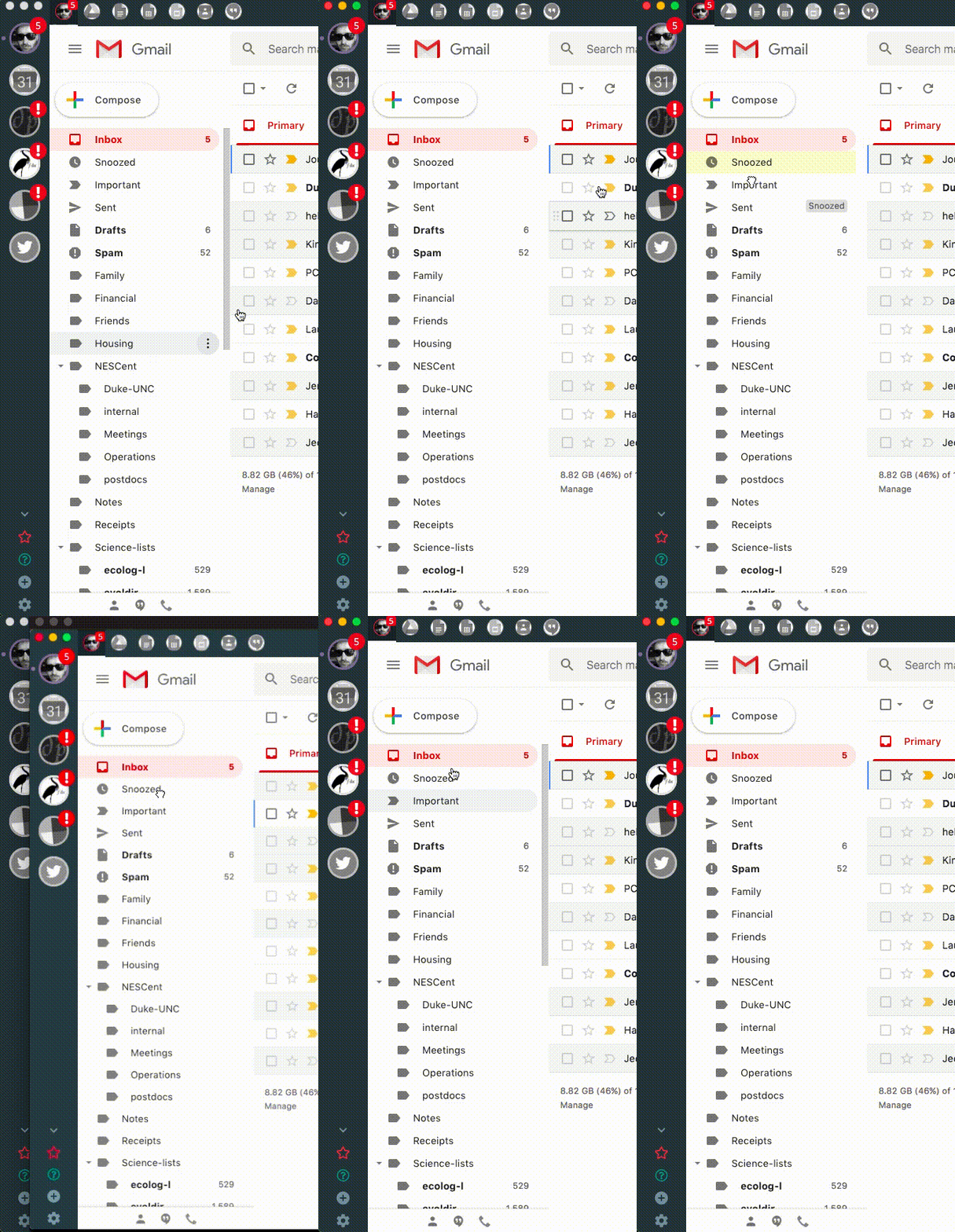
I have been having a persistent though intermittent bug in Gmail where after command-tabbing back to Wavebox, the cursor is aligned correctly with its target; specifically, the email highlighted is a row below the position of the cursor. When I click to go to the email (or mailbox), Wavebox treats that as a click and hold. When I move the cursor into the labels pane and up out of the window frame and then back, this seems to fix the problem (temporarily).
The installed extensions I have are Slack++, Dropbox, and Dark Reader. I had the same problem on 10.13 with another laptop and only had the Dropbox extension installed.
Video below demonstrates the problem.
 vancleve
All 8 comments
Thanks for reporting and for the video. I've managed to reproduce this here - although it does take a little while for it to kick in. Out of curiosity, roughly how long would you say it takes for the behaviour to appear for you?
Would you be able to try a couple of things your end, hopefully it will help me get to the root cause of it...
- When the issue comes, up does doing anything to the window, such as resizing it change the behaviour?
- Right click on the account in the left, and then
Account Settings. Under the tools section, double clickClear all browsing data. You'll need to sign back into the account, but does this fix it at all? - Try disabling dropbox, and run the app for a little while again. Does that fix it?
 Thomas101
on 15 Jan 2019
Thomas101
on 15 Jan 2019
It seems like it takes 10 minutes or so away from Wavebox before the issue crops up.
Resizing the window seems to fix the problem during that interaction with the app.
I'm working on trying the other things you suggested 😄
vancleve
on 16 Jan 2019
Having cleared all browsing data, the problem still comes back
vancleve
on 16 Jan 2019
Disabling dropbox also doesn't fix it.
vancleve
on 16 Jan 2019
Thanks for trying those! I did suspect that disabling dropbox would fix it, but it looks like I'm barking up the wrong tree with that 🤔. Maybe the setup I'm trying it with is different here...
- Does it seem to be the amount of time you spend away from the app, or is it the amount of time the app is open?
- Do you have Gmail offline enabled? You can check this out by opening your Gmail Settings within Gmail, then going to the offline tab
- Do you have any Gmail add-ons enabled? You can check this out by opening your Gmail Settings within Gmail, then going to the Add-ons tab and checking if anything is listed
A few other things to try changing, which might help...
- Try removing all extensions - I did suspect it was something to do with this, but just to make sure
- Go to Settings > Advanced, disable
Sandboxingand enableIsolate Account Processesto see if that makes any difference
Thanks!
Thomas101
on 16 Jan 2019
Ok, so disabling all the extensions seems to have helped and the problem went away.
I don't have gmail offline or other gmail add-ons
I haven't tried the sandboxing.
These tests were run on a loaner macbook air while my normal macbook pro was being repaired. I now have it back with a fresh install of Mojave and Wavebox and all seems fine. I installed the dropbox plugin two days ago and the problem hasn't come up but I'll mention it if it does.
vancleve
on 21 Jan 2019
That's great that it's working on your new machine. Would you be able to share the About this mac screen for each machine? I wonder if a different graphics card has something to do with this :-/
Thomas101
on 22 Jan 2019
Seeing that you're not seeing this anymore, I'll close this off. If it comes up again though, just recomment and I'll take another look. Thanks for taking the time to report!
Thomas101
on 23 Jan 2019
Related issues
 Ash258
·
3Comments
Ash258
·
3Comments
 bashfulrobot
·
4Comments
bashfulrobot
·
4Comments
 phcyso
·
4Comments
phcyso
·
4Comments
 MichaelTunnell
·
3Comments
MichaelTunnell
·
3Comments
 CharlesWiltgen
·
3Comments
CharlesWiltgen
·
3Comments