Waveboxapp: Wavebox has a problem and requires the page to reload
- Wavebox Version: [e.g. 3.0.0] 4.2.1beta but been happening for the last 6 - 8 weeks ish
- Operating System & Version: [e.g. Windows 10, Mac OSX 10.3.4, Ubuntu 17.10] Mint 18.3
- (Linux only) Install method: [e.g. Debian installer, Snap Package, Tar, Apt-Repo, etc...] apt repo
- Account type (if applicable): [e.g. Gmail, Office 365, Trello, etc...] gmail
Expected & actual behavior
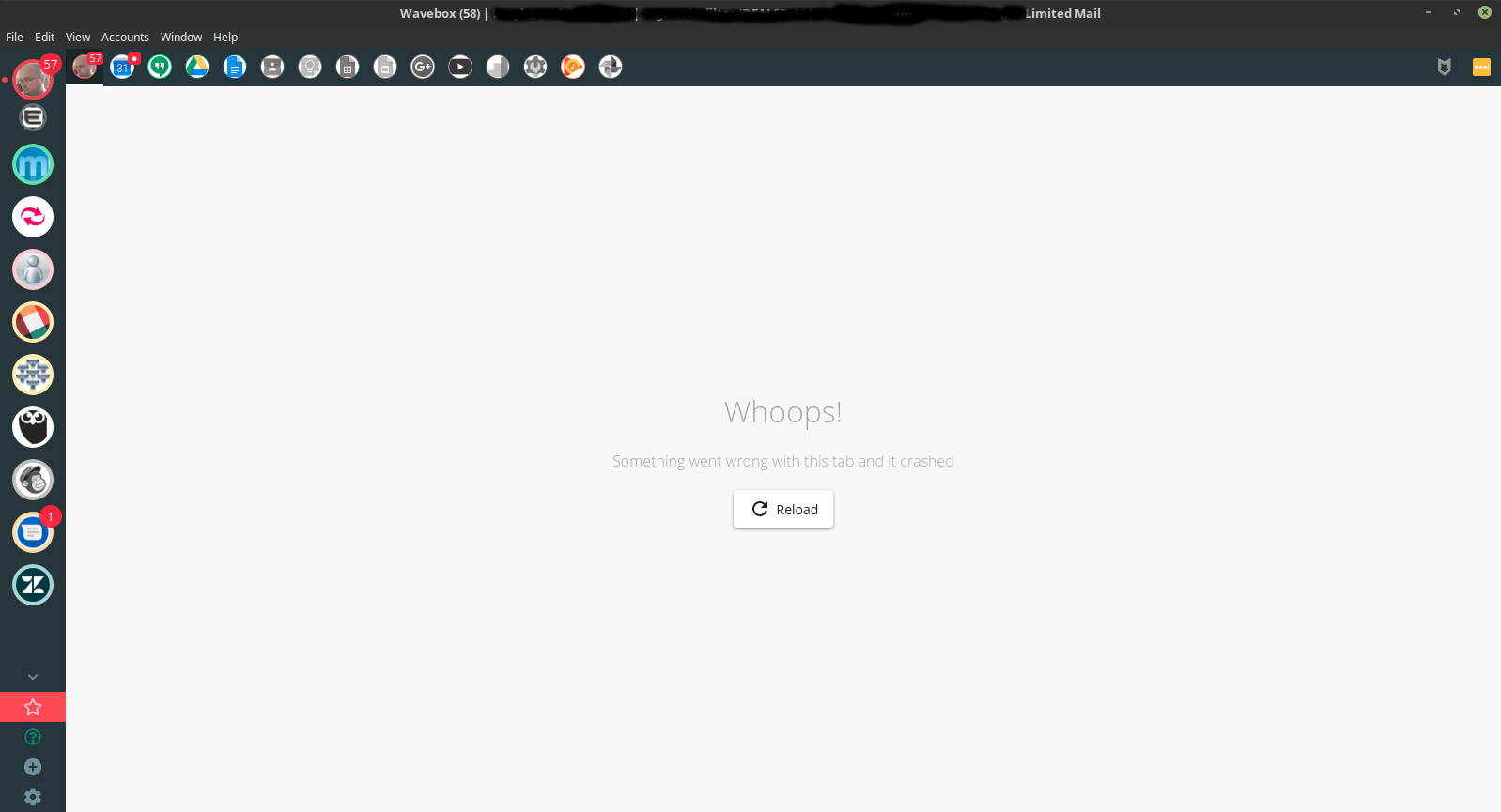
A couple of times per day usually a screen replaces the (usually gmail) screen contents, saying that something has gone wrong and I need to reload. There is a reload button on the screen. This is not a screen I get when gmail is running through the browser. It can happen when Im typing an email or sat at the main inbox. Its not linked to starting up or shutting down Wavebox, it often happens middle of the day. I believe I didnt have it during the 3 days that 4.2beta was installed but it happened again this morning after installing 4.2.1beta, within a few seconds of starting Wavebox
Im on a wired network so its not to do with dropping a wireless network connection and I dont use a VPN - its just the PC, wired to a hub, which is wired to a broadband router. I had no problems up until about 8 weeks ago, which sounded very similar to #750
Steps to reproduce
Are there any steps that we can take to reproduce the bug? No. it just happens periodically. Occasionally shortly after starting Wavebox but more often than not, sometime during the day, randomly. thankfully because gmail saves the email draft as you type, I dont lose anything ive typed, other than maybe half a sentence
Is the bug persistent or intermittent?
Do you only see it sometimes or does it always happen?
Screenshots
Screenshots often help us narrow down a bug more easily.
Additional information
Add any other context about the problem here.
 tonybyng
All 18 comments
Thanks for re-raising :-). Is it just with one Gmail account or multiple? Do you have any extensions installed? I wonder if one of those is intefering with something :-/
 Thomas101
on 29 Sep 2018
Thomas101
on 29 Sep 2018
Hi. I only have the one gmail account configured at the moment. It's a Gsuite. The only thing I can think of is that I have the multiple inboxes feature enabled
tonybyng
on 29 Sep 2018
@Thomas101 It happened this morning so I took a screen shot. I clicked on a linux notification tab that said I had an email come in and as it flipped over to wavebox, it came up with this. I will keep a mental note whenever it happens to see what im doing.
tonybyng
on 1 Oct 2018
Thanks @tonybyng the screenshot is super helpful. I thought it was the yellow Gmail warning that sometimes comes up when the connection is flakey, but obviously not, that's the tab crashing. Electron is really poor at outputting the underlying problem of the tab crash at the moment so there's not a lot of additional info in terms of logging right now.
Try going to settings > advanced and enabling "Isolate Account Processes" to see if that helps. As for the root cause, I wonder if it's the audio stack in Google Music. I've seen some issues reported on this version of Chromium as regards AV & Linux. If changing that setting helps, we can isolate the account individually to try and narrow it down.
Aside from that, I can see you've got LastPass & Markdown Here enabled, have you got any other extensions?
Thomas101
on 1 Oct 2018
Thanks @Thomas101 I got in this morning to the same crashed page (it died sometime overnight). Ive now activated the Isolate Account Processes option to see if that helps and will revert back accordingly. Ive also just put Google Music to sleep. I have todoist as well as LastPass and Markdown but ive just removed that as well so ive just introduced 3 variables into the mix ;-) If it fixes the problem over the next 3 days or so, i'd prefer to reactivate things slowly and be narrowing it down to 1 of 3 than it being an unknown - much better odds!
tonybyng
on 2 Oct 2018
Perfect, thanks! Keep me up to date and we'll see if we can narrow it down :)
Thomas101
on 2 Oct 2018
@Thomas101 Making those changes has reduced the amount of bombed out tabs but I am still getting them occasionally - and its not just gmail - I just had one in outlook.com. So just to confirm, Ive got the isolation option set, i removed the todoist app and i put the google music app to sleep. The other day when I had one, I noticed that music wasnt sleeping at the time so thought that might have been the cause but with outlook.com going just it was definitely sleeping. ;-(
tonybyng
on 9 Oct 2018
Thanks. Looks like it's not that then. Let me see if I can pull any more logging info out from a crash...
Thomas101
on 10 Oct 2018
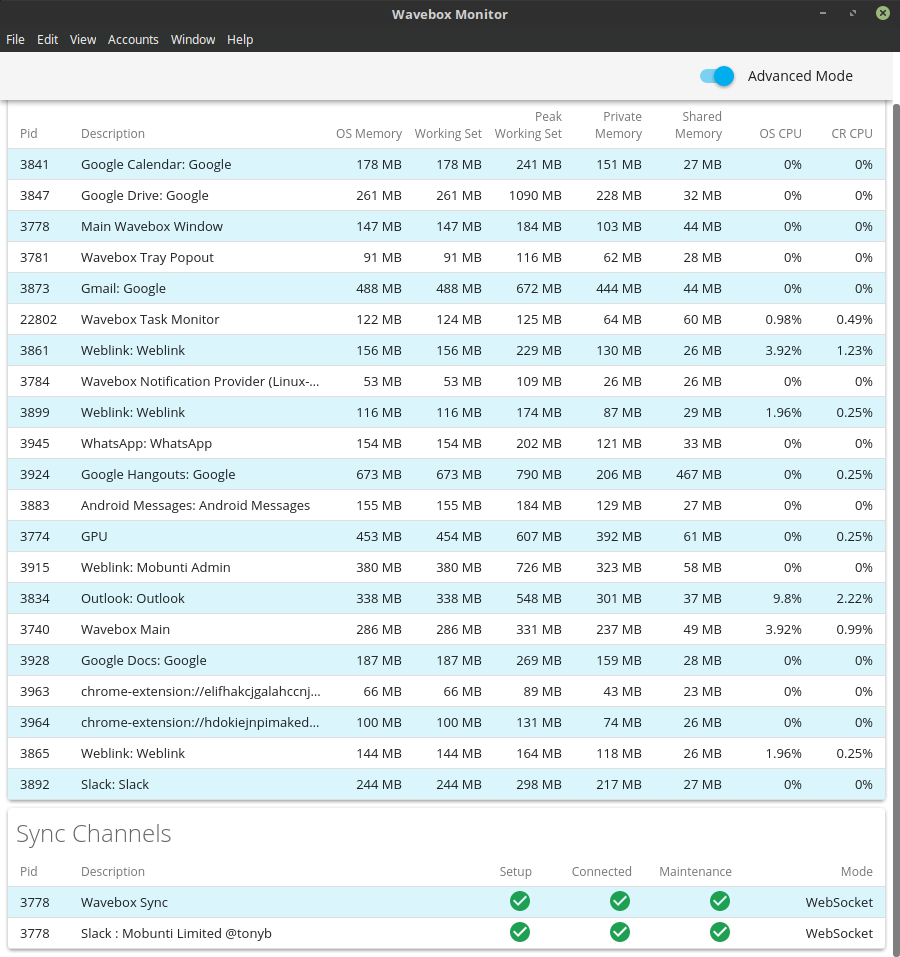
@tonybyng I'm trying narrow this down. How much ram and swap do you have on your machine? Can you send me a screenshot of Settings > Debug > Task Monitor after you've been using it a while
Thomas101
on 12 Oct 2018
@Thomas101
Hi. machine has 16 gig ram, 16 gig swap. 3 gig ram free, 16 gig swap free. wavebox has been running for a day or two. Just about to apply the next beta update so it will shut down then, so thought i'd do this now!
tonybyng
on 12 Oct 2018
@Thomas101 Im on 4.3.1beta now and apply all the betas as they come out and suddenly realised this morning that I havent had the tab crash for a few days. Will continue to monitor but have you actively changed anything in the recent releases that might affect things?
tonybyng
on 18 Oct 2018
The only thing that I can think of, is that we've started limiting the number of concurrent tabs that load at once. By default, there's a soft limit on the number of CPU cores on your machine. This could be a red-herring though
Thomas101
on 5 Nov 2018
@Thomas101 I am still getting the issue although less now than I was, so either I'm working differently or each release gets closer to resolving the problem ;-) If there is anything you think I can do to help, let me know, otherwise I will just put up with it for a bit. I just renewed my licence so I cant be that annoyed with it ;-)
 mobunti
on 5 Nov 2018
mobunti
on 5 Nov 2018
Sorry I just realised Im logged in on the wrong account - that was @tonybyng responding... oops
mobunti
on 5 Nov 2018
Thanks, there's a big chromium update getting ready to ship, so I'm hoping that will have some positive outcomes on this too :)
Thomas101
on 5 Nov 2018
Hi, I was just wondering if you've had a chance to try this with Version 4.5.0? It has an updated version of Chromium and we're hoping that this has fixed this issue. Thanks
Thomas101
on 5 Dec 2018
Ive not had the problem for a few weeks I think. I got so used to reloading it i then didnt think about it, but thinking back now Ive not had the issue recently so if you are thinking the 4.5 release may have resolved it and I dont recall having any issues then I think we may have got the problem sorted. Top man. Will let you know if it happens again but Im happy at the moment the problem is fixed so if you want to close it then i'm happy
tonybyng
on 5 Dec 2018
Awesome. Let me know if does come back up. We've added some more logging our end so we should get a better idea of what could be causing it if it does reappear.
Thomas101
on 5 Dec 2018
Related issues
 CharlesWiltgen
·
3Comments
CharlesWiltgen
·
3Comments
 phcyso
·
4Comments
phcyso
·
4Comments
 cdeutsch
·
3Comments
cdeutsch
·
3Comments
 phileasb
·
3Comments
phileasb
·
3Comments
 texelate
·
3Comments
texelate
·
3Comments