Waveboxapp: Instagram with Multiple Accounts
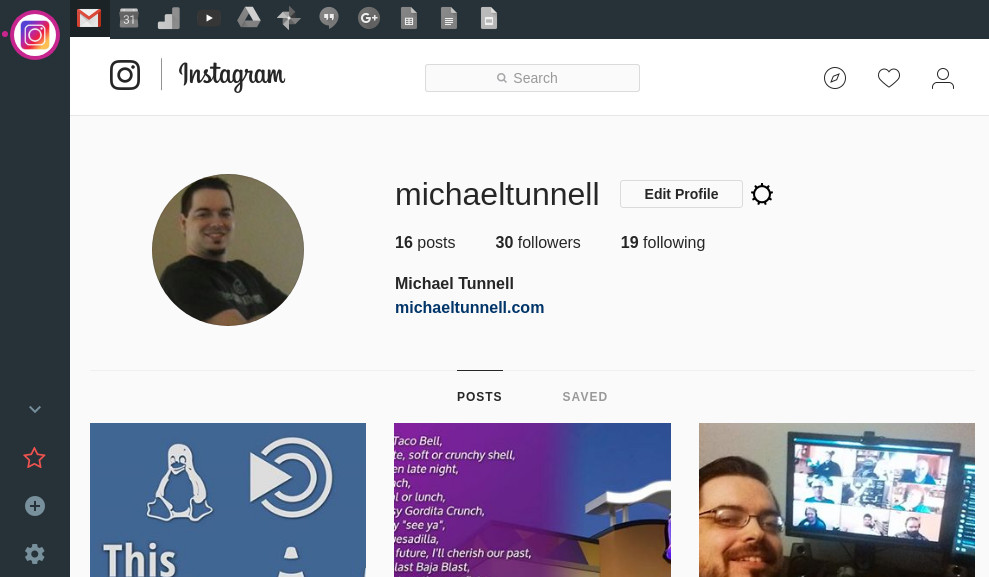
Wavebox could be the perfect solution for Instagram Desktop usage. If it had the user agent option as I described in issue #185 and the ability to do Multiple Accounts in the services style that GMail accounts can do.
I created a quick&dirty screenshot of what I mean and attatched it below.
If you could make it so that Instagram would have 1 entry on the sidebar but access to switch between accounts in the top navbar like how you can with GMail that would make the service much more powerful than any other option.
The #185 part is needed as well because that is the only way to upload to Instagram from the desktop but add those together and you have a fantastic solution!
 MichaelTunnell
All 8 comments
185 is in master ready to ship in the next beta. I guess we should probably look at auto spoofing the user-agent as android anyway.
As regards the grouping, we've got a little bit of redesign work to do to give more flexibility around arranging accounts. We're not sure how we're going to do it yet, but it will either be the ability to add accounts to an existing grouping, or just a free-for-all grouping type thing.
 Thomas101
on 22 Feb 2018
Thomas101
on 22 Feb 2018
Hi, we’ve just released this to the beta channel of Wavebox in version 3.14.8. You can now add another service into an existing account by right-clicking on one of the tabs and picking Add another service

If you want to give it a try there are some instructions on how to use the beta channel here. Thanks
Thomas101
on 23 Jul 2018
I just tested this and while this new feature is cool, it doesn't accomplish what is requested in this issue.
This would be good if a user wanted to have a single sandbox for a variety of different services but this request is for the reverse. If a user wanted a bunch of services all in the same sandbox for a single entity/company then this would work great.
I was wanting to have a single Instagram item on the sidebar and then multiple sub-services that I could use for various accounts. Due to the sub-services all using the same sandbox and thus the same login details, the multiple accounts approach is not possible with this implementation.
MichaelTunnell
on 23 Jul 2018
Okay, I follow you. This is the same underlying issue as #732 then.
We're trying to figure the best way to present this because there's definitely a use case for both but bubbling that up in an easy enough way that makes sense is a challenge.
Maybe just a simple checkbox to isolate a single service would work. There wouldn't be any sharing between services in an account, but it would let you for example, add multiple Instagrams into a single group.
Thomas101
on 23 Jul 2018
yea it does seem like a similar issue with that.
Maybe just a simple checkbox to isolate a single service would work. There wouldn't be any sharing between services in an account, but it would let you for example, add multiple Instagrams into a single group.
Sounds good to me. I don't really have a preference to how it is done. I don't really want sharing between the services of the group in my usecase as my purpose is more focused on organization and consolidation. I currently have 25 main services that could be consolidated down to 12 with grouping like this
However, I would like to make a follow up request that a shortcut be available to switch between sub-services of a group.
I currently use Ctrl+PageUp and Ctrl+PageDown (standard shortcut for tab switching in browsers) to switch between the main services and that saves a lot of time with the multi-account approach so I'd like to have something similar if the grouping approach is setup.
We're trying to figure the best way to present this because there's definitely a use case for both but bubbling that up in an easy enough way that makes sense is a challenge.
I am in no rush for this feature. This would just make the app feel cleaner or more polished but Wavebox already provides the functionality I need to accomplish what I want with it so I'm not bothered by not having this feature at the moment. I am very patient person so whenever you get the time is fine with me. :)
MichaelTunnell
on 23 Jul 2018
Hi, we’ve just released this to the beta channel of Wavebox in version 3.14.9. To setup multiple accounts of the same type you need to enable sandboxing after adding them. There's two ways to do this...
If Wavebox detects that you've got two services of the same type it will bring up the following dialog shortly after adding. Pick
Keep here and sandbox

Go into the account settings and locate the service. Under the advanced section enable Sandboxing here
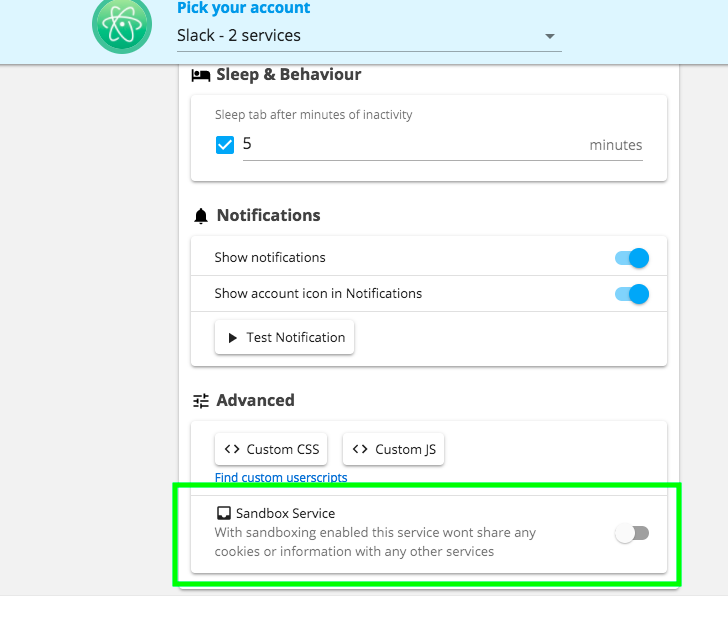
Once it's sandboxed it almost as if it's in different accounts - doesn't share cookies, credentials etc with any other tab. Let me know if this works for your usecase :)
Thomas101
on 26 Jul 2018
Hi, this has just been released in the latest version of Wavebox (4.0.0). You can get the update by using the Application/File menu and clicking Check for Update or by downloading the latest version from our releases page or download page. Thanks!
Thomas101
on 10 Sep 2018
This works great! Thank you!
MichaelTunnell
on 18 Sep 2018
Related issues
Thomas101
·
3Comments
 lots0logs
·
3Comments
lots0logs
·
3Comments
 bashfulrobot
·
4Comments
bashfulrobot
·
4Comments
 yermulnik
·
3Comments
yermulnik
·
3Comments
 phileasb
·
3Comments
phileasb
·
3Comments
Most helpful comment
Hi, this has just been released in the latest version of Wavebox (4.0.0). You can get the update by using the Application/File menu and clicking
Check for Updateor by downloading the latest version from our releases page or download page. Thanks!