Waveboxapp: Badges for Google inbox not working
Which version of Wavebox are you using? [e.g. 3.0.0]
3.10Which Operating System are you using? [e.g. Windows 10, Mac OSX 10, Ubuntu 14.04]
OSX 10.13.3, Ubuntu 16.04
No badges are show in Inbox. Default settings in Unread & Sync.
Show unread count in sidebar or toobar,active
Show unread count in Menu Bar & App Badege, active.
 roccolord
All 22 comments
Hi, which unread mode do you have selected under your account settings? Have you tried the steps in this kb article?
 Thomas101
on 13 Feb 2018
Thomas101
on 13 Feb 2018
I have Unread Unbundled Messages, in 3 different Inbox accounts.
roccolord
on 15 Feb 2018
Okay thanks. There's a few things worth trying...
- If you try pasting the following into the Google Inbox search bar do you get any messages?
label:inbox label:unread -has:userlabels -category:promotions -category:forums -category:social - Does re-adding/adding one of the accounts a second time bring up any unread counts for that account
- If you restart Wavebox, then go to
View > Developer > Wavebox Developer Toolsyou should get a debug window appear. Click on the console tab. Have any errors or warnings appeared there?
Thomas101
on 15 Feb 2018
- Yes for 2 of 3 accounts.
- Yes the number of messages found in search 1, is displayed as a badge when added a second time.
- one 404 on a drive api https://clients6.google.com/discovery/v1/apis/drive/v2internal/rest
401 on https://clients6.google.com/voice/v1/users/@me/account?checkHangoutsCallingPermission
roccolord
on 15 Feb 2018
After re-adding the accounts does the count now work correctly across all 3?
Thomas101
on 19 Feb 2018
no.
roccolord
on 20 Feb 2018
Above you said that after adding a second time, the number of messages is displayed in the badge. How many of the accounts are now not working? Is it all three or just one etc?
For the ones that aren't working, is it happening on both your Ubuntu install and macOS install or just one? Are the Google Accounts @gmail.com or @mycompany.com addresses?
Thomas101
on 20 Feb 2018
Sorry for being unclear. Adding an account a second time gives badges correctly, on that newly added account, only. Not the old that was added way back, they are still borked. I have since deleted the newly added account.
Of the 3 accounts I have 2 are @mybothcomanies.com and 1 @gmail.com. It's happening both on OSX and Ubuntu on all of the accounts. All using Inbox.
roccolord
on 20 Feb 2018
Thanks for the extra info, are you on the beta channel by any chance? You can find this out by clicking on the settings cog (bottom left) and there's a version in the bottom right of that screen. Is it 3.10.3beta?
Thomas101
on 20 Feb 2018
No I'm on stable.
roccolord
on 20 Feb 2018
I can change to other branches if needed for testing purposes.
roccolord
on 20 Feb 2018
No it's okay, I was wondering if this was related to another issue that's currently on the beta channel.
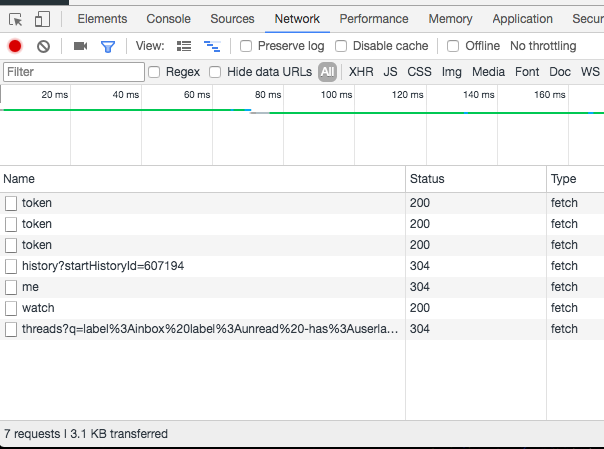
I think I might know what the root cause of this is. It would be good to confirm though. Could you try the following...
- Press Cmd+Alt+J on your macOS install
- Click the network tab
- Right click on your Google Account and pick "Resync"
You should see a bunch of new logs come out and I'm guessing one of them in your case has a 404 status?
Thomas101
on 21 Feb 2018
I'm on Ubuntu at the moment but doing the same thing, the strange thing is that nothing is added when doing a "Resync".
roccolord
on 21 Feb 2018
In the console tab do you see the Started in n | n and [SYNCS][WebSocket] Socket opened logs?
Thomas101
on 21 Feb 2018
Ohh sorry missed that there is a "Wavebox developer tools". In that one I get the started and Websockets and also in network a 404 to:
https://www.googleapis.com/gmail/v1/users/me/history?startHistoryId=3094460
roccolord
on 21 Feb 2018
Okay, I know what this is. The root cause is the Gmail API returned a history id with 3094460 at some point and then has now removed this history id - which is why the 404 comes back. This shouldn't happen, but there's been a flurry of these issues recently. We think that Google has either had some kind of failure and they're restored from backup or collapsed a bunch of history ids for some reason.
We've put a patch in the beta channel, which means if it ever finds this it does a full re-fetch from Google as if it's a new account which solves the issue.
Until that goes out to stable there's a few things you can do to get your counts back. Any one of these should resolve the issue...
- Re-add the account, as this will fetch a new history id and you should be good to go from there
- Remove the history id manually. To do this...
- Quit Wavebox
- Locate the
mailboxes_db.jsonfile in data folder - Edit the file and replace occurances of
historyIdwithxhistoryId. For example\"historyId\":3094460becomes\"xhistoryId\":3094460 - Start Wavebox
- Try the beta channel which includes the fix. It's worth mentioning that there is a seperate sync issue in the current beta (#590) which means you may need to right click on the accounts and hit
Resyncafter restarting Wavebox. A fix for this is due to be released early next week in 3.10.4beta
Thomas101
on 22 Feb 2018
Whoho! Did option 2.
roccolord
on 22 Feb 2018
Probably the best one if you're comfortable editing those :). I'll keep you up to date as and when the fix goes out into beta & stable
Thomas101
on 22 Feb 2018
OK, cheers! Thanks for you help on this issue, very good!
Vim is my friend:
:%s/historyId/xhistoryId/gc
So option 2 was a nobrainer for me :+1:
roccolord
on 22 Feb 2018
+1 vim :)
Thomas101
on 22 Feb 2018
Hi, we’ve just released this to the beta channel of Wavebox in version 3.10.4. If you want to give it a try there are some instructions on how to use the beta channel here. Thanks
Thomas101
on 9 Mar 2018
Hi, this has just been released in the latest version of Wavebox. You can get the update by using the Application/File menu and clicking Check for Update or by downloading the latest version from our download page. Thanks!
Thomas101
on 20 Mar 2018
Related issues
 dzg
·
4Comments
dzg
·
4Comments
 bashfulrobot
·
4Comments
Thomas101
·
3Comments
bashfulrobot
·
4Comments
Thomas101
·
3Comments
 phileasb
·
3Comments
phileasb
·
3Comments
 phcyso
·
4Comments
phcyso
·
4Comments