Waveboxapp: Microsoft Teams - add unread count & notification support
Which version of Wavebox are you using? [e.g. 3.0.0]
3.7.2betaWhich Operating System are you using? [e.g. Windows 10, Mac OSX 10, Ubuntu 14.04]
Windows 10
Hi,
With my Microsoft Teams account, counter of the unread messages from chat is not working.
Regards
 NullpointerForever
All 25 comments
@NullpointerForever where do you mean exactly it is not working?
Microsoft teams is a integration that has not a 100% support yet with notifications. And services that is a non major service is not going to be visible in the tray icon since it will only get the unread count from major services.
 nmat
on 5 Jan 2018
nmat
on 5 Jan 2018
When the new message from Teams arrive, I can't see any number of unread in the left bar on the Teams icon (like unread counter in the Outlook icon) and there is no desktop notification.
NullpointerForever
on 5 Jan 2018
We're going to be adding teams as an integrated account in the future which will include notification and badge support. There's more info on the difference between the two account types here
 Thomas101
on 8 Jan 2018
Thomas101
on 8 Jan 2018
Has this been included in version 3.9? I'm using 3.10 on Ubuntu 14.04 and haven't seen any changes to Teams notifications.
 blakejwc
on 31 Jan 2018
blakejwc
on 31 Jan 2018
Not as yet, aiming to get this out with 3.11 though
Thomas101
on 1 Feb 2018
Some more feedback. Since the notifications are sent "in browser" for wavebox its a bit annoying because the notification can pop over the text area so when recieving a notification it goes in the way of me typing. :/
nmat
on 28 Feb 2018
Hi, this has just been released in the latest version of Wavebox. You can get the update by using the Application/File menu and clicking Check for Update or by downloading the latest version from our download page. Thanks!
Thomas101
on 20 Mar 2018
Hi. Thanks for this but I just installed latest ( 3.11.0) and don't think desktop notification for microsoft teams is proper yet. I'm on Ubuntu 16.04.
I can verify in account settings show notifications check is ON. Anyplace else I should look to configure to ensure I have unity desktop notifications for my chat or messages.
The unread counter in indicator works though. Thanks
 rajalokan
on 20 Mar 2018
rajalokan
on 20 Mar 2018
Ah yes, sorry closed this off prematurely. It's just the badge support that's been added in so far
Thomas101
on 20 Mar 2018
Hi Guys. Any updates on this? Didn't find this in 3.14.7.
rajalokan
on 18 Jun 2018
Hmmm could this be prioritized in some way? I find the window where the notification is coming up on top of message box really disturb my work a bit. (not to bad, but still annoying having a window covering the message box when typing)
nmat
on 26 Sep 2018
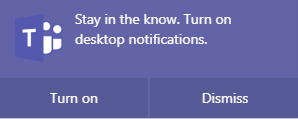
I noticed today that I got question from the teams web client using wavebox to turn on desktop notifications. Right now it just says "Wavebox notification" so I guess that the client for the web has turned on notifications much like the messenger to be able to send notifications to user desktop. Which is really great.
nmat
on 4 Dec 2018

This also means that a popup comes on the desktop. This helps in the way that no notification is showing above the conversation line so you do not have to care about text being hidden behind a in window notification. Still its nice in the way that capturing the notification when turned on might be possible. A few things to note:
- You can't click the notification in order to go to the message
- No message preview
nmat
on 4 Dec 2018
Another screenshot of the question:
nmat
on 4 Dec 2018
is there any plans on catching the notifications for teams in a more readable and more integrated format? :)
nmat
on 25 Mar 2019
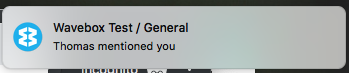
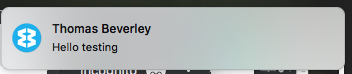
I've just given this a try and it looks like teams has added html5 notification support. It should be creating sensible notifications...
Thomas101
on 25 Mar 2019
Maybe try clearing browsing data for the account to see if it grabs an updated version of the code will help?
Thomas101
on 25 Mar 2019
Windows 10 test.
I tested this now and cleared browse data. Which only gives me the
"Wavebox"
"New notification"
But no details like you see. Could it be that you are using enchanced notifications of some kind?
nmat
on 26 Mar 2019
Could it be that you are using enchanced notifications of some kind?
I've done nothing more than just add the account :-/. I've had a look around teams settings but can't find anything there either.
Maybe try adding it as a standalone account? It's definitely weird!
Thomas101
on 27 Mar 2019
I tested now to remove and add the teams account again and nothing changed.
I still get a popup saying "New notification" but not any information more inside it. The account is running as its own service in wavebox.
Version of wavebox: 4.8.4
Should I try to clean up everything? like a reinstall of wavebox?
nmat
on 28 Mar 2019
Also tested now to clear all browser data and login again. + using latest beta.
Result seems the same though. Not sure what is going on.
nmat
on 28 Mar 2019
Think I've found it. Teams sends an icon in the format blob:https://theurl..... On Windows this causes a failure further down and the end result is New Notification. I'll just put a guard in for this :)
Thomas101
on 28 Mar 2019
OF COURSE it does! Doh! haha.....I am willing to test it further when its in place on master :)
nmat
on 28 Mar 2019
@nmat 4.9.0 has got a fix for this :).
Am I okay to close this issue off? Notifications & badges should be working now
Thomas101
on 28 Mar 2019
Looks good! I have tested it here and I can also click the notification to get to the conversation.
This is ok for me to close since:
- I get the notification count
- I get the notification popup
- Don't get a popup inside the wavebox that hovers over the text box
So I would say close it.
nmat
on 28 Mar 2019
Related issues
 phcyso
·
4Comments
phcyso
·
4Comments
 dep
·
4Comments
dep
·
4Comments
 phileasb
·
3Comments
phileasb
·
3Comments
 Tahini-123
·
4Comments
Tahini-123
·
4Comments
 Ash258
·
3Comments
Ash258
·
3Comments
Most helpful comment
Ah yes, sorry closed this off prematurely. It's just the badge support that's been added in so far