Waveboxapp: Some weirdness with Mixmax extension.
Which version of Wavebox are you using?
3.5.1 betaWhich Operating System are you using? [e.g. Windows 10, Mac OSX 10, Ubuntu 14.04]
Windows 10
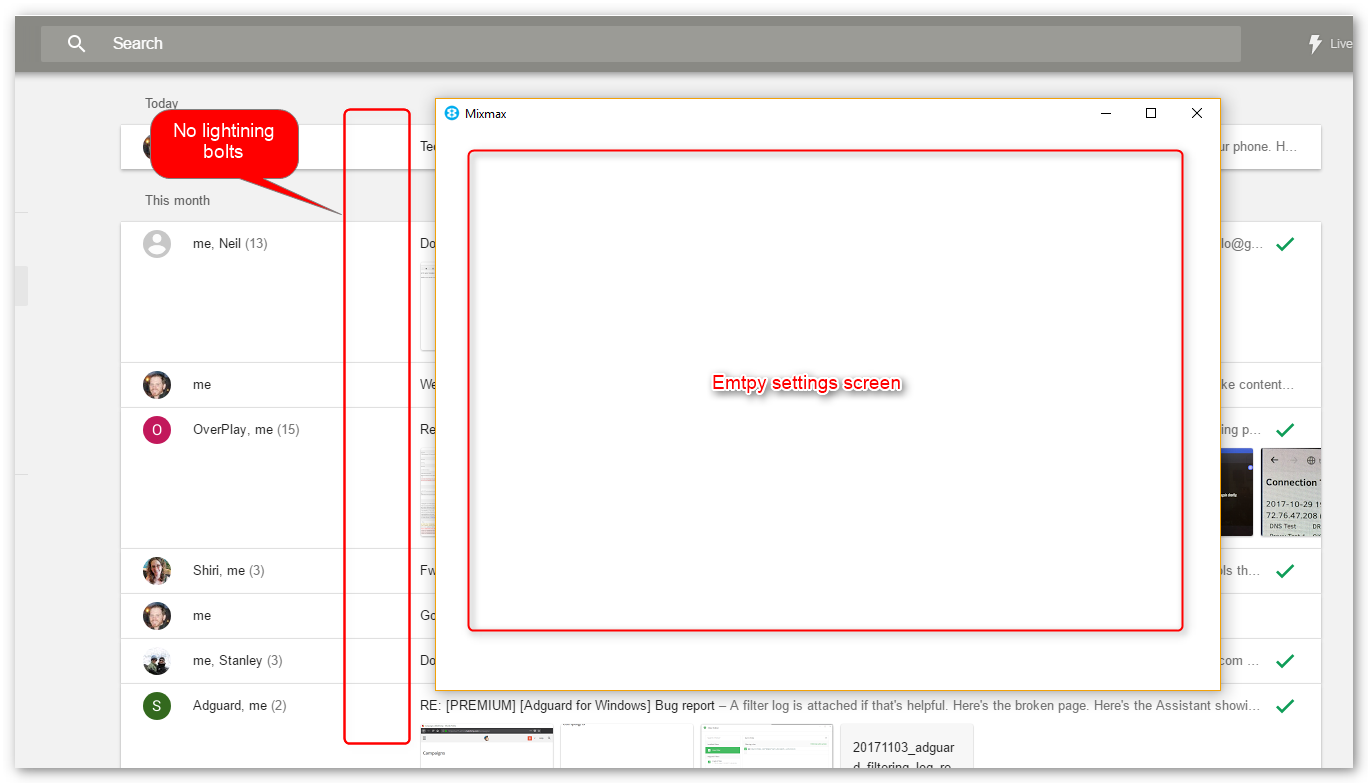
When using the Mixmax extension (THANKS for implementing this one by the way) it works great in the compose window, but the lightning bolts to opens are missing. Also, all settings screens are empty.
This screenshot shows both issues.
 GollyJer
All 21 comments
Thanks for reporting. The empty settings screen I've seen - we've got a fix for this ready to land in 3.5.2beta.
As for the lightning bolts, they appear to be there when we've been testing. If you try sending a fresh email does a lightning bolt appear next to that one? If you try restarting Wavebox does that work? Finally how many Google accounts do you have added?
 Thomas101
on 9 Nov 2017
Thomas101
on 9 Nov 2017
Restarting doesn't help.
I have a Google Inbox account (primary, the one from the screenshot) and a Gmail account.
GollyJer
on 9 Nov 2017
Hi @Thomas101 I wanted to add that mixmax is working fairly well for me in the actual message compose window (I am using 3.5.0 on MacOS 10.12.6) but when I go to insert calendar availability (/cal) or group event availability, the dialog pops up, everything works in terms of selecting times, but the "insert times" button (which populates the email with the mixmax-extended content; i.e the point of the whole thing) does not do anything; the dialog stays up and there is no new content inserted into the email.
I compared this to how it works in Chrome with the extension installed directly, and MixMax is working correctly for me there.
Thanks for your help, and I'm happy to beta-test any possible fixes.
David
 dchersey
on 12 Nov 2017
dchersey
on 12 Nov 2017
@dchersey the root of that bug is the same as the blank window above. We've got a fix for that one due to land in the next beta. We we're hoping to ship last week but have been held up by a few technical problems
Thomas101
on 13 Nov 2017
Hi, we’ve just released a fix for this to the beta channel of Wavebox in version 3.5.2. If you want to give it a try there are some instructions on how to use the beta channel here. Thanks
Thomas101
on 21 Nov 2017
@dchersey I think the calendar availability is still an issue in the current beta. I'll keep this issue open for the meantime to make sure we get that working!
@GollyJer the blank window should be fixed, I think the missing read notifications should be fixed in this one too
Thomas101
on 21 Nov 2017
That is correct @Thomas101, the insert times button still does not do anything. I can do everything else on that popup except complete the process :(
Thanks for your help & let me know when you want me to test it again.
dchersey
on 21 Nov 2017
Any updates on which beta might address this? Just tried 3.6.2 but no dice :(
dchersey
on 30 Nov 2017
Update on my end... 3.6.2beta
- MixMax popups now show the correct content. Thanks!
- Lightning bolts still missing.
If I'm on the Sent folder in Inbox, then reload the page in wavebox the bolt shows up. If I then navigate to the Inbox and back to Sent the bolts are gone.
Not sure if that helps... but at least it's something.
GollyJer
on 30 Nov 2017
It will be 3.6.3 beta
Thomas101
on 30 Nov 2017
FYI @GollyJer I have bolts in both my sent boxes; no reloading required.
dchersey
on 30 Nov 2017
@dchersey Are you using Gmail or Inbox by Gmail?
GollyJer
on 30 Nov 2017
@GollyJer we've been trying to figure out what's going on here. We added Mixmax to a fresh user profile on Chrome and tested the following to see what the difference was between Chrome and Wavebox.
In our testing we've seen some sporadic results with showing the bolts in Chrome, with the same outcomes on both Gmail and Google Inbox, it would be good to know if you're seeing the same.
See no bolts
- Load mail.google.com or inbox.google.com
- Wait 5 - 10 seconds for everything to fully load
- Switch to sent mail
- See no bolts
See bolts when loading directly into sent folder
- Load https://mail.google.com/mail/u/0/#sent or https://inbox.google.com/u/0/sent
- See bolts load after a few seconds
See bolts when quickly switching to sent folder
- Load mail.google.com or inbox.google.com
- Switch to sent mail as quickly as possible
- See bolts load after a few seconds
If we try the steps in the first group, no matter how many times we try switching to sent, sending e-mails, navigating around or anything we can think of the bolts don't appear.
Thomas101
on 30 Nov 2017
@Thomas101 Yup. You're right. It's on MixMax's end.
Using Inbox in Chrome Browser...
I see no bolts following your first process.
Your second and third process are basically the same. If you're in the Sent folder before the plugin fully loads then the bolts appear. However, navigate to any other folder and they disappear.
GollyJer
on 30 Nov 2017
Hi @Thomas101, I've been out for a bit but just got back and downloaded 3.6.5 beta ... the mixmax dialogs (/cal, /availability) still do not let me hit the "Insert Times" button and populate the emails.
Using Inbox to answer @GollyJer's question; and everything works fine in Chrome natively just not with Wavebox.
dchersey
on 14 Dec 2017
Hi @Thomas101 this is still an issue with 3.10 ... any updates on a fix? Thank you :)
dchersey
on 24 Jan 2018
So the crux of the issue is the way electron handles new windows. It differs slightly from the way that Chrome does. For the most part things just work, but in this instance, it breaks the cross window chatter that MixMax uses to set the calendar availability.
In Decemeber we started to upgrade Wavebox from the Electron 1.7 branch to the 1.8 branch and as part of this started to put a fix together to make the window behaviour more closely match that of Chromes. We've had some success, but managed to break a bunch of other things in the process. In addition to this 1.8 has been a pain because the upgraded version of Chromium has a number of breaking changes which is causing a knock on effect for other things.
Looking forward though, we're really keen to fix this as its the cause of a few other issues too. In the new beta cycle of Wavebox (3.10.1->3.10.*) our aim is to move over to the electron 1.8 branch and as part of this fix the window open issue too. I'll keep the issue posted with any progress/updates and hopefully we can get this fixed soon
Thomas101
on 25 Jan 2018
Hi, we’ve just released this to the beta channel of Wavebox in version 3.10.4. If you want to give it a try there are some instructions on how to use the beta channel here. Thanks
Thomas101
on 9 Mar 2018
@Thomas101
The pop-up now works as expected... thanks!
The lightning bolts are still hit or miss but as discussed earlier it's on MixMax's end.
Best!
Jeremy
GollyJer
on 9 Mar 2018
Working for me! I haven't tested it extensively, but that main thing is that I can dismiss the popup and it inserts mixmax functionality. Very excited about exploring the capabilities of this plugin now that I can use it without logging into google (i.e. in a proper desktop app).
dchersey
on 10 Mar 2018
Hi, this has just been released in the latest version of Wavebox. You can get the update by using the Application/File menu and clicking Check for Update or by downloading the latest version from our download page. Thanks!
Thomas101
on 20 Mar 2018
Related issues
 phileasb
·
3Comments
phileasb
·
3Comments
 MichaelTunnell
·
4Comments
Thomas101
·
3Comments
MichaelTunnell
·
4Comments
Thomas101
·
3Comments
 mgresko
·
4Comments
mgresko
·
4Comments
 atrasatti
·
3Comments
atrasatti
·
3Comments