Waveboxapp: feature request: Support EU based keyboards better
A command to do a quick switch between accounts/services etc would be good help.
 nmat
nmat
All 24 comments
Hi, have you tried the following...
macOS
CMD+>
CMD+<
CMD+1..9
Windows & Linux
Ctrl+>
Ctrl+<
Ctrl+1..9
If these don't suit the way you work, you can change the shortcuts
 Thomas101
on 13 Sep 2017
Thomas101
on 13 Sep 2017
I am using a swedish keyboard where >< is not available as a standard key. Ctrl+Tab and Ctrl+Shift+Tab would be suited there more and follow standard of keyboards in general.
The reason for the quick switcher is that it would make service changing more interactive. Especially if you are connected to more than 10 services.
nmat
on 13 Sep 2017
You can change the mapping of the > or < keys to something that might be more suited. The Previous and Next account shortcuts are the ones to change.

Which operating system are you using? Changing to Ctrl+Tab is a tricky one on some OS's because the OS binds onto these by default for app switching. If you're using macOS you could change this to be Ctrl+Tab as it uses cmd by default. There's some more info on changing shortcuts here
Thomas101
on 18 Sep 2017
I have tested to change the keybinding to use:
Ctrl+Left Arrow
Ctrl+ä
Ctrl++
and more combos. However it seems that changing the keybindings does not effect on the use case.
I have also noticed that the keys: Ctrl+§ gives me the menu. Not sure if this is due to me using a EU based keyboard that has åäö and so on.
The keyboard shortcuts seems to be a bit broken when it comes to EU based keyboard at least on my end and also to reassign shortcuts. Would it be possible to have the interface read a keyboard input and fill in the information instead of me guessing it?
nmat
on 19 Sep 2017
Would you be able to send a pic of your keyboard? Maybe I can figure it out for you now and we'll look to add support for picking up on keypress shortly
Thomas101
on 20 Sep 2017
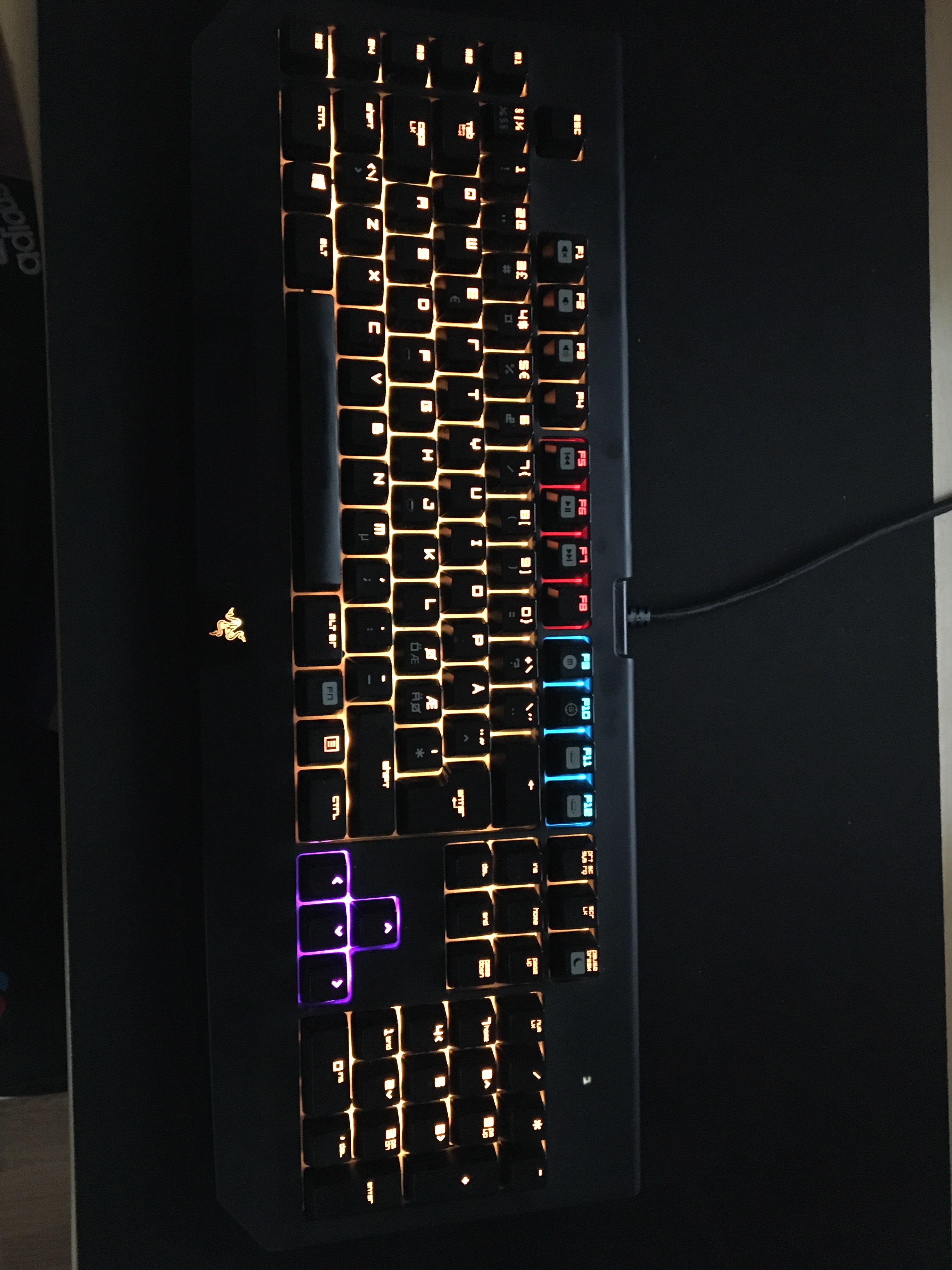
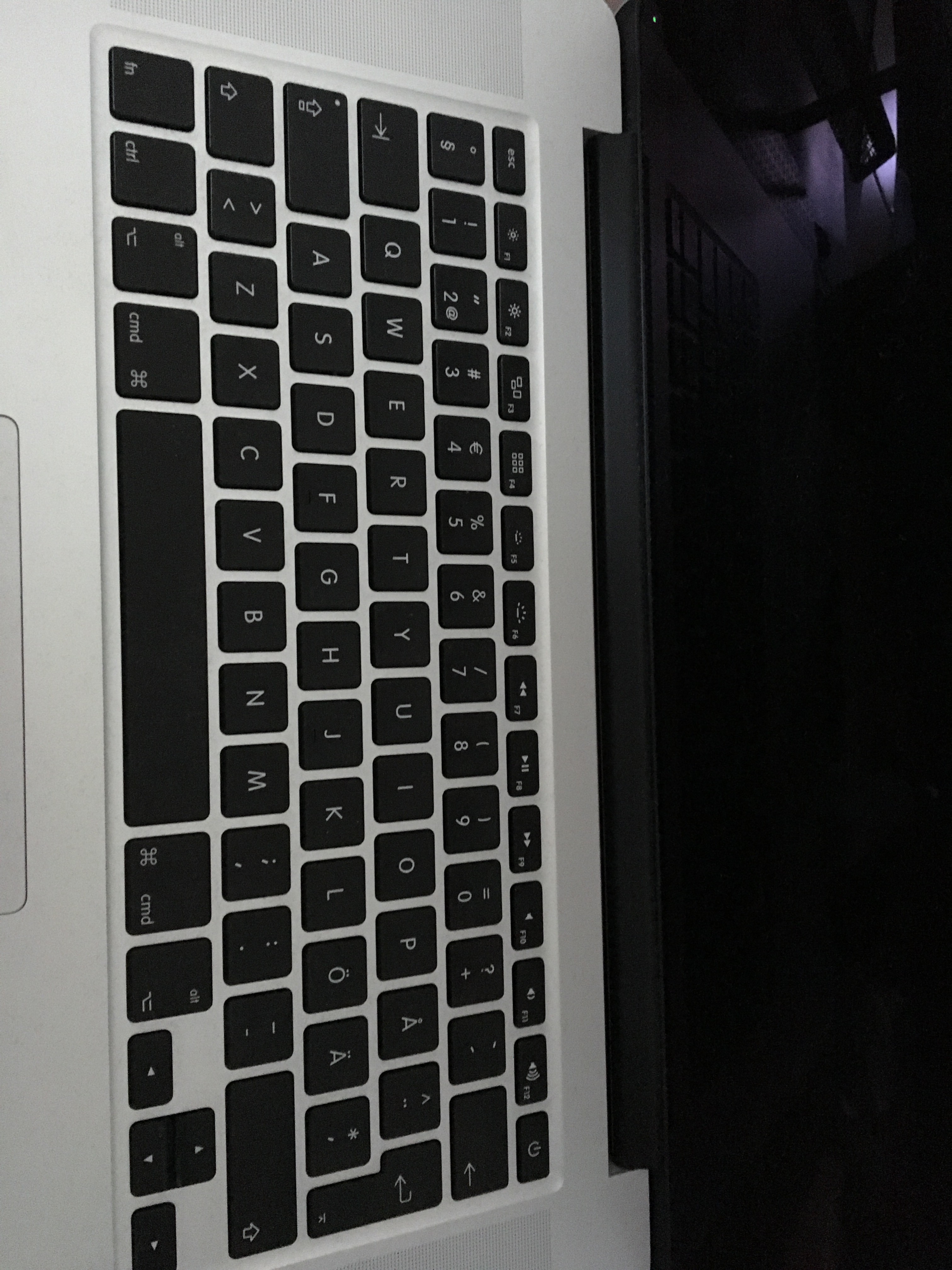
nmat
on 20 Sep 2017
These are the 2 different keyboards I am using. Same effect is on both of them
nmat
on 20 Sep 2017
Thanks for those! We definitely need to work on mappings for different layouts. I'll see if I can order a new keyboard with the same layout so we can have a go here. At the moment, you could try the following for example...
Option 1
- Find the
Navigate Back&Navigate Forwardshortcuts and delete the shortcut that's in the textbox - Change
Previous AccountandNext accountto beCmdOrCtrl+LeftandCmdOrCtrl+Right. On windows you'll be able to use ctrl+arrow and on mac cmd+arrow.
- Find the
Option 2
- Change
Previous Accountto bectrl+shift+tab - Change
Next Accountto bectrl+tab
- Change
Probably because the < and > keys sit on the same physical key you'd have to do something like cmd+< and cmd+shift+> to get those to work at the moment.
Thomas101
on 21 Sep 2017
To add some more feedback here. It seems that the: AltGr (which in america keyboard would be right Alt) is the Ctrl+Alt key.
If I type in AltGr+1..2 or whatever I do change the inner tabs. This however breaks the functionality of AltGr since it is used for doing @£$€{[]}\ signs for input.
I came across this problem when trying to type a mail and all of a sudden it changed the window when typing the @ sign. :/
nmat
on 22 Sep 2017
One suggestion I do have if you do get a keyboard with eu layout...would be to have a choice inside the preferences to say "English (US) keyboard" or "Europe" layout.
That way not having some keys that would be able to break the usage of for example AltGr which is used for other special cases.
Edit: Or have electron read the layout from the system. Should be possible since you have language and keyboard layout with different methods. In this case wavebox could determine the layout automagically with a suggestion.
nmat
on 24 Sep 2017
Is it possible to set at the moment to use something like Ctrl+LeftAlt+Number ?
I mean until this is fixed in general and tested? (If I Alt in anyway it would tell the AltGr to be overwritten which destroys the special characters) :(
nmat
on 14 Oct 2017
Unfortunately I can't see a way to use left alt, only AltGr. There's some more info on the accelerator keys here
Thomas101
on 17 Oct 2017
hmmm IF I read this correctly: Alt would indicate left alt while AltGr would indicate right Alt
However I am not 100% sure :/
nmat
on 17 Oct 2017
I've just tried on an Ubuntu box and Alt does indeed indicate left alt and AltGr right alt. Am I right in thinking you're on a windows machine? Do you see the same there?
Thomas101
on 18 Oct 2017
oh so I was correct. woho!
Yes. However I am not really able to set Alt as being left Alt in wavebox since Alt in wavebox is a summary of both left and right key. So if I add for example Alt+1 then it would mean:
(left)Alt+1
and
(right)AltGr+1
This overwrites the special key on EU keyboards:
In general EU keyboard layout is that: Example number key 2:
Shift+2 = "
AltGr+2 = @
As you can se on the above. If I assign Alt+2 then it would overwrite @ signature which is a special char for EU keyboards. Therefore it breaks the keyboard a bit and I have to remove all the special nifty shortcuts to change index in services. :(
nmat
on 18 Oct 2017
Ah, that wasn't the behaviour I was seeing when I tested it. Which OS & version are you using?
Thomas101
on 19 Oct 2017
Windows 10 creators fall update
nmat
on 19 Oct 2017
My guess is windows handles it differently to linux then :-/
Thomas101
on 20 Oct 2017
maybe it is....however the general part of EU keyboard is that (right)alt is always AltGr
nmat
on 20 Oct 2017
Changed the topic since it seems more appropriate then slack switcher
nmat
on 21 Oct 2017
It seems like the AltGr function for electron might have something to do with: https://github.com/electron/electron/pull/15378 which is fixed in version: 3.0.7
In other words it might be possible now to use the native way from electron to get the binding?
nmat
on 7 Nov 2018
Nice spot. I'll be pushing up to 3.0.8 before the next beta so we can give this a try!
Thomas101
on 10 Nov 2018
I've given this a try on 3.0.10 and unfortunately doesn't allow you to map directly to AltGr. Looks like windows treats AltGr as Ctrl+Alt
Thomas101
on 20 Nov 2018
@nmat I'm going to close this off, as support in Chromium isn't there for mapping directly to AltGr. In addition to this the new Quick Switch (via Ctrl+Tab) and Quick Search (via Ctrl / Cmd+T) should provide enough utility to switch between accounts.
Beyond that, keyboard shortcuts can be remapped if there's a specific shortcut you want easily exposed.
If there is something we're missing feel free to comment or open another issue, we can take another look! Thanks :)
Thomas101
on 23 Jan 2019
Related issues
 dep
·
4Comments
dep
·
4Comments
 yermulnik
·
3Comments
yermulnik
·
3Comments
 lots0logs
·
3Comments
lots0logs
·
3Comments
 cdeutsch
·
3Comments
cdeutsch
·
3Comments
 texelate
·
3Comments
texelate
·
3Comments