Waveboxapp: Expose shell command for window open to allow chrome profile selection
Which version of Wavebox are you using? [e.g. 3.0.0]
3.3.1 BetaWhich Operating System are you using? [e.g. Windows 10, Mac OSX 10, Ubuntu 14.04]
Ubuntu 17.04
It would be useful to allow each account to specify a profile for opening web links in an external browser. For example, I have two accounts (work and home) configured in Wavebox, and keep two chrome browser windows open (work and home). Often, in chat sessions, links to work material get passed around and currently, I copy the link address and paste it into the address bar of the proper window (since each profile has its own set of cookies/logging in sessions, etc), just like personal information is not something I want to store with my work account.
It could be as simple as allowing the browser to be specified via cli command rather than just wavebox webview or system default browser.
 walgenbach
All 10 comments
I get what you mean - it can be a bit disjointed.
In terms of opening specific browsers or browsers in a profile there's no platform support for this at the moment. Under the hood Wavebox uses xdg-open which just drops out into the default browser/mailto handler/file handler etc. If we were to try, for example running chrome in a specific profile, I'm not aware of any command line argument that Google provides for this at the moment.
One thing that might work for you, is using the Wavebox browser rather than the default browser. Each account that you add to Wavebox has it's own sandbox or profile (in a similar way to chrome), so for example, if you add [email protected] and [email protected] neither see each other. From here if you open links in the Wavebox browser that sandbox continues. So if you open a link in an email from in your [email protected] account and sign in to github.com that sign-in wont be present if you open a link in an email in your [email protected].
Having typed that it seems a bit complicated... Probably best to try with an example. There's two ways you can try it...
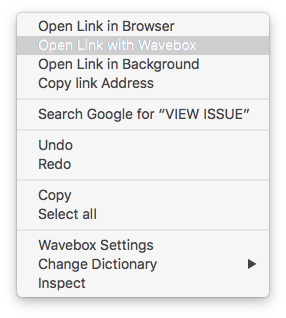
The first way is with the context menu, when right clicking on links there's the option to open with browser, or open with Wavebox. If you pick open in Wavebox you'll stay in that accounts sandbox.
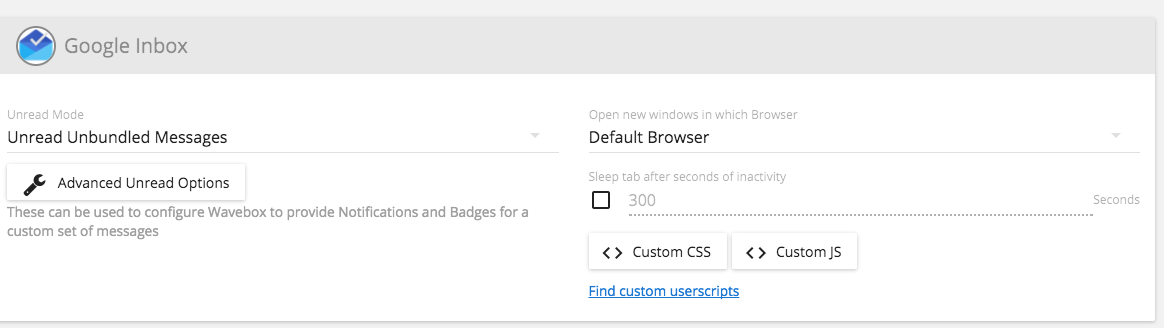
If you want a more permanent solution, if you right click on the account in the left and go to Account Settings. Scroll down to the Google Inbox or Gmail service and from here there's an option titled Open new windows in which Browser. You can change this to be the Default Browser or the Wavebox Browser.
Would that work for what you're trying to do?
 Thomas101
on 30 Aug 2017
Thomas101
on 30 Aug 2017
Thanks for the response.
At least under linux, there is an option for chrome to open with a profile:
google-chrome --profile-directory="Default" (or "Profile 1", or whatever). The name comes from how the user data directory is named in .config/google-chrome. The option appears to exist in the osx version, but I've not done a lot of work with it since I spend most of my time in linux. I don't have an MS Windows desktop, so I can't check there.
If there was any way that the account requesting the open could be indicated, I'd be happy going ahead and writing a shell script or changing xdg-open to do what I need it to. I'll dig around and see if there is any way to tease the information about the account from wavebox.
I am probably over sensitive about this issue, but I work remotely for my day job and have a side business, so keeping everything separate (including synced cookies/history/whatever) is an important way of making sure everything is on the up and up.
Thanks again.
walgenbach
on 30 Aug 2017
Well you learn something new everyday :).
I had a look into putting a setting in that would let you specify a custom command for opening urls, but to be honest this is probably a bit too much of a security risk. (e.g. enter rm -rf to that field and click my link territory).
In the long term it would be great to have some kind of click and point option that lets you pick between...
- Default Browser
- Chrome
- Chrome profile1
- Chrome profile2
- Firefox
...and so forth a little bit like how Choosy gives options on osx.
But I wonder if there's something we can do in the meantime that's a little bit difficult to setup and safe, but quick to add in. Perhaps just picking from a list of browsers is enough and typing the profile name in manually would work.
If you're really interested in having a go, there's probably 2 or 3 places the opener will need to be patched. I'd be happy to point out those and help!
Thomas101
on 1 Sep 2017
same use-case here, on OS X, using Wavebox Pro.
desired behavior AFAIC: in the Account Settings, use existing dropdown for "Open new windows in which browser" to choose between: "Last active browser window", "Last active Chrome window", "Chrome
this would define the default behavior when clicking a link, but also show these options in the link context menu, and also when "ctrl+clicking" a link (similar to choosy) (modifier configurable?).
 itamaro
on 5 Sep 2017
itamaro
on 5 Sep 2017
When I get some work cleared off my plate in the new couple of days, I'll have a chance to set up a dev environment and see if I can patch it to get something like the desired behavior. There doesn't seem to be an easy to determine which is the current account being used, so my idea of patching xdg-open to just check seems to be out.
If I am messing around with the open behavior, I might add that just to make my life easier.
walgenbach
on 5 Sep 2017
There wont be any account info passed down to xdg-open and I think this only supports opening with the default browser (I may be wrong on that one).
On the node side, the call is made through shell.openExternal in MailboxesWindow. This will normally be given the mailbox itself. I was thinking about checking some config on the given mailbox and then either running shell.openExternal or spawning a detached process that, for example runs chrome with the profile added as an arg.
Just as a side note, if Use Experimental Window Opener is disabled in settings>advanced, it doesn't run through here, however we've now turned this on by default for all users and the old behaviour is on our deprecation list, so probably not worth the effort of patching that, but just so you're aware.
Thomas101
on 6 Sep 2017
Hi, we’ve just released this to the beta channel of Wavebox in version 4.5.12.
I've added a more detailed explanation of what's been added and how to set up and get started in this issue as it's really similar to this one.
If you want to give it a try there are some instructions on how to use the beta channel here. Thanks
Thomas101
on 5 Feb 2019
Awesome, thank you for building this! :-)
Is this available only on the 4.5.x beta channel?
I'm a bit confused, because I'm on 4.6.0 (stable), and I don't see the feature.
itamaro
on 8 Feb 2019
@itamaro it's available on 4.5.x beta and also 4.6.1beta. We don't normally do mid-cycle stable releases a but changes to Google Drive meant that 4.5.x stable went to 4.6.0stable and 4.5.x beta went to 4.6.1beta in this instance.
4.6.0 only contains a bugfix for Google Drive over the previous stable release. We're planning on moving 4.6.1beta to stable this week sometime all being well :)
Thomas101
on 11 Feb 2019
Hi, this has just been released in the latest version of Wavebox (4.7.0). You can get the update by using the Application/File menu and clicking Check for Update or by downloading the latest version from our download page. Thanks!
Thomas101
on 12 Feb 2019
Related issues
 texelate
·
3Comments
texelate
·
3Comments
 CheechGe
·
4Comments
CheechGe
·
4Comments
 Tahini-123
·
4Comments
Tahini-123
·
4Comments
 MichaelTunnell
·
4Comments
MichaelTunnell
·
4Comments
 dzg
·
4Comments
dzg
·
4Comments