Waveboxapp: Slack Account Reports unread count, despite all read
Which version of Wavebox are you using?
3.1.2Which Operating System are you using?
macOS Sierra 10.12.4
Just simply logged into a slack account and always reporting unread count
 jcarroll-mediafly
All 51 comments
Hi, is this reporting an unread number or the unread dot?
 Thomas101
on 6 Apr 2017
Thomas101
on 6 Apr 2017
Me too. A slack channel has a dot with a 1 for one unread message, but I've read everything.
macOS 10.12.5 Beta (16F43c)
WaveBox Version: 3.1.2
 raguay
on 6 Apr 2017
raguay
on 6 Apr 2017
I have the same problem, it says I have 27 unread messages, but I've read everything.
 Dejw4g
on 6 Apr 2017
Dejw4g
on 6 Apr 2017
Thanks, we'll dig a bit deeper to see what's happening here
Thomas101
on 6 Apr 2017
Happening for me as well - Version 3.1.2 on Mac 10.12.4
UPDATE:
I just noticed that my emails ( I have 2 accounts attached ) no longer show an unread count. Only the Slack channel does
 Kachilero
on 6 Apr 2017
Kachilero
on 6 Apr 2017
Same here, just on slack accounts. - Wavebox 3.1.2 on Windows 10
 ghost
on 7 Apr 2017
ghost
on 7 Apr 2017
Some slack accounts (not all) have this problem.
OS X El Captaion 10.11.6
Wavebox 3.1.2
Electron/1.6.5 Chromium/56.0.2924.87
 cympfh
on 7 Apr 2017
cympfh
on 7 Apr 2017
I had the same issue, "solved" it by using the SHIFT+ESC combo a couple of times. This forces Slack to mark all messages as read. The problem did not come back for me after that.
 benvddriessche
on 7 Apr 2017
benvddriessche
on 7 Apr 2017
Just about to look into this, would be good to know if the shift+esc trick works for anyone else?
Thomas101
on 7 Apr 2017
I worked for me, although I had to restart Wavebox and I'm still not seeing unread counts for email, but that might be a separate issue
Kachilero
on 7 Apr 2017
@Kachilero are you using Gmail/Inbox/Outlook/Office365? If Gmail/Inbox have you tried right clicking on the account, going to settings and changing the unread mode?
Thomas101
on 7 Apr 2017
It worked for me. It hasn't messed up yet. Keeping an eye on it.
On Fri, Apr 7, 2017 at 10:12 PM, Alejandro notifications@github.com wrote:
I worked for me, although I had to restart Wavebox and I'm still not
seeing unread counts for email.—
You are receiving this because you commented.
Reply to this email directly, view it on GitHub
https://github.com/wavebox/waveboxapp/issues/7#issuecomment-292564031,
or mute the thread
https://github.com/notifications/unsubscribe-auth/ACX0x9Rfej-kMoij2DJDaiBH3C5noYltks5rtlJjgaJpZM4M01-H
.
raguay
on 7 Apr 2017
@Thomas101 I am using gmail ( one account is a personal, the other a business, ) and just tried as you suggested. They were both set to
- Show unread badge
- Add unread messages to app unread count
- Show notifications
Turning those off and then on again did not resolve the issue.
However, the slack issue does seem to be resolved.
Kachilero
on 7 Apr 2017
At the risk of plus-1-ing ... I was seeing the same and SHIFT+ESC worked for me (so far at least).
Wavebox   3.1.2
Electron  1.6.5
Chromium  56.0.2924.87
Mac OSX   10.12.3
 urfolomeus
on 7 Apr 2017
urfolomeus
on 7 Apr 2017
@kachilero sorry i was talking about the unread mode drop down a little bit further down. I've added a KB article here which gives some more in depth instructions
Thomas101
on 8 Apr 2017
Hi, has everyone been able to resolve this by using shift+esc?
If not, can you update to the newly released 3.1.3. Wavebox will autoupdate shortly or if you want to get it sooner you can either re-launch Wavebox to trigger an autoupdate or redownload from https://wavebox.io/download.
Once it's updated can you go to View > Developer Tools and then click on the console tab. Then enter window.waveboxDebug.flags.slackLogUnreadCounts = true. Once you've done this right click on the account in the left toolbar and then click Resync. You should see some logs come out with some information about the data returned from slack. Each channel should have some info about it...
{
      "name": "random",
      "mention_count": 0,
      "unread_count": 16
    }
The unread_count indicates new messages where you're not mentioned, where as the mention_count indicates places where you've been @thomas101 mentioned. Do you have anything with numbers here that shouldn't be
Thanks
Thomas101
on 10 Apr 2017
shift+esc solved it for me.
ghost
on 12 Apr 2017
I've added some more fixes into version 3.1.4, so hopefully this should be looking good now. Going to close this issue off but if you do have any more problems just re-comment and I'll take another look.
Wavebox should update automatically after a while, but if you want to hurry it up, just restart the app and it will re-check
Thomas101
on 14 Apr 2017
This is now happening again for me. Shift + Esc use to work but doesn't appear to work anymore. I am on windows 10. Wavebox version 3.1.5
 jaredswarts55
on 27 Apr 2017
jaredswarts55
on 27 Apr 2017
@jaredswarts55 is it showing a count or just the unread dot indicator? I'll see if I can add some debug info into the app to see what it thinks is unread
Thomas101
on 2 May 2017
@Thomas101 It was just unread dot indicators. Must have had a keyboard issue at the time because on a different machine I was able to clear the indicator with shift+esc.
jaredswarts55
on 4 May 2017
i can repro this - dot indicators - 3.1.8 on mac
shift-esc doesn't help.
 adrianaoun
on 11 Jun 2017
adrianaoun
on 11 Jun 2017
@adrianaoun what are the steps to reproduce the phantom dot?
Thomas101
on 12 Jun 2017
My slack has it 100% of the time
So reproving steps are:
-login to slack
-have no unread messages
On Mon, Jun 12, 2017 at 7:41 AM Thomas Beverley notifications@github.com
wrote:
@adrianaoun https://github.com/adrianaoun what are the steps to
reproduce the phantom dot?—
You are receiving this because you were mentioned.
Reply to this email directly, view it on GitHub
https://github.com/wavebox/waveboxapp/issues/7#issuecomment-307810140,
or mute the thread
https://github.com/notifications/unsubscribe-auth/AAVjTcTy9_BXS7p4Mc3J5YNH53_ClRtYks5sDU4hgaJpZM4M01-H
.
adrianaoun
on 12 Jun 2017
I have the same issue, Windows 10, version 3.1.8
all badge/notification settings enabled.
I have a permanent dot despite everything being read - shift-esc did nothing.
 tomsautelle
on 16 Jun 2017
tomsautelle
on 16 Jun 2017
We’ve got a permanent fix together for this which is due to land in the next release early next week
Thomas101
on 16 Jun 2017
Still having this in 3.4.0
 robin31
on 31 Oct 2017
robin31
on 31 Oct 2017
issue still present in 3.5.0
jcarroll-mediafly
on 16 Nov 2017
@robin31 @jcarroll-mediafly it would be good to have some more info...
- Are you seeing an unread number or just the unread activity dot?
- If you try right clicking on the account in the left and picking
Resyncdoes the unread go away or stay? - In the slack tab if you try pressing Shift+Esc and then
Resyncdoes this make any difference?
Thomas101
on 17 Nov 2017
- Just the activity dot, but annoying enough that I'm constantly switch to the application to see if I actually need to read something.
- Sometimes it goes away. Sometimes it goes away comes back in a few seconds. Sometimes no change and the dot persists.
- I haven't had luck with Shift+Esc. Not sure if anything should be refreshing, there is no feedback when I hit that keycombo.
I'm running on Macos Sierra 10.12.6 if that helps
jcarroll-mediafly
on 17 Nov 2017
@jcarroll-mediafly can you try the following...
Go to View > Developer > Wavebox Developer Tools. You'll get a window appear. Can you click on the console tab and then paste... window.waveboxDebug.flags.slackLogUnreadCounts = true.
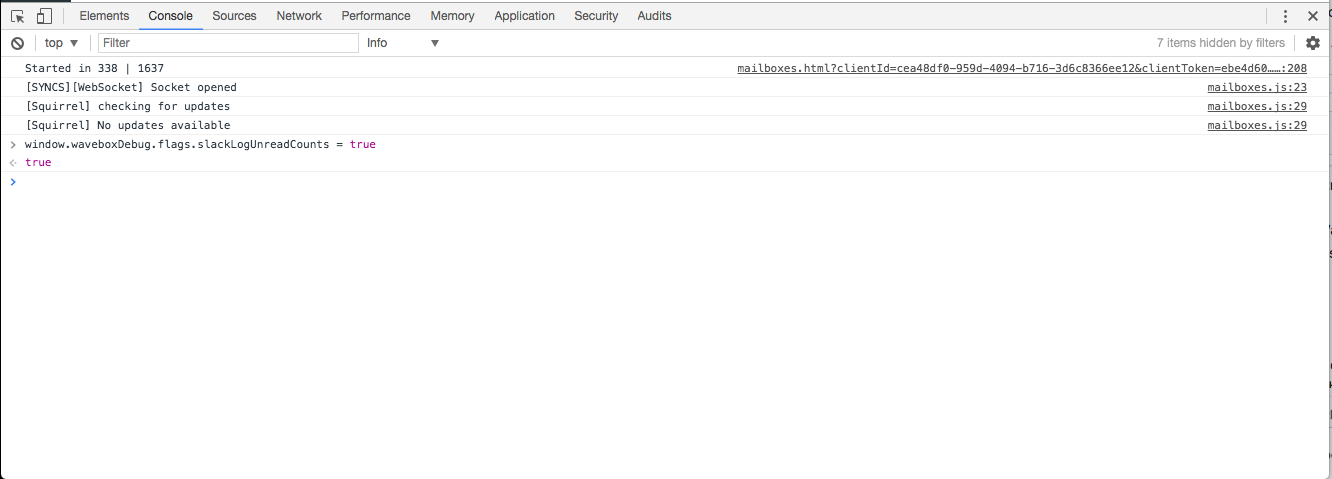
Next, right click on one of the affected accounts and hit resync. You'll see a long log of all the slack channels come out. Can you take a look to see any have has_unreads:true

These are the probable cause of what's showing the unread dot. Can you send me a screenshot of any of those (obviously blocking out any sensitive info)? It might give some clues as to what's causing the unread count
Thomas101
on 21 Nov 2017
Next time I see it I'll try those steps. As luck would have it, its behaving better atm
jcarroll-mediafly
on 21 Nov 2017
Okay, well I'll close this off again then, but just recomment if it comes back up. It could be something with Slack API, they've been having a few problems lately - their system status page is full of issues from the last few weeks
Thomas101
on 22 Nov 2017
Hi @Thomas101 ,
I've done the steps with the window.waveboxDebug.flags.slackLogUnreadCounts = true
I got this in my console:
[SLACK:UNREAD] call 34a067bd-36bb-48d7-8680-7faf400f65d8
mailboxes.js:23 [SLACK:UNREAD] start 34a067bd-36bb-48d7-8680-7faf400f65d8
mailboxes.js:35 Object {ok: false, error: "invalid_auth"}
Promise.resolve.then.then.catch @ mailboxes.js:35
mailboxes.js:23 [SLACK:UNREAD] error: 34a067bd-36bb-48d7-8680-7faf400f65d8 Object {ok: false, error: "invalid_auth"}
After seeing the error I removed the slack account and added it again. Now its working like intended again. As it seems 2 of my slack accounts got this. Don't know how they got this. Everything keeps working with the slack accounts but the notifications counter just breaks.
robin31
on 22 Nov 2017
@robin31 It could be that slack rotated tokens for some reason. I'll look to see why wavebox didn't report it as an authentication issue though!
Thomas101
on 22 Nov 2017
Ya, I tried your steps and each time I resync the out put of the logs says everything is read. Sometimes the dot will come back, and I can see there are no new unread channels. I have slack app and web browser up to confirm, nothing showing up there so no new messages truly. So I'll hit resync again and get same results, nothing marked as unread. Dot may or may not come back.
I dunno. I've been pretty aggressive hitting resync because I want the dot to clear, otherwise I feel I'm missing conversations...oh well...
jcarroll-mediafly
on 22 Nov 2017
@jcarroll-mediafly we've just released a new update 3.6.0, would you be able to give it a try with this? If you don't see the dot clearing could you try re-adding your slack account to see if that makes a difference? Thanks
Thomas101
on 23 Nov 2017
cool, will update!
jcarroll-mediafly
on 24 Nov 2017
Felt like its gotten worse. I set the flag window.waveboxDebug.flags.slackLogUnreadCounts = true and resync'd to inspect for any counts that were unread.
All the dm_count were 0, all the has_unreads were false, and all the mention_count were 0.
I resync'd 3 times and the dot came back each time. I took the output that the slackLogUnreadCounts spit out and diffed all 3 of them. Exact same output each time.
Running version 3.10.0
Not sure if any of this actually helps. Its not end of the world, simply annoying.
jcarroll-mediafly
on 12 Feb 2018
Same problem for me too !! All read messages are still marked as unread.
 MLDSBigGuy
on 3 Jun 2018
MLDSBigGuy
on 3 Jun 2018
have the same issue on mac slack 3.2.0
 paragbaxi
on 5 Jul 2018
paragbaxi
on 5 Jul 2018
web slack doesn't show any unread messages count. mac slack shows 6. when i have 1 new legit message, mac slack shows 7.
paragbaxi
on 18 Jul 2018
Unsure if this is the same problem, but my red dot problem came down to having an old inactive workplace in my slack account, that unexpectedly had some activity. Even though I wasn't actively logged into the account, that's the account that was causing the red "unread" dot on my desktop icon...
 Czarto
on 4 Sep 2018
Czarto
on 4 Sep 2018
I had the same problem, but even after pressing SHIFT+ ESC (to clear unread messages) the issue did not get solved. However I then realized that I had subscribed to multiple channels which I was not using actively. After removing myself from those channels, the unread icon went away!!
 smshashi
on 21 Mar 2019
smshashi
on 21 Mar 2019
while at work do:
  see (more unreads ⬇)
  scroll down
  see (more unreads ⬆)
  scroll up
 cmonacaps
on 24 Sep 2019
cmonacaps
on 24 Sep 2019
Shift + esc doesn't appear to work for thread replies in workspaces that aren't on paid plains. :-/ I've got an unread thread count that I can't get rid of.
 localjo
on 3 May 2020
localjo
on 3 May 2020
I have the same problem and its really annoying! shift+esc does not work, you have to exit whole workspace and come back to fix it! running on windows btw
 Tomaszu97
on 18 May 2020
Tomaszu97
on 18 May 2020
Same issue
- (threads says 3 new replies) but list is empty
shift+escdoes not fix it (mark all as read)shift+command+Rdoes not fix it (force reload)
I think this is a free tier workspace. Perhaps the issue is that there _are actually 3 unread replies in my threads_ but I cannot see them because they are too far back in my history (?)
 jcalvillo
on 19 May 2020
jcalvillo
on 19 May 2020
I have the same issue in mac desktop app. There's a thread (free tier) that I never read and is no longer accessible.
Removing and re-adding workspace does not resolve the issue.
 davidpesce
on 5 Jun 2020
davidpesce
on 5 Jun 2020
I just had the same issue with a thread that was no longer accessible. Removing and re-adding didn't work, but shift+esc did.
 quantumdotdot
on 25 Sep 2020
quantumdotdot
on 25 Sep 2020
@quantumdotdot which version of Wavebox are you using?
Thomas101
on 25 Sep 2020
Related issues
 Tahini-123
·
4Comments
Tahini-123
·
4Comments
 phcyso
·
4Comments
phcyso
·
4Comments
 dzg
·
4Comments
dzg
·
4Comments
 CheechGe
·
4Comments
CheechGe
·
4Comments
 bashfulrobot
·
4Comments
bashfulrobot
·
4Comments
Most helpful comment
I had the same issue, "solved" it by using the SHIFT+ESC combo a couple of times. This forces Slack to mark all messages as read. The problem did not come back for me after that.