Wav2letter: SegFault when running tutorial
I was able to build wav2letter++ from master & and upon running the Train command in this tutorial, the binary runs for a few seconds and exits with a Segmentation Fault & nothing else.
Wish I had more info. Here is the system info:
Google Cloud Platform Deep Learning VM
Debian GNU/Linux 9.6
miniconda v4.5.11
Python 3.7.1
g++ (Debian 6.3.0-18+deb9u1) 6.3.0 20170516
CUDA Version 10.0.130
CuDNN 7.4.1
 realdoug
All 23 comments
@realdoug — what backend are you building with flashlight (I assume CUDA)? Are all dependencies up to date on the machine? What versions of CUDA/cuDNN are you using? Can you run the tests in build/tests/ successfully? We're not going to be able to provide much help unless we know a little more about the environment.
 jacobkahn
on 7 Jan 2019
jacobkahn
on 7 Jan 2019
I also was able to build wav2letter++ from master and run Librispeech recipe using Train command. But I got the following error:
asus@asus-M51AC:~/toolkit/wav2letter$ /home/asus/toolkit/wav2letter/build/Train train --flagsfile /home/asus/toolkit/wav2letter/recipes/librispeech/config/conv_glu/train.cfg --rundir recipes/librispeech/
F0104 23:37:18.678984 7164 Train.cpp:472] Loss has NaN values
* Check failure stack trace: *
@ 0x7fde58c535cd google::LogMessage::Fail()
@ 0x7fde58c55433 google::LogMessage::SendToLog()
@ 0x7fde58c5315b google::LogMessage::Flush()
@ 0x7fde58c55e1e google::LogMessageFatal::~LogMessageFatal()
@ 0x45b9d8 _ZZ4mainENKUlSt10shared_ptrIN2fl6ModuleEES_IN3w2l17SequenceCriterionEES_INS3_10W2lDatasetEERNS0_19FirstOrderOptimizerES9_biE4_clES2_S5_S7_S9_S9_bi.constprop.8990
@ 0x418c2b main
@ 0x7fddfeb1a830 __libc_start_main
@ 0x457359 _start
@ (nil) (unknown)
Aborted (core dumped)
The process is running almost 1 day without any output or progress, then show the above error.
I use the specification for CUDA, NCCL, CuDNN and FlashLight that mentioned in CMakeLists.txt.
I run it on Ubuntu 16.04.
Any suggestion?
Thanks.
 misbullah
on 7 Jan 2019
misbullah
on 7 Jan 2019
@misbullah this seems like a different problem — can you create another issue so we can track it separately?
jacobkahn
on 7 Jan 2019
Create issue #128
misbullah
on 7 Jan 2019
@jacobkahn I am fairly certain that i have up to date dependencies since I installed everything on a fresh VM over the holidays. I'm using GCP's template image specially built for pytorch (fwiw). Updated the original comment w/ CUDA & CuDNN versions.
Rebuilt with testing ON and it looks like tests num 6 & num 12 (DataTest & MfccTest) are producing the SegFault.
Test project /home/dougfriedman/git/wav2letter/build
      Start  1: W2lCommonTest
 1/19 Test  #1: W2lCommonTest ....................   Passed    5.59 sec
      Start  2: CriterionTest
 2/19 Test  #2: CriterionTest ....................   Passed   14.05 sec
      Start  3: Seq2SeqTest
 3/19 Test  #3: Seq2SeqTest ......................   Passed   16.89 sec
      Start  4: AttentionTest
 4/19 Test  #4: AttentionTest ....................   Passed    3.11 sec
      Start  5: WindowTest
 5/19 Test  #5: WindowTest .......................   Passed    3.68 sec
      Start  6: DataTest
 6/19 Test  #6: DataTest .........................***Exception: SegFault  2.36 sec
      Start  7: DecoderTest
 7/19 Test  #7: DecoderTest ......................   Passed    1.43 sec
      Start  8: CeplifterTest
 8/19 Test  #8: CeplifterTest ....................   Passed    0.08 sec
      Start  9: DctTest
 9/19 Test  #9: DctTest ..........................   Passed    0.16 sec
      Start 10: DerivativesTest
10/19 Test #10: DerivativesTest ..................   Passed    0.07 sec
      Start 11: DitherTest
11/19 Test #11: DitherTest .......................   Passed    8.09 sec
      Start 12: MfccTest
12/19 Test #12: MfccTest .........................***Exception: SegFault  0.09 sec
      Start 13: PreEmphasisTest
13/19 Test #13: PreEmphasisTest ..................   Passed    0.08 sec
      Start 14: SoundTest
14/19 Test #14: SoundTest ........................   Passed    0.10 sec
      Start 15: SpeechUtilsTest
15/19 Test #15: SpeechUtilsTest ..................   Passed    2.41 sec
      Start 16: TriFilterbankTest
16/19 Test #16: TriFilterbankTest ................   Passed    0.08 sec
      Start 17: WindowingTest
17/19 Test #17: WindowingTest ....................   Passed    0.08 sec
      Start 18: W2lModuleTest
18/19 Test #18: W2lModuleTest ....................   Passed    3.90 sec
      Start 19: RuntimeTest
19/19 Test #19: RuntimeTest ......................   Passed   33.23 sec

89% tests passed, 2 tests failed out of 19

Total Test time (real) =  95.48 sec

The following tests FAILED:
      6 - DataTest (SEGFAULT)
     12 - MfccTest (SEGFAULT)
Errors while running CTest
Makefile:83: recipe for target 'test' failed
make: *** [test] Error 8
Thanks for those details @realdoug — can you also run ./tests/DataTest and ./tests/MfccTest separately to see which individual tests fail? I'll try to reproduce this as well.
jacobkahn
on 7 Jan 2019
Both fail on the first test:
fl-3-vm:~/git/wav2letter/build$ src/tests/DataTest
[==========] Running 6 tests from 2 test cases.
[----------] Global test environment set-up.
[----------] 5 tests from DataTest
[ RUN      ] DataTest.inputFeaturizer
Segmentation fault

fl-3-vm:~/git/wav2letter/build$ src/tests/MfccTest
[==========] Running 5 tests from 1 test case.
[----------] Global test environment set-up.
[----------] 5 tests from MfccTest
[ RUN      ] MfccTest.htkCompareTest
Segmentation fault
I'm looking for more info and/or to see if i can come up with consistent repro steps from scratch.
realdoug
on 7 Jan 2019
@jacobkahn how are you installing/what is the recommended way of installing FFTW? apt-get? conda? build from source via autotools? build source via cmake?
I was able to trace both test failures to this line.
realdoug
on 8 Jan 2019
@realdoug thanks investigating this further. If I had to guess, this is an issue with how FFTW is linked with our build configuration. I've installed and used it via apt-get, but it may end up not mattering how it was built. I'll take a closer look today.
jacobkahn
on 8 Jan 2019
@realdoug @jayavanth — I'm unable to reproduce on Ubuntu 16.04 with an apt-get installation of fftw3 (sudo apt-get install libfftw3-dev). How did each of you build/install fftw?
jacobkahn
on 8 Jan 2019
@jacobkahn I installed through apt but I was using 18.04
 jayavanth
on 8 Jan 2019
jayavanth
on 8 Jan 2019
I think this could actually be an MKL issue. I installed from source but I noticed from @jayavanth's stack trace that we both have manual installs of MKL in $HOME dir. Re-running w/ apt-get version of fftw but if that doesn't fix it, that's the clearest lead I think.
realdoug
on 8 Jan 2019
@jacobkahn Yep, same issue with apt-get. must be an mkl/fftw linking issue.
realdoug
on 8 Jan 2019
Here's a docker image you can build to make sure we all have the same environment wav2letter-docker I'm getting a different SIGSEGV now in ArrayFire. You can check it out yourself by following instructions in the README.
BTW I also built a 16.04 image and I still get the same seg fault there.
jayavanth
on 9 Jan 2019
@jayavanth where is the segfault with ArrayFire? By "the same segfault" do you mean you were able to repro the issue with fftw_plan_dft_r2c_1d in the Docker image?
jacobkahn
on 11 Jan 2019
@jacobkahn I see the Arrayfire segfault in both 18.04 and 16.04 Ubuntu versions of my docker image. This is different from when I got the fftw_plan_dft_r2c_1d on my host system.
Here's the backtrace for the ArrayFire segfault:
(gdb) bt
#0  0x00007fff9cb8804e in graphics::ForgeManager::~ForgeManager() ()
   from /arrayfire/lib/libafcuda.so.3
#1  0x00007fff9c78d13a in cuda::DeviceManager::DeviceManager() ()
   from /arrayfire/lib/libafcuda.so.3
#2  0x00007fff9c7935e9 in cuda::memoryManager() () from /arrayfire/lib/libafcuda.so.3
#3  0x00007fff9c771959 in cuda::setMemStepSize(unsigned long) () from /arrayfire/lib/libafcuda.so.3
#4  0x00007fff9c9637ea in af_set_mem_step_size () from /arrayfire/lib/libafcuda.so.3
#5  0x00007fff9cb2d5c7 in af::setMemStepSize(unsigned long) () from /arrayfire/lib/libafcuda.so.3
#6  0x00005555555903f0 in main (argc=4, argv=0x7fffffffe4d8) at /wav2letter/Train.cpp:123
line 213 at Train.cpp af::setMemStepSize(FLAGS_memstepsize);
Wait, is FLAGS_memstepsize set?
jayavanth
on 11 Jan 2019
@jayavanth — if you don't set the memory step size ArrayFire defaults to 1024 bytes. The memory step size is set when ArrayFire initializes, although this seems like it's an issue with the ArrayFire device manager, which makes me think your device isn't visible to ArrayFire when run in Docker. Can you:
- Try running ArrayFire tests examples in Docker to see if they pass?
- Check if running
nvidia-smiproperly shows your attached GPUs when run in the Docker container?
@jayavanth @realdoug — I tried again recently and I'm still unable to repro the fftw issue. It would be good to try to find a better way to consistently repro. Does the fftw call succeed when run with the Docker image on your respective machines?
jacobkahn
on 14 Jan 2019
@jacobkahn the docker image works for me, and i've switched over to using it.
realdoug
on 14 Jan 2019
In that case, I'm going to close this issue for now since we can't repro and the Dockerfile appears to be working on your platforms. Thanks for your help.
@jayavanth if you're still having trouble with Docker/the ArrayFire device manager after my last comments, you can open another issue here, or with ArrayFire.
jacobkahn
on 14 Jan 2019
Lol. That's unfortunate for me. But I'm happy it worked for you @realdoug. Did you do anything differently than my instructions in README?
@jacobkahn yes nvidia-smi works fine for me. Trying it out on another workstation that we have.
Also, the Arrayfire tests are seg faulting on the docker image
Edit: Never mind. Just found out there is an official Docker image
jayavanth
on 14 Jan 2019
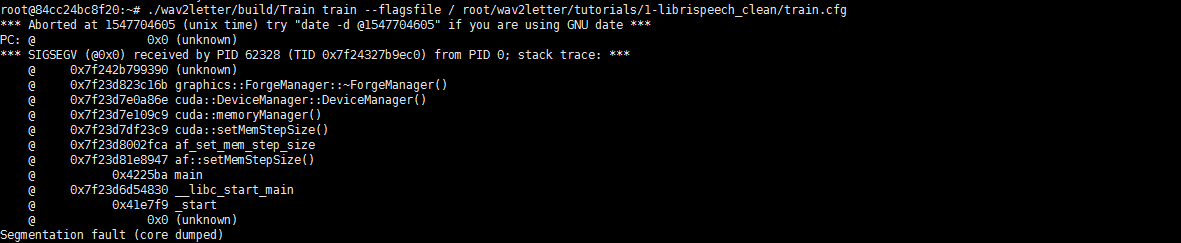
I have the same error
 zhengqun
on 17 Jan 2019
zhengqun
on 17 Jan 2019

zhengqun
on 17 Jan 2019
@zhengqun - see my response in https://github.com/facebookresearch/wav2letter/issues/153. This isn't a wav2letter-related issue.
jacobkahn
on 17 Jan 2019
Related issues
 ekorudi
·
5Comments
ekorudi
·
5Comments
 mlexplore1122
·
3Comments
mlexplore1122
·
3Comments
 megharangaswamy
·
5Comments
megharangaswamy
·
5Comments
 bill-kalog
·
4Comments
bill-kalog
·
4Comments
 ghost
·
5Comments
ghost
·
5Comments
Most helpful comment
@jacobkahn the docker image works for me, and i've switched over to using it.