Wav2letter: Train multinode multigpu
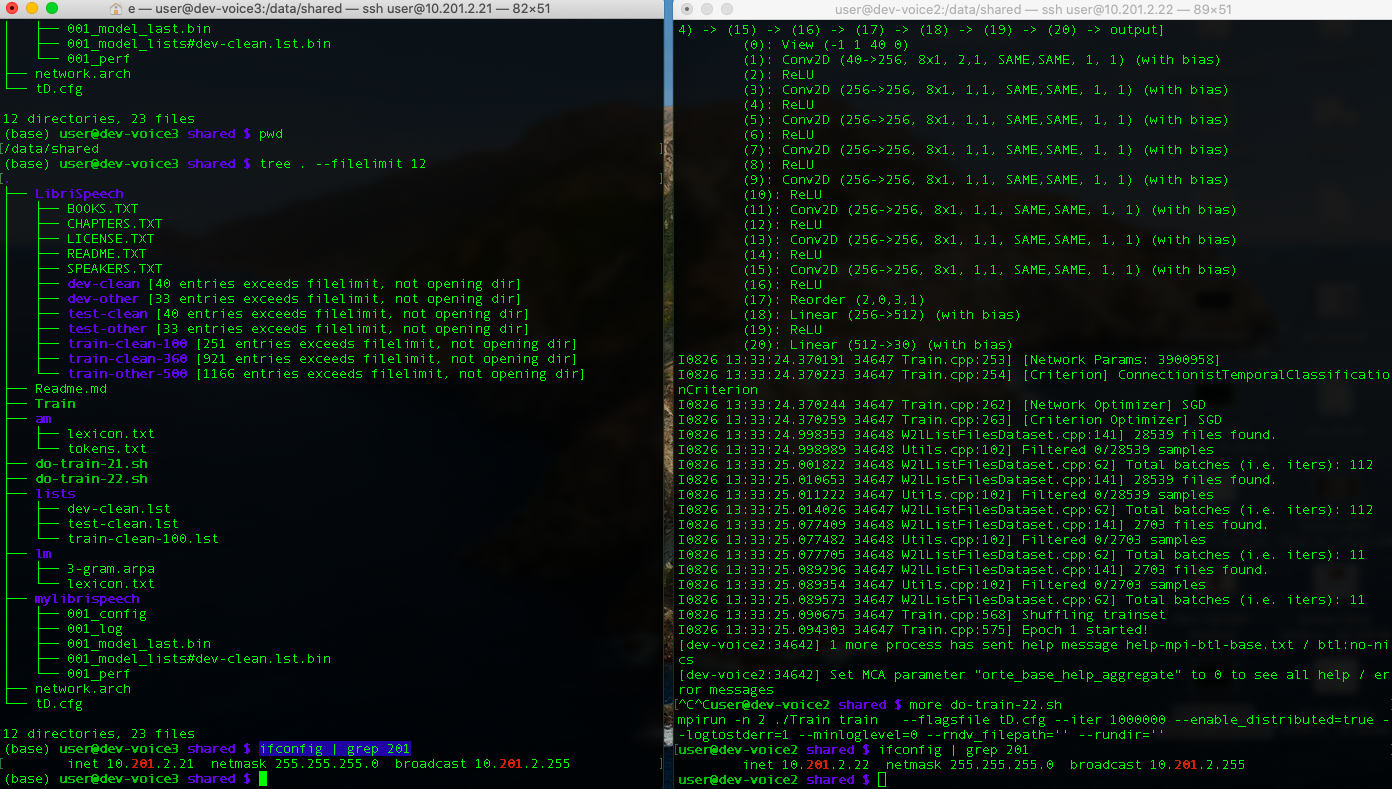
We have 2 machine node1 (10.201.2.21 - left screen) and node2 (.22 - right screen).
/data/shared/ is shared storage between the two.
Training command can run multi gpu on 1 node with
mpirun -n 2 ./Train train --flagsfile tD.cfg --iter 1000000 --enable_distributed=true --logtostderr=1 --minloglevel=0 --rndv_filepath='' --rundir=''
, but not sure how to run on multi node.
- What is correct command on each node to use distributed multi node training ?
- What to see in the log that multi node training already running ?
293 #550 #555
cc: @lunixbochs @jacobkahn
 ekorudi
All 5 comments
For multi-node training you need to have for example SLURM, or any other systems which can schedule jobs in multi-node. For it to communicate between processes one can use https://github.com/facebookresearch/wav2letter/blob/v0.2/src/common/Defines.cpp#L329 and also world_size and world_rank https://github.com/facebookresearch/wav2letter/blob/v0.2/src/common/Defines.cpp#L318.
See also discussion here https://github.com/facebookresearch/wav2letter/issues/605
 tlikhomanenko
on 26 Aug 2020
tlikhomanenko
on 26 Aug 2020
- Build an mpirun hostfile like this, called e.g.
hostfile. The machine you're on needs to be able to SSH into each node to start the jobs. 8 here is the number of gpus per node. You'll also need to pass that to mpirun later as$mingpus
10.0.10.61 slots=8 max_slots=8
10.0.10.54 slots=8 max_slots=8
Use the same disk layout on all of your nodes. I used a read-only /data/* mount for my training data, and copied model configs into /tmp/w2l/ on every node before starting a training run.
Run mpirun, something like this.
$njobsis the number of total GPUs in play.
    mpirun -d -n "$njobs" --hostfile "hostfile" \
        --wdir /tmp/w2l \
    --bind-to none \
        -- /path/to/Train \
            --flagsfile flagsfile \
            --max_devices_per_node "$mingpus" \
            --enable_distributed true \
            --runname model \
            --rundir /tmp/w2l \
            --rndv_filepath=''
Ultimately distributed training wasn't fast enough for me to actually use. I ran into a bottleneck somewhere and never fully figured it out. I ended up training mostly on individual 8GPU nodes. Maybe you'll have more luck with two GPUs per node than I had with 8.
 lunixbochs
on 26 Aug 2020
lunixbochs
on 26 Aug 2020
1. Build an mpirun hostfile like this, called e.g. `hostfile`. The machine you're on needs to be able to SSH into each node to start the jobs. 8 here is the number of gpus per node. You'll also need to pass that to mpirun later as `$mingpus`10.0.10.61 slots=8 max_slots=8 10.0.10.54 slots=8 max_slots=81. Use the same disk layout on all of your nodes. I used a read-only /data/* mount for my training data, and copied model configs into /tmp/w2l/ on every node before starting a training run. 2. Run mpirun, something like this. `$njobs` is the number of total GPUs in play.mpirun -d -n "$njobs" --hostfile "hostfile" \ --wdir /tmp/w2l \ --bind-to none \ -- /path/to/Train \ --flagsfile flagsfile \ --max_devices_per_node "$mingpus" \ --enable_distributed true \ --runname model \ --rundir /tmp/w2l \ --rndv_filepath=''Ultimately distributed training wasn't fast enough for me to actually use. I ran into a bottleneck somewhere and never fully figured it out. I ended up training mostly on individual 8GPU nodes. Maybe you'll have more luck with two GPUs per node than I had with 8.
When I followed the instruction, mpi caught error because it can't find proc session directory and job session directory. Do you have any suggestion how to fix this error @lunixbochs?
 light42
on 1 Oct 2020
light42
on 1 Oct 2020
I found the same problem as @light42 . could you please enlighten us @lunixbochs
 tryanbot
on 2 Oct 2020
tryanbot
on 2 Oct 2020
Sorry, you'll need to debug any MPI issues yourself.
lunixbochs
on 3 Oct 2020
Related issues
 hajix
·
4Comments
hajix
·
4Comments
 megharangaswamy
·
5Comments
megharangaswamy
·
5Comments
 gauenk
·
3Comments
gauenk
·
3Comments
 AvielNiego
·
6Comments
AvielNiego
·
6Comments
 mlexplore1122
·
3Comments
mlexplore1122
·
3Comments
Most helpful comment
hostfile. The machine you're on needs to be able to SSH into each node to start the jobs. 8 here is the number of gpus per node. You'll also need to pass that to mpirun later as$mingpusUse the same disk layout on all of your nodes. I used a read-only /data/* mount for my training data, and copied model configs into /tmp/w2l/ on every node before starting a training run.
Run mpirun, something like this.
$njobsis the number of total GPUs in play.Ultimately distributed training wasn't fast enough for me to actually use. I ran into a bottleneck somewhere and never fully figured it out. I ended up training mostly on individual 8GPU nodes. Maybe you'll have more luck with two GPUs per node than I had with 8.