Waterfox: Dissenter Extension displays incorrectly on Windows 10 version
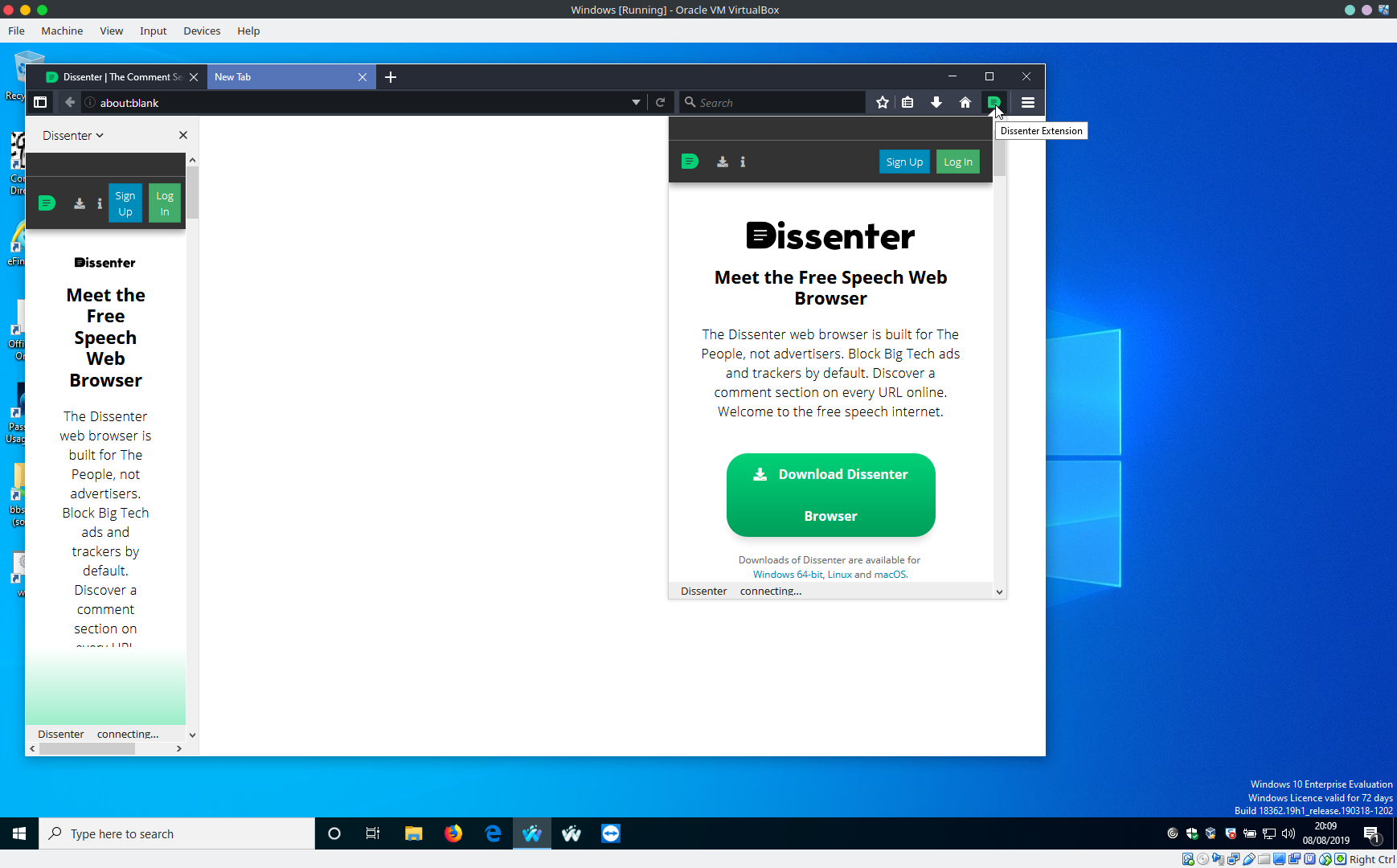
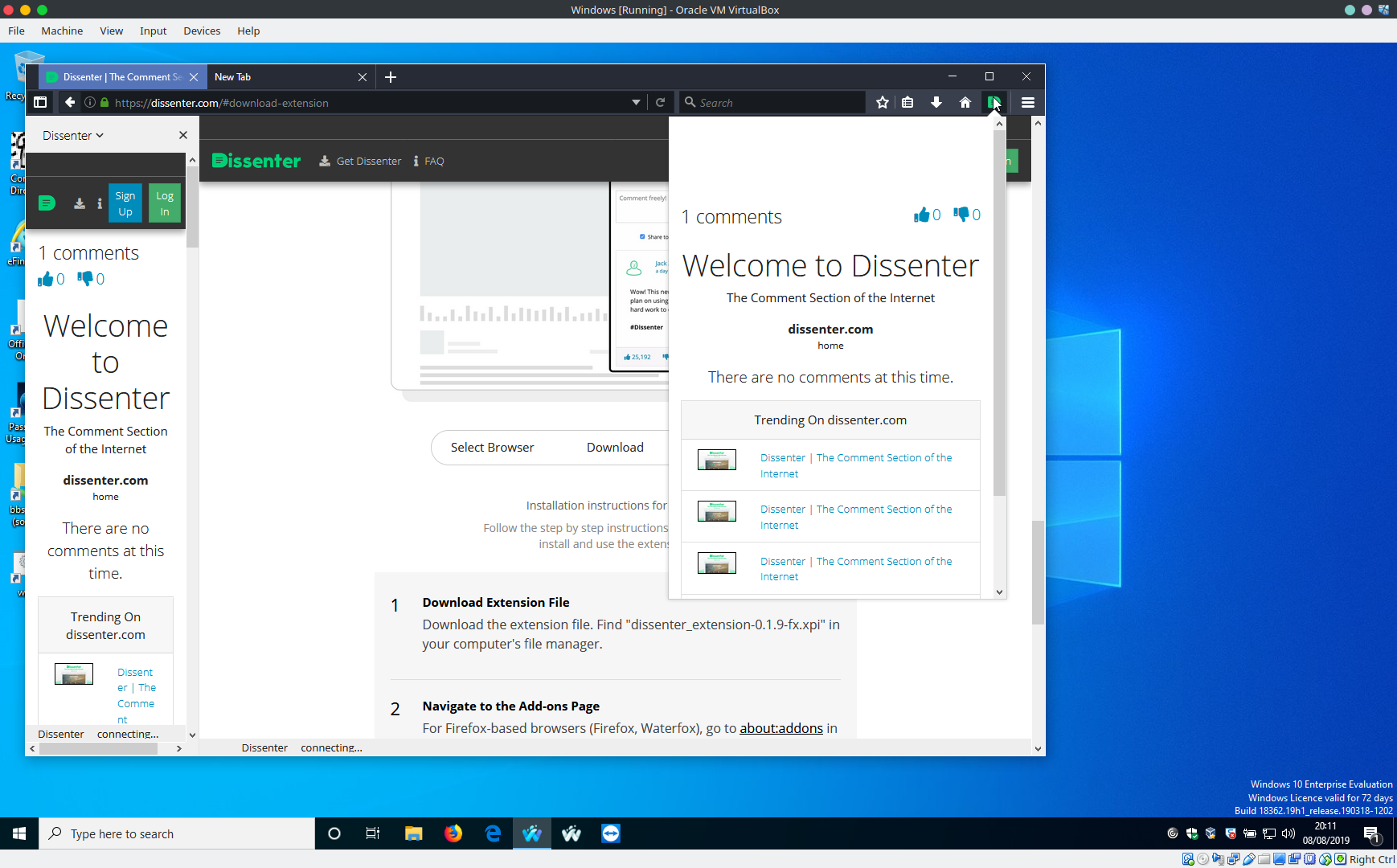
So here is the Windows version.

And the Linux (Debian) so you can see the comparison

Since it is the same version of the extension, I am assuming it is Waterfox with the issue.
Both OSs are using version 56.2.12, and both using Dissenter version 0.1.10
 tcreek
All 20 comments
56.2.12 on Windows 10:
 grahamperrin
on 8 Aug 2019
grahamperrin
on 8 Aug 2019
Well, seems some are having issues. I have removed it, and installed again with same results.
tcreek
on 8 Aug 2019
Do you have any other plugins that would be messing with the default zoom levels of web pages or altering their content in any other major way?
 SenpaiSharp
on 17 Aug 2019
SenpaiSharp
on 17 Aug 2019
No. I have the same one 3 ones on each browser.
TrackMeNot
TabMixPlus
Dissenter
tcreek
on 20 Aug 2019
Reproducible with a new profile?
Can you provide a full-screen shot? It might help to sort of read between the lines of the issue …
grahamperrin
on 23 Aug 2019
I created a new profile, It is the same exact result.

tcreek
on 24 Aug 2019
Thanks, is that full screen or a full window?
What resolution is the display?
grahamperrin
on 27 Aug 2019
That is full screen @ 1920 x 1080
tcreek
on 28 Aug 2019
Which version of Windows?
What's the hardware setup?
Windows scaling issues for high-DPI devices
Maybe report the issue to developers of the extension, https://github.com/gab-ai-inc/gab-dissenter-extension/issues
grahamperrin
on 30 Aug 2019
Windows 10. It's a one year old laptop. I use the browser in an external monitor. Moving the browser to the main laptop screen, which is also 1920 x 1080, makes the extension appear correctly.
I will give them a try and see what they have to say
tcreek
on 30 Aug 2019
… laptop … 1920 x 1080, …
What make and model is the laptop?
grahamperrin
on 30 Aug 2019
HP Pavilion Laptop 15-CC5XX
tcreek
on 30 Aug 2019
Does it have the 4K (3,840 x 2,160) IPS option?
grahamperrin
on 31 Aug 2019
I am not sure about that, but it is capable of supporting an external 4k monitor.
tcreek
on 31 Aug 2019
Here is a screen shot of FireFox 69.0.2 with Dissenter version 0.1.10 on the same screen as is Waterfox

tcreek
on 3 Oct 2019
If you like, use mozregression to tell which build of Firefox was the last to be bugged in the same way as Waterfox Classic.
If that can be told, then it should become easier to pinpoint the Mozilla commit(s) from which a fix might apply to Waterfox Classic.
grahamperrin
on 4 Oct 2019
Seems to me a Waterfox issue

tcreek
on 7 Oct 2019
… with Waterfox primarily using code from Firefox; can you use mozregression?
grahamperrin
on 7 Oct 2019
Yeah, that is what I tried. I attempted a bisection of version 55 and 56. It kept bringing up version 56
tcreek
on 7 Oct 2019
55 and 56.
You'll probably find the bug reproducible with Firefox 56.0.2 (yes?) so instead, try a higher range.
grahamperrin
on 7 Oct 2019
Related issues
grahamperrin
·
4Comments
 sutex
·
3Comments
sutex
·
3Comments
 514guy
·
3Comments
514guy
·
3Comments
 laniakea64
·
3Comments
laniakea64
·
3Comments
 ghost
·
4Comments
ghost
·
4Comments