Waterfox: Detailed Info on the issue of being the Default Browser on Windows and what may still need fixing
There have been a few issues with getting Waterfox 55 and higher to correctly handle being the default browser in Windows.
I have created this Github issue to list how Firefox and Waterfox handle being set as the default browser in Windows, what may still need to be fixed and keep track of previous Github Issues and Reddit Posts on the topic in one place.
On Github those issues are: #315, #343, #363, #383.
On Reddit the posts about this are [TBD].
There has been some progress on this topic and new installs of Waterfox 56.0.3 where no previous version of Waterfox has been installed before, the ability the set the default browser to Waterfox should always work without issue.
Unfortunately, if have a previous version of Waterfox installed before, some older registry keys could be left over that cause issues when trying to set Waterfox as the default browser.
Here is how the Installer Registers as a default browser handler in Windows:
1. Application Registration information with a specific ClientID is written.
If the installer has administrator privileges, the key is under the HKLM registry hive.
If the installer doesn't have administrator privileges and the Operating System is Windows 8 or higher then the key is under the HKCU registry hive.
If the installer doesn't have administrator privileges and the Operating System is not Windows 8 or higher then the key is not written at all as registering a client under HKCU is only available on Windows 8 or higher.
The key is Software\Clients\StartMenuInternet\[ClientID].
This key has many sub keys but the Capabilities key is the one used by Windows Vista and higher.
The other sub keys are for displaying in the Start Menu in Windows XP/Vista and the SPAD feature introduced in Windows XP SP1 that is unnecessary starting with Windows Vista and removed in the Windows 10 Fall Creators Update.
The Capabilities key can be located anywhere so a value needs to be created under Software\RegisteredApplications that points to "Software\Clients\StartMenuInternet\[ClientID]\Capabilities", the value name can either be the full name of the program or [ClientID] for consistency.
In early versions of Firefox and Waterfox, [ClientID] was called FIREFOX.exe and WATERFOX.exe.
In later versions of Firefox when multiple editions of Firefox were made available such as the release edition and the Developer Edition, using FIREFOX.exe was not specific enough so it was changed to $AppRegName-$AppUserModelId where $AppUserModelId is a specific id generated by the installer, the first time it's run (upgrade installs use the already existing $AppUserModelId instead of generating a new one) and $AppRegName is Firefox.
Later versions of Waterfox picked up this change though it's not really needed for Waterfox at the current time.
Whenever this change happened, it seems $AppRegName was not set to Waterfox as it should have been.
I fixed this in pull request #362 that was included in Waterfox 56.0.3.
If the installer for later versions sees an older key name used when doing an upgrade, it will just keep using that key name to avoid needing to reset the default browser.
2. ProgID specified in the keys under the Capabilities key are created
They are created in Software\Classes under the registry hive HKLM or HKCU using the same rules as listed for the above listed key.
In early versions of Firefox, two ProgIDs were created, FirefoxHTML and FirefoxURL.
In later versions of Firefox, two ProgIDs were created, FirefoxHTML-$AppUserModelId and FirefoxURL-$AppUserModelId
These were to go with the Firefox-$AppUserModelId ClientID listed above.
The creation of ProgIDs for Waterfox should be the same ones except for replacing Firefox with Waterfox.
Changing this requires updating a lot of hard coded strings in the Installer.
It would be easier if the install code for ProgIDs just used $AppRegName as the part creating the the Application Registration client keys.
Because the requirement of updating hard coded strings is not an obvious thing to be required to be changed as one would assume the changing of $AppName or $AppRegName would be enough, this was missed twice.
First in the Waterfox versions released a couple years ago and Second time was in version 55.
The first time was fixed when I posted about the issue in the subreddit, the second time was fixed by me in pull request #348 that was included in Waterfox 56.0.2.
So if the ProgIDs for Waterfox are the exact same as the Progs for Firefox then the Waterfox installer will overwrite the ProgIDs for Firefox, making it no longer possible to set Firefox as the default browser and if Firefox is installed after Waterfox was installed then it's no longer possible to set Waterfox as the default browser.
For users installing Waterfox 55 to 56.0.1, if the ProgIDs containing $AppUserModelId where used there was no problem.
It appears the older ProgIDs are created when the older PROGRAM.exe ClientID was used instead of the newer $AppRegName-$AppUserModelId ClientIDs.
So those problems could be fixed by deleting the PROGRAM.exe ClientID manually and reinstalling Waterfox, forcing it to create the new style ClientID and ProgID keys.
Using the new style $AppRegName-$AppUserModelId ClientID is an issue on Waterfox 56.0.3 where $AppRegName is set to Waterfox when upgrading from Waterfox 56.0.2 or earlier where $AppRegName is set to Firefox.
In this situation both ClientIDs Firefox-$AppUserModelId and Waterfox-$AppUserModelId exist and I'm not really sure what happens but I would guess this could result in:
A. Two identical entries in Set Default Programs (Which would be confusing but otherwise wouldn't really be a problem).
B. It might confuse Waterfox when it checks to see if it's the default browser (This would be annoying but not much of an issue otherwise).
C. It may cause Waterfox to get confused and not be able to set the default browser (Seems unlikely but hard to know for sure, would be a problem).
D. Any combination of A, B and C or no problems at all and which it is could vary depending what OS version is installed.
My workaround to deal with that potential problem is pull request #372 which just includes code in the installer to delete the Firefox-$AppUserModelId ClientID but it wasn't a great solution and I wasn't sure it would work because I'm not really familiar with how the NSIS code works.
It's fairly simple to just replace hard coded strings in a function that writes to the registry which is under a comment from the Mozilla Developer(s) that did the change explaining how the code functions.
It's a lot harder to insert new code in it when you aren't that familiar with the specific language used.
Probably due to that Waterfox 56.0.3 was released without any code to handle this issue and so far with my systems running Windows 10, it doesn't seem to be an issue.
Based on some new issues and subreddit posts that came in after the release of 56.0.3, it appears that was not the case for other people so doing a proper fix for this might be necessary.
 jdunn0
All 17 comments
… Two identical entries in Set Default Programs …
I don't know whether the screenshots below add value, but here goes … Windows 7 Enterprise, logged on as a devolved administrator …
56.0.2 after downloading the update to 56.0.3

– note the absence of Waterfox from the list of available programs.
First launch of 56.0.3

– without accepting the Waterfox prompt to set it as a default:
- still no listing for Waterfox; and
- refreshing the view does not cause a listing to appear.
After accepting the Waterfox prompt to set it as a default, and after closing then reopening the _Set Default Programs_ window

– two listings for Waterfox, not entirely identical.
First (uppermost) listing in Set Default Programs
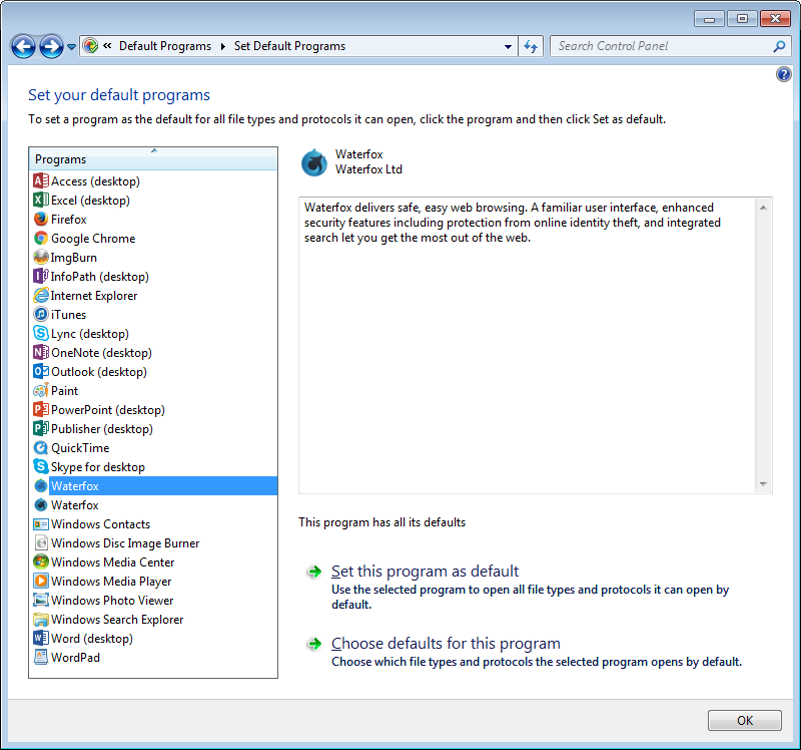

– eight lines (five extensions, three protocols).
Second listing
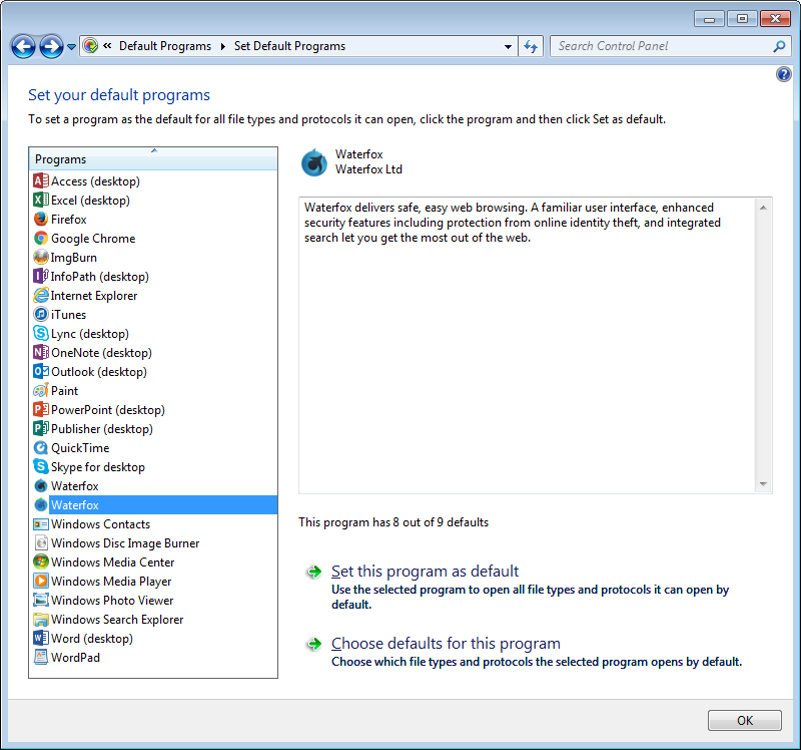
- reportedly 8 of 9, however …

– again, eight lines. Not nine.
There's the same discrepancy (eight, not nine) for Firefox –


– and I'm 99% certain that I have seen the same discrepancy for Firefox at Windows 7 computers where Waterfox is not installed, and that's why I'm not sure whether what's above adds value :-)
 grahamperrin
on 16 Jan 2018
grahamperrin
on 16 Jan 2018
Me too have 2 instances of Waterfox:
1st has 8 of 9
2nd has 9 of 9
 AjvarXX
on 17 Jan 2018
AjvarXX
on 17 Jan 2018
…
1st has 8 of 9
2nd has 9 of 9
Thanks.
In the detailed view: are there truly nine lines?
If so, what's the one extra (compared to my screenshots of five extensions plus three protocols)?
grahamperrin
on 17 Jan 2018
@grahamperrin:
I have no idea why Waterfox wouldn't show up in Set Default Programs until you told Waterfox to set itself as the default browser, that is strange.
I use the Windows 10 Fall Creators Update which has replaced Set Default Programs with options in the UWP Settings app so it's harder to test the behavior of Set Default Programs.
I do have a Windows 7 virtual machine available so I will use it to see if I can figure out what is going on.
Edit: I forgot my VM is 32-bit so while I could test the 8/9 items issue with Firefox, I can't with Waterfox because it doesn't have a 32-bit version. I'll need to setup a Windows 7 64-bit virtual machine to test behavior specific to Waterfox on Windows 7.
I did some tests on the other issue in the virtual machine based on what I thought might be happening and confirmed the reason as to why there are 9 items total but you only see 8 items.
The Capabilities key has 4 sub keys checked by Set Default Programs: FileAssociations, MIMEAssociations, UrlAssociations and Startmenu.
The 9th Association is the Start Menu one.
The Startmenu key lists what Software\Clients\StartMenuInternet subkey to use for the pinned Default Browser spot on the Windows Vista Start Menu.
If this seems odd because because the Capabilities key is a subkey of the StartMenuInternet subkey, it's because Microsoft did not intend for the Capabilities to be under the StartMenuInternet subkey.
Microsoft recommended that browsers use Software[Company][Product]\Capabilities key instead and this how Internet Explorer handles this in Windows Vista and higher.
However because with the Capabilities subkey was introduced in Windows Vista and not supported in Windows XP, every other browser continued to use the Software\Clients\StartMenuInternet\[ClientID] format so the entry would work in both Windows XP and Windows Vista.
In Windows Vista, if you open Set Default Programs, you will see the 9th association listed as "Start Menu link" (As shown in the MSDN page on Set Default Programs).
In Windows 7, Microsoft removed the Start Menu spot reserved for the default browser.
Because this spot is no longer used, Set Default Programs in Windows 7 and higher doesn't display the Start Menu link Association but Set Default Programs in Windows 7 will still set the registry value behind this setting when you click "Set this program as default" button thus all 9 items will be set but if click "Choose defaults for this program" and select all visible options, only the 8 visible items will be set.
As for why Microsoft decided to have Set Default Programs in Windows 7 just hide the Start Menu Internet Association instead of just ignoring it as the setting is no longer used, I don't know.
In 2016, Google Chrome and Firefox dropped support for both Windows XP and Windows Vista but they both still create the Capabilities\Startmenu key.
I don't know if this is because it is still needed for some reason or because the developers didn't think it was worth the potential risk of problems from updating the older code.
jdunn0
on 17 Jan 2018
Same as Firefox for # of lines. The problem is why there are 2 WF instanses.
AjvarXX
on 17 Jan 2018
@AjvarXX: As I said in my first post, the reason for the two Waterfox entries is because the Firefox-$AppUserModelId ClientID used by Waterfox 56.0.2 and earlier was not removed in Waterfox 56.0.3 which used Waterfox-$AppUserModelId instead.
Both ClientIDs exist for one install at that point with an almost identical Capabilities key.
The ApplicationName value, ApplicationIcon value and ApplicationDescription are exactly identical so you see two entries in Set Default Programs that both say Waterfox with a Waterfox Icon.
I have now done a patch in pull request #396 that will remove the old ClientID and assuming the patch is merged into the next release, the second entry should be gone when you install the next update to Waterfox when that is released.
Hopefully this will mean that all the issues with Setting Waterfox as the default browser in Windows are solved.
After the release of the next update, assuming it has this patch merged, I will monitor this issue for a couple days afterwords to see if anyone still has a problem and if not I will close this issue.
jdunn0
on 20 Jan 2018
Sorry I haven’t had much time to look at this, and thank you jdunn0 for your help!
I’m doing a thorough test myself to make sure it will also be resolved properly with the new pull request.
I had fixed this issue a few years ago, but after rebasing Waterfox a while back, the installer and related code remained with its Firefox/Mozilla values.
 MrAlex94
on 20 Jan 2018
MrAlex94
on 20 Jan 2018
… thank you jdunn0 for your help! …
💯
grahamperrin
on 20 Jan 2018
… If the installer for later versions sees an older key name used when doing an upgrade, it will just keep using that key name …
I think I saw that yesterday when accidentally using the full installer https://storage-waterfox.netdna-ssl.com/releases/win64/installer/Waterfox%2056.0.4%20Setup.exe at a notebook with Windows 10 (probably version 1709) where I had forgotten about a prior installation of Waterfox. Upgrading from maybe 56.0.2 or 56.0.3.
The resulting 56.0.4.1 did not actively prompt me to set it as the default, but when I chose the preference at about:preferences#general it launched the Windows UI to default apps, with two listings for the browser. I made no attempt to change things there.
grahamperrin
on 10 Feb 2018
i thought i should share my fix for this that i had to do by hand.
I was still being prompted for default browser with version 56.1.0
So i used the info from this post to get me in the right direction
- went to reg key HKEY_LOCAL_MACHINE\SOFTWARE\RegisteredApplications
- noticed that there were multiple entries for firefox/waterfox with the same data of Software\Clients\StartMenuInternet\WATERFOX.EXE\Capabilities
- I removed all the entries that has the same data. In my case i had one for Firefox, Waterfox, and Waterfox.exe
- then i ran the command from reg key HKEY_LOCAL_MACHINE\SOFTWARE\Clients\StartMenuInternet\WATERFOX.EXE\InstallInfo\ReinstallCommand which was in my case "C:\Program Files\Waterfox\uninstall\helper.exe" /SetAsDefaultAppGlobal
Doing this I'm able to finally set the default program from the control panel and the browser see's it is the default browser.
hope this helps someone still dealing with this.
 theQ23
on 27 Mar 2018
theQ23
on 27 Mar 2018
theQ23 Thank you for this fix! I've been trying to solve this problem for so long and your idea finally removed the "Waterfox is not your default browser" message.
 mshomo
on 27 Apr 2018
mshomo
on 27 Apr 2018
538
grahamperrin
on 15 May 2018
Re: https://redd.it/8kzko8 I might find part of a lunch hour today to review a Windows 7 Enterprise case. Probably an update from 56.1.0 (I'll not know until I gain access to the user's computer).
Detailed Info …
Will it help if I take a note of any particular registry entries before and after an update?
grahamperrin
on 23 May 2018
From Update Program Description on Windows · Issue #387 …:

@BrendonIrwan that's interesting, in the screenshots at https://github.com/MrAlex94/Waterfox/issues/384#issuecomment-358122005 above it's _Waterfox Ltd_ (not Mozilla Corporation).
I did see 'Mozilla Waterfox' (or something like that) once in the past, not sure whether I kept a record. I'll take a look …
grahamperrin
on 15 Jun 2018
@BrendonIrwan do you have Internet Explorer installed and if so, what's the version?
I did see 'Mozilla Waterfox'
Found it. A screenshot that I took at work a few months ago:

I know, it's a shot of Internet Explorer, but I named it _Microsoft Waterfox_ for a reason. Unfortunately I can't recall the reason (Waterfox would have been a distraction from work at the time, no opportunity to take more detailed notes).
Note to self: does the size of the image – 1,109 x 726 pixels – help me to identify the hardware where I might have taken the shot?
grahamperrin
on 15 Jun 2018
theQ23's solution also solved it for me, under HKLM\Software\RegisteredApplications I had entries for Firefox, Waterfox and WATERFOX.EXE, all pointing to "Software\Clients\StartMenuInternet\WATERFOX.EXE\Capabilities".
After following those steps only the WATERFOX.EXE entry exists, and Waterfox now correctly detects and sets itself as my default browser.
ETA: It also makes Waterfox reappear in the "Set Default Programs" control panel (this is Win7) where it was missing previously.
 Annihilannic
on 22 Jan 2019
Annihilannic
on 22 Jan 2019
Waterfox Classic
From https://www.reddit.com/comments/do1az7/-/f69733h/?context=2:
… create a new folder named ''Waterfox Classic'' and move all of the Waterfox files in to it? …
Instead of creating and then moving, probably simpler to:
- exit Waterfox Classic
- rename its folder.
Make it:
C:\Program Files\Waterfox Classic\
I did try renaming the folder, but Waterfox kept asking me if I wanted to make it the default browser each time that I opened it, no matter if I opened it on its own, or within Sandboxie.
grahamperrin
on 3 Nov 2019
Related issues
 Kallinteris-Andreas
·
3Comments
Kallinteris-Andreas
·
3Comments
 empimp
·
4Comments
empimp
·
4Comments
 fghsgh
·
4Comments
fghsgh
·
4Comments
 RaitaroH
·
3Comments
RaitaroH
·
3Comments
 hook321
·
4Comments
hook321
·
4Comments
Most helpful comment
@AjvarXX: As I said in my first post, the reason for the two Waterfox entries is because the Firefox-$AppUserModelId ClientID used by Waterfox 56.0.2 and earlier was not removed in Waterfox 56.0.3 which used Waterfox-$AppUserModelId instead.
Both ClientIDs exist for one install at that point with an almost identical Capabilities key.
The ApplicationName value, ApplicationIcon value and ApplicationDescription are exactly identical so you see two entries in Set Default Programs that both say Waterfox with a Waterfox Icon.
I have now done a patch in pull request #396 that will remove the old ClientID and assuming the patch is merged into the next release, the second entry should be gone when you install the next update to Waterfox when that is released.
Hopefully this will mean that all the issues with Setting Waterfox as the default browser in Windows are solved.
After the release of the next update, assuming it has this patch merged, I will monitor this issue for a couple days afterwords to see if anyone still has a problem and if not I will close this issue.