Watchtower: Watchtower is stuck - "Waiting for running update to be finished"
Describe the bug
Watchtower prints in logs Waiting for running update to be finished... and does nothing. I know there are containers to be updated, but it's stuck.
I've tried killing/stopping/rebooting the container, it doesn't help. It just prints again the same error.
The issue is "fixed" by recreating the container and deleting its internal data.
My docker-compose
version: "2"
services:
  watchtower:
    image: containrrr/watchtower
    container_name: watchtower
    restart: unless-stopped
    volumes:
        - /var/run/docker.sock:/var/run/docker.sock
        - /etc/localtime:/etc/localtime:ro
    environment:
        - WATCHTOWER_NOTIFICATIONS=email
        - WATCHTOWER_NOTIFICATION_EMAIL_FROM=foo
        - WATCHTOWER_NOTIFICATION_EMAIL_TO=bar
        - WATCHTOWER_NOTIFICATION_EMAIL_SERVER=thebestsmtpserver
        - WATCHTOWER_NOTIFICATION_EMAIL_SERVER_USER=blip
        - WATCHTOWER_NOTIFICATION_EMAIL_SERVER_PASSWORD=blop
        - WATCHTOWER_NOTIFICATION_EMAIL_SERVER_PORT=587
        - WATCHTOWER_SCHEDULE=0 0 0 * * *
        - WATCHTOWER_CLEANUP=true
        - WATCHTOWER_TIMEOUT=30s
        - WATCHTOWER_NOTIFICATIONS_LEVEL=info
        - WATCHTOWER_NO_STARTUP_MESSAGE=true
        - TZ=Europe/Rome
To Reproduce
I don't really know how to reproduce, I think it's a random issue.
Expected behavior
Watchtower should not be stuck.
Screenshots

Environment
- Platform: Debian 10
- Architecture: x64
- Docker version: 19.03.8
Logs from running watchtower with the --debug option
Additional context
I think it's not the first time that happens.
 auanasgheps
All 17 comments
I enabled the debug flag but I can't see much.
time="2020-04-16T00:07:55+02:00" level=debug msg="Sleeping for a second to ensure the docker api client has been properly initialized.",
time="2020-04-16T00:07:56+02:00" level=debug msg="Retrieving running containers",
time="2020-04-16T00:07:56+02:00" level=debug msg="There are no additional watchtower containers",
time="2020-04-16T00:40:03+02:00" level=info msg="Waiting for running update to be finished...",
time="2020-04-16T11:00:48+02:00" level=debug msg="Sleeping for a second to ensure the docker api client has been properly initialized.",
time="2020-04-16T11:00:49+02:00" level=debug msg="Retrieving running containers",
time="2020-04-16T11:00:49+02:00" level=debug msg="There are no additional watchtower containers",
time="2020-04-17T00:40:01+02:00" level=info msg="Waiting for running update to be finished...",
time="2020-04-17T11:00:49+02:00" level=debug msg="Sleeping for a second to ensure the docker api client has been properly initialized.",
time="2020-04-17T11:00:50+02:00" level=debug msg="Retrieving running containers",
time="2020-04-17T11:00:50+02:00" level=debug msg="There are no additional watchtower containers",
Given that you get multiple
Sleeping for a second to ensure the docker api client has been properly initialized.
I kind of get the impression that your watchtower container is continuously crashing. Could you please check your docker ps to see if this is actually the case?
 simskij
on 25 Apr 2020
simskij
on 25 Apr 2020
Not really. You are seeing those messages because my server is not always on 24 hours, but starts at 11am and shuts down at 00:40am every day. Weekends are different but you get the idea.
Watchtower is scheduled to do updates every day at midnight.
At the moment I have "fixed" the problem recreating the container.
I think this message is the issue
Waiting for running update to be finished..."
What else can I check other than if it's crashing? The issue will eventually come back in the future.
auanasgheps
on 25 Apr 2020
Waiting for running update to be finished... is just a message that watchtower spits out when something tries to shut it down while it's running an update loop. Your server is shutting down while updates are still running.
I'd say the message would likely go away if you postpone the shutdown 30 minutes to an hour more.
Are you on a heavily shaped/slow connection or something like that? I'm thinking that it might be due to download of images taking a long time, as watchtower downloads the latest image for each container every time it runs an update lap, regardless of whether there are any changes or not.
simskij
on 26 Apr 2020
My internet connection is super fast (1Gbps) and when Watchtower works fine, it's fast as well: last month it updated 9 containers and restarted them in just 1 minute and 28 seconds.
If this message appears when I turn off the server, watchtower was actually stuck for other reasons. Now it's fine, and nothing has changed other than recreating the container. I will keep you posted if occurs again and I won't recreate the container.
auanasgheps
on 26 Apr 2020
I don't know if it is the case, but due to COVID-19 (more people are at home overloading our infrastructure), most DNS servers nearby my location have malfunctioned, making requests take much longer than usual (timeouts had been constant, also).
Some colleagues reported having trouble while fetching docker images. You could try another DNS if the problem persists.
 victorcmoura
on 26 Apr 2020
victorcmoura
on 26 Apr 2020
Guess what? The issue is back.
time="2020-04-27T11:15:41+02:00" level=debug msg="Sleeping for a second to ensure the docker api client has been properly initialized.",
time="2020-04-27T11:15:42+02:00" level=debug msg="Retrieving running containers",
time="2020-04-27T11:15:42+02:00" level=debug msg="There are no additional watchtower containers",
time="2020-04-28T00:40:01+02:00" level=info msg="Waiting for running update to be finished...",
time="2020-04-28T11:00:49+02:00" level=debug msg="Sleeping for a second to ensure the docker api client has been properly initialized.",
time="2020-04-28T11:00:50+02:00" level=debug msg="Retrieving running containers",
time="2020-04-28T11:00:50+02:00" level=debug msg="There are no additional watchtower containers",
time="2020-04-28T19:22:42+02:00" level=info msg="Waiting for running update to be finished...",
time="2020-04-28T19:26:00+02:00" level=debug msg="Sleeping for a second to ensure the docker api client has been properly initialized.",
time="2020-04-28T19:26:01+02:00" level=debug msg="Retrieving running containers",
time="2020-04-28T19:26:01+02:00" level=debug msg="There are no additional watchtower containers",
time="2020-04-29T00:40:01+02:00" level=info msg="Waiting for running update to be finished...",
time="2020-04-29T11:00:47+02:00" level=debug msg="Sleeping for a second to ensure the docker api client has been properly initialized.",
time="2020-04-29T11:00:48+02:00" level=debug msg="Retrieving running containers",
time="2020-04-29T11:00:48+02:00" level=debug msg="There are no additional watchtower containers",
The container is not crashing and there are no issues in my network.
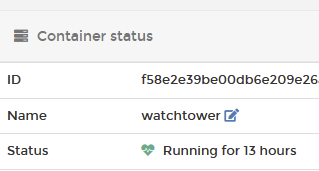
Last time it did an update was on 2020-04-27 00:00:35, this means the message "Waiting for running update to be finished" on 2020-04-28 is absolutely not correct.
auanasgheps
on 30 Apr 2020
I have an additional update.
The container somewhat managed to _recover_ itself, then it got stuck again. I haven't touched anything.
Was stuck for days showing this weird message. I am cutting logs for clarity.
time="2020-04-28T19:22:42+02:00" level=info msg="Waiting for running update to be finished...",
time="2020-04-28T19:26:00+02:00" level=debug msg="Sleeping for a second to ensure the docker api client has been properly initialized.",
time="2020-04-28T19:26:01+02:00" level=debug msg="Retrieving running containers",
time="2020-04-28T19:26:01+02:00" level=debug msg="There are no additional watchtower containers",
time="2020-04-29T00:40:01+02:00" level=info msg="Waiting for running update to be finished...",
time="2020-04-29T11:00:47+02:00" level=debug msg="Sleeping for a second to ensure the docker api client has been properly initialized.",
time="2020-04-29T11:00:48+02:00" level=debug msg="Retrieving running containers",
time="2020-04-29T11:00:48+02:00" level=debug msg="There are no additional watchtower containers",
time="2020-04-30T00:40:01+02:00" level=info msg="Waiting for running update to be finished...",
time="2020-04-30T11:00:48+02:00" level=debug msg="Sleeping for a second to ensure the docker api client has been properly initialized.",
time="2020-04-30T11:00:49+02:00" level=debug msg="Retrieving running containers",
time="2020-04-30T11:00:49+02:00" level=debug msg="There are no additional watchtower containers",
time="2020-05-01T00:40:03+02:00" level=info msg="Waiting for running update to be finished...",
time="2020-05-01T00:41:58+02:00" level=debug msg="Sleeping for a second to ensure the docker api client has been properly initialized.",
time="2020-05-01T00:41:59+02:00" level=debug msg="Retrieving running containers",
time="2020-05-01T00:41:59+02:00" level=debug msg="There are no additional watchtower containers",
time="2020-05-01T02:40:57+02:00" level=info msg="Waiting for running update to be finished...",
time="2020-05-01T11:00:47+02:00" level=debug msg="Sleeping for a second to ensure the docker api client has been properly initialized.",
time="2020-05-01T11:00:48+02:00" level=debug msg="Retrieving running containers",
time="2020-05-01T11:00:48+02:00" level=debug msg="There are no additional watchtower containers",
time="2020-05-02T01:18:18+02:00" level=info msg="Waiting for running update to be finished...",
time="2020-05-02T11:50:50+02:00" level=debug msg="Sleeping for a second to ensure the docker api client has been properly initialized.",
time="2020-05-02T11:50:51+02:00" level=debug msg="Retrieving running containers",
time="2020-05-02T11:50:51+02:00" level=debug msg="There are no additional watchtower containers",
time="2020-05-03T00:00:00+02:00" level=debug msg="Checking containers for updated images",
time="2020-05-03T00:00:00+02:00" level=debug msg="Retrieving running containers",
time="2020-05-03T00:00:00+02:00" level=debug msg="Pulling jlesage/handbrake:latest for /handbrake",
Then updated all container just fine on 2020-05-03.
Then, stuck again.
time="2020-05-04T00:40:02+02:00" level=info msg="Waiting for running update to be finished...",
time="2020-05-04T11:00:48+02:00" level=debug msg="Sleeping for a second to ensure the docker api client has been properly initialized.",
time="2020-05-04T11:00:49+02:00" level=debug msg="Retrieving running containers",
time="2020-05-04T11:00:51+02:00" level=debug msg="There are no additional watchtower containers",
time="2020-05-05T00:40:02+02:00" level=info msg="Waiting for running update to be finished...",
time="2020-05-05T11:00:48+02:00" level=debug msg="Sleeping for a second to ensure the docker api client has been properly initialized.",
time="2020-05-05T11:00:49+02:00" level=debug msg="Retrieving running containers",
time="2020-05-05T11:00:49+02:00" level=debug msg="There are no additional watchtower containers",
time="2020-05-06T00:40:01+02:00" level=info msg="Waiting for running update to be finished...",
time="2020-05-06T11:00:49+02:00" level=debug msg="Sleeping for a second to ensure the docker api client has been properly initialized.",
time="2020-05-06T11:00:50+02:00" level=debug msg="Retrieving running containers",
time="2020-05-06T11:00:50+02:00" level=debug msg="There are no additional watchtower containers",
time="2020-05-07T00:40:01+02:00" level=info msg="Waiting for running update to be finished...",
time="2020-05-07T11:00:51+02:00" level=debug msg="Sleeping for a second to ensure the docker api client has been properly initialized.",
time="2020-05-07T11:00:52+02:00" level=debug msg="Retrieving running containers",
time="2020-05-07T11:00:52+02:00" level=debug msg="There are no additional watchtower containers",
time="2020-05-08T00:40:01+02:00" level=info msg="Waiting for running update to be finished...",
time="2020-05-08T11:00:48+02:00" level=debug msg="Sleeping for a second to ensure the docker api client has been properly initialized.",
time="2020-05-08T11:00:49+02:00" level=debug msg="Retrieving running containers",
time="2020-05-08T11:00:49+02:00" level=debug msg="There are no additional watchtower containers",
This makes absolutely no sense. The only reason for that message to ever appear is if watchtower receives a SIGINT/SIGTERM and shuts down, which your dashboard says it hasn't. Something is telling your watchtower container to shut down.
You don't have any one-offs scheduled with --run-once in crontab or anything?
simskij
on 9 May 2020
Something is telling your watchtower container to shut down.
The message appears when my system is scheduled to shut down. As I said, my system only runs some hours per day.
I have a theory: watchtower doesn't like standby on my system. I have moved the crontab schedule before my system goes in standby, and not after has woken up. I'll let you know if this improves the situation.
auanasgheps
on 9 May 2020
Like previously stated, the message "Waiting for running update to be finished" means that it's waiting to shut down. At that point, no more scheduled checks will be done.
It looks like it's just not hitting the cron scheduled times. Could you set WATCHTOWER_NO_STARTUP_MESSAGE=false, so that the offset to the first scheduled run is displayed?
 piksel
on 9 May 2020
piksel
on 9 May 2020
Could you set
WATCHTOWER_NO_STARTUP_MESSAGE=false, so that the offset to the first scheduled run is displayed?
I haven't done this yet, but I changed the schedule to run every day shortly after my system is started.
11:50 is the new scheduled time.
_Seems like_ it's working: the schedule is correct, and it executed updates today (made this change a couple of days ago). I will keep monitoring the situation.
I'm not sure if I was clear nor not, but i see _Waiting for running update to be finished..._ when my system shuts down, either because it's scheduled or done manually.
Here's debug log from last two days
time="2020-05-08T12:48:07+02:00" level=debug msg="Sleeping for a second to ensure the docker api client has been properly initialized.",
time="2020-05-08T12:48:08+02:00" level=debug msg="Retrieving running containers",
time="2020-05-08T12:48:08+02:00" level=debug msg="There are no additional watchtower containers",
time="2020-05-09T02:38:01+02:00" level=info msg="Waiting for running update to be finished...",
time="2020-05-09T11:50:47+02:00" level=debug msg="Sleeping for a second to ensure the docker api client has been properly initialized.",
time="2020-05-09T11:50:48+02:00" level=debug msg="Retrieving running containers",
time="2020-05-09T11:50:54+02:00" level=debug msg="There are no additional watchtower containers",
time="2020-05-10T01:51:41+02:00" level=info msg="Waiting for running update to be finished...",
time="2020-05-10T11:50:48+02:00" level=debug msg="Sleeping for a second to ensure the docker api client has been properly initialized.",
time="2020-05-10T11:50:49+02:00" level=debug msg="Retrieving running containers",
time="2020-05-10T11:50:49+02:00" level=debug msg="There are no additional watchtower containers",
time="2020-05-11T00:40:01+02:00" level=info msg="Waiting for running update to be finished...",
time="2020-05-11T11:00:45+02:00" level=debug msg="Sleeping for a second to ensure the docker api client has been properly initialized.",
time="2020-05-11T11:00:46+02:00" level=debug msg="Retrieving running containers",
time="2020-05-11T11:00:46+02:00" level=debug msg="There are no additional watchtower containers",
time="2020-05-11T11:50:00+02:00" level=debug msg="Checking containers for updated images",
time="2020-05-11T11:50:00+02:00" level=debug msg="Retrieving running containers",
[redacted]
time="2020-05-11T11:51:48+02:00" level=info msg="Removing image sha256:9a44a59e3b210381d79ebeb6cebf17a9cd4f6ede2873e24a09e124ccb67858dc",
time="2020-05-11T11:51:48+02:00" level=debug msg="Scheduled next run: 2020-05-12 11:50:00 +0200 CEST",
So, giving the updates more time actually solved the issue? That's reason to celebrate, I think! 🎉
simskij
on 11 May 2020
Uhm, I don't think it's the amount of time.
My server starts at 11AM, goes to sleep at 1:30PM, then wakes up at 6PM and finally shuts down at 00:40AM.
Watchtower was scheduled at midnight, so after the system went to sleep. Now it runs shortly after the system has started (11:50AM)
I will keep monitoring and eventually let you know if this adjustment made the fix.
If this is the case, would mean that watchtower doesn't _resume_ when the system is put to standby and then resumed?
auanasgheps
on 11 May 2020
The issue can be closed for me.
As said above, I fixed the issue moving watchtower schedule before standby.
auanasgheps
on 16 May 2020
To avoid important communication to get lost in a closed issues no one monitors, I'll go ahead and lock this issue. If you want to continue the discussion, please open a new issue. Thank you! 🙏🏼
![devbots-lock-issue[bot] picture](https://avatars3.githubusercontent.com/in/21245?v=4&s=40) devbots-lock-issue[bot]
on 16 May 2020
devbots-lock-issue[bot]
on 16 May 2020
Not sure about what we can do about it, but there might be some kind of issue with standby support. Either because of the time skip (as far as the process is concerned, the time just suddenly skipped ahead to the wake up moment). Or it might be something related to go functions and channels that's getting corrupted due to the standby. At least it might be worth noting for future issues.
piksel
on 29 May 2020
Related issues
 7imbrook
·
7Comments
7imbrook
·
7Comments
 Fredrik81
·
5Comments
Fredrik81
·
5Comments
 ghost
·
4Comments
simskij
·
5Comments
ghost
·
4Comments
simskij
·
5Comments
 Ezwen
·
6Comments
Ezwen
·
6Comments