Watchtower: Dotnet core containers do not stop gracefully on synology
Describe the bug
I'm following the directions to use env variables for pulling an image from a private repo, by using REPO_USER, REPO_PASS, because I tried config.json and didn't get the credentials.
watchtower recognises the credentials and pulls the new image successfully, it shuts down the container but then .... PANIC happens...
Then the container is DELETED.!!!
To Reproduce
Steps to reproduce the behavior:
sudo docker run -d --name watchtower --restart always -v /var/run/docker.sock:/var/run/docker.sock --env REPO_USER=gtaranti --env REPO_PASS=my-secret-password v2tec/watchtower -i 60 --debug --cleanup fnttapi
Environment
- Platform : Synologu NAS
- Architecture : x64
- Docker version : 17.05.0-ce
Logs from running watchtower with the --debug option
time="2019-08-02T11:47:59Z" level=debug msg="Retrieving running containers"
time="2019-08-02T11:47:59Z" level=info msg="First run: 2019-08-02 11:48:59 +0000 UTC"
time="2019-08-02T11:48:59Z" level=debug msg="Checking containers for updated images"
time="2019-08-02T11:48:59Z" level=debug msg="Retrieving running containers"
time="2019-08-02T11:48:59Z" level=debug msg="Pulling gtaranti/fntapi:latest for /fnttapi"
time="2019-08-02T11:48:59Z" level=debug msg="Loaded auth credentials {gtaranti my-secret-password } for gtaranti/fntapi:latest"
time="2019-08-02T11:49:50Z" level=info msg="Found new gtaranti/fntapi:latest image (sha256:43d51995ad2288ae2a8034078922ea9b557ebb49b7324ba84e563be3263dd42c)"
time="2019-08-02T11:49:50Z" level=info msg="Stopping /fnttapi (e6eae80f10f36610e37e27b8c0720c6bb71e98bcdb374d486fe20a2cb9673614) with SIGTERM"
time="2019-08-02T11:49:51Z" level=debug msg="Removing container e6eae80f10f36610e37e27b8c0720c6bb71e98bcdb374d486fe20a2cb9673614"
2019/08/02 11:49:52 cron: panic running job: assignment to entry in nil map
goroutine 41 [running]:
github.com/v2tec/watchtower/vendor/github.com/robfig/cron.(Cron).runWithRecovery.func1(0xc42000cf50)
/go/src/github.com/v2tec/watchtower/vendor/github.com/robfig/cron/cron.go:154 +0xbc
panic(0x894d00, 0xc4202bb140)
/usr/local/go/src/runtime/panic.go:458 +0x243
github.com/v2tec/watchtower/container.Container.runtimeConfig(0x1, 0xc4203f6ff0, 0xc4203bd180, 0x0)
/go/src/github.com/v2tec/watchtower/container/container.go:164 +0x3df
github.com/v2tec/watchtower/container.dockerClient.StartContainer(0xc420234d80, 0x1, 0xc4203f6f01, 0xc4203f6ff0, 0xc4203bd180, 0x0, 0x0)
/go/src/github.com/v2tec/watchtower/container/client.go:135 +0x6b
github.com/v2tec/watchtower/container.(dockerClient).StartContainer(0xc4202bb770, 0xc4203ad701, 0xc4203f6ff0, 0xc4203bd180, 0xbd7440, 0x0)
github.com/v2tec/watchtower/actions.Update(0xb8c400, 0xc4202bb770, 0xc4200660b0, 0x1, 0x1, 0xc420010001, 0x685968, 0xc42001cf10)
/go/src/github.com/v2tec/watchtower/actions/update.go:91 +0x4fb
main.start.func1()
/go/src/github.com/v2tec/watchtower/main.go:212 +0x12c
github.com/v2tec/watchtower/vendor/github.com/robfig/cron.FuncJob.Run(0xc4203f6840)
/go/src/github.com/v2tec/watchtower/vendor/github.com/robfig/cron/cron.go:94 +0x19
github.com/v2tec/watchtower/vendor/github.com/robfig/cron.(Cron).runWithRecovery(0xc42000cf50, 0xb857a0, 0xc4203f6840)
/go/src/github.com/v2tec/watchtower/vendor/github.com/robfig/cron/cron.go:158 +0x57
created by github.com/v2tec/watchtower/vendor/github.com/robfig/cron.(Cron).run
/go/src/github.com/v2tec/watchtower/vendor/github.com/robfig/cron/cron.go:192 +0x48e
time="2019-08-02T11:49:59Z" level=debug msg="Checking containers for updated images"
time="2019-08-02T11:49:59Z" level=debug msg="Retrieving running containers"
time="2019-08-02T11:49:59Z" level=debug msg="Scheduled next run: 2019-08-02 11:50:59 +0000 UTC"
 gtaranti
All 26 comments
Hey, thanks for the report! 🙏
First off, I'd like to suggest that you switch from v2tec/watchtower, which is no longer maintained, to containrrr/watchtower. A lot of work has been done since the last update of v2tec/watchtower and we wont be able to succesfully help you if you're not running the latest image.
Second thing is to switch back to using config.json, which works a lot better if you're pulling images from multiple sources as REPO_USER and REPO_PASS assumes these credentials should be used for all images.
At last, make sure that you use fully qualified paths for your images, ie. docker.io/containrrr/watchtower:latest for example.
 simskij
on 2 Aug 2019
simskij
on 2 Aug 2019
Thanks for the help.
I tried with the containrrr/watchtower.
I used again REPO_USER, REPO_PASS.
But it didn't work. There was a different PANIC.
From the logs :
time="2019-08-02T12:34:33Z" level=debug msg="Scheduled next run: 2019-08-02 12:35:32 +0000 UTC"
time="2019-08-02T12:35:32Z" level=debug msg="Checking containers for updated images"
time="2019-08-02T12:35:32Z" level=debug msg="Retrieving running containers"
time="2019-08-02T12:35:32Z" level=debug msg="Pulling gtaranti/fntapi:latest for /fntapi"
time="2019-08-02T12:35:32Z" level=debug msg="Loaded auth credentials {gtaranti my-secret-password } for gtaranti/fntapi:latest"
time="2019-08-02T12:35:32Z" level=debug msg="Got auth value: ..."
time="2019-08-02T12:35:32Z" level=debug msg="Got image name: gtaranti/fntapi:latest"
time="2019-08-02T12:35:40Z" level=info msg="Found new gtaranti/fntapi:latest image (sha256:99a3deb177fa942ab3c0cb55c314b992e791797b67797b108de7c163eb9e72aa)"
time="2019-08-02T12:35:40Z" level=info msg="Stopping /fntapi (de4549695558f819004db56dbc23733e45f926d9390b346e976a0b56e948586c) with SIGTERM"
time="2019-08-02T12:35:41Z" level=debug msg="Removing container de4549695558f819004db56dbc23733e45f926d9390b346e976a0b56e948586c"
2019/08/02 12:35:42 cron: panic running job: assignment to entry in nil map
goroutine 11 [running]:
github.com/robfig/cron.(*Cron).runWithRecovery.func1(0xc00030ea50)
/go/pkg/mod/github.com/robfig/[email protected]/cron.go:161 +0x9e
panic(0xa56e20, 0xbd9770)
/usr/local/go/src/runtime/panic.go:522 +0x1b5
github.com/containrrr/watchtower/container.Container.runtimeConfig(0x1, 0xc000492b10, 0xc0000d71e0, 0x0)
/home/circleci/repo/container/container.go:170 +0x3c6
github.com/containrrr/watchtower/container.dockerClient.StartContainer(0xc09f00, 0xc000320780, 0xc000350001, 0xc000492b01, 0xc000492b10, 0xc0000d71e0, 0x0, 0x0)
/home/circleci/repo/container/client.go:149 +0x7b
Maybe I'll try with the config.json next time, although it doesn't seem to be the problem.
gtaranti
on 2 Aug 2019
Does it panic the same way if you do --interval 60 instead of -i 60? Might be totally unrelated, but the error is indicating that something is wrong with the cron map generated from the provided interval. If this does not work, what happens if you omit interval entirely? I understand that this isn't a solution, but would appreciate your help in triaging the problem so that it may get fixed.
simskij
on 2 Aug 2019
Still the same error.
I removed the argument -I 60 altogether.
The command was :
sudo docker run -d --name watchtower --restart always -v /var/run/docker.sock:/var/run/docker.sock --env REPO_USER=gtaranti --env REPO_PASS=my-secret-password containrrr/watchtower --debug --cleanup fntapi
and from the logs :
time="2019-08-02T13:19:35Z" level=debug msg="Scheduled next run: 2019-08-02 13:24:34 +0000 UTC"
time="2019-08-02T13:24:34Z" level=debug msg="Checking containers for updated images"
time="2019-08-02T13:24:34Z" level=debug msg="Retrieving running containers"
time="2019-08-02T13:24:34Z" level=debug msg="Pulling gtaranti/fntapi:latest for /fntapi"
time="2019-08-02T13:24:34Z" level=debug msg="Loaded auth credentials {gtaranti my-secret-password } for gtaranti/fntapi:latest"
time="2019-08-02T13:24:34Z" level=debug msg="Got auth value: ..."
time="2019-08-02T13:24:34Z" level=debug msg="Got image name: gtaranti/fntapi:latest"
time="2019-08-02T13:24:40Z" level=info msg="Found new gtaranti/fntapi:latest image (sha256:0fb5f6c6087bf038ee2c88175e2dca0409f0abe8e8b7e749a98988f8d0a2d507)"
time="2019-08-02T13:24:40Z" level=info msg="Stopping /fntapi (c23835978fd53640c2062ac066d11b0d1db0e0419956a14feac58d3629043854) with SIGTERM"
time="2019-08-02T13:24:42Z" level=debug msg="Removing container c23835978fd53640c2062ac066d11b0d1db0e0419956a14feac58d3629043854"
2019/08/02 13:24:43 cron: panic running job: assignment to entry in nil map
goroutine 34 [running]:
github.com/robfig/cron.(Cron).runWithRecovery.func1(0xc0002c4f00)
/go/pkg/mod/github.com/robfig/[email protected]/cron.go:161 +0x9e
panic(0xa56e20, 0xbd9770)
/usr/local/go/src/runtime/panic.go:522 +0x1b5
github.com/containrrr/watchtower/container.Container.runtimeConfig(0x1, 0xc00007fb30, 0xc0002bcc60, 0x0)
/home/circleci/repo/container/container.go:170 +0x3c6
github.com/containrrr/watchtower/container.dockerClient.StartContainer(0xc09f00, 0xc00031a680, 0xc000280001, 0xc00007fb01, 0xc00007fb30, 0xc0002bcc60, 0x0, 0x0)
/home/circleci/repo/container/client.go:149 +0x7b
github.com/containrrr/watchtower/actions.Update(0xbf82e0, 0xc00034c0c0, 0xc000315230, 0x1, 0x2540be400, 0x0, 0x0, 0x0)
/home/circleci/repo/actions/update.go:88 +0x62e
github.com/containrrr/watchtower/cmd.runUpdatesWithNotifications(0xc000315230)
/home/circleci/repo/cmd/root.go:173 +0xb3
github.com/containrrr/watchtower/cmd.runUpgradesOnSchedule.func1()
/home/circleci/repo/cmd/root.go:134 +0xa9
/go/pkg/mod/github.com/robfig/[email protected]/cron.go:92 +0x25
github.com/robfig/cron.(Cron).runWithRecovery(0xc0002c4f00, 0xbe5880, 0xc0004300e0)
/go/pkg/mod/github.com/robfig/[email protected]/cron.go:165 +0x57
created by github.com/robfig/cron.(*Cron).run
/go/pkg/mod/github.com/robfig/[email protected]/cron.go:199 +0x749
This is getting tiresome, because for every trial I need to create a minor change to my sour
ce, commit, push to GitHub, Docker auto build and then watchtower.
gtaranti
on 2 Aug 2019
Sorry, I'm not really sure how to help you. The synology support really is at a best effort basis as they:
- Opted to use their own docker release, and
- I don't have or use one myself.
I'm also unable to reproduce the error on darwin or linux. Anyone else with a synology device that might be able to assist @gtaranti in what is happening here?
simskij
on 12 Oct 2019
Closing due to lack of activity and willingness from OP to troubleshoot/experiment any further (which I completely understand).
simskij
on 28 Mar 2020
I have the same issue where I would get cron: panic running job: assignment to entry in nil map. This is also on a Synology device. This errors only occur with my C# .NET Core 2.2 container. My Angular, Python, Mongo, Unifi, Pihole, Openhab containers all work and update correctly.
To conclude I think it's not a Synology issue but rather with the Dockerfile and the container not wanting to shut down gracefully. I followed the official guide here.
My entrypoint looks like this: ENTRYPOINT ["dotnet", "aspnetapp.dll"].
Hope it helps, would be nice to find the problem.
 JoachimVeulemans
on 30 Mar 2020
JoachimVeulemans
on 30 Mar 2020
I'm seeing the same behaviour.
My failing container is a .Net Core 2.2 container.
gtaranti
on 30 Mar 2020
@simskij can we reopen this issue?
JoachimVeulemans
on 30 Mar 2020
If you are willing to participate in troubleshooting, sure :)
- Have you been able to reproduce this bug on x86/x64?
- A minimal repro Dockerfile would also be very helpful.
Thanks 👍
simskij
on 30 Mar 2020
I presume you based your images on this guide?
 piksel
on 30 Mar 2020
piksel
on 30 Mar 2020
When I run the container and press Ctrl + C, it isn't received by the Docker. When I add -it this works as expected. Does watchtower execute the docker stop command? Because on x86/x64 docker stop works with this Dockerfile, exit code 0.
Dockerfile:
# 1 - Define base image
FROM mcr.microsoft.com/dotnet/core/sdk:2.2 AS build-env

# 2 - Change working directory
WORKDIR /app

# 3 - Copy csproj to current working directory
COPY ./ChessBackend/ChessBackend/*.csproj ./

# 4 - Restore distinct layers
RUN dotnet restore

# 5 - Copy everything else to current working directory
COPY ./ChessBackend/ChessBackend/ ./

# 6 - Build project
RUN dotnet publish -c Release -o out

# 7 - Build runtime image
FROM mcr.microsoft.com/dotnet/core/aspnet:2.2

# 8 - Change working directory
WORKDIR /app

# 9 - Copy build project to current working directory
COPY --from=build-env /app/out .

# 10 - Expose port in container
EXPOSE 80

# 11 - Set entrypoint commands
ENTRYPOINT ["dotnet", "ChessBackend.dll"]
I was almost able to set it up using the Virtual DSM. It should be possible with some preparations.
Also the panic is thrown here because config.ExposedPorts is nil for some reason.
I'm not sure how that relates to the container not stopping, but you can see from the log:
time="2019-08-02T13:24:40Z" level=info msg="Stopping /fntapi
(c23835978fd53640c2062ac066d11b0d1db0e0419956a14feac58d3629043854) with SIGTERM"
That it is indeed using SIGTERM to stop it, so if SIGINT doesn't work on Synology Docker, but works on x86 Docker, that definitely seems like the root cause. In that case I think you can override what signal Watchtower uses to stop the old container. Maybe worth a shot?
piksel
on 31 Mar 2020
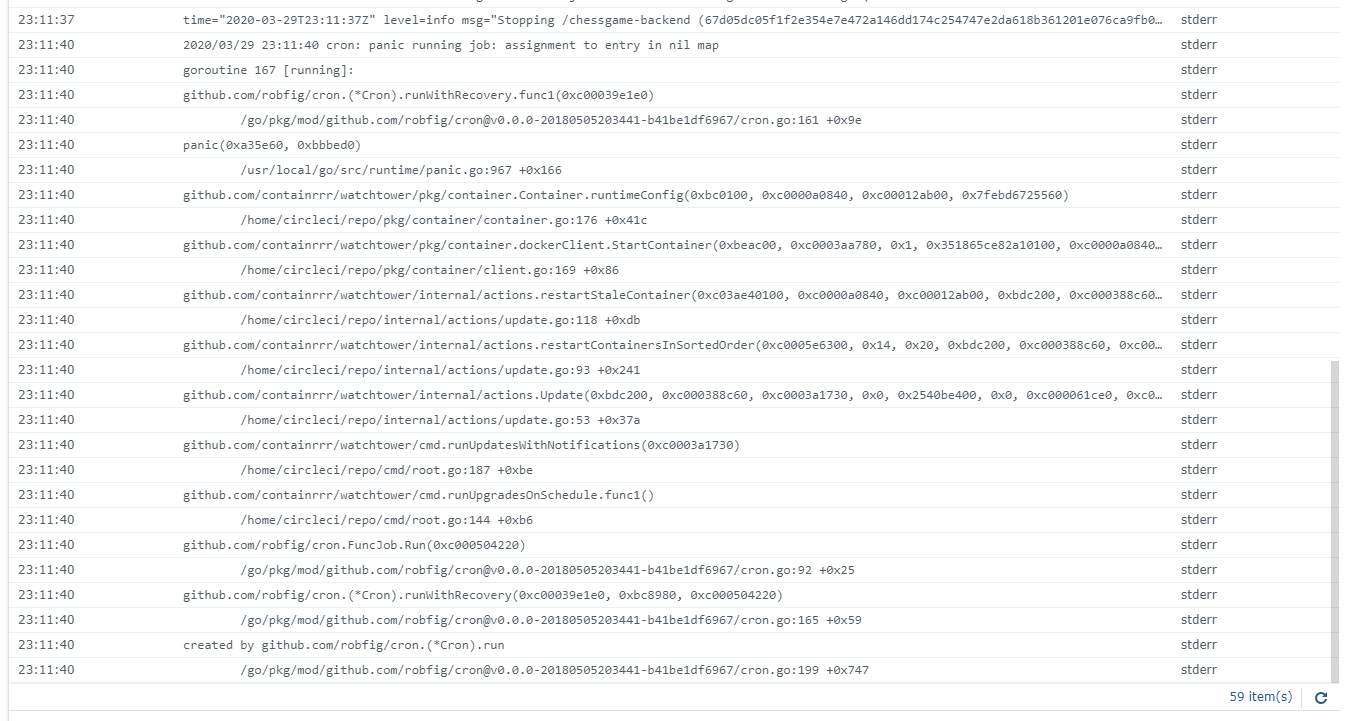
This is the error log I get:
JoachimVeulemans
on 31 Mar 2020
Yep, lines up with containrrr/watchtower/v0.3.11/pkg/container/container.go:176
piksel
on 31 Mar 2020
So to understand the problem, the container doesn't respond to the stop signal so it keeps running in the background and when watchtower wants to start a new container on that port, it crashes because the port is not available. Logic.
So does watchtower need to send another signal or do we have to change the dockerfile?
JoachimVeulemans
on 31 Mar 2020
So to understand the problem, the container doesn't respond to the stop signal so it keeps running in the background and when watchtower wants to start a new container on that port, it crashes because the port is not available. Logic.
So does watchtower need to send another signal or do we have to change the dockerfile?
We already have support for sending different signals. See here for instructions.
You might have to experiment a bit with different signals to find the one able to do the job with as little force as possible. 🙂
simskij
on 4 Apr 2020
@gtaranti @piksel @simskij I found a solution to the problem. Thanks to @simskij for pointing me to the documentation, I've confirmed that labelling the image with the SIGHUP signal, gracefully shuts down and recreates the container.
@gtaranti This should solve your problem too with your container. Just add LABEL com.centurylinklabs.watchtower.stop-signal="SIGHUP" to your Dockerfile.
@simskij For me, this issue can be closed.
JoachimVeulemans
on 6 Apr 2020
If this does not solve your issue, @gtaranti, feel free to reopen the ticket. 🙏🏻
simskij
on 6 Apr 2020
@gtaranti @piksel @simskij I found a solution to the problem. Thanks to @simskij for pointing me to the documentation, I've confirmed that labelling the image with the SIGHUP signal, gracefully shuts down and recreates the container.
@gtaranti This should solve your problem too with your container. Just add
LABEL com.centurylinklabs.watchtower.stop-signal="SIGHUP"to your Dockerfile.@simskij For me, this issue can be closed.
@JoachimVeulemans : This doesn't work for me. I used the proposed solution but I still the exact same behaviour of the crash.
@simskij : I'm using the proposed LABEL in the command line, like docker run --label=com.centurylinklabs.watchtower.stop-signal=SIGHUP ... BUT in the logs I see that SIGTERM is used anyway!!
time="2020-04-06T22:55:05Z" level=info msg="Stopping /fntapi (68c809171acab8ba5faf790b8eccd48b2e8f301556fbfe848727f1fef76de938) with SIGTERM"
gtaranti
on 7 Apr 2020
That label should be added to the container in question, not watchtower. Is that what you did?
simskij
on 7 Apr 2020
Oh.. Silly me! Yes, I added the label to the watchtower container.
I thought instead of labelling every container in synology machine, to just label the watchtower container.
OK, I'll add it to the .NET Core 3.1 container and get back with results.
gtaranti
on 7 Apr 2020
How about adding an option to watchtower to use a different default signal than 'SIGTERM'?
gtaranti
on 7 Apr 2020
@gtaranti I think this is not a good idea. Every container should be stopped as gracefully as possible. Only the .NET containers cause some trouble so they need a little bit more force. No need to stop other containers with the same level of force, this might corrupt the data in some instances when the container doesn't end properly... And that is not what you want.
@simskij do you think otherwise? otherwise, problem solved, issue closed 😄
JoachimVeulemans
on 7 Apr 2020
While I thank you for the idea @gtaranti , I agree with @JoachimVeulemans on this one. Changing the signal should be a per-container option one resorts to if nothing else works, not a default option for an entire stack.
simskij
on 7 Apr 2020
I verified that putting the label proposed above in the container with the .NET Core 3.1 image, watchtower WORKED as it should, by stopping the container and restarting with the new pulled image.
Thank you @JoachimVeulemans and @simskij !
gtaranti
on 7 Apr 2020
Related issues
 eloo
·
5Comments
simskij
·
5Comments
eloo
·
5Comments
simskij
·
5Comments
 kiprasmel
·
5Comments
kiprasmel
·
5Comments
 7imbrook
·
7Comments
7imbrook
·
7Comments
 meandthedevil
·
6Comments
meandthedevil
·
6Comments
Most helpful comment
@gtaranti @piksel @simskij I found a solution to the problem. Thanks to @simskij for pointing me to the documentation, I've confirmed that labelling the image with the SIGHUP signal, gracefully shuts down and recreates the container.
@gtaranti This should solve your problem too with your container. Just add
LABEL com.centurylinklabs.watchtower.stop-signal="SIGHUP"to your Dockerfile.@simskij For me, this issue can be closed.