Wappalyzer: NPM driver returns inconsistent results
What is the current behavior ?
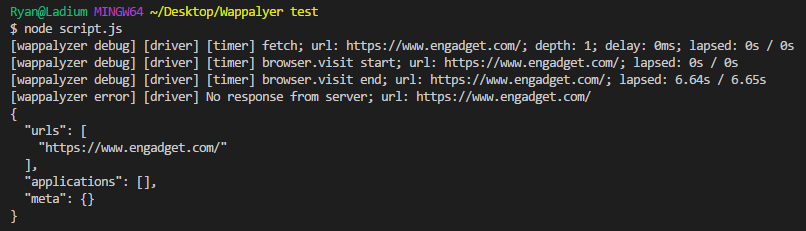
Wappalyzer fails sometimes to get response from server and thus outputting empty result.
Other times it returns incomplete list of detected services.
Empty result
Incomplete result

the steps to reproduce the problem
const url = 'https://www.engadget.com'
const wappalyzer = new Wappalyzer(url, options);
wappalyzer.analyze()
  .then(json => {
    process.stdout.write(JSON.stringify(json, null, 2) + '\n')
    process.exit(0);
  })
  .catch(error => {
    process.stderr.write(error + '\n')

    process.exit(1);
});
What is the expected behavior ?
Output complete list of all services

 xde013
All 13 comments
I'm not sure what causes this. It's an issue with Zombie.js most likely.
 AliasIO
on 6 Jul 2018
AliasIO
on 6 Jul 2018
@AliasIO is there any possibility to switch to another browser?
xde013
on 6 Jul 2018
What do you suggest?
AliasIO
on 7 Jul 2018
Headless chrome is really nice to work with. Especially with puppeteer ( https://github.com/GoogleChrome/puppeteer ).
Unfortunately I've some issues with zombie too (it's crashing the entire node process on some websites).
Edit: nevermind, I was using an older version of Wappalyzer without commit https://github.com/AliasIO/Wappalyzer/commit/916b3af5c030b159020a73857931d6a7f5e39d64
 dege88
on 19 Jul 2018
dege88
on 19 Jul 2018
Zombie.js is much, much leaner than headless Chrome and runs entirely in JavaScript, making it more portable.
AliasIO
on 20 Jul 2018
It's now possible to use a different headless browser by crearting a wrapper, like this one for Zombie.js:
https://github.com/AliasIO/Wappalyzer/blob/master/src/drivers/npm/browsers/zombie.js
AliasIO
on 8 Dec 2018
Hi, I try to use Wappalyzer with Puppeteer. Do you have a working wrapper for this browser? :)
(I have troubles to get the js of the page I want to analyze)
 juffardm
on 28 Jan 2019
juffardm
on 28 Jan 2019
@juffardm Did you succeed? Can anyone share a working example of using wappalyzer with puppeteer?
 ThomasLohner
on 29 Jul 2019
ThomasLohner
on 29 Jul 2019
@xde013 @juffardm This will be fixed by adding Puppeteer support in #2711. Until then as a workaround you can grab pupeteer.js from realhidden/Wappalyzer and put it in your project.
You will need to change the line
const Browser = require('../browser');
to
const Browser = require('wappalyzer/browser');
Add Puppeteer & Puppeteer-Cluster npm i puppeteer puppeteer-cluster.
Now your fine to go with this working example:
const url = 'https://www.google.com';

const options = {
  debug: false,
  delay: 500,
  maxDepth: 3,
  maxUrls: 10,
  maxWait: 5000,
  recursive: true,
  userAgent: 'Wappalyzer',
  htmlMaxCols: 2000,
  htmlMaxRows: 2000,
};

const Wappalyzer = require('wappalyzer/driver.js');
const Browser = require('./puppeteer.js');
const wappalyzer = new Wappalyzer(Browser, url, options);

wappalyzer.analyze()
  .then(json => {
    process.stdout.write(`${JSON.stringify(json, null, 2)}\n`);

    process.exit(0);
  })
  .catch(error => {
    process.stderr.write(`${error}\n`);

    process.exit(1);
});
@ThomasLohner Thank you so much for your codes, it seems to be working fine detecting full technologies. I realized you use puppeteer-cluster , based on this latest comment on Jul 30, is there any way to push a list of URLs into the puppeteer-clusters instead of one URL?
 rainbowhat
on 10 Sep 2019
rainbowhat
on 10 Sep 2019
@rainbowhat I don't know ;-) I'm just using code from https://github.com/realhidden/Wappalyzer/ which is pending here in #2711. I guess you should ask @realhidden if there is a way to push multiple urls at once into puppeteer-cluster / wappalyzer.
ThomasLohner
on 10 Sep 2019
The support of Puppeteer has been released, but I have still inconsistency between Chrome Plugin and NPM driver.
For https://www.tsr-recyclage.fr/, Google Analytics is detected with the plugin, but not with the driver
  const maxWait = req.query.maxWait || 5000;
  const options = {
    browser: 'puppeteer',
    debug: true,
    delay: 0,
    maxDepth: 1,
    maxUrls: 1,
    maxWait: maxWait,
    recursive: false,
    userAgent: "Wappalyzer"
  };

  const wappalyzer = new Wappalyzer("https://www.tsr-recyclage.fr/", options);
  wappalyzer
    .analyze()
    .then(json => {
      process.stdout.write(`${JSON.stringify(json, null, 2)}\n`);

      process.exit(0);
    })
    .catch(error => {
      process.stderr.write(`${error}\n`);

      process.exit(1);
    });
[wappalyzer debug] [core] Identified Lodash, Nginx (www.tsr-recyclage.fr)
Do you know where this might be coming from?
 hugoobauer
on 3 Apr 2020
hugoobauer
on 3 Apr 2020
@hugoobauer It looks like GA is only being loaded after accepting cookies on that website.
AliasIO
on 7 Apr 2020
Related issues
 oxr463
·
6Comments
oxr463
·
6Comments
 KeviinCosmos
·
7Comments
KeviinCosmos
·
7Comments
 cfjedimaster
·
5Comments
cfjedimaster
·
5Comments
 mrandreastoth
·
9Comments
mrandreastoth
·
9Comments
 tonyd85
·
8Comments
tonyd85
·
8Comments
Most helpful comment
@xde013 @juffardm This will be fixed by adding Puppeteer support in #2711. Until then as a workaround you can grab pupeteer.js from realhidden/Wappalyzer and put it in your project.
You will need to change the line
to
Add Puppeteer & Puppeteer-Cluster
npm i puppeteer puppeteer-cluster.Now your fine to go with this working example: