Walletwasabi: #v1.1.12rc Changing fee entry option can make sending not work
General Description
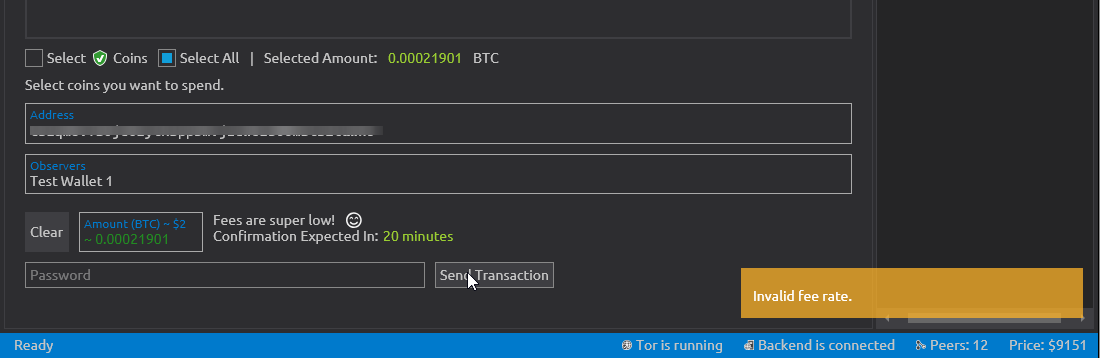
Is you change the "Manual fee entry" option to Off after filling the send data and with a 0, empty or invalid value for the manual fee option ("or set Fee"), you can't send, because the fee disappears and when you try to "Send Transaction" an "Invalid fee rate" message appears.
How To Reproduce? / Screenshots
Have "Manual fee entry" On in Settings
Fill all the send data (Address, Observers and Amount) + the manual fee option with a 0, empty or invalid value
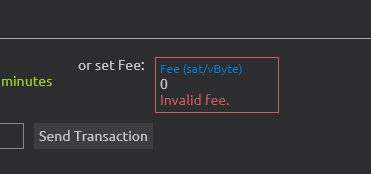
Change "Manual fee entry" to Off in Settings
Return to "Send" tab. The fees dissapeared.
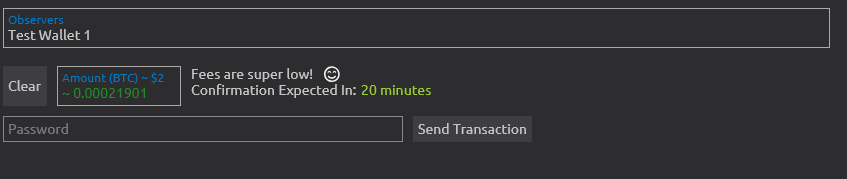
User can assume that fees are auto. Try to "Send Transaction", and you can't. An "Invalid fee rate" message appears.
Operating System
Windows 10. Version 10.0.18363. Compilation 18363
Logs
Don't needed
Wasabi Version
Release Candidate for 1.1.12 (#3782)
 ibertario
All 9 comments
I cannot reproduce on Debian, transaction is successfully sent.
 PulpCattel
on 17 Jul 2020
PulpCattel
on 17 Jul 2020
cannot reproduce on Debian, transaction is sent successfully.
 MaxHillebrand
on 17 Jul 2020
MaxHillebrand
on 17 Jul 2020
Well, at least on Windows the bug appears only if you filled _previously_ all the send data (Address, Observers and Amount) + invalid fee.
Updated step 2.
ibertario
on 17 Jul 2020
even when prefilling the address observer and amount, I cannot reproduce, the tx get's broadcast and it has 1 sat/vbyte fee
MaxHillebrand
on 17 Jul 2020
I've tried several times, reboot and check logs (anything different than the running CoinJoin)
ibertario
on 17 Jul 2020
I can reproduce this.
 yahiheb
on 17 Jul 2020
yahiheb
on 17 Jul 2020
2 points
MaxHillebrand
on 17 Jul 2020
@MaxHillebrand
My name in points bookkeeping board is wrong... I'm new here, no problem: ibertario
ibertario
on 18 Jul 2020
Thanks for the report. This is an issue but not for this release.
 molnard
on 20 Jul 2020
molnard
on 20 Jul 2020
Related issues
MaxHillebrand
·
3Comments
 trading2835
·
3Comments
trading2835
·
3Comments
 2pac1
·
3Comments
MaxHillebrand
·
3Comments
2pac1
·
3Comments
MaxHillebrand
·
3Comments
 gabridome
·
3Comments
gabridome
·
3Comments