Walletwasabi: v1.1.12rc - Recover wallet on minimized window
General Description
If the window size is reduced to the minimum (or close to it), and we click on Show Advanced Option, the recover button is pushed down and there is no scroll bar to reach it.
How To Reproduce?
- Open Wasabi
- Reduce the window size close to minimum
- Reach the
Recover Walletscreen - See that the
Recoverbutton is unreachable
Screenshots
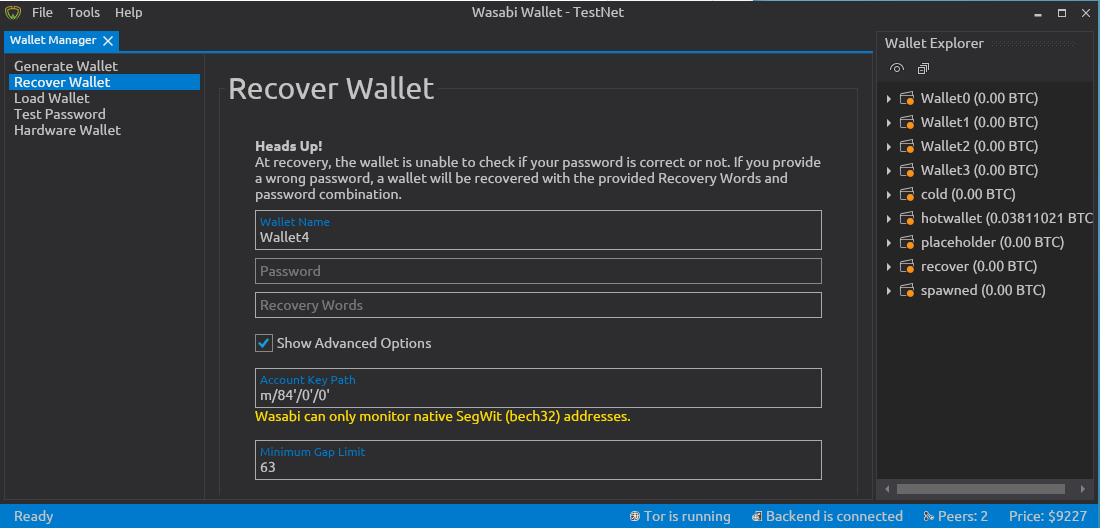
Note
This happens also with older versions.
Imho a scroll bar should appear in a case like this.
Operating System
Whonix Workstation 15.0.1.3.4
Wasabi Version
Release Candidate for 1.1.12 (#3782)
Deb package
 PulpCattel
All 4 comments
I can reproduce this issue on W10
 kravens
on 14 Jul 2020
kravens
on 14 Jul 2020
Similar scrollbar issues have been reported like #3487 #3663
These should be fixed all together.
 yahiheb
on 14 Jul 2020
yahiheb
on 14 Jul 2020
👍1
I could repro. It is annoying should be fixed, before the release. @jmacato please take a look.
3 points
 molnard
on 14 Jul 2020
molnard
on 14 Jul 2020
👍1
Can reproduce.
 MaxHillebrand
on 14 Jul 2020
MaxHillebrand
on 14 Jul 2020
Was this page helpful?
0 / 5 - 0 ratings
Related issues
yahiheb
·
3Comments
 trading2835
·
3Comments
trading2835
·
3Comments
 nopara73
·
3Comments
nopara73
·
3Comments
 RiccardoMasutti
·
3Comments
yahiheb
·
3Comments
RiccardoMasutti
·
3Comments
yahiheb
·
3Comments