Walletwasabi: Not able to clear "Bitcoin P2P Endpoint" field in settings
Previously I added an onion address to the Bitcoin P2P endpoint field in GUI settings.
I've been trying to remove it, since the node is no longer active on the network. But I'm unable to clear the field, even after restarting the Wasabi Wallet (as recommended, after changing a setting).
I tried:
- Restarting, reinstalling wasabi
- Changing config file manually
Any ideas here?
OS: MacOS 10.15.3
Wasabi Version: 1.1.1.0
 sahilc0
All 30 comments
After you clear the value and restart the wallet, is the "Bitcoin P2P Endpoint" restored with the default value or the one that you entered before?
 lontivero
on 1 Apr 2020
lontivero
on 1 Apr 2020
Do you know what the default value is? If there is one. Then I can verify if the current one is the default or not.
Unfortunately since my old node is not active, I don't have the onion address for it so can't check.
sahilc0
on 1 Apr 2020
To be clear it seems like there are a few keys here:
"MainNetBackendUriV3", "MainNetFallbackBackendUri", and "MainNetBitcoinP2pEndPoint"
I'm talking about "MainNetBitcoinP2pEndPoint"
sahilc0
on 1 Apr 2020
OK so I updated the value of "MainNetBitcoinP2pEndPoint" the local IP:18333 of my new node.
As you can see things seem to be connected:

However both of the wallets I have are very clearly showing incorrect balances. I verified this by importing seed into Electrum, which is showing the correct value.
I'm not really sure what else could be wrong here!
sahilc0
on 1 Apr 2020
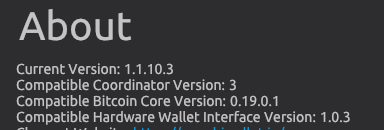
There are more than one issue then. I recommend you to upgrade Wasabi to 1.1.10.3 https://github.com/zkSNACKs/WalletWasabi/releases/tag/v1.1.10.3, a very stable version. I am sure the problem with your balance will be solved. If you decide to upgrade Wasabi will reindex your wallet (that can take a couple of minutes).
About the Bitcoin P2P endpoint, it is not a big problem because in the recommended version there is a On/Off switch to enable/disable the communication with your bitcoin node.
lontivero
on 1 Apr 2020
Woops - seems like I am already on that version - my bad.
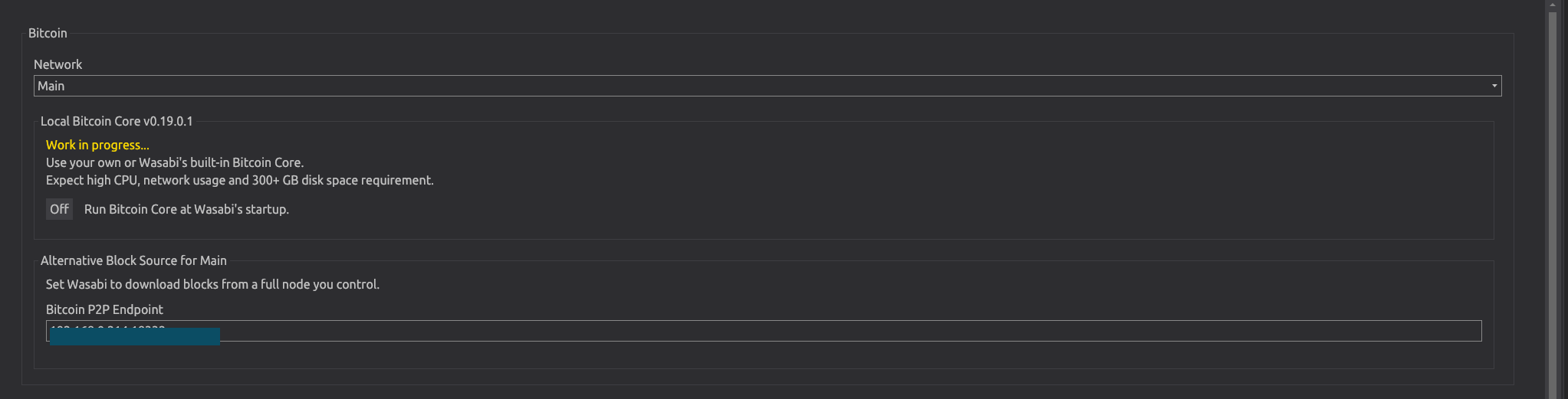
I also don't see the p2p endpoint Off option:
sahilc0
on 1 Apr 2020
Have you tried to recover your wallet using Wasabi?
 yahiheb
on 1 Apr 2020
yahiheb
on 1 Apr 2020
Thanks! I'm unable to recover my Wasabi Hot wallet - this is likely because I have the wrong seed (weird?) but I think I can still recover from the xpriv. But this is a different issue I'll try to figure out afterwards.
Related to this issue, I'm still confused how my cold wallet (coldcard) is showing the correct balance on Electrum, but not the correct balance on Wasabi. With the same XPUB.
Also, looking at the log file, I'm getting this - it seems to appear at every block download
2020-04-01 08:31:24 WARNING WalletService (600) System.OperationCanceledException: The operation was canceled.
at System.Threading.CancellationToken.ThrowOperationCanceledException()
at NBitcoin.Extensions.WithCancellationT
at NBitcoin.Protocol.Connectors.DefaultEndpointConnector.ConnectSocket(Socket socket, EndPoint endpoint, NodeConnectionParameters nodeConnectionParameters, CancellationToken cancellationToken)
at NBitcoin.Protocol.Node.ConnectAsync(Network network, EndPoint endpoint, NetworkAddress peer, NodeConnectionParameters parameters)
at WalletWasabi.Services.WalletService.TryDownloadBlockFromLocalNodeAsync(uint256 hash, CancellationToken cancel)
2020-04-01 08:31:27 INFO WalletService (471) Disconnected node:
sahilc0
on 1 Apr 2020
Related to this issue, I'm still confused how my cold wallet (coldcard) is showing the correct balance on Electrum, but not the correct balance on Wasabi. With the same XPUB.
Which cold card version do you have?
 MaxHillebrand
on 1 Apr 2020
MaxHillebrand
on 1 Apr 2020
Seems like 3.0.2 @MaxHillebrand
sahilc0
on 1 Apr 2020
but I think I can still recover from the xpriv. But this is a different issue I'll try to figure out afterwards.
You can recover your wallet (generated with Wasabi) in other software (Electrum for example) using the Extended Account zprv (not the Extended Master zprv) which you can find in the Wallet Info tab.
When recovering using Electrum choose the option Use a master key.
Just be aware that when you do that you expose your addresses to 3rd party Electrum servers.
yahiheb
on 1 Apr 2020
Do you know what the default value is?
I think it is 127.0.0.1:18333
yahiheb
on 1 Apr 2020
Thanks for the info @yahiheb! I tried that (importing zprv into Electrum) but it doesn't seem to be working in Electrum. I think I'll branch that off into another discussion though - the main issue seems to be the discrepancy in wallet balance. I think this has something to do with the error message I pasted above, and whatever node I'm connected to somehow being incorrect
sahilc0
on 1 Apr 2020
I think it is 127.0.0.1:18333
Strangely I've tried this, and others including my old node, current node and nothing seems to be giving correct balances.
It's showing balances from specifically the last two weeks - but nothing before that 🤔
sahilc0
on 1 Apr 2020
I meant 127.0.0.1:8333 not 127.0.0.1:18333.
yahiheb
on 1 Apr 2020
Tried that too, unfortunately.
sahilc0
on 2 Apr 2020
Hey @nopara73 as I said in the reddit post, tagging you here to keep convo in a single location, in case others have this issue in the future.
Any idea about this discrepancy in wallet balances?
Pasted from a message above in this thread, this is log file message I'm getting for every block download
2020-04-01 08:31:24 WARNING WalletService (600) System.OperationCanceledException: The operation was canceled.
at System.Threading.CancellationToken.ThrowOperationCanceledException()
at NBitcoin.Extensions.WithCancellationT
at NBitcoin.Protocol.Connectors.DefaultEndpointConnector.ConnectSocket(Socket socket, EndPoint endpoint, NodeConnectionParameters nodeConnectionParameters, CancellationToken cancellationToken)
at NBitcoin.Protocol.Node.ConnectAsync(Network network, EndPoint endpoint, NetworkAddress peer, NodeConnectionParameters parameters)
at WalletWasabi.Services.WalletService.TryDownloadBlockFromLocalNodeAsync(uint256 hash, CancellationToken cancel)
2020-04-01 08:31:27 INFO WalletService (471) Disconnected node:
sahilc0
on 2 Apr 2020
I could possibly just try the nuclear option and uninstall + delete .wasabi folder, since my coldcard stores the private key. However - I do have some funds on the hot wallet, and when I plug in the seed (wasabi) or the zprv (electrum) no funds show up.
Therefore I think the solution is related to the above error, and not getting transactions properly from the network.
sahilc0
on 2 Apr 2020
Can you first take a look at my answer on reddit about how to restore on Electrum using a Master key:
https://www.reddit.com/r/WasabiWallet/comments/ft27on/can_wasabi_import_from_xpriv_instead_of_seed/fm6fy1v?utm_source=share&utm_medium=web2x
yahiheb
on 2 Apr 2020
@yahiheb Yep sorry - I should have expanded but when I said
" zprv (electrum) no funds show up."
That was based on your recommendation. In other words - Electrum recognized it, but no funds were shown.
On the other hand, Wasabi shows a balance for that hot wallet, but it's an out of date balance (not showing UTXOs before 2 weeks).
That's why I'm thinking if anyone knows what that error message is, that might solve the problem of wallet balances not showing correctly (on both cold wallet, and wasabi hot wallet)
sahilc0
on 2 Apr 2020
However both of the wallets I have are very clearly showing incorrect balances. I verified this by importing seed into Electrum, which is showing the correct value.
I'm unable to recover my Wasabi Hot wallet - this is likely because I have the wrong seed (weird?)
In the first sentence you said that you recovered you wallet in Electrum using your seed, but in the second sentence you couldn't do the same in Wasabi which should be investigated.
Also you said that in Electrum it is showing the correct value, my question is:
how do you know it is the correct value? Electrum might show a wrong balance when you CoinJoin.
Try to increase the gap_limit and the gap_limit_for_change to 100 for example.
Open Electrum's Console and type the following commands:
wallet.change_gap_limit(100)
wallet.gap_limit_for_change = 100
wallet.synchronize()
Sorry for the confusion - let me clarify. Two wallets - Wallet CC (coldcard) and Wallet WH (wasabi hot). Both are showing out of date balances using Wasabi as front end.
Wallet CC: (where private keys are on cold card) when Electrum is used as front end (xpub in electrum), balance is correct. When Wasabi is used (xpub in wasabi) balance is not correct.
Wallet WH: Electrum - Importing seed, not compatible. So try to import zprv as recommended, it works, but wallet balance is 0 (somehow). Wasabi Importing seed as a new wallet ("Recover Wallet") also shows balance as 0. But the current wallet that is open in Wasabi shows a non-zero balance - it's just an outdated balance.
So there are two issues:
Issue A) Wasabi seems to not be getting the correct balance / correct txn info from before 2 weeks ago
Issue B) Not able to restore WH wallet successfully. (This could be a number of problems - eg. I have the wrong seed, etc) But I think this issue can solve itself if A^ can be sorted out.)
Would anything else from the logs help?
sahilc0
on 2 Apr 2020
Restoring P2P endpoint to default:
- File/Open/Config File
- Delete
MainNetBitcoinP2pEndPoint,TestNetBitcoinP2pEndPoint, andRegTestBitcoinP2pEndPointentries.
These defaults will be restored:
  "MainNetBitcoinP2pEndPoint": "127.0.0.1:8333",
  "TestNetBitcoinP2pEndPoint": "127.0.0.1:18333",
  "RegTestBitcoinP2pEndPoint": "127.0.0.1:18444",
Clear up a few things
I also don't see the p2p endpoint Off option:
There's no P2P EndPoint off option. If we find a full node on your computer then we get the blocks from it and not from random nodes. The reason is that, there's no need to access the internet when everything that we need is available locally.
Rescanning your wallet
- Create a copy of your wallet file.
- Set the
"Height"json field to 0 and theMinGapLimitjson field to 100. - Load the wallet.
Can you report back if this fixes your balance or not? If not, then there's something really strange going on.
 nopara73
on 3 Apr 2020
nopara73
on 3 Apr 2020
Oh also you may want to use Wasabi v1.1.11 (which will be out in a day or so, at least the pre-release: https://github.com/zksnacks/walletwasabi/releases It rescans your wallet 20-30 TIMES faster.)
nopara73
on 3 Apr 2020
There's no P2P EndPoint off option. If we find a full node on your computer then we get the blocks from it and not from random nodes. The reason is that, there's no need to access the internet when everything that we need is available locally.
What if the node I am running is not synced (and it might take days to sync), what does Wasabi do in that case?
yahiheb
on 3 Apr 2020
if (fn is there AND fn has block) get block from fn
nopara73
on 3 Apr 2020
Holy fuck, it worked. Thanks a ton you guys.
In case someone else comes across this, this is what fixed it. Idk which one solved it, but one of them did:
- Update config "MainNetBitcoinP2pEndPoint": "127.0.0.1:8333"
- Rescanned wallet.
My guess is #2 worked, since I already tried #1 before. Who knows!
@nopara73 I can close this issue if we are done here. Thanks again.
sahilc0
on 4 Apr 2020
Great to hear that your issue is solved.
OK so I updated the value of "MainNetBitcoinP2pEndPoint" the local IP:18333 of my new node
Maybe it was # 1 because in the above quote you said you used 18333 with MainNetBitcoinP2pEndPoint which should be 8333.
yahiheb
on 4 Apr 2020
Glad to hear that your problem is solved. However, I am reopening this because I was trying to clear that textbox and I had to hack it around as it was not obvious how to do that. A normal user will just erase the textbox and expect that it will be filled automatically with the default.
But now you will get back your original value that is meant to be cleared.
 molnard
on 6 Apr 2020
molnard
on 6 Apr 2020
This also happens with Tor SOCKS5 Endpoint and with Bitcoin full node Data Folder fields.
yahiheb
on 6 Apr 2020
Related issues
molnard
·
3Comments
yahiheb
·
3Comments
 kenny47
·
3Comments
kenny47
·
3Comments
 2pac1
·
3Comments
nopara73
·
3Comments
2pac1
·
3Comments
nopara73
·
3Comments
Most helpful comment
Glad to hear that your problem is solved. However, I am reopening this because I was trying to clear that textbox and I had to hack it around as it was not obvious how to do that. A normal user will just erase the textbox and expect that it will be filled automatically with the default.
But now you will get back your original value that is meant to be cleared.