Walletwasabi: Test vectors for v1.1.11 Release
Test vectors for Wasabi v1.1.11
Release candidate here: https://github.com/molnard/WalletWasabi/releases/tag/v1.1.11rc1
Legal documents
Brief Description: as soon as the wallet connected to the backend will check for new Legal docs. If the legal doc is not up to date or missing at DATADIR/Legal - then it will download the new one and pops up the Legal agreement form which has to be accepted in order to continue using Wasabi. If the wallet is offline, the legal docs will never pop up - this is by design. The wallet will check for updates every 7 minutes and when it started.
Location of DATADIR
- Delete DATADIR/Legal folder. Test if the client downloads and shows the agreement form.
- Delete DATADIR/Legal folder. Go offline, load the wallet. Go online, see if the legal doc is downloaded.
- Delete DATADIR/Legal folder. Turn off Tor in settings. Restart Wasabi, see agreement form again.
- If the legal doc screen appeared you have to agree, you cannot hack it around.
https://github.com/zkSNACKs/WalletWasabi/pull/3167 https://github.com/zkSNACKs/WalletWasabi/pull/3192 https://github.com/zkSNACKs/WalletWasabi/pull/3246
Tor test
Brief Description: more robust workflow, but basically the same as before. Compatibility has to be checked.
- Use version v1.1.10.3, tor works. Now upgrade to the new Wasabi version. Check if tor works. Kill Tor process, restart Wasabi. Check functionality.
- Turn off tor, check.
https://github.com/zkSNACKs/WalletWasabi/pull/3189
Daemon
Brief Description: removed the --mixall parameter but add the option to specify the destination wallet. After the coin reached the specified anonset within the next CoinJoin it will be transferred to the destination wallet.
https://medium.com/@nopara73/how-to-move-funds-from-wasabi-wallet-to-a-hardware-wallet-ec07ea0b4999
- Start mixing with the daemon.
- Try all parameters like --keepalive, mix, --destination, etc .
- Enter wallet password, check the functionality.
- Generate wallet with/without password and load them.
- Try to mix into another wallet.
https://github.com/zkSNACKs/WalletWasabi/pull/3184 https://github.com/zkSNACKs/WalletWasabi/pull/3243 https://github.com/zkSNACKs/WalletWasabi/pull/3245 https://github.com/zkSNACKs/WalletWasabi/pull/3268
Receive tab
- Generate more than 21 receive address.
- Check QR code functionality.
- Rename labels.
- Test all right-click context menu functionality.
https://github.com/zkSNACKs/WalletWasabi/pull/3135 https://github.com/zkSNACKs/WalletWasabi/pull/3201
Custom change address
- Turn on/off custom change address feature in settings, observe Send tab.
- Create sending a transaction with the change, test if the change sent to the custom address.
- Try to enter an invalid address or same address to both address boxes, check the error message.
https://github.com/zkSNACKs/WalletWasabi/pull/3198 https://github.com/zkSNACKs/WalletWasabi/pull/3250
Wallet loading
- Try to quit wasabi in every situation. During the connect, loading, wallet loaded phase. Should not deadlock or crash.
- Check the wallet order in LoadWallet. The last recent item should be on the top. In wallet-explorer opened wallets on top otherwise alphabetical order.
CoinJoin
- Enqueue coins, quit wasabi in special situations, Input registration, Output registration Signing. Wasabi should dequeue the coins first then quit.
https://github.com/zkSNACKs/WalletWasabi/pull/3239
Multi wallet
- Start loading multiple wallets, observe the status bar.
- Go to DATADIR/Wallets. Delete the folder. Wasabi should restore the Wallet from the backup folder.
- Start loading multiple wallets, check loading animation.
- Load multiple wallets. Open different tabs Send/Receive etc. Click on the Tab and observe in WalletExplorer the owner wallet should be selected.
- Generate wallet
- Check WalletExplorer toolbox functionality, LWM mode and collapse all.
- Generate wallet with a password, try to load, test password will pop up and the proper wallet selected! Restart wasabi, try to load the same wallet, test password will pop up again. Enter the password, the wallet will load.
- In wallet explorer, you can click anywhere on the closed wallet item line, the context menu will pop up.
- Start loading a wallet in Wallet Manager or in Wallet Explorer, the busy indicator and the status will be updated.
- Load wallet with a double click.
https://github.com/zkSNACKs/WalletWasabi/pull/3332 https://github.com/zkSNACKs/WalletWasabi/pull/3276 https://github.com/zkSNACKs/WalletWasabi/pull/3371 https://github.com/zkSNACKs/WalletWasabi/pull/3384 https://github.com/zkSNACKs/WalletWasabi/pull/3386 https://github.com/zkSNACKs/WalletWasabi/pull/3387 https://github.com/zkSNACKs/WalletWasabi/pull/3385 https://github.com/zkSNACKs/WalletWasabi/pull/3392
Setting
- Change settings, restart and check if setting still there.
- Turn on LWM mode, or lock screen, restart and check if the setting is still there.
https://github.com/zkSNACKs/WalletWasabi/pull/3281
Test full node functionality
- Start the full node functionality in settings, observe.
- Check if it is synchronizing. Quit restart, try to break it.
https://github.com/zkSNACKs/WalletWasabi/pull/3327
GUI
- Open Wasabi, resize, reposition the window, restart wasabi, check if the last status was remembered.
- Resize wallet, try to break the UI on every tab!
- Close WalletManager tab, reopen it, check if works correctly - select items, whatever.
- Load wallet, create tx, confirm a transaction - check if history tab updated.
- Click on all Main menu item and check functionality.
- Check the Coin details by double-click on the coin.
- Check the Coin context menu by right click on the coin.
- Check tx details in the History tab by double-click and by context menu.
- Maximalize window, restart, check if it is maxed
- Resize window, restart, check if size the same.
- Dual monitor test: repeat maximalize, and size test.
https://github.com/zkSNACKs/WalletWasabi/pull/3350 https://github.com/zkSNACKs/WalletWasabi/pull/3376 https://github.com/zkSNACKs/WalletWasabi/pull/3389 https://github.com/zkSNACKs/WalletWasabi/pull/3395
Hardware Wallets
- Connect all types of hardware wallets. Search and load them. Observe they were added to Load Tab and to WalletExplorer.
- Check PSBT functionality.
https://github.com/zkSNACKs/WalletWasabi/pull/3338
General
- Build tx with transaction builder.
- Broadcast tx with Broadcaster.
- Check wallet info in the advanced menu.
- Recover the wallet and try to load it.
 molnard
All 25 comments
I started to test the hardware wallets on win10 - TestNet
Results:
Trezor T model
- Load wallet with passphrase enabled. Enter passphrase. Send/Receive. Load Wallet again. Deny tx.
- Load wallet without the passphrase. Send/Receive. Test transaction builder. Check the wallet info.
Trezor One
- Load wallet with the PIN. Pinpad test.
- Receive, Send.
ColdCard MK3
- Found a bug with wallet selection - fixing it https://github.com/zkSNACKs/WalletWasabi/pull/3414
- Receive, Send.
- Import skeleton file.
- Export PSBT, Sign, Broadcast.
Nano S
- Load wallet.
- Receive, Send
molnard
on 30 Mar 2020
Ledger Nano S: After pressing "Send transaction": navigate to reject transaction on the device, selecting reject, nothing happens in GUI, while Ledger goes back to "Application is ready" and after a while changes again to review transaction. Navigating to reject for the second time the transaction gets rejected and the notification comes up.
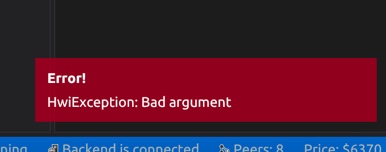
Rejection should happen for the first time and the notification should be more clear on what happend. (Error! Rejected by hardware wallet, etc.)
 bharmat
on 31 Mar 2020
bharmat
on 31 Mar 2020
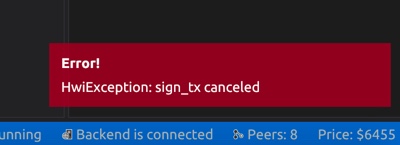
Same with Coldcard. for the first rejection nothing happens in the GUI, after a while Coldcard asks again if Im OK to send. This time rejecting results in rejection in the GUI too with the following error message:
bharmat
on 31 Mar 2020
I tested on Qubes 4, with virtual machines of both Debian 10 and Fedora 30. Since I did not encounter any discrepancies between the OS, I will not mention it again explicitly herein.
Legal documents
Everything works
Tor
Everything works, though I never encountered the user reported Tor bug in v1.1.10.3 in the first place.
Daemon
Everything works
Receive
Everything works
Custom change address
Everything works
Wallet loading
I encountered this crash with logs, it is fixed in #3410.
I do not like that the Load Wallet tab and Wallet Explorer show two different orders of the wallet list. imho, the Load Wallet should be removed all together. #3339
CoinJoin
Everything works
Multi Wallet
Go to DATADIR/Wallets. Delete the folder. Wasabi should restore the Wallet from the backup folder.
Does NOT work, even after several restarts. The wallet is in the WalletBackup folder, but it is not shown in the GUI. #3417
In wallet explorer, you can click anywhere on the closed wallet item line, the context menu will pop up.
This works, however, if wallet is already loaded, then a double click should drop down the items. #3416
Setting
Everything works
Test full node functionality
Cannot test
GUI
Everything works [known i3 issues are irrelevant]
Hardware Wallet [ColdCard only]
Can confirm bug reported in #3414, it is fixed in the PR.
General
Everything works
Run the tests
Currently doing this, will report results asap.
 MaxHillebrand
on 31 Mar 2020
MaxHillebrand
on 31 Mar 2020
TESTING
On MacBook Pro (13-inch, 2017), macOS Mojave Version 10.14.6
Legal documents
-Delete DATADIR/Legal folder. Test if the client downloads and shows the agreement form:
Not sure if I did this right. I deleted the Legal folder inside the Wasabi Wallet folder, then tried to run wasabi and there was an error:
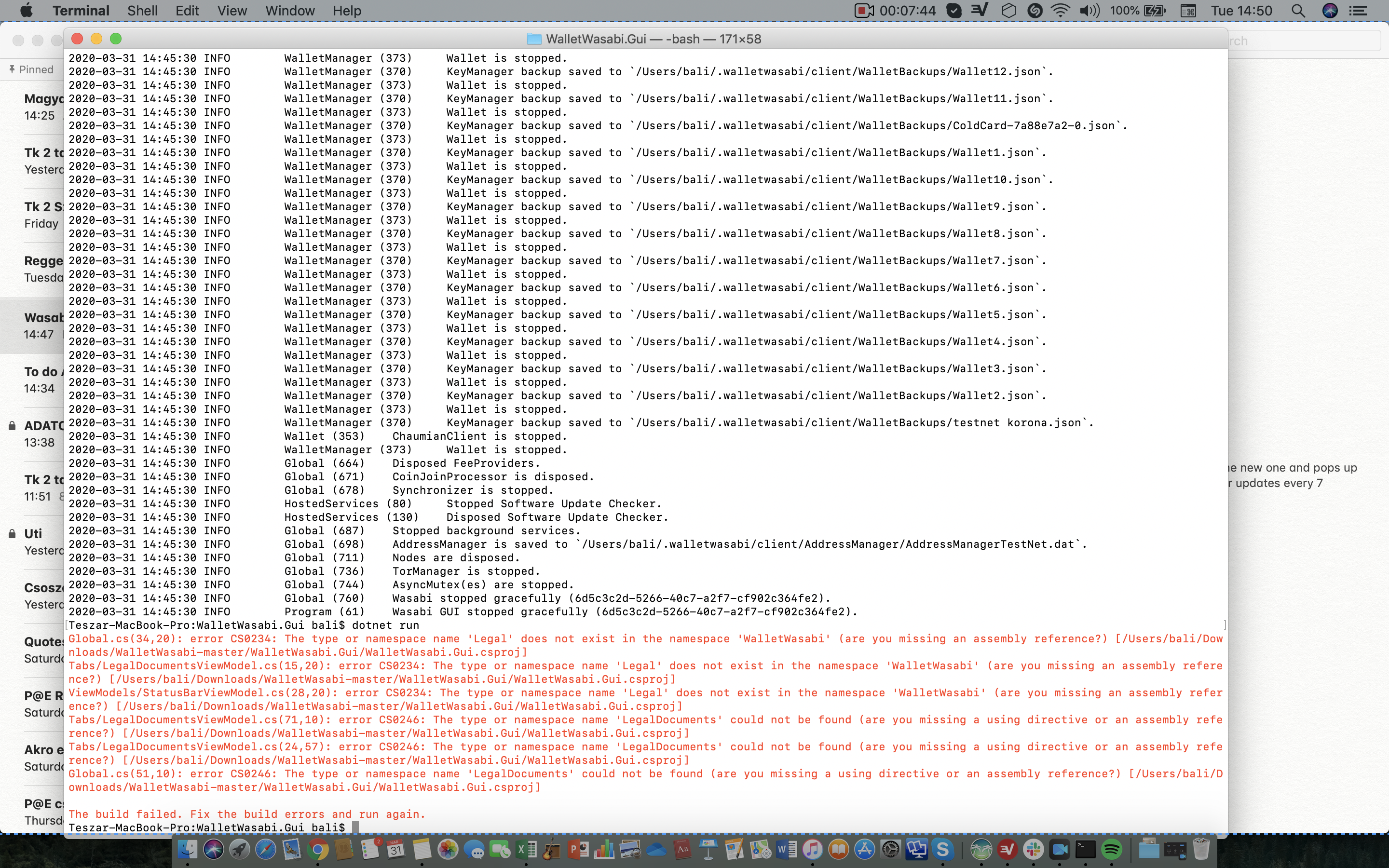
The same error goes for the other two tests:
-Delete DATADIR/Legal folder. Go offline, load the wallet. Go online, see if the legal doc is downloaded.
-Delete DATADIR/Legal folder. Turn off Tor in settings. Restart Wasabi, see agreement form again.
Receive tab
Everything worked well.
Custom change address
Everything worked well.
Wallet loading
Quitting Wasabi in every situation--» everything worked well.
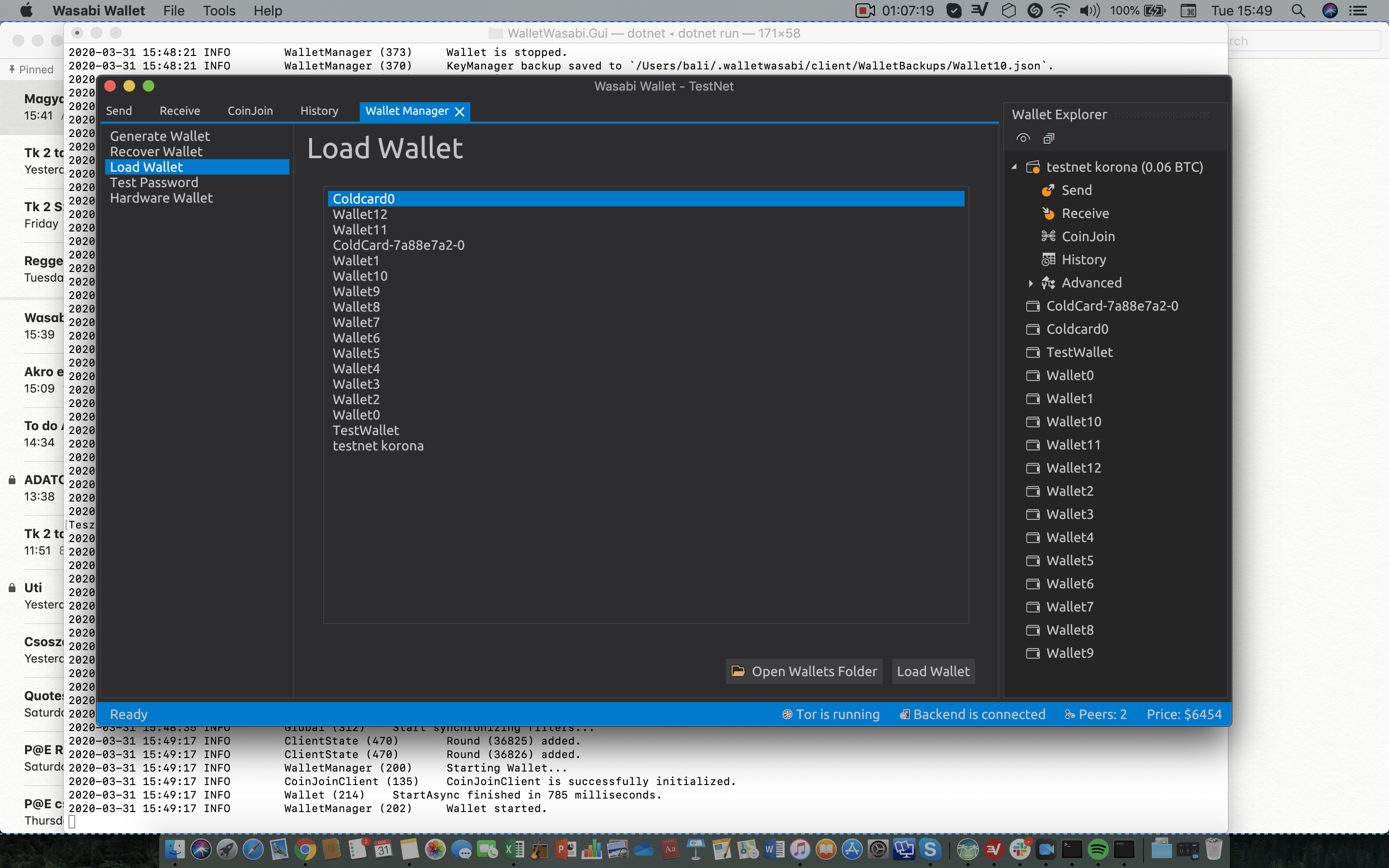
-Check the wallet order in LoadWallet. The last recent item should be on the top. In wallet-explorer opened wallets on top otherwise alphabetical order.
For me, this is not the case. I opened testnet korona (yeah I know lol) the last time, and it was in the bottom and the other wallets were not in alphabetical order:
CoinJoin
I only encountered the input registration phase. Not sure how to make output registration and signing happen, but I quit Wasabi during CoinJoin many times and it worked well every time.
Multi wallet
-Go to DATADIR/Wallets. Delete the folder. Wasabi should restore the Wallet from the backup folder.
When I deleted the Wallets folder and tried to run Wasabi I got an error message, similar to the case with the Legal documents:
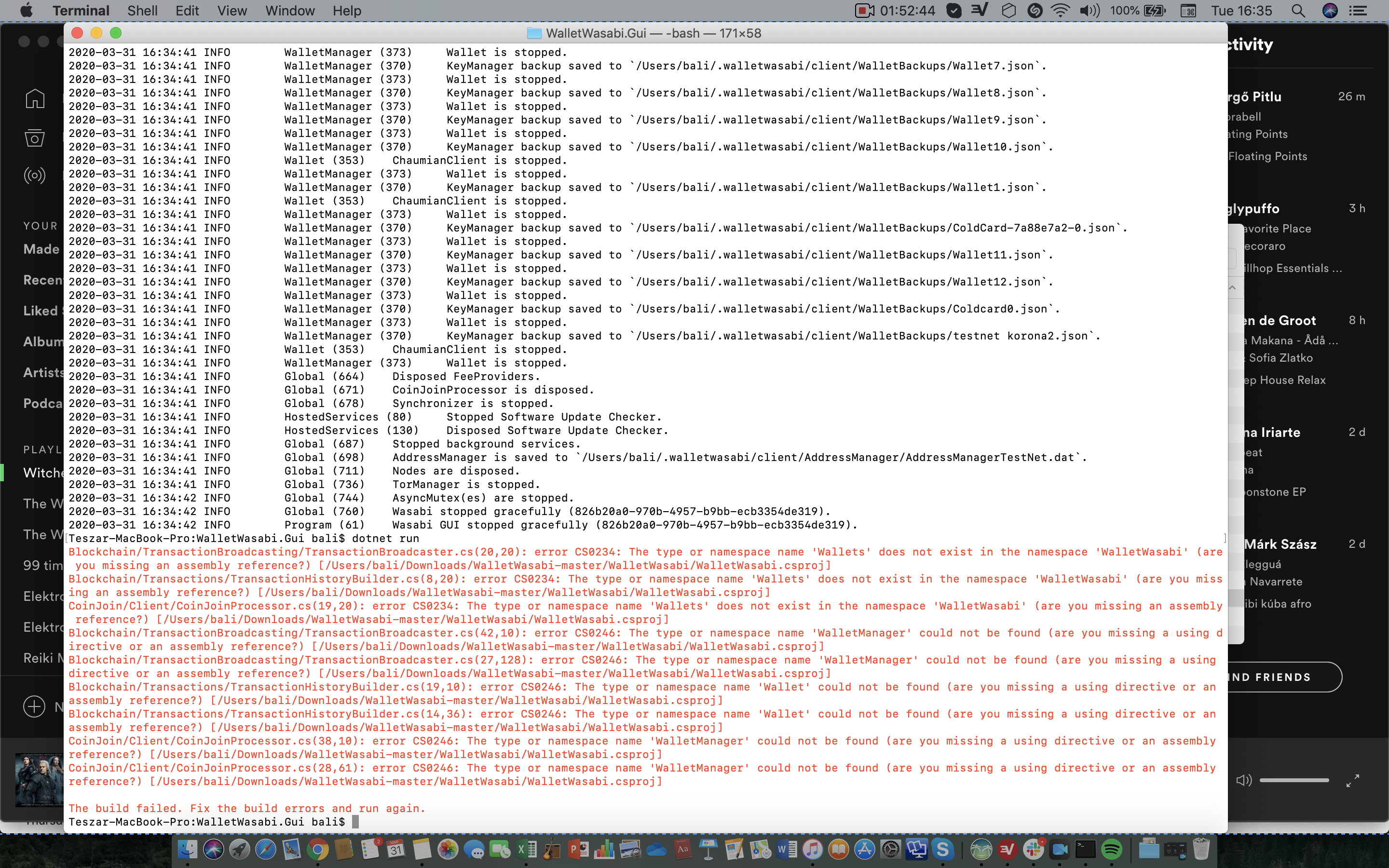
Everything else in Multi wallet worked well.
Setting
Everything worked well.
GUI
Wasabi quit unexpectedly:
I wanted to check which version of Wasabi I'm using:
Top left corner--» Wasabi Wallet--» About Wasabi Wallet--» and when I clicked on it Wasabi quit unexpectedly.
I tried the same thing again a second and third time, and it produced the same error, quitting unexpectedly.
Everything else worked well.
General
-Broadcast tx with Broadcaster --» I don't know / didn't know how to do that.
-Recover Wallet:
I don't understand something already in the beginning, what the text says at the Recover Wallet section:
"At recovery, the wallet is unable to check if your password is correct or not. If you provide a wrong password, a wallet will be recovered with the provided Recovery Words and password combination."
I don't get it. If I provide a wrong password how come that the wallet is recovered? Shouldn't it be recovered if I provide the right password?
Everything else worked well.
 Zolgarr
on 31 Mar 2020
Zolgarr
on 31 Mar 2020
@bharmat Thank you for your report, that is normal. Wasabi will try to send the request several times. You are right about the message would be more clear and in a certain case of rejection Wasabi should immediately about the process. Not critical but worth to create and issues for that.
molnard
on 2 Apr 2020
@MaxHillebrand Thank you for you report. As far as I can see nothing critical. However your issue with backups can be the subject of consideration to add as a bugfix. https://github.com/zkSNACKs/WalletWasabi/issues/3417
Backups might be used when the wallet file was corrupted and not in the case when it was deleted. @lontivero how do you remember? What was the original purpose of this feature?
molnard
on 2 Apr 2020
@Zolgarr Thank you for your report! Your errors came from the deletion of the wrong Legal folder. I corrected my description up there, so now it is clear where you can find correct legal docs.
Please repeat the tests.
molnard
on 2 Apr 2020
Testing
On Win10 (build 18363) and TestNet chain. Installed using the .msi installer.
Legal documents
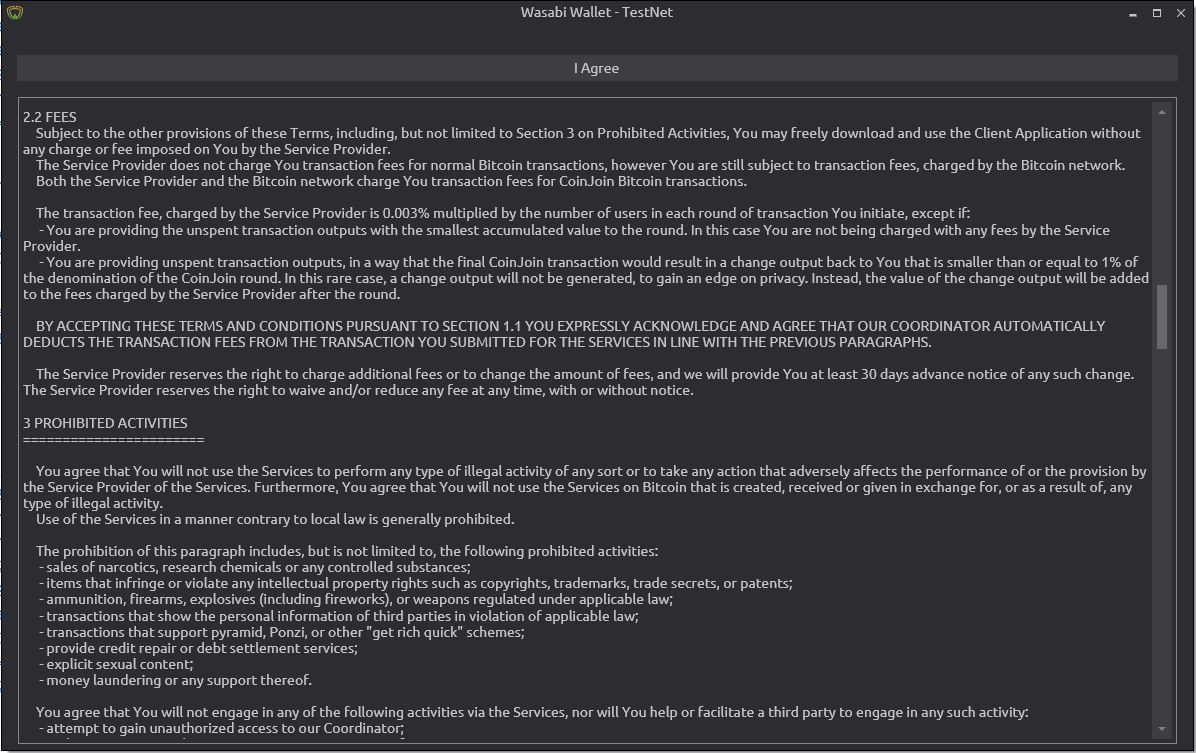
Working!
Tor test
Works also with stand-alone Tor instance running before Wasabi starts.
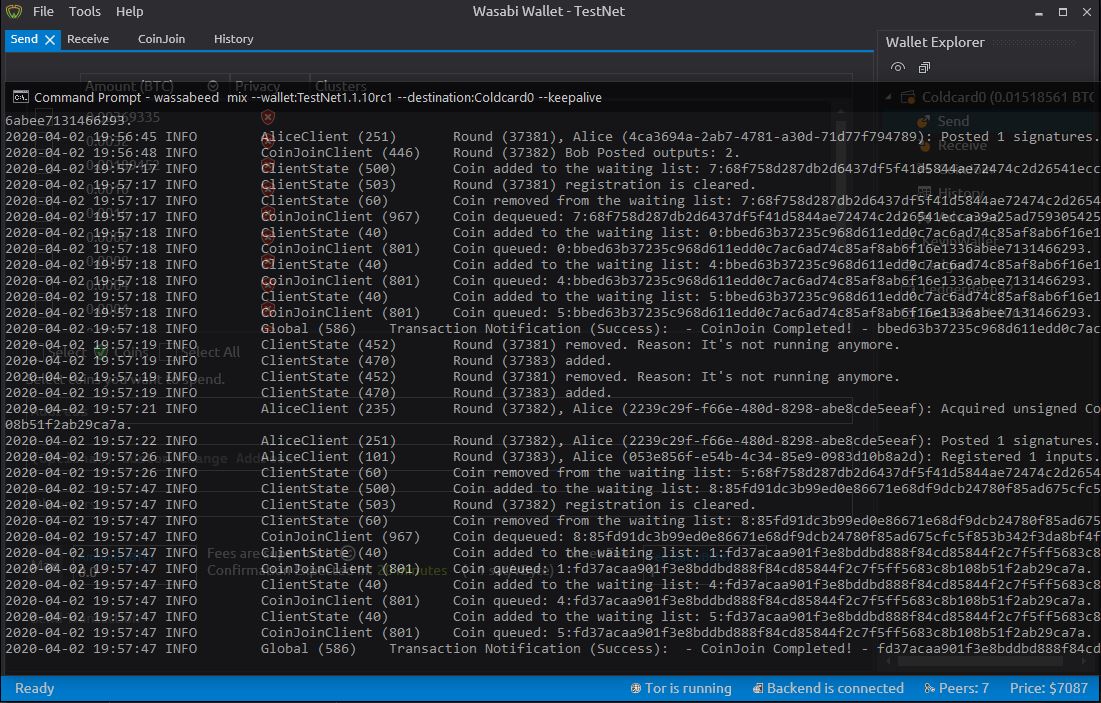
Daemon
Working mixed from hot to cold wallet via wassabeed!
Receive tab
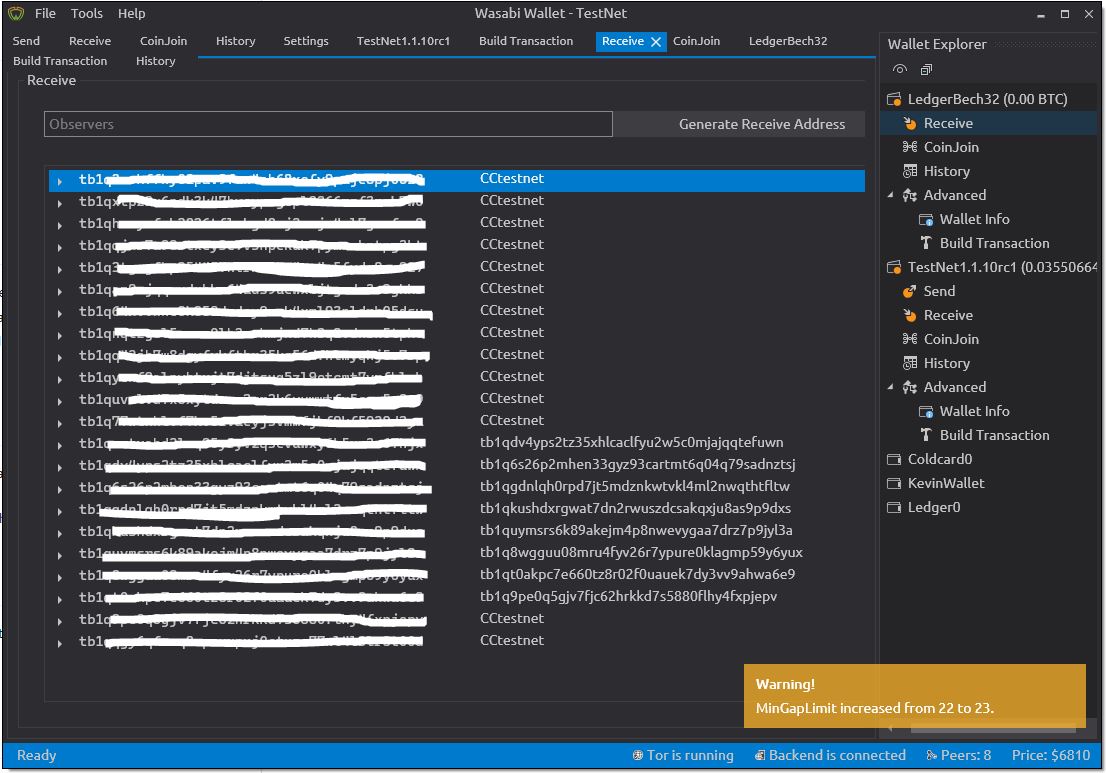
Correctly adjusts MinGapSize, correct QR, can hide addresses. How do you recover accidentally hidden addresses?
Custom change address
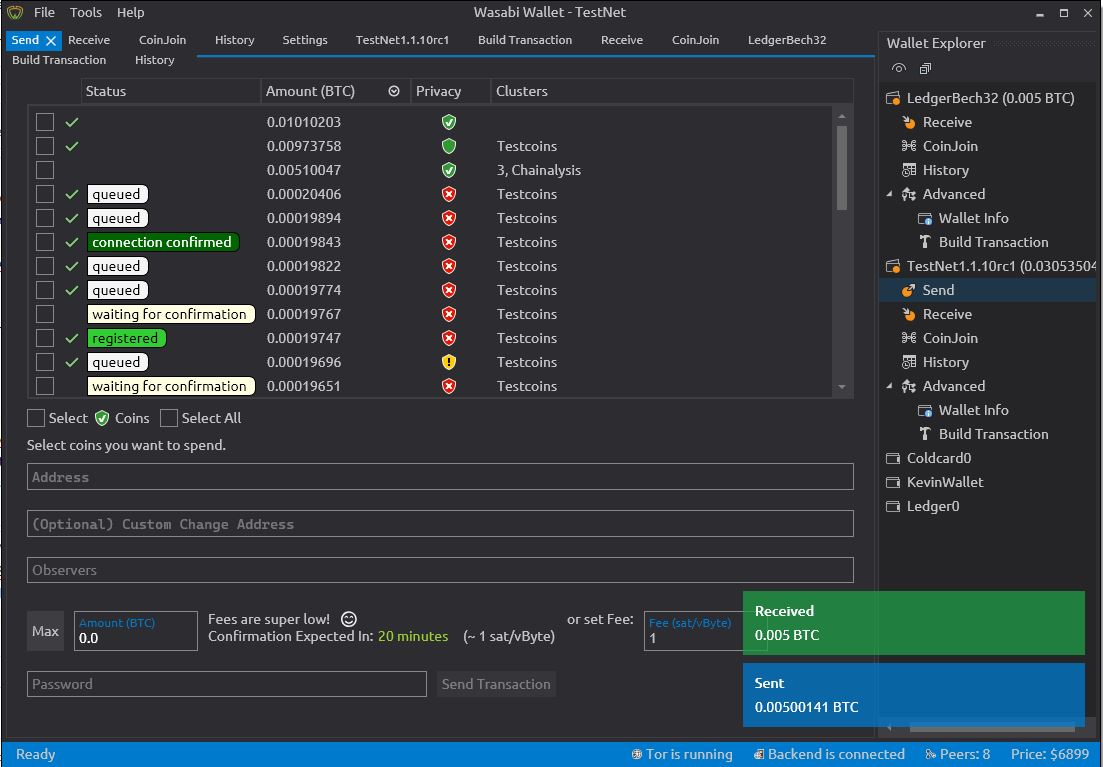
Works smoothly!
Wallet loading
Looks OK!
CoinJoin
Working!
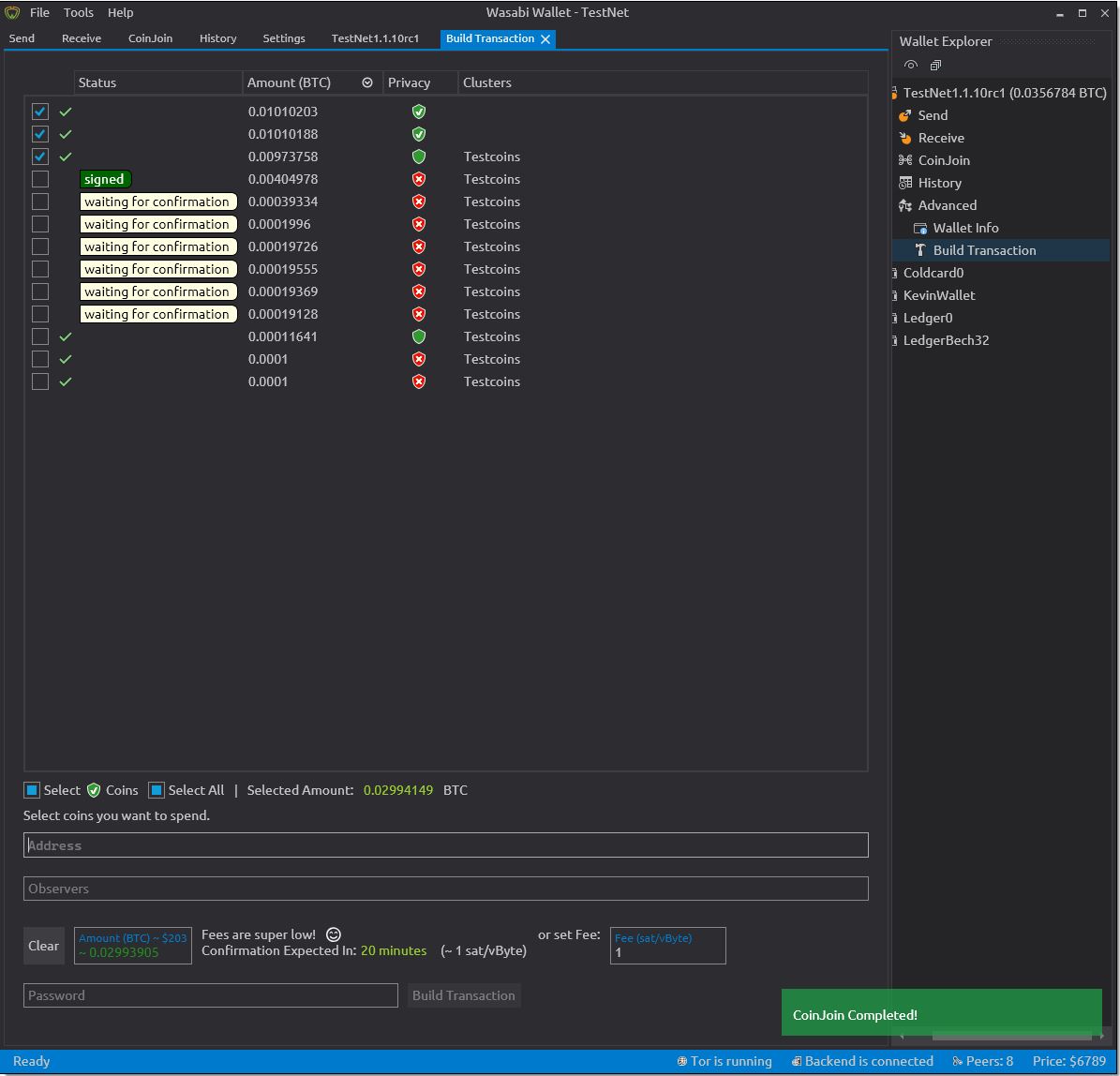
If too many UTXO are present and the window height is limited, the CoinJoin buttons disappear from the GUI...
https://github.com/zkSNACKs/WalletWasabi/issues/3463
Multi-wallet
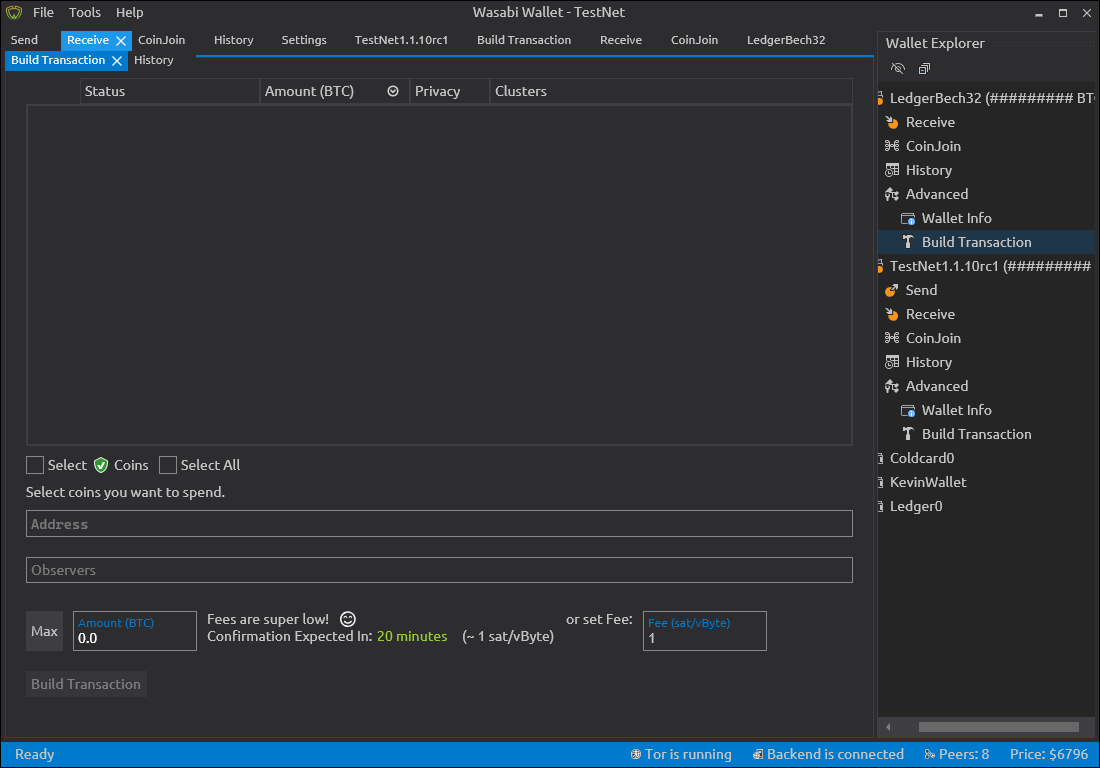
Tabs of two wallets wrap to next horizontal line, breaking the blue GUI line visually. Still functional as a button though.
Deleting(renaming extension) of wallet file before selecting/loading gives this error:
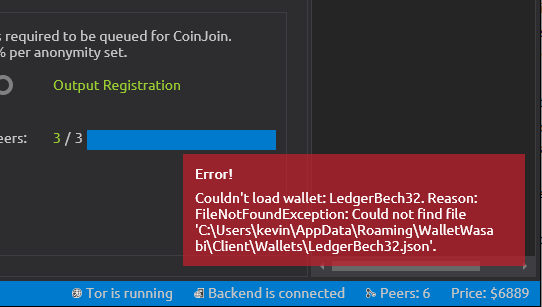
Correctly recovers json-file if first loaded and then deleted.
Setting
Settings remain as set.
LWM works!
Test full node functionality
Pointed to use (not-bundled) Bitcoin Core on local machine, still works fine.
GUI
Discovered that when not using LW-mode that the History tab scrollbar can be hidden in smallest window size:

Can be confusing, not critical issue. Also the Wallet Explorer needs a scrollbar if many wallets are open simultaneously.
Hardware Wallets
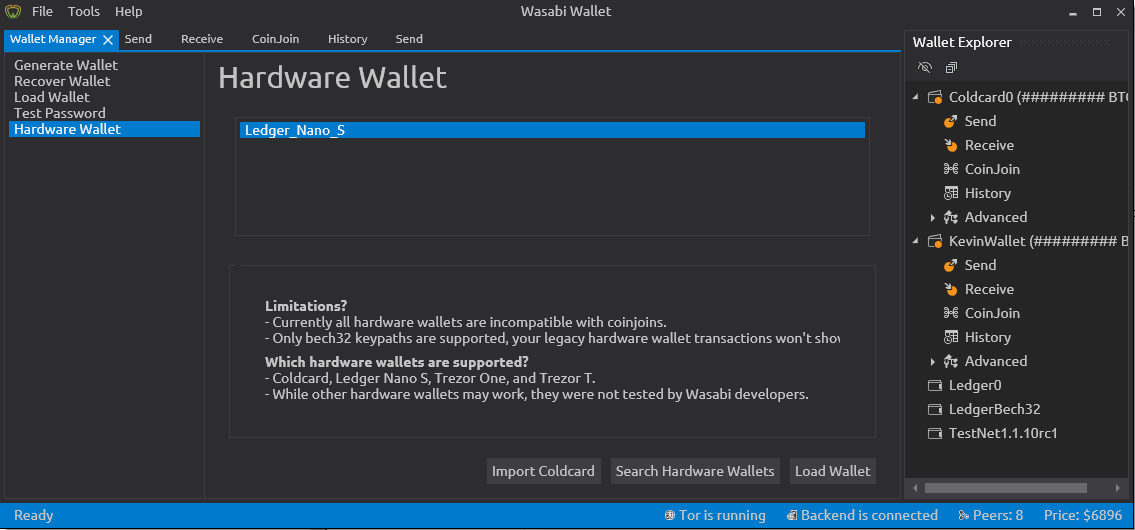
Tested Ledger Nano S, search works!
Loading it from HW-tab gives an error:
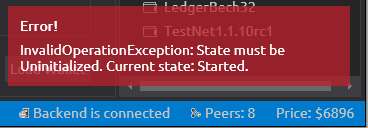
This could use a better warning, or disable the Load Wallet button when Wasabi Wallet already has opened this wallet via the Wallet Explorer.
Tested Coldcard mk2, search works, loading works when no other wallet is open :)
General
PSBT build, signed on microSD+ColdCard and broadcasting works!
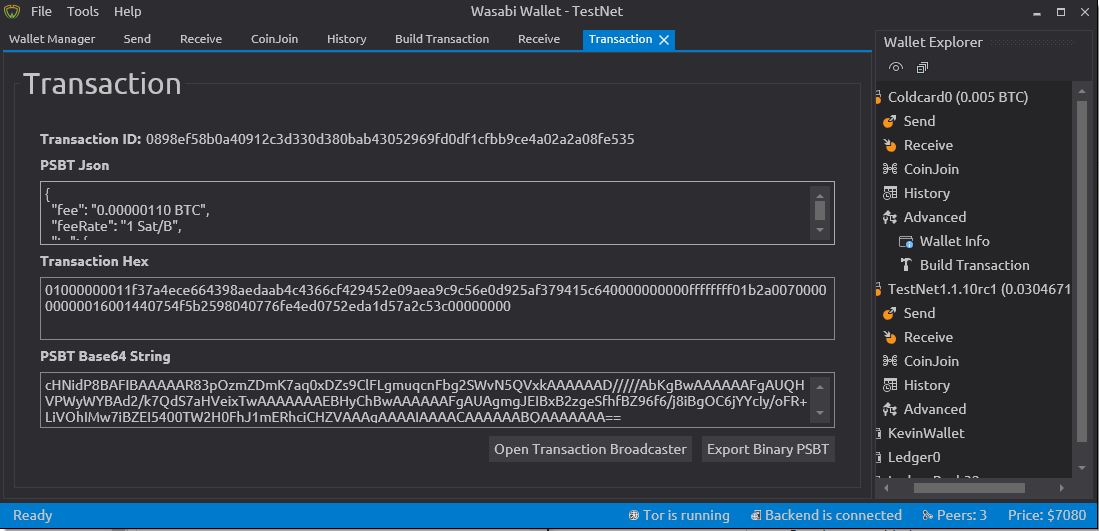
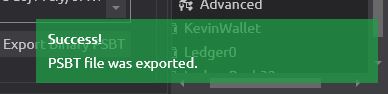
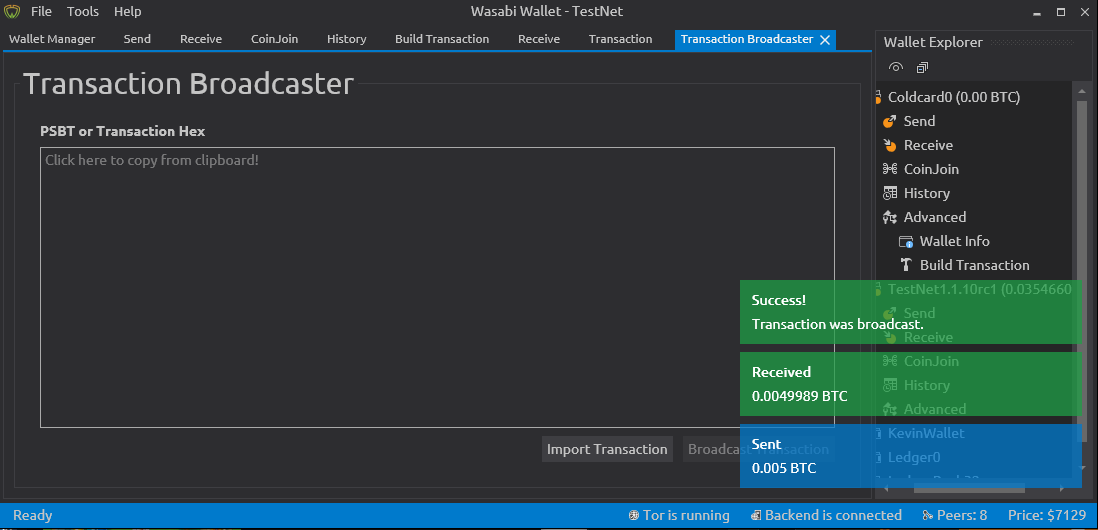
Run the tests
*not possible with .msi package?
 kravens
on 2 Apr 2020
kravens
on 2 Apr 2020
@kravens
Correctly adjusts MinGapSize, correct QR, can hide addresses. How do you recover accidentally hidden addresses?
I don't know :) We should definitely do something with this - not critical.
1 point
molnard
on 3 Apr 2020
@kravens
Tabs of two wallets wrap to next horizontal line, breaking the blue GUI line visually. Still functional as a button though.
Good catch it is a bug - not critical. 1 point.
Can you create separate issues for these?
molnard
on 3 Apr 2020
@kravens open issues for these pls:
- Can be confusing, not critical issue. Also the Wallet Explorer needs a scrollbar if many wallets are open simultaneously.
- This could use a better warning, or disable the Load Wallet button when Wasabi Wallet already has opened this wallet via the Wallet Explorer.
Thank you, excellent work.
molnard
on 3 Apr 2020
Tested on OSX 10.13.6
MacBook Pro Retina 13” Early 2015
Legal
Legal Loads at startup
Deleted legal folder -> does not reload legal after >7 mins
Restart Wasabi -> Legal docs download, did not show immediately though. Small lag time of ~ 1 minute, then popped up.
Delete Legal folder -> offline -> load wallet -> online -> Legal docs reload and show
Delete Legal folder -> Turn Tor off -> restart wasabi -> legal docs reload and show
Receive Tab
Generate more than 21 receive addresses - warning about mini gap limit pops up, increases by 1 with each new address generated.
QR code functionality good
Renaming good
All right-click menu functionality is good
Potential privacy attack: (!)
The autofill for observer names works across different wallets. If I use a name in wallet A, and then restart Wasabi and create wallet B, the autofill will suggest observer names used in wallet A, when creating a new receiving address for wallet B. So an attacker unable to load your wallet could still learn what label names you've used by creating a new wallet and then watching the autofill results.
It would be better if autofill results were based on that specific wallet's history, not the application's history. Kind of an obscure consideration but it seems relevant.
Custom Change Addresses
Turning on/off change address feature works.
Tested functionality with a couple sends, works fine.
Same address test: gives a warning, cannot send. Good
Invalid address test: gives a warning, cannot send. Good
When addresses are both invalid and the same, displays warning about addresses being the same, clicking send button displays warning about ‘invalid address’. Good
Wallet Loading
Quit during….
Connection: No problem / wasabi quit gracefully
Wallet Loading: No problem / wasabi quit gracefully
Wallet Loaded: No problem / Wasabi quit gracefully
Wallet order in load wallet:
In wallet manager, the recently loaded wallet is shown at the bottom of the list (!)
Wallet order in ‘wallet explorer’ is correct.
CoinJoin (!!!!!)
I had three wallets open in Wasabi, each with a single UTXO of value >0.00011 queued for a conjoin.
First, I quit during output registration:
Wasabi attempted to exit, lots of yellow errors flying by about coins being queued. Coinjoin finished and then wasabi quit. Re-opened the wallet, and the coinjoin had finished as expected.
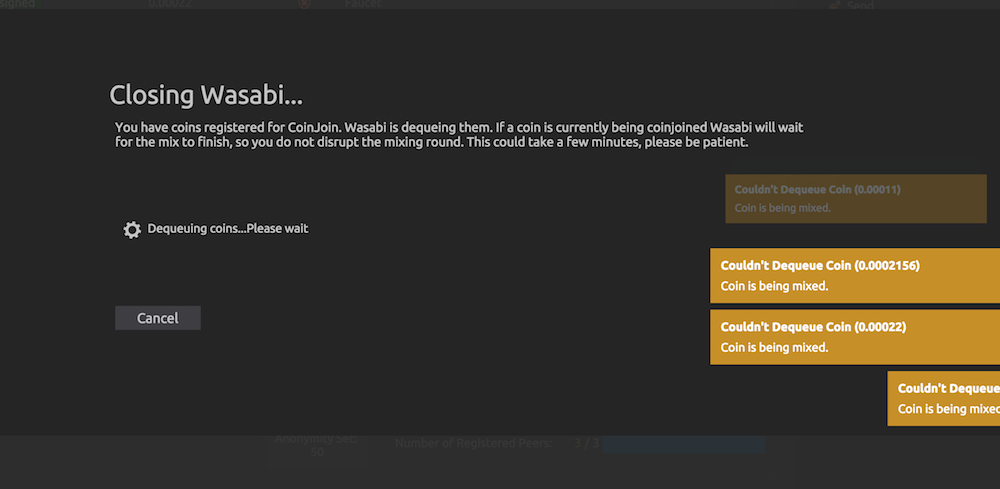
Next, I quit during signing: (!!!)
Same as above, wasabi attempts to exit, but coinjoin first finishes. BUT!
When I re-opened all three wallets, I found that two of them had decreased in tbtc, and one had increased! So what happened?
First, the conjoin transaction proceeded as expected:
1c5df02ec3abdbd47f332acd99afb9688ef82fa76c91ebf9be9273c8879b1289
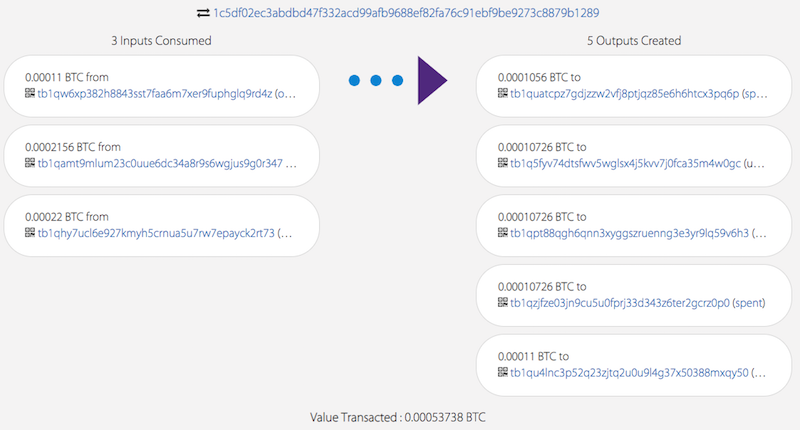
But then, this transaction was also created and broadcast! It is literally the very next transaction in the block these were mined in:
49acd66859b8c95a4d92c711ddc16d3dbca9b07a67797a53b5f6a2e2cbeb02aa
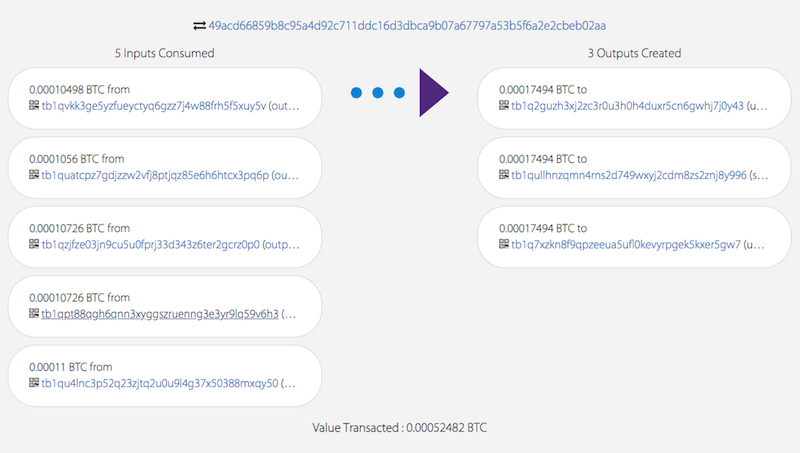
Notice that tx49a.. spends 4 outputs from the first coinjoin tx1c5... (index 0,2,3,4), as well as one additional output (sourced from one of the wallets involved?! It wasn't in the coinjoin queue). Tx49a creates three equal value outputs, one for each wallet!
At the start, each wallet had ~0.00022 tbtc in it.
At the end, two of the wallets had 0.00017494 tbtc, and the last had ~0.00028 tbtc.
So unless there is some mixing functionality of Wasabi I am completely unaware of, this seems really weird to me! I would assume that wallets which have separately registered inputs to a coinjoin would not share funds in this way.
So next, I created a self-send transaction, to split a UTXO in the wallet with the larger balance, so that I could attempt to recreate the issue above (I would need an output of distinguishable value in the mix to do so).
So I created this transaction in Wasabi, and the wallet lost track of the funds self-sent. (!)
1631ec6d248073bb2612ff988b762c347771f9fb9c5bd962c73bb26180fd45d0
Notice the 0.00005 tbtc sent to tb1qn4t6dezemtrmcujdawx3qd5vgudq7cl3fcapka
This is the address at path m/84’/0’/0’/0/3 of the wallet, but the coins just aren’t showing up, even though the wallet should have the privkey for it. See this screenshot as proof that the wallet should be in control of this address:
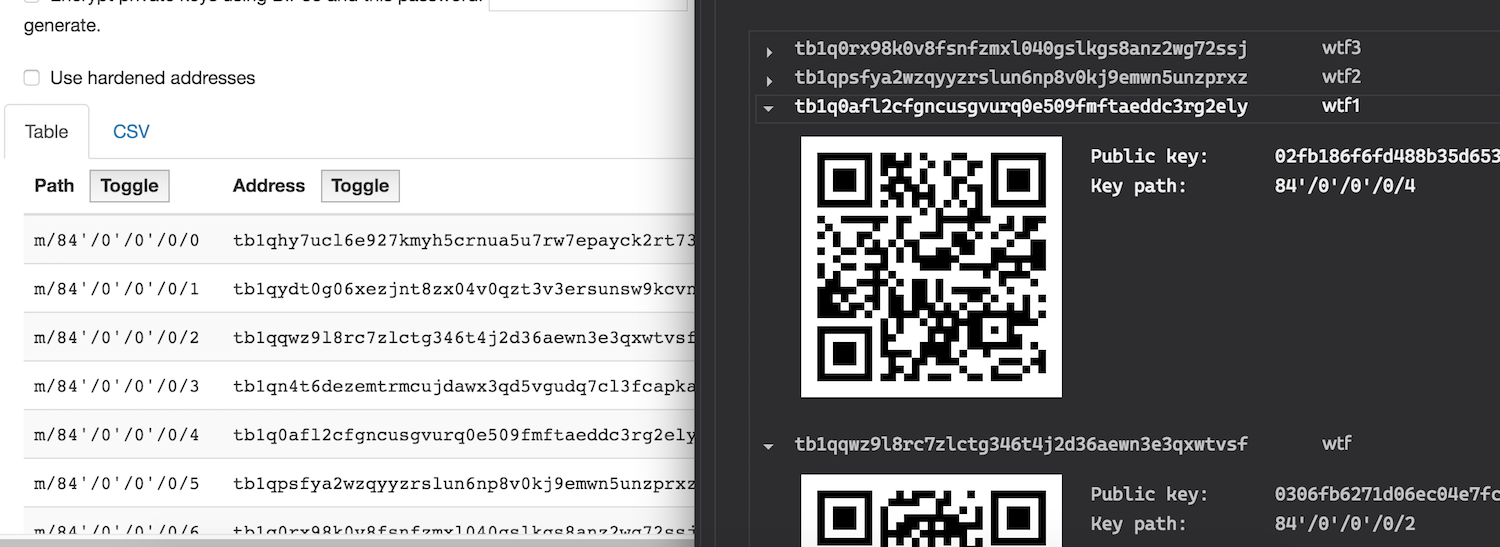
The transaction 1631e... shows in the wallet history as an outgoing spend for the amount send to tb1qn4t6d... + fees, but it should have been just a self-send? (!)
Multi-Wallet
Close Wasabi, deleted DATADIR/Wallets, open Wasabi -> Wallet list does not repopulate, had to manually copy files (!)
Loading multiple wallets, animation works fine
Loading multiple wallets, status bar just continues to read ‘A new version of wasabi wallet is available’
Multiple tabs work as expected
Generate wallet works as expected (while other wallets open)
LWM and collapse all work
Load with double click works
Settings:
All UI option selection is persistent across app restarts
Lock screen still there after restart
Lock screen PIN works
GUI:
Size of window persistent after restart, but position on screen different (!)
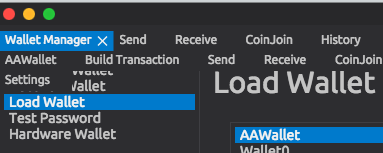
If you open enough tabs to fill the entire first row, they start to populate a second row (and so on), but do so by overlapping the screen that is open (!)
This affects the wallet manager screen most noticeably, ‘Generate Wallet’ and ‘Recover Wallet’ can become hidden under the tabs. The more tabs you add to a small window, the more overlap you get. Example:
UI seems fine with resizing otherwise.
History tab updates fine
Coin details, coin context menu, transaction details, all work fine
When full screen mode is entered, and then wasabi is quit, an OS-level popup appears that says ‘Wasabi Wallet quit unexpectedly’ (!)
—> Happen in both single and dual screen modes. Exits fine otherwise.
Wasabi crashes when ‘About Wasabi’ is selected from the main menu ‘Wasabi Wallet’ dropdown. (!)
General
Wallet info in advanced menu looks good.
Recovering a wallet and loading works fine.
(Note: I tried recovering the wallet which lost track of funds, but the recovered wallet shows the same balance as the original wallet (ie, it also cannot locate the UTXO in question). )
I'll see if I can finish the remaining tests another day, I still want to play with the hardware wallet interface :)
 htims-xela
on 6 Apr 2020
htims-xela
on 6 Apr 2020
Thanks for the detailed report @htims-xela. Although v1.1.11 is already released, it is still very useful for future bug fixes.
I will respond to some of the things you say:
Deleted legal folder -> does not reload legal after >7 mins
Restart Wasabi -> Legal docs download, did not show immediately though. Small lag time of ~ 1 minute, then popped up.
This works as designed.
The autofill for observer names works across different wallets. If I use a name in wallet A, and then restart Wasabi and create wallet B, the autofill will suggest observer names used in wallet A, when creating a new receiving address for wallet B. So an attacker unable to load your wallet could still learn what label names you've used by creating a new wallet and then watching the autofill results.
It would be better if autofill results were based on that specific wallet's history, not the application's history. Kind of an obscure consideration but it seems relevant.
This is not really an attack vector, because anyone who has the wallet file [which contains the labels] will have the unencrypted xpub, and thus knows your whole transaction history anyhow. But having the labels across wallet allows to have a better coin control and clustering. So I think this is a feature, not a bug.
In wallet manager, the recently loaded wallet is shown at the bottom of the list (!)
Wallet order in ‘wallet explorer’ is correct.
Yes, this is annoying, we are working on refactoring the whole Load Wallet tab, maybe removing it alltogether.
First, I quit during output registration:
Wasabi attempted to exit, lots of yellow errors flying by about coins being queued. Coinjoin finished and then wasabi quit. Re-opened the wallet, and the coinjoin had finished as expected.
This works as expected [although the notifications fly in crazy fast]
Next, I quit during signing: (!!!)
Same as above, wasabi attempts to exit, but coinjoin first finishes. BUT!
When I re-opened all three wallets, I found that two of them had decreased in tbtc, and one had increased! So what happened?
This also works as expected, in order to minimize block space usage, some do not pay fee [even get paid] for a coinjoin because their value of coin is just above / below minimum denomination.
Notice the 0.00005 tbtc sent to tb1qn4t6dezemtrmcujdawx3qd5vgudq7cl3fcapka
This is the address at path m/84’/0’/0’/0/3 of the wallet, but the coins just aren’t showing up, even though the wallet should have the privkey for it. See this screenshot as proof that the wallet should be in control of this address:
this indeed is weird, and the transaction should have been properly broadcasted and received. are you sure you sent within the same wallet, maybe you got confused by the tabs and send from one wallet to another?
Close Wasabi, deleted DATADIR/Wallets, open Wasabi -> Wallet list does not repopulate, had to manually copy files (!)
Yes, this is expected and working properly.
Size of window persistent after restart, but position on screen different (!)
Yes, window size is now persistent, but right, screen position is not. maybe it should be, not sure. @danwalmsley
If you open enough tabs to fill the entire first row, they start to populate a second row (and so on), but do so by overlapping the screen that is open (!)
this is known, will be fixed in the coming releases.
This affects the wallet manager screen most noticeably, ‘Generate Wallet’ and ‘Recover Wallet’ can become hidden under the tabs. The more tabs you add to a small window, the more overlap you get. Example:
This is also knwon, will be fixed in the coming releases.
Wasabi crashes when ‘About Wasabi’ is selected from the main menu ‘Wasabi Wallet’ dropdown. (!)
Yes, this was reported, and "fixed" before the release, it should no longer be present in the final v1.1.11
MaxHillebrand
on 6 Apr 2020
Oh, woops I didn't realize v1.1.11 was released! Hopefully this can be useful nonetheless.
This is not really an attack vector, because anyone who has the wallet file [which contains the labels] will have the unencrypted xpub, and thus knows your whole transaction history anyhow. But having the labels across wallet allows to have a better coin control and clustering. So I think this is a feature, not a bug.
Ah okay, I understand the rationale, thanks. I tried deleting the wallet files, and of course the autofill labels were then gone when generating addresses in a new wallet. Works as intended.
This also works as expected, in order to minimize block space usage, some do not pay fee [even get paid] for a coinjoin because their value of coin is just above / below minimum denomination.
Hmm okay, gotcha. So the wallet will initialize the second transaction, potentially grabbing other previously coinjoined outputs to round out the transaction and provide larger coinjoined outputs?
It just seemed odd because 2 of the wallets had their balance decreased by almost 20%, and the last one increased by ~35%. Is that a consequence of the testnet mix being a smaller amount, so on mainnet the difference would be much smaller relative to the mixed amount? What are the bounds for the difference?
this indeed is weird, and the transaction should have been properly broadcasted and received. are you sure you sent within the same wallet, maybe you got confused by the tabs and send from one wallet to another?
I'm sure its the same wallet: the history for that wallet shows the transaction as a payment leaving the wallet, and then the receive tab for that same wallet shows all of the addresses immediately before/after the derivation path of the address in question.
The screenshot above shows the receive tab of the wallet, next to (the same) addresses derived using https://iancoleman.io/bip39/ (which does show the address in question).
Is it possible to somehow mark an address/UTXO as unspendable or hidden?
htims-xela
on 6 Apr 2020
Hmm okay, gotcha. So the wallet will initialize the second transaction, potentially grabbing other previously coinjoined outputs to round out the transaction and provide larger coinjoined outputs?
It just seemed odd because 2 of the wallets had their balance decreased by almost 20%, and the last one increased by ~35%. Is that a consequence of the testnet mix being a smaller amount, so on mainnet the difference would be much smaller relative to the mixed amount? What are the bounds for the difference?
Yes, that's the gist of it. Also notice that on testnet the CoinJoins are behaving odd, in a way that they do not on mainnet. There is only 2 or 3 anonset, and rounds happen very fast, and this messes up the minimum denominations sometimes...
Is it possible to somehow mark an address/UTXO as unspendable or hidden?
Ah, I think you figured it out, there is a dust threshold, a value denomination under which a coin will not be shown in the GUI [to protect forced address reuse]. Please check in your settings what the dust threshold value is, and if that coin is below it. You can also reduce the dust threshold, and the coin should be shown in the GUI again. I think there is an open issue to disable this when it is a self spend...
MaxHillebrand
on 6 Apr 2020
Summary
Dear Testers, Thank you for your work. It was very valuable for us. The test reports what we got from you all were amazingly detailed - so I was sure that even the smallest part of the software was tested at least one time. So here are the results. Please let me know if I miss something!
Everyone who followed the test-vectors and reported back here or on slack got 3 points.
@transisto (1 point)
@Davterra (4 points)
- https://github.com/zkSNACKs/WalletWasabi/issues/3405 (1)
- https://github.com/zkSNACKs/WalletWasabi/issues/3396 (3)
@RiccardoMasutti (19 points)
- https://github.com/zkSNACKs/WalletWasabi/issues/3446 (1)
- https://github.com/zkSNACKs/WalletWasabi/issues/3447 (1)
- https://github.com/zkSNACKs/WalletWasabi/issues/3450 (1)
- https://github.com/zkSNACKs/WalletWasabi/issues/3449 (1)
- https://github.com/zkSNACKs/WalletWasabi/issues/3443 (3)
- https://github.com/zkSNACKs/WalletWasabi/issues/3448 (1)
- https://github.com/zkSNACKs/WalletWasabi/issues/3466 (1)
- https://github.com/zkSNACKs/WalletWasabi/issues/3467 (1)
- https://github.com/zkSNACKs/WalletWasabi/issues/3468 (3)
- https://github.com/zkSNACKs/WalletWasabi/issues/3396 (3)
- https://github.com/zkSNACKs/WalletWasabi/issues/3470 (1)
- https://github.com/zkSNACKs/WalletWasabi/issues/3471 (1)
- https://github.com/zkSNACKs/WalletWasabi/issues/3469 (1)
@kravens (13 points)
- https://github.com/zkSNACKs/WalletWasabi/issues/3463 (3)
- https://github.com/zkSNACKs/WalletWasabi/issues/3462 (2)
- https://github.com/zkSNACKs/WalletWasabi/issues/3459 (1)
- https://github.com/zkSNACKs/WalletWasabi/issues/3458 (1)
- https://github.com/zkSNACKs/WalletWasabi/issues/3464 (1)
- https://github.com/zkSNACKs/WalletWasabi/issues/3460 (2)
- https://github.com/zkSNACKs/WalletWasabi/issues/3396 (3)
@UkolovaOlga (10 points)
- https://github.com/zkSNACKs/WalletWasabi/issues/3485 (1)
- https://github.com/zkSNACKs/WalletWasabi/issues/3480 (1)
- https://github.com/zkSNACKs/WalletWasabi/issues/3482 (3)
- https://github.com/zkSNACKs/WalletWasabi/issues/3481 (1)
- https://github.com/zkSNACKs/WalletWasabi/issues/3487 (1)
- https://github.com/zkSNACKs/WalletWasabi/issues/3396 (3)
@htims-xela (3 points)
molnard
on 6 Apr 2020
Thanks everyone for reviewing, it really helped a lot to get the release out on CoinJoinDay!
Please send a fresh address to @bharmat on slack. [some have sent it to me, I will forward it to Balint, who does the payout]
The distribution of 0.3 bitcoin bounty is as follows:
@Transisto 2.2% = 0.0066 btc
@davterra 8.5% = 0.0255 btc
@RiccardoMasutti 34% = 0.102 btc
@kravens 27.7% = 0.0831 btc
@ukolovaolga 21.3% = 0.0639 btc
@htims-xela 6.3% = 0.0189 btc
MaxHillebrand
on 6 Apr 2020
@molnard @MaxHillebrand I think you forgot to add #3470, #3471, #3454 and #3469
Also, am I wrong or are these 3 issues duplicated? @yahiheb
https://github.com/zkSNACKs/WalletWasabi/issues/3459
https://github.com/zkSNACKs/WalletWasabi/issues/3463
https://github.com/zkSNACKs/WalletWasabi/issues/3485
 RiccardoMasutti
on 6 Apr 2020
RiccardoMasutti
on 6 Apr 2020
Congratulations to all the testers!
I think next time we should advertise the Contribution Game more on Wasabi Social Media channels; I was hoping there were more testers than the previous edition.
Thanks for helping us and welcome among testers @UkolovaOlga and @htims-xela! :1st_place_medal:
RiccardoMasutti
on 6 Apr 2020
Also, am I wrong or are these 3 issues duplicated? @yahiheb
3459
3463
3485
The first two issue are duplicates, the last one is not.
 yahiheb
on 6 Apr 2020
yahiheb
on 6 Apr 2020
@molnard @MaxHillebrand I think you forgot to add #3470, #3471, #3454 and #3469
Also, am I wrong or are these 3 issues duplicated? @yahiheb
3459
3463
3485
We could not reproduce the tor bug.
@RiccardoMasutti yes I missed those ones, my bad. Added.
Those 2 duplicates worth 1-1 point as the effort was made there. Thank you!
molnard
on 6 Apr 2020
@molnard @MaxHillebrand I think you forgot to add #3470, #3471, #3454 and #3469
Also, am I wrong or are these 3 issues duplicated? @yahiheb3459
3463
3485
We could not reproduce the tor bug.
@RiccardoMasutti yes I missed those ones, my bad. Added.
Those 2 duplicates worth 1-1 point as the effort was made there. Thank you!
Ok, thank you for the clarification :)
About the Tor issue, seems like it occurs only in Tails. I'm still investigating...
RiccardoMasutti
on 6 Apr 2020
Ah, I think you figured it out, there is a dust threshold, a value denomination under which a coin will not be shown in the GUI [to protect forced address reuse].
@MaxHillebrand ah, yeap that was it! I feel silly for not realizing it sooner. Appreciate your attention, working as intended now.
Thanks all, happy to contribute what I can :)
htims-xela
on 7 Apr 2020
The final results are as follows due to the corrections made by @molnard on the points of @RiccardoMasutti :
@Transisto | 1 | 2% | 0,006
@davterra | 4 | 8% | 0,024
@RiccardoMasutti | 19 | 38% | 0,114
@kravens | 13 | 26% | 0,078
@UkolovaOlga | 10 | 20% | 0,06
@htims-xela | 3 | 6% | 0,018
Please those who have not provided yet an address do so and I will send you the sats.
Thank you once more for you contribution! 🙏🏻
bharmat
on 7 Apr 2020
Related issues
MaxHillebrand
·
3Comments
 gabridome
·
3Comments
gabridome
·
3Comments
 davterra
·
3Comments
davterra
·
3Comments
 2pac1
·
3Comments
yahiheb
·
3Comments
2pac1
·
3Comments
yahiheb
·
3Comments
Most helpful comment
Summary
Dear Testers, Thank you for your work. It was very valuable for us. The test reports what we got from you all were amazingly detailed - so I was sure that even the smallest part of the software was tested at least one time. So here are the results. Please let me know if I miss something!
Everyone who followed the test-vectors and reported back here or on slack got 3 points.
@transisto (1 point)
@Davterra (4 points)
@RiccardoMasutti (19 points)
@kravens (13 points)
@UkolovaOlga (10 points)
@htims-xela (3 points)