Walletwasabi: Can't generate wallet
I can’t generate a wallet, buttons do not respond WasabiLinux-1.1.10.2.tar.gz on Tails 4.1.
The steps:
Logged into the OS with an administrator password
I downloaded WasabiLinux-1.1.10.2.tar.gz and WasabiLinux-1.1.10.2.tar.gz.asc
Verified signature
Unpacked sudo tar -pxzf WasabiLinux-1.1.10.2.tar.gz
Launched through the terminal
The application has opened but does not respond to button presses (not all, logs for example open).
 redute13IO
All 57 comments
@MaxHillebrand Could you reproduce it? You have Tails, right?
 nopara73
on 5 Jan 2020
nopara73
on 5 Jan 2020
I tried it out on Tails 4.1 with Wasabi 1.1.10.2, but everyting seems to work fine for me...
@pulpcattel, could you maybe try to reproduce too?
@redute13IO, did you use the provided install scripts or did you do it manually??
 MaxHillebrand
on 6 Jan 2020
MaxHillebrand
on 6 Jan 2020
I cannot reproduce either.
@redute13IO from what folder are you launching it?
If you click File > Open > Log File it works, but if you click File > Generate Wallet it doesn't?
FYI the sudo privileges aren't needed, you can just:
- download the tar.gz
- right click it
- click
extract here ./wassabee
 PulpCattel
on 6 Jan 2020
PulpCattel
on 6 Jan 2020
Wasabi 1.1.9.1 is the version which works for me on Tails 4.1 as far as i can see it.
Newer versions (1.1.10.*) do not start properly. They give a GUI error. At work now. Will share this evening
 jsspanjer
on 7 Jan 2020
jsspanjer
on 7 Jan 2020
This is weird, I've used every Wasabi version with Tails and they all work properly, 1.1.10.* included. There also been the bug bounty for the newer version and Tails was tested too.
PulpCattel
on 7 Jan 2020
Ok. Just upgraded to Tails 4.2.
Started terminal.
sudo dpkg -i Wasabi-1.1.10.2.deb
Wasabi installs.
Getting Wasabi Gui started (..guid...)
Segmentation fault
And nothing.
Note:
On Tails 4.1 i also got a Segmentation fault but it did show the gui with barely clickable buttons.
Rest of gui unresponsive.
Same for all 1.1.10.* releases. The one that works for me is 1.1.9.1
jsspanjer
on 7 Jan 2020
Installed 1.1.9.1 over existing 1.1.10.2. Starts up fine.
Installed 1.1.10.2 over 1.1.9.1. Gui starts. But unresponsive. You can click file, tools and Help. They will list the options but nothing can be selected. Rest of screen is filled with wasabi logo and -Click and Drag upwards to unlock-. Can only be killed with pkill.
jsspanjer
on 7 Jan 2020
I downloaded Tails 4.2 (.iso) and ran it in a Virtual Box. Then:
$ wget https://tails.mirror.metalgamer.eu/tails/stable/tails-amd64-4.2/tails-amd64-4.2.iso
$ tar -pxzf WasabiLinux-1.1.10.2.tar.gz
$ cd WasabiLinux-1.1.10.2
$ ./wassabee
After that I was able to generate a new wallet with no problem.
 lontivero
on 7 Jan 2020
lontivero
on 7 Jan 2020
Ok. I am following instructions from https://docs.wasabiwallet.io/using-wasabi/WasabiSetupTails.html#create-admin-password
I see there is also a tip to not install the debian package but to extract the *.tar.gz.
Will try that tonight. Can someone test the debian instructions?
jsspanjer
on 8 Jan 2020
ok.
$ tar -pxzf WasabiLinux-1.1.10.2.tar.gz
$ cd WasabiLinux-1.1.10.2
$ ./wassabee
Gui started in correct form. Then app crashed with Segmentation Fault again.
$ ./wassabee
Immediately Segmentation Fault.
jsspanjer
on 8 Jan 2020
Can someone test with normal Tails install on USB instead of virtual machines?
jsspanjer
on 8 Jan 2020
I don't know if my usb device is broken or what the problem is but I never loads. Can someone else try this?

lontivero
on 8 Jan 2020
@MaxHillebrand
@redute13IO, did you use the provided install scripts or did you do it manually??
Manually
@PulpCattel
@redute13IO from what folder are you launching it?
Tried different folders (TorBrow/Persist) - also the same result
If you click
File > Open > Log Fileit works, but if you clickFile > Generate Walletit doesn't?
Yes, right. Wanna watch logs?
w/wo sudo - the same
Tails 4.2 WasabiLinux-1.1.10.2
Do I understand correctly that for .deb I definitely need a BitcoinCore that weighs 300 gb?
redute13IO
on 11 Jan 2020
Do I understand correctly that for .deb I definitely need a BitcoinCore that weighs 300 gb?
No. How you decide to install Wasabi makes no difference in the requirements. Wasabi doesn't requires bitcoin core (it is optional).
lontivero
on 13 Jan 2020
@nopara73 Should I expect a correction of the described bug?
redute13IO
on 20 Jan 2020
@redute13IO I don't know yet. @jmacato @danwalmsley can you try tor reproduce it? If one of them would be able to reproduce it, then we'd have a chance to fix it. I wanted someone to confirm the issue before I get them involved, which did not happen, (instead another bug was exposed by @jsspanjer.)
nopara73
on 20 Jan 2020
I cannot reproduce either.
 RiccardoMasutti
on 20 Jan 2020
RiccardoMasutti
on 20 Jan 2020
@jsspanjer @redute13IO if you guys are still around, do you know how to compile wasabi?
If so if you could try with https://github.com/zkSNACKs/WalletWasabi/pull/2988
It may well have fixed the problem.
If you need further assistance to do this please let me know.
 danwalmsley
on 20 Jan 2020
danwalmsley
on 20 Jan 2020
@jsspanjer @redute13IO https://docs.wasabiwallet.io/using-wasabi/BuildSource.html
RiccardoMasutti
on 21 Jan 2020
Still here. Have seen https://github.com/zkSNACKs/WalletWasabi/pull/2988
Also think it is a gui problem so this may be a solution.
Issue is the same as https://github.com/zkSNACKs/WalletWasabi/issues/2826
Something has changed from 1.1.9.2 that causes this.
Can I install .NET Core 3.1 on Tails?
jsspanjer
on 21 Jan 2020
@jsspanjer let me know if you manage to test with #2988 .
danwalmsley
on 21 Jan 2020
I am afraid you cannot install .NET Core 3.1 on Tails. I tried but to no avail. I will wait till there is a new package available and will test that.
jsspanjer
on 21 Jan 2020
I tried installing .NET Core 3.1, however...
$ sudo apt-get update
[sudo] password for amnesia:
Err:1 https://packages.microsoft.com/debian/10/prod buster InRelease
  Temporary failure resolving 'packages.microsoft.com'
Hit:2 tor+http://jenw7xbd6tf7vfhp.onion 4.2.2 InRelease
Hit:3 tor+http://vwakviie2ienjx6t.onion/debian buster InRelease
Hit:4 tor+http://sgvtcaew4bxjd7ln.onion buster/updates InRelease
Hit:5 tor+http://sdscoq7snqtznauu.onion/torproject.org buster InRelease
Hit:6 tor+http://vwakviie2ienjx6t.onion/debian bullseye InRelease
Hit:7 tor+http://vwakviie2ienjx6t.onion/debian sid InRelease
Reading package lists... Done
W: Failed to fetch https://packages.microsoft.com/debian/10/prod/dists/buster/InRelease  Temporary failure resolving 'packages.microsoft.com'
W: Some index files failed to download. They have been ignored, or old ones used instead.
$ sudo apt-get install dotnet-sdk-3.1
[sudo] password for amnesia:
Reading package lists... Done
Building dependency tree
Reading state information... Done
E: Unable to locate package dotnet-sdk-3.1
E: Couldn't find any package by glob 'dotnet-sdk-3.1'
E: Couldn't find any package by regex 'dotnet-sdk-3.1'
Had exact the same experience.
jsspanjer
on 21 Jan 2020
@jsspanjer I beleive @molnard is going to produce a test build for you to try out for us, stand by.
danwalmsley
on 21 Jan 2020
Can you guys try the master branch now that PR https://github.com/zkSNACKs/WalletWasabi/pull/2988 is merged?
nopara73
on 21 Jan 2020
@nopara73 they are unable to install .net core 3.1 on tails os, so need one of us to build for them, I could but not sure how to run the packager?
danwalmsley
on 21 Jan 2020
If anyone can produce a build or show me how I can build one on an Linux VM I would love to test it after work.
jsspanjer
on 22 Jan 2020
@jsspanjer I deployed a nightly release here: https://github.com/molnard/WalletWasabi/releases/tag/v1.1.10.2-200122
Try it and let me know if you succeeded or not.
 molnard
on 22 Jan 2020
molnard
on 22 Jan 2020
@molnard Thank you! Will test it this evening. Will let you know shortly after.
jsspanjer
on 22 Jan 2020
Thanks @molnard for the build, I could properly install this nightly release.
However, @danwalmsley it seems that the update to Avalonia makes it worse... When I start wassabee, then the backend is connected and filters are downloaded, however, I only see this in the logs, as the GUI is completely hung up on the very first frame, with Connecting... on the wallet generation tab, and no buttons whatsoever work. I can exit the window on the top right X, however, then it does not end properly but is stuck with the terminal still open...
MaxHillebrand
on 22 Jan 2020
@MaxHillebrand Hi Max, This is exactly the issue I saw on Tails. Do you also get a Segmentation Fault?
If you pkill wasabee and then start again you get to the gui but nothing is clickable and it stays Connecting...
Anyway. Will test it also tonight.
jsspanjer
on 22 Jan 2020
Installed nightly build...
https://github.com/molnard/WalletWasabi/releases/tag/v1.1.10.2-200122

First two times loading wassabee resulted in Segmentation Fault.
After a couple of times "pkill wassabee" and "wassabee" it loaded.
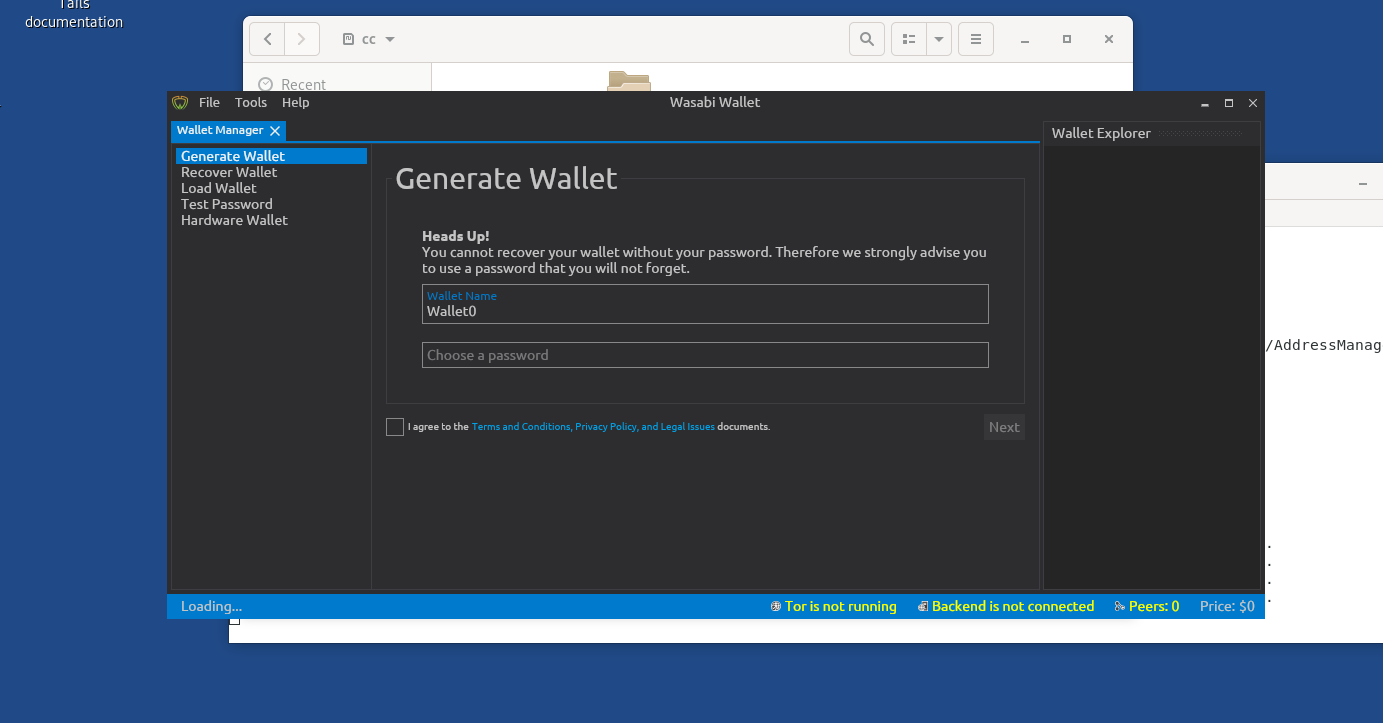
GUI can be resized, but windows will not size properly. Parts of GUI not there
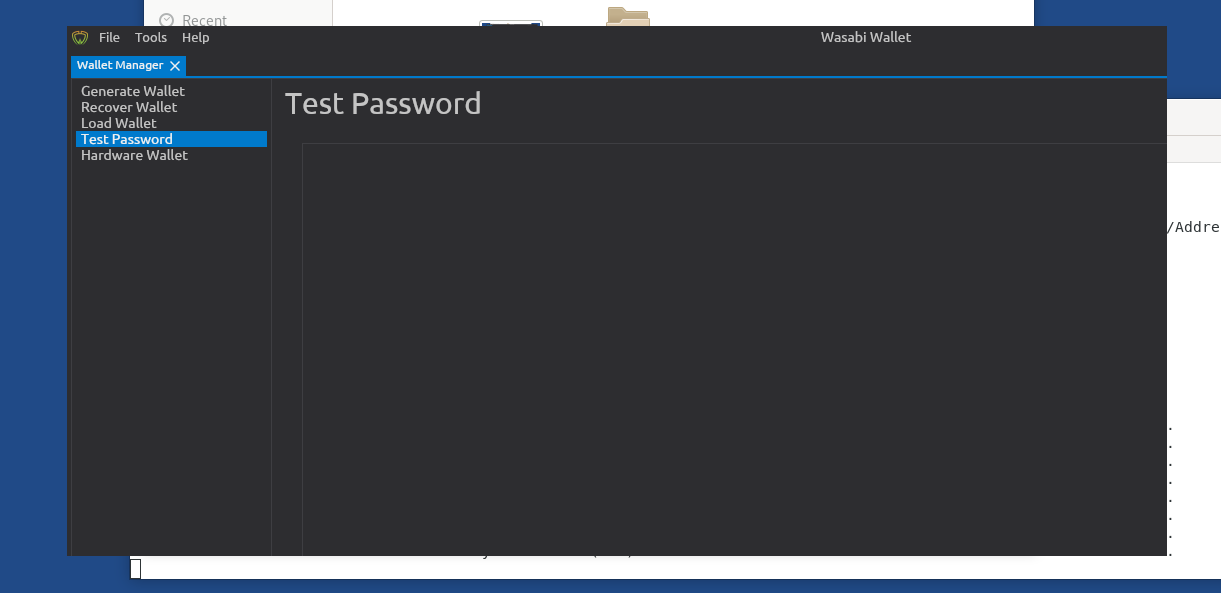
Double clicking title bar will maximizing it. GUI will show properly

Top menu is accessible but you cannot click anything.
jsspanjer
on 22 Jan 2020
@jsspanjer thanks for this, can you confirm the following:
- Window Manager name that tails is using
- XOrg version
- Is XWayland being used?
danwalmsley
on 22 Jan 2020
@danwalmsley
Do not know, but I found this:
https://redmine.tails.boum.org/code/issues/12213
I think Wayland is on the roadmap
jsspanjer
on 22 Jan 2020
@jsspanjer please try pasting output of command wmctrl -m
danwalmsley
on 22 Jan 2020
@danwalmsley
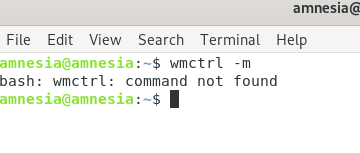
Command not found....
Not everything works on Tails
jsspanjer
on 22 Jan 2020
Command not found....
Not everything works on Tails
@jsspanjer: You might be able to install the wmctrl command with:
$ sudo apt -y update && sudo install -y wmctrl
(You will need to start Tails with an administrator password added to be able to run sudo commands.)
 hkjn
on 23 Jan 2020
hkjn
on 23 Jan 2020
@hkjn Not thought about that. Will do that this evening.
jsspanjer
on 23 Jan 2020
VM Specs (VirtualBox 6.1.0 r135406)
RAM: 3GB
CPU: 3 Cores; KVM-accelerated
Tails version: 4.2.2
Wasabi version: 1.1.10.2
- Startup works
- Wallet generation works
- Receive Address generation works
- Coinjoin works
So yeah i can't repro anything that the OP described :(
 jmacato
on 23 Jan 2020
jmacato
on 23 Jan 2020
Same results too using https://github.com/molnard/WalletWasabi/releases/tag/v1.1.10.2-200122
jmacato
on 23 Jan 2020
Installed wmctrl.

@jmacato Yes. Virtualbox will run it perfectly. But try it from USB on a machine and it fails. Strange.
jsspanjer
on 23 Jan 2020
@jsspanjer do you mind if you can tell us the specs of the machine that you tested this with?
jmacato
on 23 Jan 2020
Lenovo ThinkPad T440s
jsspanjer
on 23 Jan 2020
Still on last working version 1.1.9.2
I hope this issue can be fixed soon.
jsspanjer
on 2 Mar 2020
@jsspanjer I released a new version, here. According to this conversation you have already tried with the newest Avalonia but you can give it a try.
molnard
on 4 Mar 2020
Will try one of these days. Bit busy at the moment
jsspanjer
on 11 Mar 2020
On Lenovo thinkpad it still does not work. Segmentation Fault. Tails 4.4. Wassabi 1.1.10.3.
On Macbook pro 2014 it works. Everything fine. Tails 4.4. Wassabi 1.1.10.3. Same USB.
jsspanjer
on 12 Mar 2020
Same issue on HP Probook laptop, however evertyhing works on Lenovo laptop and on generic desktop. Tails 4.4 Wassabi 1.1.10.3. Same USB device.
 danieloto2009
on 13 Mar 2020
danieloto2009
on 13 Mar 2020
Same issue on HP Probook laptop, however evertyhing works on Lenovo laptop and on generic desktop. Tails 4.4 Wassabi 1.1.10.3. Same USB device.
Lenovo ThinkPad T440s does not work. Which Lenovo do you use?
jsspanjer
on 13 Mar 2020
Lenovo ThinkPad X260 works ok.
danieloto2009
on 13 Mar 2020
I'm able to reproduce the issue described with a Lenovo Thinkpad T420. Any additional information I could provide or testing I could perform to help move this issue along?
I've also observed that the GUI seems to actually be responding to and handling input but the GUI itself is not being redrawn. I've been able to force the GUI to be redrawn by unmaximizing and then maximizing the application. Every time this is performed, changes that I performed within the UI are now reflect visually.
 CoprinopsisAtramentaria
on 23 Mar 2020
CoprinopsisAtramentaria
on 23 Mar 2020
I'm no longer able to reproduce this issue on a Thinkpad T420 running Tails 4.4.1 when using the new WasabiLinux-1.1.11.tar.gz package. Anyone else that was experiencing this tried the new release?
CoprinopsisAtramentaria
on 6 Apr 2020
@redute13IO can you give it a try with our new release?
https://wasabiwallet.io/#download
molnard
on 6 Apr 2020
I am very happy to report that Tails 4.4.1 and Wasabi-1.1.11.deb have been successfully tested. No issues found. Gui very responsive. Thank you all!
LENOVO Thinkpad T440s
jsspanjer
on 6 Apr 2020
This is fantastic - thank You for reporting back on it!
MaxHillebrand
on 6 Apr 2020
@jsspanjer glad to hear. Your feedbacks are very well welcomed in the future.
Happy CoinJoining!
molnard
on 8 Apr 2020
Related issues
 gabridome
·
3Comments
MaxHillebrand
·
3Comments
MaxHillebrand
·
3Comments
molnard
·
3Comments
gabridome
·
3Comments
MaxHillebrand
·
3Comments
MaxHillebrand
·
3Comments
molnard
·
3Comments
 yahiheb
·
3Comments
yahiheb
·
3Comments
Most helpful comment
@jsspanjer I deployed a nightly release here: https://github.com/molnard/WalletWasabi/releases/tag/v1.1.10.2-200122
Try it and let me know if you succeeded or not.