Walletwasabi: System.IO.IOException: Could not acquire system wide mutex on MatureIndex-76A7981
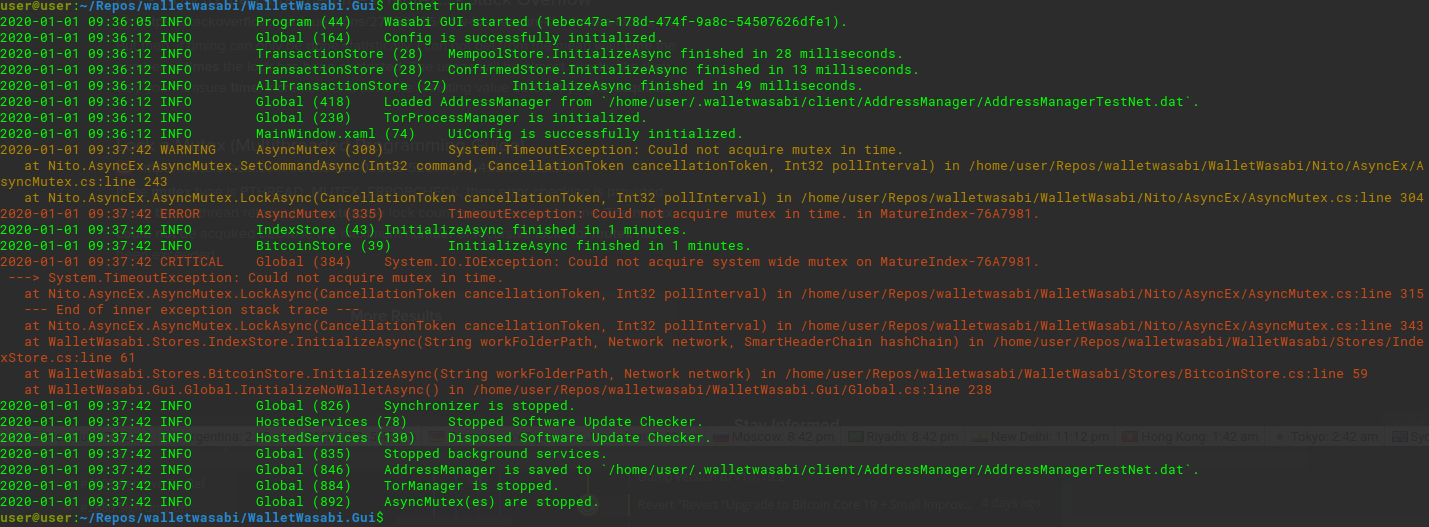
This isn't a bug, because it's only happening on a new VM that I just spun up. It's running fine on a different VM running same OS. But if any of you look at my attached screenshot and recognize the problem, I'd greatly appreciate any help possible.
Running testnet on Ubuntu 19.04 in Virtualbox VM. I've tried checking out other commits, rebuilding, and running with/without my non-wasabi full node running in same VM, with/without tor, with/without firewall, checked using Tor Browser as SOCKS connection, and I've checked my VM's clock for accuracy.
Thanks in advance for any suggestions.
 davterra
All 8 comments
That's a problem that happens not only in VMs but also in other environments from time to time too. We hope to remove that once the multi-wallet support is ready. For the moment I think you could try killing the dotnet processes (killall dotnet) and try again.
 lontivero
on 1 Jan 2020
lontivero
on 1 Jan 2020
Ok, thanks for that iinfo Lucas. Odd that in over a year of using Wasabi exclusively on VM's, I've not seen this before. If I find something useful in solving this, I'll report back.
davterra
on 1 Jan 2020
OK, so I compared all of the settings in the 2 VM's that I had Wasabi (both built from source) on. The only settings that were different between the 2 VM were display-related. The VM where the above-referenced problem occurred had 128mb of video memory and "3D Acceleration" enabled, while the other VM with no issues had 16mb video memory and no
"3D Acceleration". When I changed the "problem VM"'s display settings to match the one that runs Wasabi without issue, the problem went away. It now works fine.
I did try the suggested "killall dotnet" a few times without success before trying the "fix" that worked.
I dont know enough "C# / Wasabi code base" to say with authority, but intuitively I would be surprised if the problem is related to video memory.
Again, both VM's running ubuntu 19.04. The correctly working VM runs Lubuntu D.E., while the problem VM has Pantheon D.E.
edit: I wrote the above right before leaving my house. When I get home I will revert the display settings to the state which coincided with the problem and see if the problem returns.
I will add that before changing the display settings, Wasabi would launch, attempt to connect for a minute or so, then crash. My first attempt at changing the display settings was to reduce video memory from 128mb to 64mb, and turned off 3D Acceleration. When I did that, Wasabi would launch and try endlessly to connect, but no longer crashed.
Dropping video memory all the way down to 16mb coincided with a successful launch/connect.
davterra
on 2 Jan 2020
This is happening to me on my non-VM Ubuntu 16.04 machine. Crashes every time I try to startup on 1.1.10.x releases.
Any suggestions to try to get it to not crash?
 conscott
on 10 Jan 2020
conscott
on 10 Jan 2020
This has been automatically marked as stale because it has not had recent activity. It will be closed if no further activity occurs. Thank you for your contributions.
![stale[bot] picture](https://avatars3.githubusercontent.com/in/1724?v=4&s=40) stale[bot]
on 28 Aug 2020
stale[bot]
on 28 Aug 2020
edit: I wrote the above right before leaving my house. When I get home I will revert the display settings to the state which coincided with the problem and see if the problem returns.
@davterra Did you get a chance to reproduce this? preferably with the latest release or with master.
 yahiheb
on 28 Aug 2020
yahiheb
on 28 Aug 2020
edit: I wrote the above right before leaving my house. When I get home I will revert the display settings to the state which coincided with the problem and see if the problem returns.
@davterra Did you get a chance to reproduce this? preferably with the latest release or with master.
I had forgotten about it. I will try using the latest release. Probably not before Friday afternoon, west coast USA time.
davterra
on 28 Aug 2020
This has been automatically marked as stale because it has not had recent activity. It will be closed if no further activity occurs. Thank you for your contributions.
stale[bot]
on 27 Oct 2020
Related issues
yahiheb
·
3Comments
 UkolovaOlga
·
3Comments
yahiheb
·
3Comments
UkolovaOlga
·
3Comments
yahiheb
·
3Comments
 trading2835
·
3Comments
trading2835
·
3Comments
 the-metalworker
·
3Comments
the-metalworker
·
3Comments
Most helpful comment
I had forgotten about it. I will try using the latest release. Probably not before Friday afternoon, west coast USA time.