Walletwasabi: Visual Indicator for block fetched locally
Is your feature request related to a problem? Please describe.
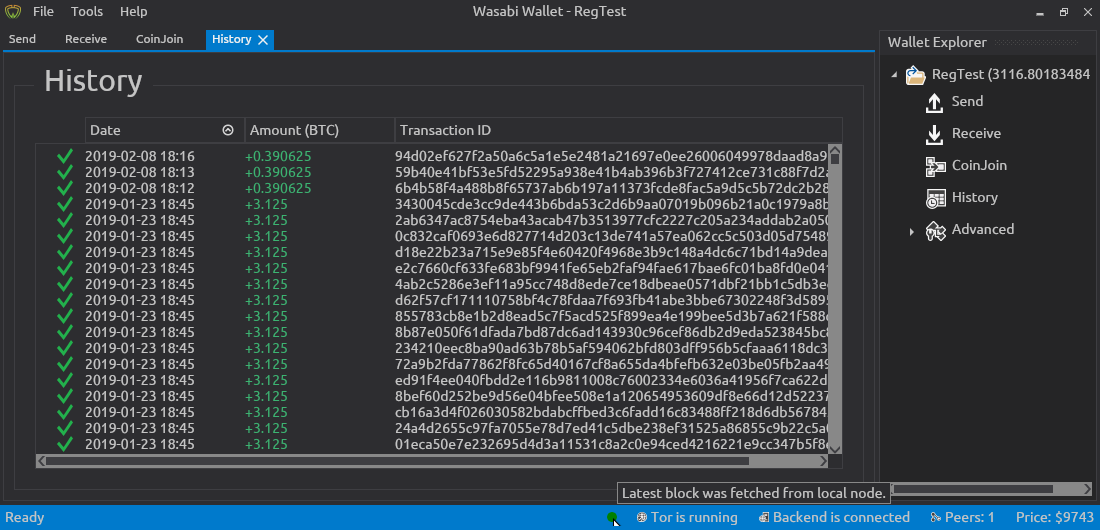
Yes, it is difficult for average users to know whether the blocks are being fetched from their local full node or not, what requires support effort.
Describe the solution you'd like
The proposed solution is add a _green bullet_ (?) indicating that the latest block was fetched from the local node and display nothing (or a gray bullet) when the latest block was not fetched from local node.
Describe alternatives you've considered
I have no alternatives in mind in this moment.
 lontivero
All 10 comments
it would be great to see a green bullet for connected status. red bullet for no node connected.
Is it possible to see an ip of once local node when you click on the bullet to see the status?
Currently to be exact since May/2019 instead of "block acquired from P2P connection" I see a different status: Downloaded filters for blocks from 581* to 581* for example. That is what I see and compare since I started using Wasabi in Feb/2019
 Kortik7
on 21 Jun 2019
Kortik7
on 21 Jun 2019
@Kortik7 there is no a long-live connection to the local node, instead Wasabi connects to the local node, downloads a block and disconnects immediately. The whole process lasts less than a second so, we cannot say wasabi is connected because it is practically never connected. That's why I say "The Latest fetched block was obtained from the local node".
About the IP address. IMO that doesn't make a lot of sense because the user is the one who must specify the IP address so, what's the point on displaying that info?
Finally, the message "Downloaded filters for blocks from 581xxx to 581xxx" indicates that wasabi is downloading the compact filters from the wasabi backend, while the message "block acquired from P2P connection" means wasabi has fetched a needed block from the local node.
Update the _red bullet_ instead of the _gray bullet_ makes sense to me.
lontivero
on 21 Jun 2019
Agreed, I think that the simple green or red bullet is a easy indicator, especially with the tooltip that explains what this stands for.
In addition, we need a GUI way of specifying the IP to the remote node in the advanced settings maybe.
 MaxHillebrand
on 21 Jun 2019
MaxHillebrand
on 21 Jun 2019
I think the idea with green or grey bullet is very good.
They only issue i see that you only see that your blocks are fetched from your local node "during" the process of receiving/sending/coinjoing. So worst case you see that the bulletin is grey. But then "damage" is done already. (i know its still very safe but again, we are talking highest possible standards)
My idea would be to add a kind of "kill switch" in the settings (or a "fetch blocks from local node only"). So just in case the bullet is grey wasabi will not connect at all. That way it would be ensured that (if a user is keen on just fetching his blocks from his own node, like me) would be 100% sure that wasabi can only fetch from local node or not at all. (That would mean that the bullet is either green and verything is working fine, or the bullet is grey (maybe with a little cross inside the grey bulletin if "kill switch" is activated) and the user will see that wasabi is not connected at all)
 btcpirate
on 21 Jun 2019
btcpirate
on 21 Jun 2019
maybe
green for local node
red for remote node
grey for offline (because no connection or "kill switch" denied connections)
btcpirate
on 21 Jun 2019
So, based on the comments it would be good to have:
- a way to specify the user's full node endpoint ([ip|domainname]:port) in the Settings page,
- a _Fetch blocks only from local_ On/Off switch, and
- a 3-states indicator (fetching from local, fetching from remote, no fetching blocks because only local is allow but no connection is happening)
lontivero
on 21 Jun 2019
Very nice.
Though I'm not certain if the differentiation between local and remote node is of use... The user knows what type of node he has, and it will be the same for him all the time. I guess it would be more simple when there are these three indicators:
- Green: Fetching from own verified node [tooltip: show if remote or local]
- Orange: Fetching from random peer to peer node over tor [tooltip: suggestion to fully verify with own node]
- Red: No fetching because no connection to own node [tooltip: give hint to activate fetching from P2P over tor]
It might be nice to point out in the tooltip that this is a verification feature, and that there is no real impact on privacy.
MaxHillebrand
on 21 Jun 2019
The distinction you make between 1.) fetching from own verified node 2.)fetching from random peer to peer node over tor 3.)no fetching because no connection to own node (or random peer to peer node not reached) is identical with what i meant. and your color code is even better with green, orange, and red! i will send you pm related to your privacy remark
btcpirate
on 21 Jun 2019
As far as ux keeping the user informed of application state, it makes sense to me to make a request to check if the node is alive on application startup and present an indicator that can change thereafter with depending on the response of each request. Naming now is "Alternative Block Source for Main" but maybe it could be "Trusted Bitcoin Node" ?
 DanGould
on 30 Jul 2020
DanGould
on 30 Jul 2020
What the heck is going on with this feature? Its still missing! Gyerünk már fiúk! Csak nem olyan komplikát, vagy igen?
 karozagorus
on 18 Aug 2020
karozagorus
on 18 Aug 2020
Related issues
 2pac1
·
3Comments
2pac1
·
3Comments
 yahiheb
·
3Comments
yahiheb
·
3Comments
 the-metalworker
·
3Comments
MaxHillebrand
·
3Comments
MaxHillebrand
·
3Comments
the-metalworker
·
3Comments
MaxHillebrand
·
3Comments
MaxHillebrand
·
3Comments
Most helpful comment
So, based on the comments it would be good to have: