Walletwasabi: Black screen in Version 1.1.1 in Windows 7 Professional 64bit
General Description
After installing desktop wasabi version 1.1.1 for windows, the wasabi window is completely black. It is responsive (I can drag the window around, and I can close / minimize / maximize it by guessing where to click) but it is completely black (it flashes in blue for less than a second when starting up).
How To Reproduce?
- Install version 1.1.1
- Launch wasabi
Operating System
Windows 7 Professional 64 bit
 mpolavieja
All 32 comments
I rolled back to version 1.1.0
mpolavieja
on 1 Mar 2019
We have upgraded the GUI engine since then. Compiling from source will solve it. I will check that on my VM and let you know.
 molnard
on 1 Mar 2019
molnard
on 1 Mar 2019
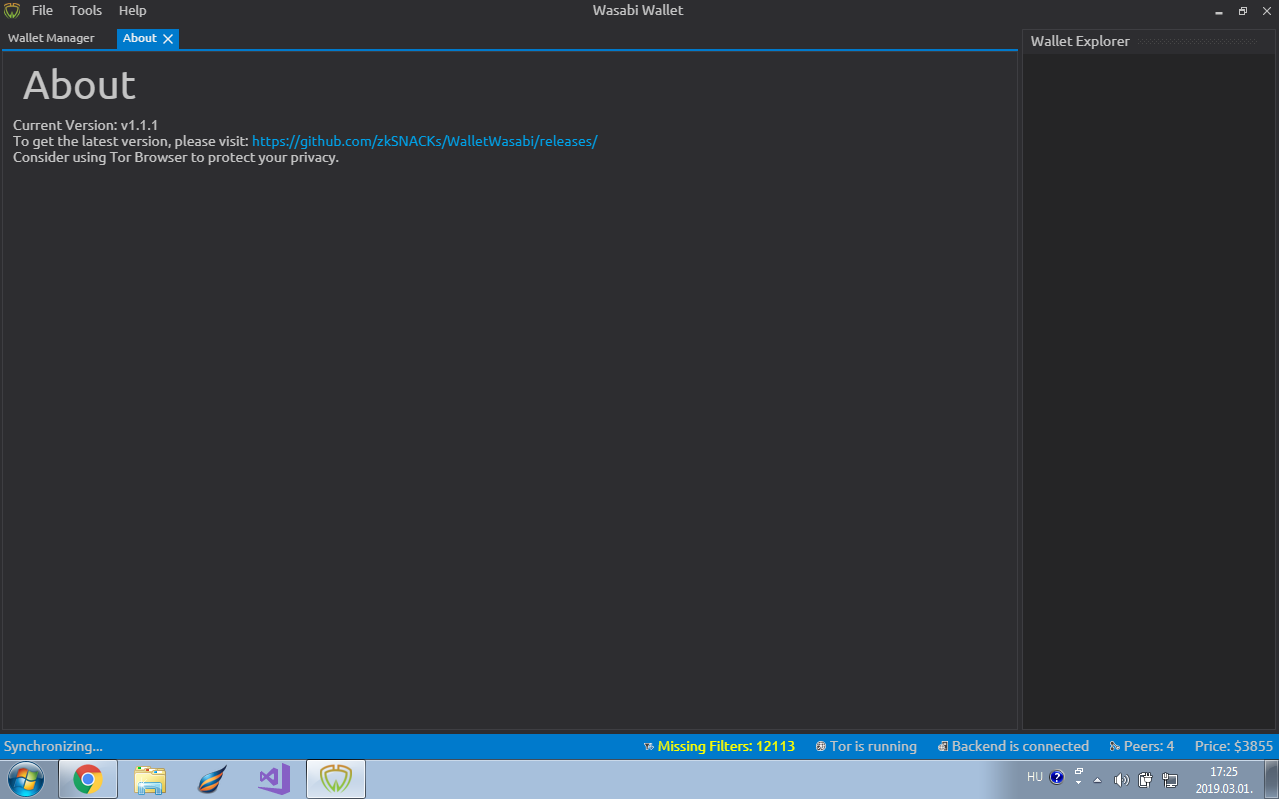
I cannot reproduce it. It works properly for me on Windows 7 Professional.
 nopara73
on 1 Mar 2019
nopara73
on 1 Mar 2019
I also want to test it with doing it from source, because that may fix it. If I remember well, @danwalmsley's magic UI engine change happened after 1.1.1 was released, so that may fix it, but also I never made sure it works on win7. So anyway, to progress further on this issue, Wasabi must be compiled from code on your local machine, but for that the restore issue must be fixed: https://github.com/zkSNACKs/WalletWasabi/issues/1202
nopara73
on 1 Mar 2019
Restore issue fixed, I didn't try it on win7 yet. Will comment when I did. https://github.com/zkSNACKs/WalletWasabi/pull/1203
nopara73
on 1 Mar 2019
I've tried to build from source but got too many errors :( I am not used to build from source.
mpolavieja
on 4 Mar 2019
Tested current master on win7. It works well. @mpolavieja I create a release for you now with the current master so you can test it.
nopara73
on 4 Mar 2019
@mpolavieja I created a release for you and uploaded it to google drive.
https://drive.google.com/file/d/1K3ja9SAqfk-p8u_BpaGbruXNRRhF0q_a/view?usp=sharing
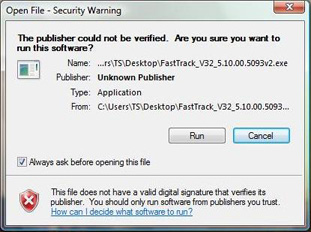
Just to be sure, at installing make sure when the popup comes it does say it was signed by zksnacks and it doesn't say something like "unknown publisher."
Wrong example:
nopara73
on 4 Mar 2019
I´ve tried current master on another win7 professional 64bit machine and it works well. I´ll try the release you´ve created for me in my other computer this evening. Thank you very much.
mpolavieja
on 4 Mar 2019
I´ve tried the special release and I got the same result (black screen). Maybe this is a problem on my home computer.
mpolavieja
on 4 Mar 2019
Could you run the version from command line with wassabee --loglevel=debug? Maybe you see some error?
nopara73
on 5 Mar 2019
These are the logs from running on command line:
FS:
SKSL:
   1    #version 100
   2    in half4 vcolor_Stage0;
   3    void main()
   4    {
   5            half4 outputColor_Stage0;
   6            half4 outputCoverage_Stage0;
   7            {
   8                    // Stage 0, DefaultGeometryProcessor
   9                    outputColor_Stage0 = vcolor_Stage0;
  10                    outputCoverage_Stage0 = half4(1);
  11            }
  12            {
  13                    // Xfer Processor: Porter Duff
  14                    sk_FragColor = outputColor_Stage0 * outputCoverage_Stage
0;
  15            }
  16    }
  17
GLSL:
   1    #version 100
   2
   3    precision mediump float;
   4    varying mediump vec4 vcolor_Stage0;
   5    void main() {
   6        mediump vec4 outputColor_Stage0;
   7        {
   8            outputColor_Stage0 = vcolor_Stage0;
   9        }
  10        {
  11            gl_FragColor = outputColor_Stage0;
  12        }
  13    }
  14
Program linking failed.
VS:
SKSL:
   1    #version 100
   2    uniform float4 sk_RTAdjust;
   3    in float2 inPosition;
   4    in half4 inColor;
   5    out half4 vcolor_Stage0;
   6    void main()
   7    {
   8            // Primitive Processor DefaultGeometryProcessor
   9            half4 color = inColor;
  10            vcolor_Stage0 = color;
  11            float2 pos2 = inPosition;
  12            sk_Position = float4(pos2.x , pos2.y, 0, 1);
  13    }
  14
GLSL:
   1    #version 100
   2
   3    precision mediump float;
   4    uniform highp vec4 sk_RTAdjust;
   5    attribute highp vec2 inPosition;
   6    attribute mediump vec4 inColor;
   7    varying mediump vec4 vcolor_Stage0;
   8    void main() {
   9        mediump vec4 color = inColor;
  10        vcolor_Stage0 = color;
  11        highp vec2 pos2 = inPosition;
  12        gl_Position = vec4(pos2.x, pos2.y, 0.0, 1.0);
  13        gl_Position = vec4(gl_Position.xy * sk_RTAdjust.xz + gl_Position.ww
* sk_RTAdjust.yw, 0.0, gl_Position.w);
  14    }
  15

FS:
SKSL:
   1    #version 100
   2    in half4 vcolor_Stage0;
   3    void main()
   4    {
   5            half4 outputColor_Stage0;
   6            half4 outputCoverage_Stage0;
   7            {
   8                    // Stage 0, DefaultGeometryProcessor
   9                    outputColor_Stage0 = vcolor_Stage0;
  10                    outputCoverage_Stage0 = half4(1);
  11            }
  12            {
  13                    // Xfer Processor: Porter Duff
  14                    sk_FragColor = outputColor_Stage0 * outputCoverage_Stage
0;
  15            }
  16    }
  17
GLSL:
   1    #version 100
   2
   3    precision mediump float;
   4    varying mediump vec4 vcolor_Stage0;
   5    void main() {
   6        mediump vec4 outputColor_Stage0;
   7        {
   8            outputColor_Stage0 = vcolor_Stage0;
   9        }
  10        {
  11            gl_FragColor = outputColor_Stage0;
  12        }
  13    }
  14
Program linking failed.
VS:
SKSL:
   1    #version 100
   2    uniform float4 sk_RTAdjust;
   3    uniform float2 uAtlasSizeInv_Stage0;
   4    in float2 inPosition;
   5    in half4 inColor;
   6    in float2 inTextureCoords;
   7    out float2 vTextureCoords_Stage0;
   8    out float vTexIndex_Stage0;
   9    out half4 vinColor_Stage0;
  10    void main()
  11    {
  12            // Primitive Processor Texture
  13            float2 indexTexCoords = float2(inTextureCoords.x, inTextureCoord
s.y);
  14            float2 unormTexCoords = floor(0.5*indexTexCoords);
  15            float2 diff = indexTexCoords - 2.0*unormTexCoords;
  16            float texIdx = 2.0*diff.x + diff.y;
  17            vTextureCoords_Stage0 = unormTexCoords * uAtlasSizeInv_Stage0;
  18            vTexIndex_Stage0 = texIdx;
  19            vinColor_Stage0 = inColor;
  20            float2 pos2 = inPosition;
  21            sk_Position = float4(pos2.x , pos2.y, 0, 1);
  22    }
  23
GLSL:
   1    #version 100
   2
   3    precision mediump float;
   4    uniform highp vec4 sk_RTAdjust;
   5    uniform highp vec2 uAtlasSizeInv_Stage0;
   6    attribute highp vec2 inPosition;
   7    attribute mediump vec4 inColor;
   8    attribute highp vec2 inTextureCoords;
   9    varying highp vec2 vTextureCoords_Stage0;
  10    varying highp float vTexIndex_Stage0;
  11    varying mediump vec4 vinColor_Stage0;
  12    void main() {
  13        highp vec2 indexTexCoords = vec2(inTextureCoords.x, inTextureCoords.
y);
  14        highp vec2 unormTexCoords = floor(0.5 * indexTexCoords);
  15        highp vec2 diff = indexTexCoords - 2.0 * unormTexCoords;
  16        highp float texIdx = 2.0 * diff.x + diff.y;
  17        vTextureCoords_Stage0 = unormTexCoords * uAtlasSizeInv_Stage0;
  18        vTexIndex_Stage0 = texIdx;
  19        vinColor_Stage0 = inColor;
  20        highp vec2 pos2 = inPosition;
  21        gl_Position = vec4(pos2.x, pos2.y, 0.0, 1.0);
  22        gl_Position = vec4(gl_Position.xy * sk_RTAdjust.xz + gl_Position.ww
* sk_RTAdjust.yw, 0.0, gl_Position.w);
  23    }
  24

FS:
SKSL:
   1    #version 100
   2    uniform lowp sampler2D uTextureSampler_0_Stage0;
   3    in float2 vTextureCoords_Stage0;
   4    in float vTexIndex_Stage0;
   5    in half4 vinColor_Stage0;
   6    void main()
   7    {
   8            half4 outputColor_Stage0;
   9            half4 outputCoverage_Stage0;
  10            {
  11                    // Stage 0, Texture
  12                    outputColor_Stage0 = vinColor_Stage0;
  13                    half4 texColor;
  14                    {
  15                            texColor = texture(uTextureSampler_0_Stage0, vTe
xtureCoords_Stage0).rrrr;
  16                    }
  17                    outputCoverage_Stage0 = texColor;
  18            }
  19            {
  20                    // Xfer Processor: Porter Duff
  21                    sk_FragColor = outputColor_Stage0 * outputCoverage_Stage
0;
  22            }
  23    }
  24
GLSL:
   1    #version 100
   2
   3    precision mediump float;
   4    uniform lowp sampler2D uTextureSampler_0_Stage0;
   5    varying highp vec2 vTextureCoords_Stage0;
   6    varying highp float vTexIndex_Stage0;
   7    varying mediump vec4 vinColor_Stage0;
   8    void main() {
   9        mediump vec4 outputColor_Stage0;
  10        mediump vec4 outputCoverage_Stage0;
  11        {
  12            outputColor_Stage0 = vinColor_Stage0;
  13            mediump vec4 texColor;
  14            {
  15                texColor = texture2D(uTextureSampler_0_Stage0, vTextureCoord
s_Stage0).xxxx;
  16            }
  17            outputCoverage_Stage0 = texColor;
  18        }
  19        {
  20            gl_FragColor = outputColor_Stage0 * outputCoverage_Stage0;
  21        }
  22    }
  23
Program linking failed.
VS:
SKSL:
   1    #version 100
   2    uniform float4 sk_RTAdjust;
   3    in float2 position;
   4    in half4 color;
   5    in float2 textureCoords;
   6    out half4 vcolor_Stage0;
   7    out float2 vtextureCoords_Stage0;
   8    void main()
   9    {
  10            // Primitive Processor TextureGeometryProcessor
  11            vcolor_Stage0 = color;
  12            vtextureCoords_Stage0 = textureCoords;
  13            sk_Position = float4(position.x , position.y, 0, 1);
  14    }
  15
GLSL:
   1    #version 100
   2
   3    precision mediump float;
   4    uniform highp vec4 sk_RTAdjust;
   5    attribute highp vec2 position;
   6    attribute mediump vec4 color;
   7    attribute highp vec2 textureCoords;
   8    varying mediump vec4 vcolor_Stage0;
   9    varying highp vec2 vtextureCoords_Stage0;
  10    void main() {
  11        vcolor_Stage0 = color;
  12        vtextureCoords_Stage0 = textureCoords;
  13        gl_Position = vec4(position.x, position.y, 0.0, 1.0);
  14        gl_Position = vec4(gl_Position.xy * sk_RTAdjust.xz + gl_Position.ww
* sk_RTAdjust.yw, 0.0, gl_Position.w);
  15    }
  16

FS:
SKSL:
   1    #version 100
   2    uniform lowp sampler2D uTextureSampler_0_Stage0;
   3    in half4 vcolor_Stage0;
   4    in float2 vtextureCoords_Stage0;
   5    void main()
   6    {
   7            half4 outputColor_Stage0;
   8            half4 outputCoverage_Stage0;
   9            {
  10                    // Stage 0, TextureGeometryProcessor
  11                    outputColor_Stage0 = vcolor_Stage0;
  12                    float2 texCoord;
  13                    texCoord = vtextureCoords_Stage0;
  14                    outputColor_Stage0 = outputColor_Stage0 * texture(uTextu
reSampler_0_Stage0, texCoord);
  15                    outputCoverage_Stage0 = float4(1);
  16            }
  17            {
  18                    // Xfer Processor: Porter Duff
  19                    sk_FragColor = outputColor_Stage0 * outputCoverage_Stage
0;
  20            }
  21    }
  22
GLSL:
   1    #version 100
   2
   3    precision mediump float;
   4    uniform lowp sampler2D uTextureSampler_0_Stage0;
   5    varying mediump vec4 vcolor_Stage0;
   6    varying highp vec2 vtextureCoords_Stage0;
   7    void main() {
   8        mediump vec4 outputColor_Stage0;
   9        {
  10            outputColor_Stage0 = vcolor_Stage0;
  11            highp vec2 texCoord;
  12            texCoord = vtextureCoords_Stage0;
  13            outputColor_Stage0 = outputColor_Stage0 * texture2D(uTextureSamp
ler_0_Stage0, texCoord);
  14        }
  15        {
  16            gl_FragColor = outputColor_Stage0;
  17        }
  18    }
  19
This is quite strange. @danwalmsley does it tell something to you?
nopara73
on 5 Mar 2019
FYI there is another user reporting the same problem https://www.reddit.com/r/WasabiWallet/comments/axpcgp/black_screen/
 lontivero
on 6 Mar 2019
lontivero
on 6 Mar 2019
Same problem here
 jordankittle
on 7 Mar 2019
jordankittle
on 7 Mar 2019
@kekekeks is this some kind of gpu compatibility issue?
 danwalmsley
on 11 Mar 2019
danwalmsley
on 11 Mar 2019
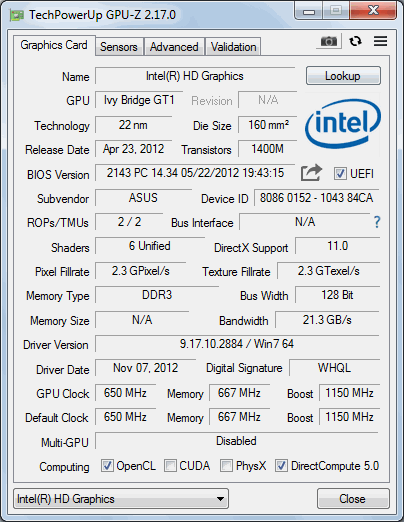
@mpolavieja @jordankittle can you report what gpu you have and what drivers / driver version you have?
danwalmsley
on 11 Mar 2019
Hi, I am in the same situation: black screen on Windows 7 professional.
even with the "special release" compiled for mpolavieja
I hope this help you. these are is the infos of my gpu:
thanks
 hubnix
on 12 Mar 2019
hubnix
on 12 Mar 2019
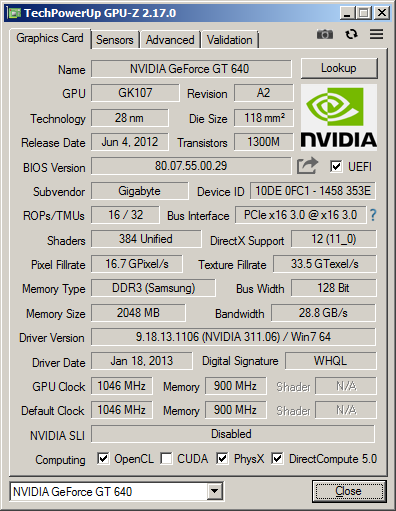
@mpolavieja @jordankittle can you report what gpu you have and what drivers / driver version you have?
Here is mine
mpolavieja
on 12 Mar 2019
@hubnix @mpolavieja thanks that is most helpful. Could you also scan your machines to see if there are any files called:
libEGL.dll or libGLES.dll
and post the location of these files.
danwalmsley
on 12 Mar 2019
I have like 17 different versions of the file libEGL.dll in many different locations. I don´t have the file libGLES.dll
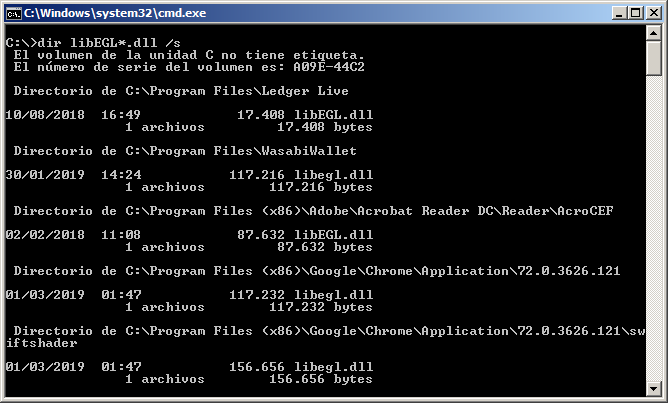
mpolavieja
on 12 Mar 2019
I have libEGL.dll, but not libGLES.dll:
`Directory di C:\Users\x\AppData\Local\Confide\app-1.5.11
06/05/2018 18:06 87.032 libEGL.dll
1 File 87.032 byte
Directory di C:\Users\x\AppData\Local\exodus\app-1.61.1
09/10/2018 19:28 25.096 libEGL.dll
1 File 25.096 byte
Directory di C:\Users\x\AppData\Local\exodus\app-1.63.1
01/11/2018 02:40 21.304 libEGL.dll
1 File 21.304 byte
Directory di C:\Users\x\AppData\Local\TomTom\HOME3\Updates\InstallTomTomMyDriveConnect_4_2_2_3561\MyDriveConnectUpdater
28/06/2017 05:11 13.312 libEGL.dll
1 File 13.312 byte
Directory di C:\Users\x\AppData\Local\TomTom\HOME3\Updates\InstallTomTomMyDriveConnect_4_2_3_3625\MyDriveConnectUpdater
28/06/2017 05:11 13.312 libEGL.dll
1 File 13.312 byte
Directory di C:\Users\x\Desktop\Tor Browser\Browser
27/02/2019 00:57 26.112 libEGL.dll
1 File 26.112 byte
Directory di C:\Users\x\Downloads\monero-gui-v0.13.0.4
03/05/2018 07:20 22.528 libEGL.dll
1 File 22.528 byte`
hubnix
on 13 Mar 2019
also experiencing same issue on 1.1.3 and have tried all suggestion as above.
C:\Users\x\Desktop\Tor Browser\Browser\libEGL.dll
C:\Users\x\Desktop\Tor Browser\Browser\libGLESv2.dll

 tolerant-fellow
on 15 Mar 2019
tolerant-fellow
on 15 Mar 2019
I got hold of an old gtx1060 and installed it on a windows 7 pc, but with the latest drivers and it works.
@tolerant-fellow can you try updating either using windows update or downloading from nvidia website?
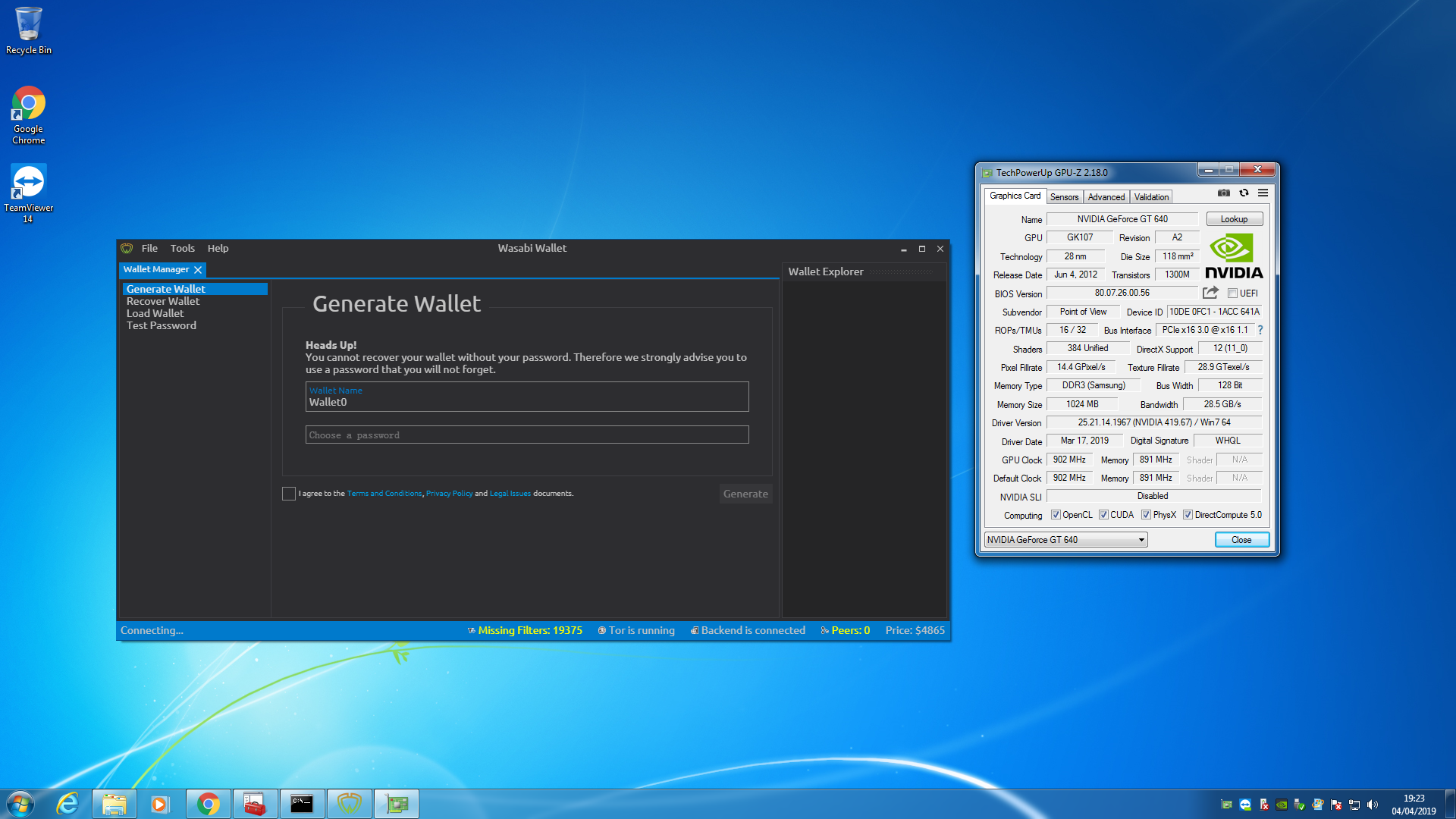
danwalmsley
on 4 Apr 2019
@hubnix @mpolavieja can you also run a full windows update installing also optional updates like nvidia graphics or intel hd graphics driver updates and see if it resolves the issue.
danwalmsley
on 4 Apr 2019
Update:
So I have tried 3 different video cards 1 GT640 and 1 GTX1050 ti, and also Intel HD graphics, iv tried oldest nvidia drivers and intel drivers I could find, but couldnt repro.
Please all update nvidia drivers and windows update and if problems still persist we may need to talk about remote debugging with one of you.
danwalmsley
on 4 Apr 2019
@hubnix @mpolavieja @tolerant-fellow @jordankittle or anyone experiencing this please could you get in touch I have a potential fix for you to test, but as im unable to repro it myself I need you to try it for me.
Thanks
danwalmsley
on 16 Apr 2019
you can get in touch on slack here:
danwalmsley
on 16 Apr 2019
Same problem with last Wasabi release
https://github.com/zkSNACKs/WalletWasabi/issues/2861
 Denis7771111
on 17 Dec 2019
Denis7771111
on 17 Dec 2019
@Denis7771111 can u compile from source code?
https://github.com/zkSNACKs/WalletWasabi#build-from-source-code
You can start to play with the parameters in WalletWasabi.Gui / Program.cs
For example:
Instead of this:
.With(new AvaloniaNativePlatformOptions { UseDeferredRendering = true, UseGpu = true })
You can write:
.With(new AvaloniaNativePlatformOptions { UseDeferredRendering = true, UseGpu = false })
Or if you are on linux u can try
Instead of this:
.With(new X11PlatformOptions { UseGpu = useGpuLinux, WmClass = "Wasabi Wallet" })
You can write:
.With(new X11PlatformOptions { UseGpu = true, WmClass = "Wasabi Wallet" })
or
.With(new X11PlatformOptions { UseGpu = false, WmClass = "Wasabi Wallet" })
molnard
on 18 Dec 2019
@molnard AvaloniaNativePlatformOptions are OSX only, and X11PlaformOptions are Linux only, he needs to look a Win32PlatformOptions.
danwalmsley
on 30 Dec 2019
I have upgraded my video card to the latest drivers and the problem did not solve. However, I updated Windows 7 through windows update and the problem was solved (my OS was very outdated).
mpolavieja
on 2 Jan 2020
Related issues
nopara73
·
3Comments
 the-metalworker
·
3Comments
the-metalworker
·
3Comments
 kenny47
·
3Comments
kenny47
·
3Comments
 yahiheb
·
3Comments
yahiheb
·
3Comments
 MaxHillebrand
·
3Comments
MaxHillebrand
·
3Comments
Most helpful comment
I have upgraded my video card to the latest drivers and the problem did not solve. However, I updated Windows 7 through windows update and the problem was solved (my OS was very outdated).