Wails: The wait build - ldflags "- H windowsgui" command is invalid
#
 If you have a technical issue, please do not open a bug this way!
                  Please use the `wails issue` command!
#
Description
Run the wails build -ldflags "-H windowsgui" command to package the application
But starting an external application will still have an extra black window |
运行wails build -ldflags "-H windowsgui"命令打包应用程序
但是仍然会有一个多余的黑色窗口
To Reproduce
Steps to reproduce the behaviour:
- wails Init
- wails build -ldflags "-H windowsgui"
Expected behaviour
When launching external applications, I don't want to have an extra window |
启动外部应用程序的时候,我不希望有一个多余的窗口
Screenshots

System Details
Go 1.14.4
Wails v1.8.0
OS Windows 10
Additional context
I think this is not an error. It should be my improper operation. However, I operate according to the method of using v1.8.0 as required in the document.
 misitebao
All 16 comments
Whilst technically you should be able to do this, I think what you are looking for is the -p flag. Building in debug mode will give you the console
 leaanthony
on 14 Sep 2020
leaanthony
on 14 Sep 2020
When building for Windows the -H windowsgui flag is already being passed in automatically so you shouldn't need to pass that yourself.
Do you require the flags when building in debug mode?
I just checked and I can see that it is not specified automatically when the application is built in debug mode.
 tmclane
on 14 Sep 2020
tmclane
on 14 Sep 2020
@leaanthony @tmclane Thank you for your advice, but I still have some small problems here.
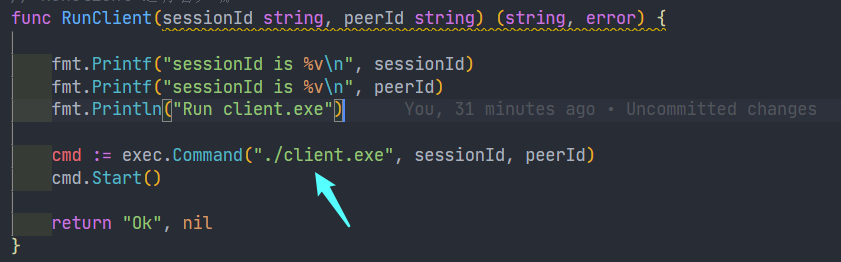
I call the RunClient method in wails application. The method is as follows: |
我在wails应用中调用 RunClient方法,方法体如下:
func RunClient(sessionId string, peerId string) (string, error) {

    fmt.Printf("sessionId is %v\n", sessionId)
    fmt.Printf("sessionId is %v\n", peerId)
    fmt.Println("Run client.exe")

    cmd := exec.Command("./client.exe", sessionId, peerId)
    cmd.Start()

    return "Ok", nil
}
Run the 'wails build' command to package the application, and then copy and paste the generated application binary file into theclient.exeThe folder where the file is located is as follows: |
运行wails build命令打包应用程序,然后将生成的应用程序二进制文件复制粘贴到client.exe文件所在文件夹,目录如下:
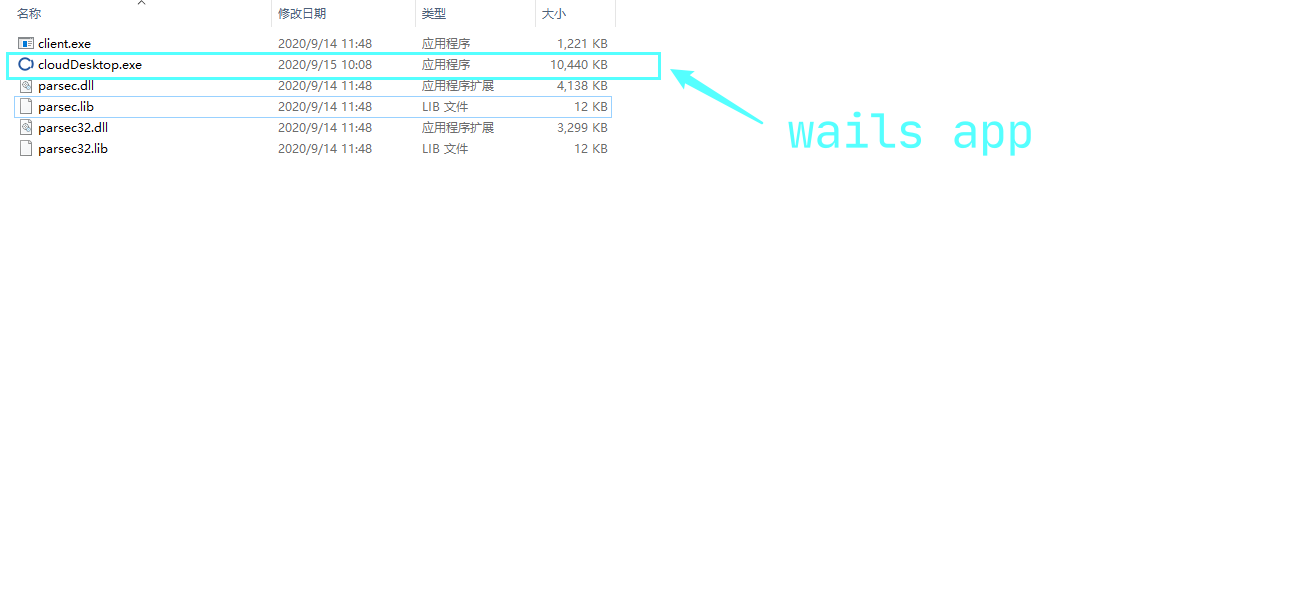
StartcloudDesktop.exeThere will be an extra window, as shown in the figure: |
启动cloudDesktop.exe会有一个多余的窗口,如图所示:
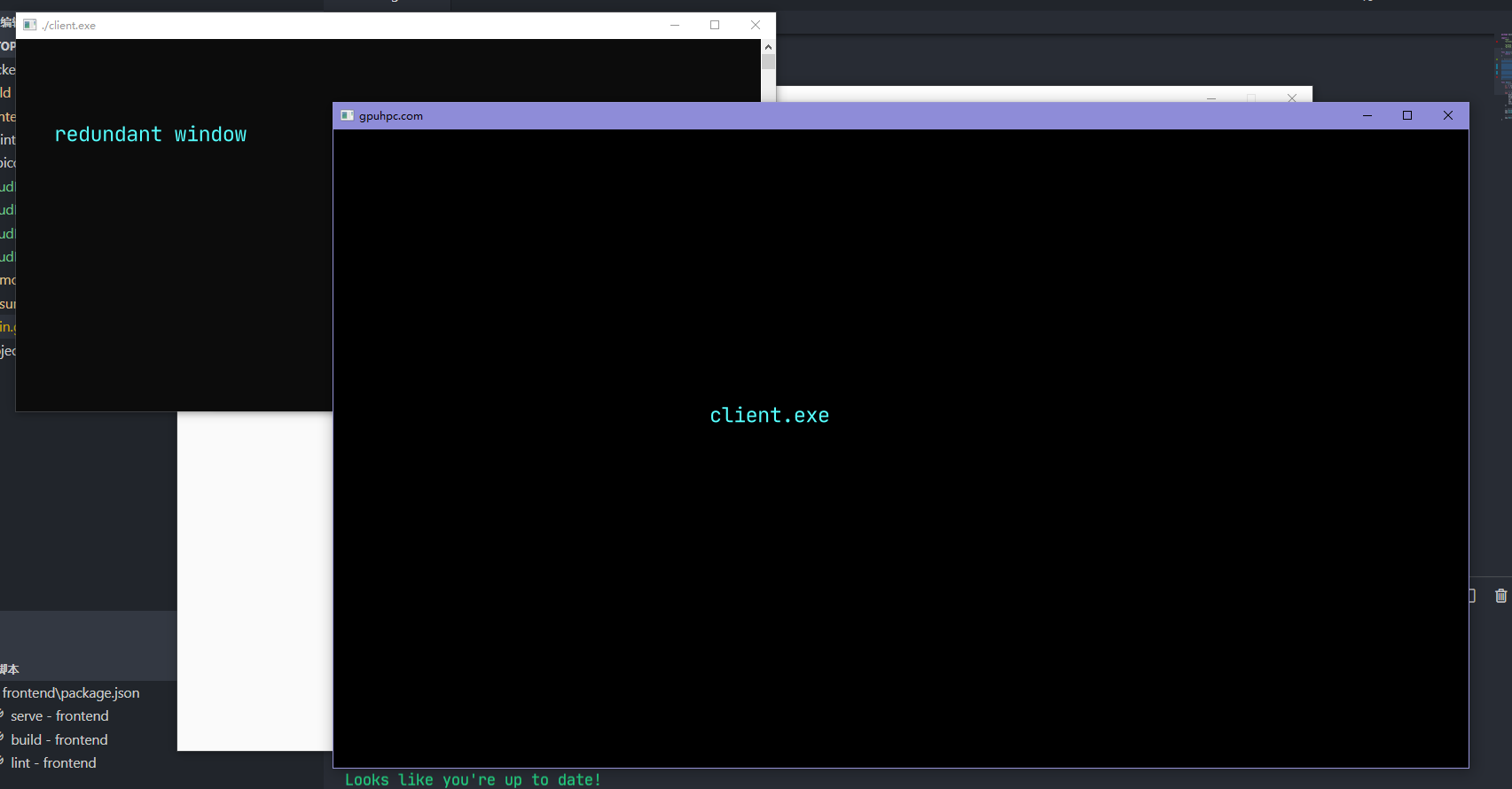
I want the 'redundant window' not to be displayed when I perform the previous step. So how can I package the application to meet my requirements?|
我希望执行上一步的时候,不显示redundant window。那么,我应该怎么打包应用程序才能实现我的需求?
misitebao
on 15 Sep 2020
Is the client.exe another wails app?
What creates that binary?
tmclane
on 15 Sep 2020
When building for Windows the flag is already being passed in automatically so you shouldn't need to pass that yourself.
Do you require the flags when building in debug mode?
I just checked and I can see that it is not specified automatically when the application is built in debug mode.-H windowsgui
There's no problem building in debug mode, there's a debug window, but there won't be an extra black window like the one I've shown. thank you! |
在调试模式下构建没有任何问题,有一个调试窗口,但是不会像我展示的图片那样出现一个多余的黑色窗口。谢谢你。
misitebao
on 15 Sep 2020
Is the client.exe another wails app?
What creates that binary?
It's not a wails app,It can run alone, I put the wails app(desktopClient.exe) Paste it into the directory to call it,Use the following code:|
它不是一个wails app。它可以单独运行,我把wails app——desktopClient.exe粘贴到目录里面就是为了调用它
misitebao
on 15 Sep 2020
Would you mind trying branch feature/windowsgui and seeing how it works for you?
The change in the branch is to always specify the -H windowsgui if the platform is windows.
tmclane
on 15 Sep 2020
You can try to use go language to call another binary program on Windows OS, and the same problem will occur. This is not only in wails, but also in Go program, which can use "go build - ldflags" - S - W - H = windowsgui " main.go `Order to solve the problem. But the wails application uses the wails command, so I don't know how to solve this problem. |
你可以尝试在windwos上用go语言调用另外一个二进制程序,会出现同样的问题,这个不是不只是存在wails中,但是go程序可以用go build -ldflags "-s -w -H=windowsgui" main.go命令解决这个问题。但是wails应用程序使用wails命令,所以,我不知道怎么去解决这个问题。
misitebao
on 15 Sep 2020
I don't understand why you are doing this. wails build -d will give you a debug version with the terminal window for debug output and wails build -p will give you a production build without the terminal window.
leaanthony
on 15 Sep 2020
Would you mind trying branch
feature/windowsguiand seeing how it works for you?
The change in the branch is to always specify the-H windowsguiif the platform is windows.
I've just tried your scheme, but it's still the same result. However, I just tried a small demo. There will be no problem using wails packaged app to call wails packaged app. Why is this? Is it mine clien.exe Is that a problem? |
刚刚尝试了你的这个方案,很遗憾,还是一样的结果,不过我刚才尝试了一个小demo,使用wails打包的app调用wails打包的app不会有任何问题,这个是为什么,难道是我的clien.exe的问题吗?
misitebao
on 15 Sep 2020
I don't understand why you are doing this.
wails build -dwill give you a debug version with the terminal window for debug output andwails build -pwill give you a production build without the terminal window.
We need to use wails to write a desktop client to call another binary program written by C. when calling, we need to pass parameters, similar to 'client Param1 param2'. But we found the above problem when calling. :cry: |
我们需要用wails写一个桌面客户端,去调用另外一个由c编写的二进制程序并且调用的时候需要传递参数,类似client param1 param2,但是调用的时候发现了上面的问题。 :cry:
misitebao
on 15 Sep 2020
Surely that's a problem with compiling your app? I'm a little lost tbh. It looks like your command.Exec is opening that window.
leaanthony
on 15 Sep 2020
Unsure how you compiled that program but it would seem the issue with the extra window is the program you are running. If you run client.exe all by itself on the command-line does it not open a window?
tmclane
on 15 Sep 2020
Unsure how you compiled that program but it would seem the issue with the extra window is the program you are running. If you run
client.exeall by itself on the command-line does it not open a window?
If I open the 'client.exe' program alone, there is no extra window |
如果我单独打开"client.exe"程序,是没有额外的窗口的。
misitebao
on 18 Sep 2020
Surely that's a problem with compiling your app? I'm a little lost tbh. It looks like your command.Exec is opening that window.
On the "windows" platform, use the "go" language“ exec.command ”Command to open other applications will have such a problem. Generally, the "- lgflag" parameter will be added when compiling to solve this problem. However, in the wails program, I don't know how to solve this problem. You can try to use the wails application on the windows system Starting other programs on your computer should have the same problem. |
在“windows”平台上,使用”go“语言里面的“exec.command”命令打开其他应用程序都会有这样的问题,一般会在编译的时候加上“-lgflag”参数来解决这个问题,但是在wails程序里面,我不知道怎么去解决这个问题,获取你可以尝试一下在windows系统上面,使用wails应用启动你的电脑上的其他程序,应该也会存在一样的问题。
misitebao
on 18 Sep 2020
Sorry @misitebao - this isn't a wails problem.
leaanthony
on 20 Sep 2020
Related issues
 yosefbenshimon
·
5Comments
yosefbenshimon
·
5Comments
 billacw
·
3Comments
billacw
·
3Comments
 jonericcook
·
6Comments
leaanthony
·
3Comments
leaanthony
·
6Comments
jonericcook
·
6Comments
leaanthony
·
3Comments
leaanthony
·
6Comments
Most helpful comment
Unsure how you compiled that program but it would seem the issue with the extra window is the program you are running. If you run
client.exeall by itself on the command-line does it not open a window?