Hi. New Wails user. Very impressed.
I also recently started using Rekit Studio, which I love. It's an opinionated React-powered webapp framework with a built-in IDE.
I can also see some times when I may just want to create a simple HTML/CSS/JSS app without a framework.
I propose an new wails init template: essentially, an empty project, with just a Go module and nothing in the frontend directory. This template could be used if you want to use a framework other than one that is currently on the list, or if you don't want to use a framework at all.
Is this doable?
 stevesobol
All 16 comments
Hi @stevesobol - Thanks for the kind words. There's a vanilla template already there:
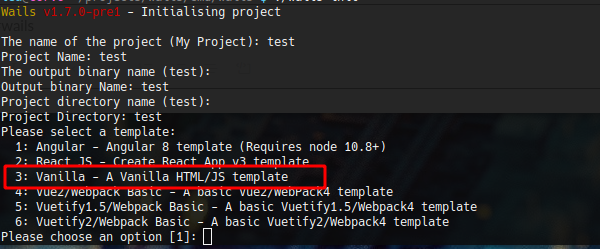
You can delete what's in the frontend and customise as you please.
Let us know how you get on!
 leaanthony
on 1 Jul 2020
leaanthony
on 1 Jul 2020
Ugh. When creating my first project, I read option 3 as _VanillaJS,_ which, of course, isn't what it actually SAYS.
VanillaJS is this.
Oops. :)
Thank you.
stevesobol
on 2 Jul 2020
You know what? I should change it to "Plain HTML/JS/CSS"
leaanthony
on 2 Jul 2020
Also, you do know that that's a joke site advocating using plain js? 😉
leaanthony
on 2 Jul 2020
HA! No, I thought it was an actual framework. I haven't had time to look at the site. But try checking any of the checkboxes on the homepage; no matter what you check, the download size remains
Final size: 0 bytes uncompressed, 25 bytes gzipped.
So... Sharing this experience so other people don't embarrass themselves like I did. O.o
stevesobol
on 2 Jul 2020
So now you've learnt 2 things! 😃
Let us know if you need any help. Good luck!
leaanthony
on 3 Jul 2020
I'm getting a Javascript error when I build a sample app and try to run it (using the vanilla template). Things run error-free using wails serve / npm run serve - I'm going to have to do a debug build and see what's happening.
stevesobol
on 3 Jul 2020
Urgh, that's something I didn't actually try :facepalm: - I'll have a look today.
leaanthony
on 4 Jul 2020
I just re-read your message. I absolutely did test that.
On Sat, 4 Jul 2020, 02:29 Steve Sobol, notifications@github.com wrote:
I'm getting a Javascript error when I build a sample app and try to run it
(using the vanilla template). Things run error-free using wails serve / npm
run serve - I'm going to have to do a debug build and see what's
happening.—
You are receiving this because you modified the open/close state.
Reply to this email directly, view it on GitHub
https://github.com/wailsapp/wails/issues/450#issuecomment-653615809, or
unsubscribe
https://github.com/notifications/unsubscribe-auth/AAO2SYBQUVIOYHVKRMFHDHLRZYBNLANCNFSM4ONTIIZQ
.
leaanthony
on 4 Jul 2020
Hm. Well, I was running 1.6.0 and tried running wails update and discovered that I was using a rather old version. Updated to 1.7.1 and I'm going to try creating a new vanilla project.
stevesobol
on 4 Jul 2020
Ahhah. Only started with Wails within the last week, not sure how I ended up with 1.6.0. But updating to 1.7.1 worked. I tried creating a new project and using wails build -d and it's running fine. Next step is to try a Rekit project! 😁
stevesobol
on 4 Jul 2020
Nice one!
leaanthony
on 4 Jul 2020
So, with Rekit-React, my app's entry point is build\static\main.48cc335b.chunk.js (the four-digit hex number in the middle changes, IIRC). wails build is expecting to find it in build\main.js. It would appear that I need a custom webpack config. Rekit-React normally doesn't create a webpack.json when you start a new project. This will be interesting...
stevesobol
on 4 Jul 2020
I'm going to play around with my project. I should put my results up on a blog somewhere. Regardless, the problem I had is fixed :)
stevesobol
on 4 Jul 2020
Configure the project as you need. Wails doesn't impose anything on you. The install and build commands are all it uses and they are configurable in project.json.
leaanthony
on 5 Jul 2020
Related issues
 yosefbenshimon
·
5Comments
leaanthony
·
6Comments
yosefbenshimon
·
5Comments
leaanthony
·
6Comments
 ahmadfarisfs
·
3Comments
ahmadfarisfs
·
3Comments
 VladislavSournine
·
5Comments
VladislavSournine
·
5Comments
 bh90210
·
3Comments
bh90210
·
3Comments