Vvv: PHP FPM Service timeout, leading to Gateway 502
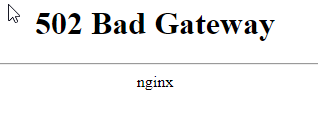
Provisioning a fresh instance of VVV results in a PHP FPM service that times out and refuses to start. The cause is unknown and manifests as a "502 bad gateway" error in the browser
Edits:
The Cause
Ondrej updated his packages with a new feature and discovered a bug in the process. For some reason the pid setting was being ignored, which meant our incorrect value was suddenly being used. The value has been corrected in master and develop, and will be released in the v3.3 release.
Fixing For New Users
master and develop branches are good, just make sure to use v3.3 and above
Fixing For Existing Users
To fix this, please update to the newest VVV, preferably via git, then reprovision. A git pull && vagrant up --provision should be enough.
Can I Hotfix and Older VVV?
It is not possible to hotfix older versions. This is because older versions do not overwrite PHP configs once they're installed, but newer versions do. So if you had VVV 2.4 and applied the fix, it wouldn't be installed inside the VM.
Do I Need to Update The Box?
No, you don't need to do a box update, you get all the updates a box brings by running the main provisioner anyway, so save yourself the hassle.
Do I Need to Destroy and Recreate?
No, but you can do this if you want peace of mind
 tomjn
tomjn
All 55 comments
I'm seeing this on master branch as well.
 benleeth
on 6 Feb 2020
benleeth
on 6 Feb 2020
Same here on master branch.
 herbie4
on 6 Feb 2020
herbie4
on 6 Feb 2020
Same here on master for me it causes https://github.com/Varying-Vagrant-Vagrants/VVV/issues/2062
 nicksull
on 6 Feb 2020
nicksull
on 6 Feb 2020
Same issue.
 BE-Webdesign
on 6 Feb 2020
BE-Webdesign
on 6 Feb 2020
Same here, errors are:
log\nginx\error.log
connect() to unix:/var/run/php7.4-fpm.sock failed (2: No such file or directory) while connecting to upstream
from provision:
Job for php7.2-fpm.service failed because a timeout was exceeded.
What can get done?
 cueqzapper
on 6 Feb 2020
cueqzapper
on 6 Feb 2020
did you tried with a new provision now?
 Mte90
on 6 Feb 2020
Mte90
on 6 Feb 2020
doing: vagrant reload --provision
cueqzapper
on 6 Feb 2020

The issue is still there. But the output around the error looks slightly different.
cueqzapper
on 6 Feb 2020
The error that one sees because of that is 502 Bad Gateway:
cueqzapper
on 6 Feb 2020
Those errors are fake positive I think that we need the output of systemctl status php7.2-fpm.service from inside the vagrant machine.
Mte90
on 6 Feb 2020
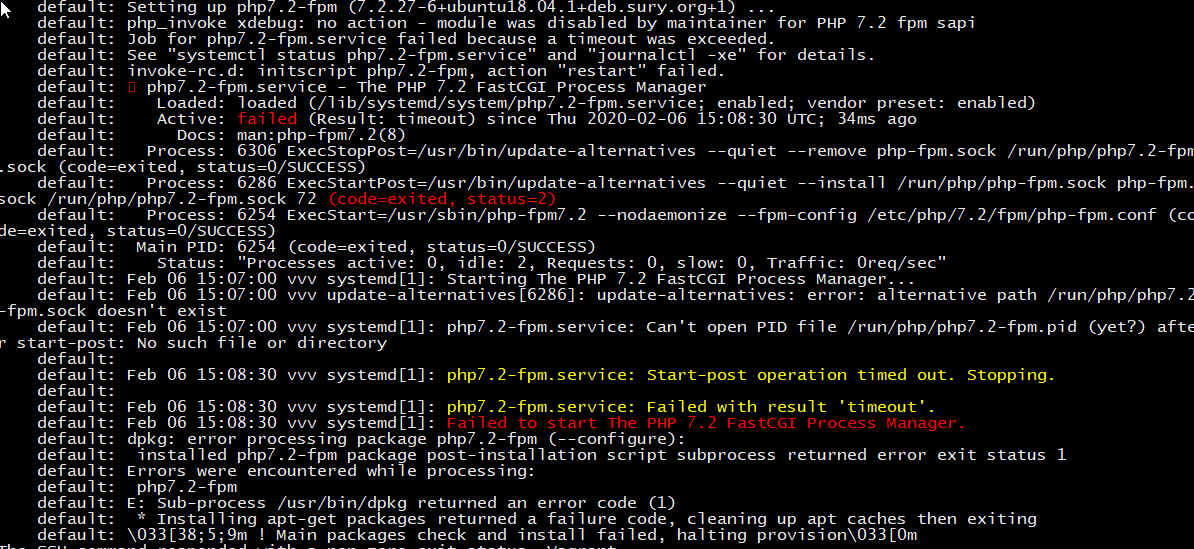
This is how it looks in the master branch. Latest VVV, latest box ('ubuntu/bionic64' version '20200131.0.0'), latest Vagrant (2.2.6)
cueqzapper
on 6 Feb 2020
we need to check the path of the pid file if it is changed, I don't have time today to investigate and debug it.
Mte90
on 6 Feb 2020

Output of:
systemctl status php7.2-fpm.service
cueqzapper
on 6 Feb 2020
Temporary solution for me was to change from using a socket file to a port (I used 9000)
Modify /etc/php/7.2/fpm/pool.d/www.conf:
Change line 33 to listen = 127.0.0.1:9000
Modify /lib/systemd/system/php7.2-fpm.service and remove the 2 lines which talk about adding/removing sockets
Modify /etc/nginx/nginx.conf
Change line 90 to server 127.0.0.1:9000;
sudo systemctl daemon-reload
sudo service php7.2-fpm restart
sudo service nginx restart
This is a temp fix until it's fixed properly I guess, but at least I can continue development...
 olipayne
on 6 Feb 2020
olipayne
on 6 Feb 2020
If I run vagrant up the FPM service doesn't start, leading to the 502 errors.
However, if I SSH into the VM and run sudo php-fpm7.2, the dashboard loads again and sites begin to work
tomjn
on 6 Feb 2020
It looks like this is a problem upstream with the PHP packages, there were issues very recently, unsure why we're still encountering them though as they're meant to have been resolved
I've opened https://github.com/oerdnj/deb.sury.org/issues/1334 to try and provide more details and get to the bottom of this
tomjn
on 6 Feb 2020
I believe I've fixed this on the develop branch for the built in PHP 7.2, if somebody can confirm this I can add the fix to the various php/php7.4 etc utilities
To test you'll need a VM that doesn't have any additional versions of PHP, pull down the develop branch and reprovision
tomjn
on 6 Feb 2020
This change works for me on vagrant up, but I first encountered the issue while running vagrant provision, and I remain unable to provision after adding a new site.
 gregsullivan
on 6 Feb 2020
gregsullivan
on 6 Feb 2020
Can I see your config file?
On Thu, 6 Feb 2020 at 20:07, Greg Sullivan notifications@github.com wrote:
This change works for me on vagrant up, but I first encountered the issue
while running vagrant provision, and I remain unable to provision after
adding a new site.—
You are receiving this because you authored the thread.
Reply to this email directly, view it on GitHub
https://github.com/Varying-Vagrant-Vagrants/VVV/issues/2061?email_source=notifications&email_token=AAAOLZ3MCEDD7ZXIHUEWEDTRBRUWJA5CNFSM4KQUR4I2YY3PNVWWK3TUL52HS4DFVREXG43VMVBW63LNMVXHJKTDN5WW2ZLOORPWSZGOELATAKA#issuecomment-583086120,
or unsubscribe
https://github.com/notifications/unsubscribe-auth/AAAOLZ2LVGN32NDSZTFGRR3RBRUWJANCNFSM4KQUR4IQ
.
tomjn
on 6 Feb 2020
I truncated the sites block:
gregsullivan
on 6 Feb 2020
I've provisioned a fresh VM in a new folder and it all works, distributing fix ot the utility
tomjn
on 6 Feb 2020
I've merged https://github.com/Varying-Vagrant-Vagrants/vvv-utilities/pull/54 can I get confirmation that the latest develop works after a vagrant halt and a vagrant up --provision?
tomjn
on 6 Feb 2020
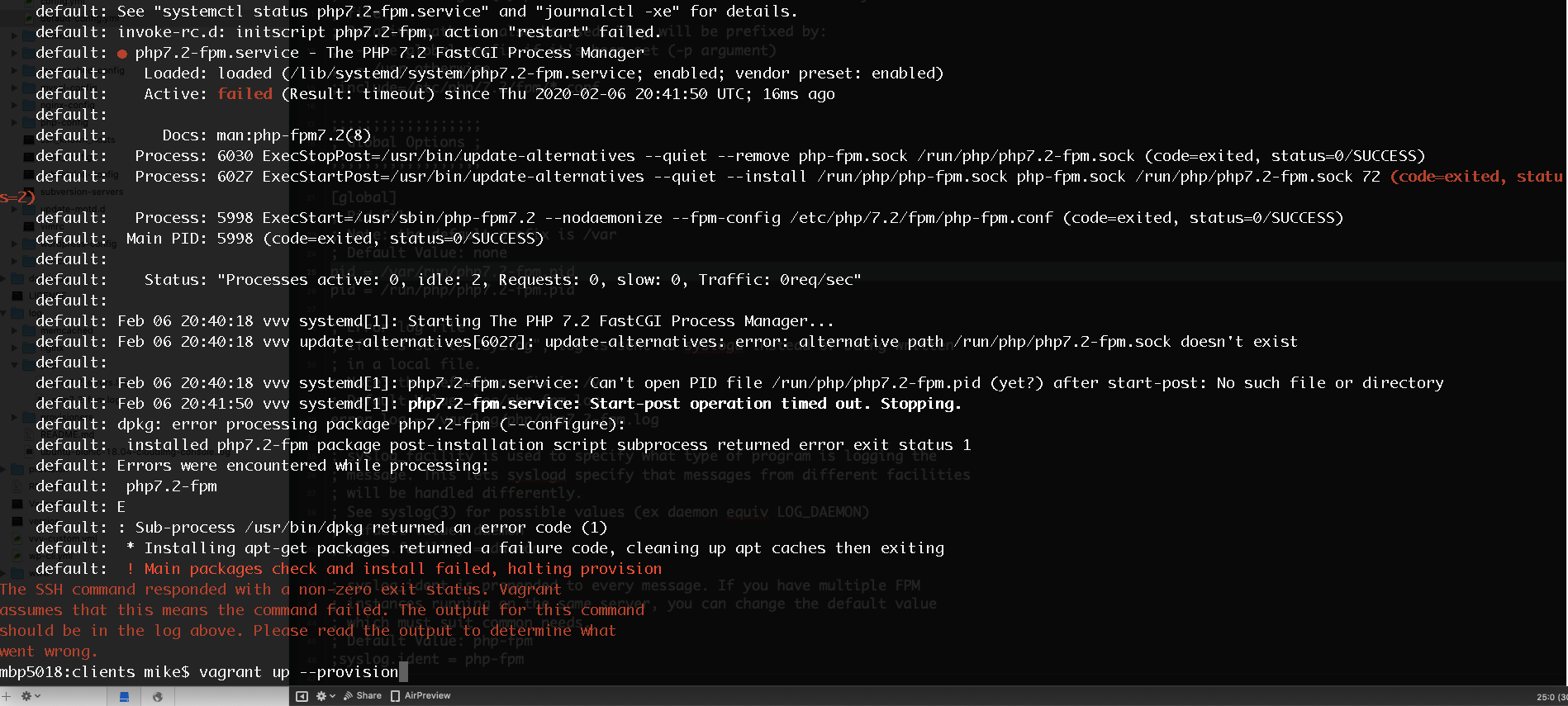
The fix does not seem to be working for me.
I replaced pid = /var/run/php7.2-fpm.pid with pid = /run/php/php7.2-fpm.pid in config/php-config/php7.2-fpm.conf
Did a vagrant halt followed by a vagrant up --provision and I'm still getting the same error.
 bigmike7801
on 6 Feb 2020
bigmike7801
on 6 Feb 2020
Did you just make that change as a hot fix or did you pull down the latest
develop branch?
On Thu, 6 Feb 2020 at 20:46, bigmike7801 notifications@github.com wrote:
The fix does not seem to be working for me.
I replaced pid = /var/run/php7.2-fpm.pid with pid =
/run/php/php7.2-fpm.pid in config/php-config/php7.2-fpm.confDid a vagrant halt followed by a vagrant up --provision and I'm still
getting the same error.[image: image]
https://user-images.githubusercontent.com/782338/73977130-97816280-48de-11ea-8724-d648d2ff5541.png—
You are receiving this because you authored the thread.
Reply to this email directly, view it on GitHub
https://github.com/Varying-Vagrant-Vagrants/VVV/issues/2061?email_source=notifications&email_token=AAAOLZ36ID36V4U64PSGA23RBRZIVA5CNFSM4KQUR4I2YY3PNVWWK3TUL52HS4DFVREXG43VMVBW63LNMVXHJKTDN5WW2ZLOORPWSZGOELAW7XY#issuecomment-583102431,
or unsubscribe
https://github.com/notifications/unsubscribe-auth/AAAOLZ7GCHAA7QMQCX64HPTRBRZIVANCNFSM4KQUR4IQ
.
tomjn
on 6 Feb 2020
I pulled down the latest develop branch and tried after vagrant halt and vagrant up --provision, but to no avail.
It worked after vagrant destroy.
Edit: While it's too late for me to test, I'd suggest trying @vertizio's solution below before running vagrant destroy.
gregsullivan
on 6 Feb 2020
@tomjn I did a hot fix.
bigmike7801
on 6 Feb 2020
@bigmike7801 ssh into the box:
sudo apt-get --purge remove php7.2-fpm
sudo apt-get --reinstall install php7.2-fpm
Then restart your box and provision
 vertizio
on 6 Feb 2020
vertizio
on 6 Feb 2020
I pulled down the latest develop branch and tried after
vagrant haltandvagrant up --provision, but to no avail.It worked after
vagrant destroy.
Here too, now working again.
herbie4
on 6 Feb 2020
@vertizio That did the trick!
bigmike7801
on 6 Feb 2020
Do I need to pull the develop branch at this point to get this fix? Or can I pull master?
I tried @vertizio's solution but it didn't work. So I am proceeding with a new Fresh Start but want to make sure I get the fix. Would I start with git checkout develop?
 youandyouglow
on 6 Feb 2020
youandyouglow
on 6 Feb 2020
master does not contain the fix, you need the develop branch
You might be able to get it via adding extra PHP versions but I would
recommend moving to the latest develop branch
tomjn
on 6 Feb 2020
The fix is on both develop and master, and it's in the core utility. A reprovision will be needed for the fix to take effect.
Note that on older versions of VVV, the config file may not get updated, newer versions of VVV force copy the PHP config files
tomjn
on 6 Feb 2020
Works! Thank you!
youandyouglow
on 7 Feb 2020
Works for me. Excellent - thank you!!
nicksull
on 7 Feb 2020
Updated to master, had to vagrant destroy, then it worked. Thank you!
What was the issue?
cueqzapper
on 7 Feb 2020
The fix is on both
developandmaster, and it's in the core utility. A reprovision will be needed for the fix to take effect.
Also master works for me now. Thank you.
herbie4
on 7 Feb 2020
And we're up and running again. Thanks for fixing @tomjn , you deserve a :coffee: !
vertizio
on 7 Feb 2020
For specifics, the issue was the process ID file that PHP FPM uses to start itself up with. Fixing it involved changing it back to the default.
I'm still unsure why it was needed now yet it worked fine for 6 years though. I've asked Ondrej in the GH issue but I imagine he has more important things to wrangle.
For people not using the latest VVV, you'll get the fix for other PHP versions, but your mileage with the default version may vary. I'd recommend updating. A git pull and a reprovision should be enough for most people, you don't have to destroy the VM.
master and v3.3
As for master, it now contains the unreleased v3.3, at some point over the next few days it'll have its changelog updated from the PRs and commits, and we'll tag it, otherwise you'll get mostly bug fixes, e.g. mailhog working on CLI, small performance boosts, and several unhandled issues being handled. The biggest changes that have happened in the last 6 months have been in the utility repo, which VVV pulls down regardless of version anyway
you deserve a ☕️ !
I'm at WC Glasgow this weekend, and should be around at europe :) If anybody would like to join the tester program let me know, it just means every now and again you'll change to a PR branch, reprovision, and double check everything still works
We're around on the VVV slack too https://varyingvagrantvagrants.org/docs/en-US/slack/
_I'm going to leave this issue open for a few days, I'm a little concerned that @gregsullivan had to destroy their VM, if you end up in that situation let me know via slack_
tomjn
on 7 Feb 2020
@bigmike7801 ssh into the box:
sudo apt-get --purge remove php7.2-fpm
sudo apt-get --reinstall install php7.2-fpm
Then restart your box and provision
This did the trick. Pulling down master (or develop) and reprovisioning did not prove to be enough on my end. Follow the steps in @vertizio's comment before taking the vagrant destroy approach...
 frankiebordone
on 7 Feb 2020
frankiebordone
on 7 Feb 2020
I had to destroy my VM too after pulling the latest changes to get it work again. A reprovision did not help 😯
Thank you for the quick fix and the tips in this thread everybody 🙌
 atomtigerzoo
on 9 Feb 2020
atomtigerzoo
on 9 Feb 2020
So glad I found this issue! I had just gotten a new computer and had to set up all my dev tools once again when I ran into this 🤦🏾♀️Upgrading to the latest VVV fixed my issue ✨
 metalandcoffee
on 9 Feb 2020
metalandcoffee
on 9 Feb 2020
I think it will be good to be pushed as a new 3.2.1 release? Otherwise many new people who download the releases will keep experiencing this problem.
 pnpetroff
on 12 Feb 2020
pnpetroff
on 12 Feb 2020
I'm getting a 502 Gateway error but none of the solutions on this thread have fixed the issue for me.
 Pezzab
on 17 Feb 2020
Pezzab
on 17 Feb 2020
@Pezzab are you using the latest version of VVV? Note that you cannot hotfix older versions of VVV, you must update
tomjn
on 17 Feb 2020
@Pezzab The latest release is still at 3.2.0, You will need to pull the latest master to your local and vagrant up --provision again to fix the issue.
 IronGhost63
on 17 Feb 2020
IronGhost63
on 17 Feb 2020
I resolved issue only after doing those actions:
- entered VVV folder, opened console and pulled newest version of repo (
git pull) - run cmd as admin, entered in VVV folder run
vagrant up
Vagrant was successfully up, bet address vvv.test was on 502 badgateway
Then - in cmd
vagrant ssh - copied
sudo apt-get --purge remove php7.2-fpm - copied
sudo apt-get --reinstall install php7.2-fpm - exit from vagrant ssh
- Then wrote
vagrant destroy - And then run
vagrant up --provision
Hope someone help this guide for urgent fix :D
 reinisg
on 19 Feb 2020
reinisg
on 19 Feb 2020
On my mac:
vagrant destroy
update vvv via git
vagrant up (provisions by default)
 adrianrjones
on 20 Feb 2020
adrianrjones
on 20 Feb 2020
@tomjn that turned out to be the issue - I thought I had updated vvv as well!
Pezzab
on 20 Feb 2020
@Pezzab did you install via git or are you going to the releases page? We still haven't updated the changelog and tagged 3.3
tomjn
on 20 Feb 2020
@tomjn sorry I've been really lax here and haven't properly noted my steps.
Backtracking through my ssh history I did vagrant box update followed by git pull that seemed to do the trick, though I can't rule out any number of other steps I tried beforehand trying to get it to work.
Pezzab
on 20 Feb 2020
Just a heads up that you don't need to update the box to update VVV, it's just nice to have if you're installing from scratch/afresh. Any VM that already exists will get updated by provisioning anyway
tomjn
on 20 Feb 2020
In my case, provisioning failed. This happened on two different computers.
To clarify, I had the same message that @bigmike7801 had after trying to add another host. --provision did not work.
adrianrjones
on 20 Feb 2020
Is anybody still encountering this issue?
tomjn
on 12 Mar 2020
I'm going to close this as fixed, nobody has encountered the issue recently on the newest versions
tomjn
on 4 Apr 2020
This thread has been automatically locked since there has not been any recent activity after it was closed. Please open a new issue for related bugs.
![lock[bot] picture](https://avatars.githubusercontent.com/in/6672?v=4&s=40) lock[bot]
on 25 Apr 2020
lock[bot]
on 25 Apr 2020
Related issues
 dingo-d
·
3Comments
dingo-d
·
3Comments
 neilgee
·
5Comments
neilgee
·
5Comments
 CreativeTransmissions
·
5Comments
CreativeTransmissions
·
5Comments
 caseyallen386
·
5Comments
caseyallen386
·
5Comments
 PorterBytes
·
5Comments
PorterBytes
·
5Comments
Most helpful comment
For specifics, the issue was the process ID file that PHP FPM uses to start itself up with. Fixing it involved changing it back to the default.
I'm still unsure why it was needed now yet it worked fine for 6 years though. I've asked Ondrej in the GH issue but I imagine he has more important things to wrangle.
For people not using the latest VVV, you'll get the fix for other PHP versions, but your mileage with the default version may vary. I'd recommend updating. A
git pulland a reprovision should be enough for most people, you don't have to destroy the VM.masterand v3.3As for
master, it now contains the unreleased v3.3, at some point over the next few days it'll have its changelog updated from the PRs and commits, and we'll tag it, otherwise you'll get mostly bug fixes, e.g. mailhog working on CLI, small performance boosts, and several unhandled issues being handled. The biggest changes that have happened in the last 6 months have been in the utility repo, which VVV pulls down regardless of version anywayI'm at WC Glasgow this weekend, and should be around at europe :) If anybody would like to join the tester program let me know, it just means every now and again you'll change to a PR branch, reprovision, and double check everything still works
We're around on the VVV slack too https://varyingvagrantvagrants.org/docs/en-US/slack/
_I'm going to leave this issue open for a few days, I'm a little concerned that @gregsullivan had to destroy their VM, if you end up in that situation let me know via slack_